Introduction
This manual provides detailed instructions for the operation and maintenance of your Intempo EE4296BLKSTKUK Fabric Stereo Speaker. Please read this manual thoroughly before using the product to ensure proper function and to extend its lifespan.
The Intempo Core Wireless Fabric Stereo Speaker offers immersive stereo sound with Bluetooth technology, a 25-meter wireless range, and up to 26 hours of playtime. It features an easy-to-use control panel and hands-free calling capabilities.
Product Overview
Familiarize yourself with the components and controls of your speaker.
Speaker Components
- Fabric Stereo Speaker Unit
- Integrated Carry Hook
- Control Panel Buttons
- Charging Port (Micro USB)
- USB Port
- Micro SD Card Slot
- On/Off Switch
Control Panel
The top of the speaker features an intuitive control panel for easy operation.

Image: Top view of the speaker highlighting the control buttons for mode, volume, and track navigation.
- M (Mode) Button: Press to switch between Bluetooth, USB, and Micro SD card modes.
- - (Volume Down / Previous Track) Button: Press to decrease volume. Hold to go to the previous track.
- + (Volume Up / Next Track) Button: Press to increase volume. Hold to go to the next track.
- > (Play/Pause / Call) Button: Press to play or pause music. Press to answer or end a call. Hold to reject a call.
Ports and Switches
The rear of the speaker houses the charging port, USB port, Micro SD card slot, and power switch.

Image: Detailed view of the speaker's rear panel showing the various input ports and the power switch.
Setup
Charging the Speaker
- Locate the Micro USB charging port on the rear of the speaker.
- Connect the provided Micro USB charging cable to the speaker's charging port.
- Connect the other end of the charging cable to a compatible USB power source (e.g., USB wall adapter, computer USB port).
- The charging indicator light will illuminate during charging and turn off when fully charged.
- A full charge provides up to 26 hours of playtime.
Powering On/Off
- To power on, slide the On/Off switch located on the rear of the speaker to the 'On' position.
- To power off, slide the On/Off switch to the 'Off' position.
Operating Instructions
Bluetooth Pairing
The speaker uses Bluetooth technology for wireless audio streaming.

Image: The speaker positioned near a smartphone, demonstrating its wireless connectivity.
- Ensure the speaker is powered on and in Bluetooth mode (indicated by a flashing blue LED). If not, press the 'M' button to switch modes.
- Enable Bluetooth on your smartphone, tablet, or other Bluetooth-enabled device.
- Search for available Bluetooth devices. The speaker will appear as "EE4296BLKSTKUK" or similar.
- Select the speaker from the list to pair. A confirmation tone will sound when successfully paired.
- Once paired, you can play audio from your device through the speaker. The wireless range is up to 25 meters.
Music Playback
- Play/Pause: Press the '>' button.
- Next Track: Hold the '+' button.
- Previous Track: Hold the '-' button.
- Volume Up: Press the '+' button.
- Volume Down: Press the '-' button.
Hands-Free Calling
The speaker supports hands-free calling when connected via Bluetooth.
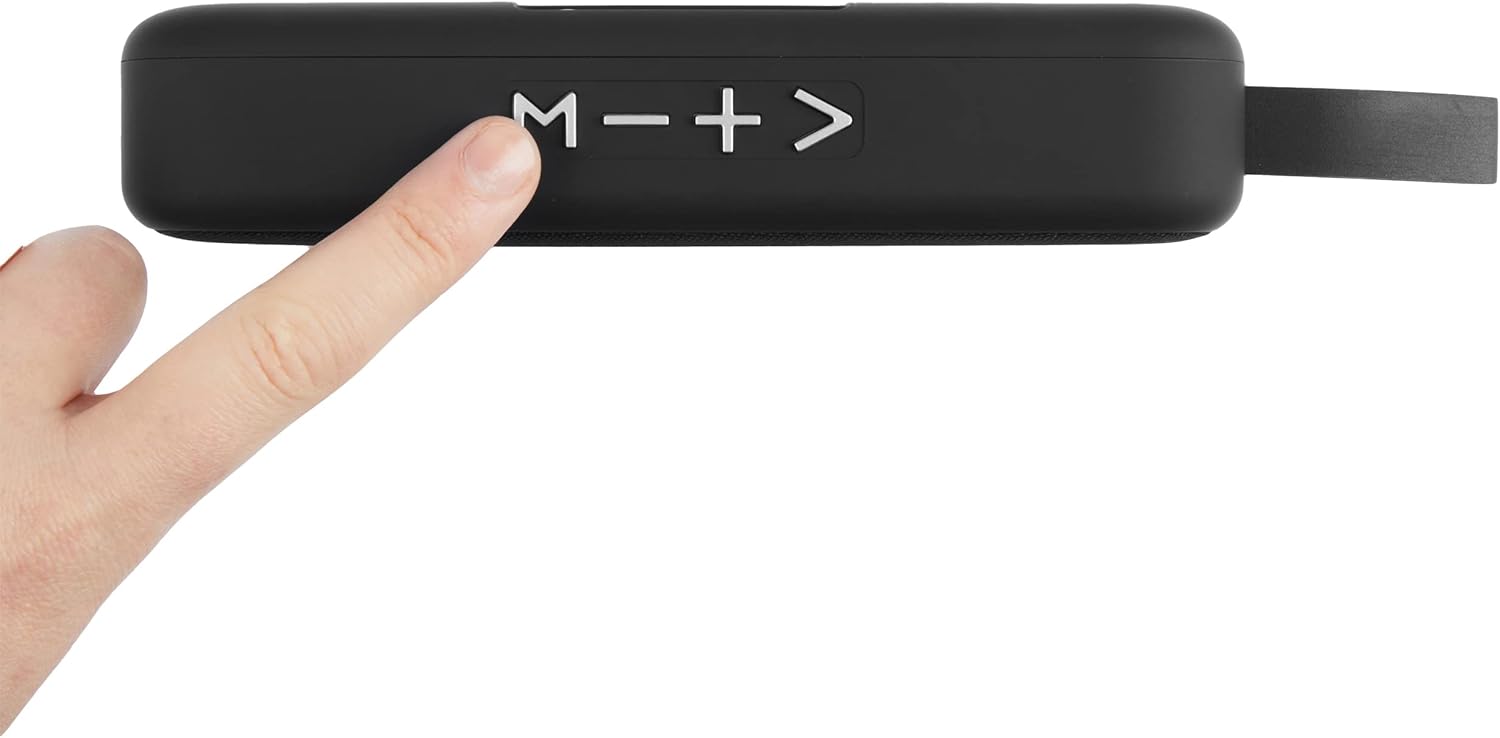
Image: The speaker shown with an icon representing its hands-free calling capability.
- Answer Call: Press the '>' button when a call comes in.
- End Call: Press the '>' button during a call.
- Reject Call: Hold the '>' button when a call comes in.
Using USB Drive / Micro SD Card
The speaker can play audio directly from a USB drive or Micro SD card.
- Insert a USB drive into the USB port or a Micro SD card into the Micro SD card slot on the rear of the speaker.
- Press the 'M' button to switch to USB or Micro SD card mode. The speaker will automatically detect and begin playing compatible audio files.
- Use the '+', '-', and '>' buttons for playback control as described in the "Music Playback" section.
Maintenance
- Clean the speaker with a soft, dry cloth. Do not use abrasive cleaners or solvents.
- Keep the speaker away from water and moisture, despite being listed as waterproof, excessive exposure can cause damage.
- Store the speaker in a cool, dry place when not in use for extended periods.
- Avoid dropping the speaker or subjecting it to strong impacts.
Troubleshooting
| Problem | Possible Cause | Solution |
|---|---|---|
| Speaker does not power on. | Battery is low or depleted. | Charge the speaker fully. |
| Cannot pair via Bluetooth. | Speaker is not in pairing mode or device Bluetooth is off. | Ensure speaker is in Bluetooth mode (flashing LED). Turn Bluetooth on your device and re-scan. Ensure devices are within 25m range. |
| No sound from speaker. | Volume is too low or muted. Incorrect mode selected. | Increase volume on both speaker and connected device. Press 'M' button to select correct input mode (Bluetooth, USB, SD). |
| Poor sound quality. | Device is too far from speaker or interference. | Move the connected device closer to the speaker. Avoid obstacles between devices. |
Specifications
| Feature | Detail |
|---|---|
| Model Number | EE4296BLKSTKUK |
| Brand | Intempo |
| Connectivity Technology | Bluetooth |
| Wireless Range | Up to 25 meters |
| Audio Output Mode | Stereo |
| Power Source | Battery (Rechargeable) |
| Playtime | Up to 26 hours |
| Control Method | Touch (Buttons) |
| Product Dimensions | 8.8D x 23W x 9.7H centimeters |
| Waterproof | Yes |
| Compatible Devices | Smartphone, Tablet |
Warranty and Support
For warranty information and customer support, please refer to the documentation included with your purchase or visit the official Intempo website. Keep your proof of purchase for any warranty claims.
If you encounter issues not covered in the troubleshooting section, please contact Intempo customer service for assistance.


