
1. Introduction
Thank you for choosing the TOKAÏ EBB44W White Noise and Melodies Speaker with Night Light. This device is designed to create a soothing environment for relaxation and sleep, offering a variety of sounds and a gentle night light. Please read this manual carefully before use to ensure proper operation and to maximize your experience with the product.
2. Safety Information
- Read all instructions before operating the device.
- Keep the device away from water or excessive moisture. Do not immerse in liquids.
- Do not attempt to disassemble, repair, or modify the device. This will void the warranty.
- Use only the provided USB charging cable. Ensure the power source meets the device's specifications.
- Keep out of reach of children and pets.
- Avoid exposing the device to extreme temperatures, direct sunlight, or open flames.
3. Package Contents
Please check the package for the following items:
- TOKAÏ EBB44W White Noise and Melodies Speaker with Night Light
- USB Charging Cable
- User Manual (this document)
4. Product Overview
Familiarize yourself with the device's components and controls. The exact button layout may vary slightly, but the functions are generally as described below.

Image 1: Front view of the TOKAÏ EBB44W speaker, highlighting its compact form factor and user interface.
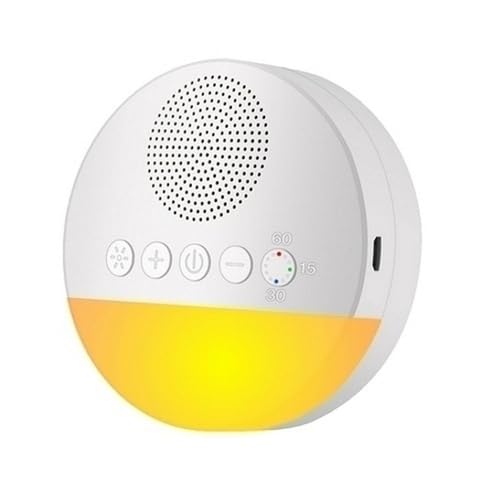
Image 2: Side view of the TOKAÏ EBB44W speaker, illustrating the USB charging port location.
Controls and Ports:
- Power Button: Long press to turn the device On/Off.
- Sound Selection Button: Short press to cycle through the 18 available white noises and melodies.
- Volume Up/Down Buttons: Press to adjust the audio volume.
- Timer Button: Short press to set the automatic shut-off timer (15, 30, or 60 minutes).
- Night Light Button: Press to activate the night light, cycle through static and intermittent modes, and turn off.
- USB Charging Port: For connecting the USB cable to charge the device.
5. Setup
- Initial Charge: Before first use, fully charge the device. Connect the provided USB cable to the speaker's USB charging port and the other end to a USB power adapter (not included) or a computer's USB port. The charging indicator light will show the charging status. A full charge provides up to 30 hours of autonomy.
- Placement: Place the speaker on a stable, flat surface away from direct heat sources or water.
6. Operating Instructions
6.1. Power On/Off
- To turn on, long press the Power Button until the device activates.
- To turn off, long press the Power Button again until the device shuts down.
6.2. Sound Selection
- Once powered on, the device will play the last selected sound or a default sound.
- Short press the Sound Selection Button to cycle through the 18 available white noises and melodies.
6.3. Volume Adjustment
- Press the Volume Up Button to increase the sound volume.
- Press the Volume Down Button to decrease the sound volume.
6.4. Timer Function
- Short press the Timer Button to activate the automatic shut-off function.
- Each press will cycle through the available timer settings: 15 minutes, 30 minutes, 60 minutes, and off. An indicator light or audible cue may confirm the selected timer setting.
6.5. Night Light Operation
- Press the Night Light Button once to turn on the night light in static mode.
- Press the Night Light Button a second time to switch to intermittent mode.
- Press the Night Light Button a third time to turn off the night light.
6.6. Charging the Device
- When the battery is low, the device may indicate this with an audible alert or a flashing indicator light.
- Connect the USB charging cable to the device's USB port and to a suitable power source.
- The charging indicator will illuminate during charging and typically turn off or change color when fully charged.
7. Maintenance
- Cleaning: Wipe the device with a soft, dry cloth. Do not use abrasive cleaners, solvents, or harsh chemicals.
- Storage: When not in use for extended periods, store the device in a cool, dry place. Ensure it is fully charged before storing and recharge every few months to maintain battery health.
8. Troubleshooting
| Problem | Possible Cause | Solution |
|---|---|---|
| Device does not turn on | Low or depleted battery | Charge the device fully using the provided USB cable. |
| No sound output | Volume is too low or muted; incorrect sound selected. | Increase the volume using the Volume Up button. Press the Sound Selection button to cycle through sounds. |
| Night light not working | Light mode not activated or battery low. | Press the Night Light button to activate. Ensure the device is charged. |
| Device not charging | Faulty USB cable or power source. | Ensure the USB cable is securely connected. Try a different USB port or power adapter. |
9. Specifications
- Model: EBB44W
- Sounds: 18 white noises and melodies
- Timer Settings: 15, 30, 60 minutes
- Night Light Modes: Static, Intermittent
- Battery Life: Up to 30 hours (depending on usage)
- Charging: USB (cable included, adapter not included)
10. Warranty and Support
This product is covered by a standard manufacturer's warranty. For warranty claims, technical support, or any questions regarding your TOKAÏ EBB44W speaker, please contact the seller or retailer from whom you purchased the product. Please retain your proof of purchase for warranty purposes.