1. Introduction
Thank you for choosing the MOKA SFX 3D LED Pixel Tube Lights. This manual provides essential information for the safe and efficient operation of your new lighting system. Please read this manual thoroughly before installation and use, and retain it for future reference.
The MOKA SFX LPT002 is a versatile 3D LED Pixel Tube Light designed for stage, event, nightclub, and entertainment applications. It features 360-degree light emission, RGBWA mixed color capabilities, and multiple control modes including DMX, mobile APP, and remote control. Its robust, waterproof IP65 design ensures durability and reliable performance in various environments.
2. Safety Information
To ensure safe operation and prolong the lifespan of your device, please observe the following safety precautions:
- Always connect the device to a grounded power outlet.
- Do not expose the device to rain or moisture unless specifically rated for such conditions (this product is IP65 rated for outdoor use, but avoid submersion).
- Ensure proper ventilation around the unit.
- Do not open the housing; there are no user-serviceable parts inside. Refer all servicing to qualified personnel.
- Avoid direct eye exposure to the light source.
- Disconnect power before cleaning or performing any maintenance.
- Use only the specified power adapter and accessories.
3. Package Contents
Verify that all items are present and in good condition upon unpacking:
- MOKA SFX 3D LED Pixel Tube Lights (2 units)
- Charger
- Remote Control
- User Manual
4. Product Overview
The MOKA SFX LPT002 features a durable design with integrated controls and versatile mounting options.

Figure 4.1: MOKA SFX 3D LED Pixel Tube Lights in operation.
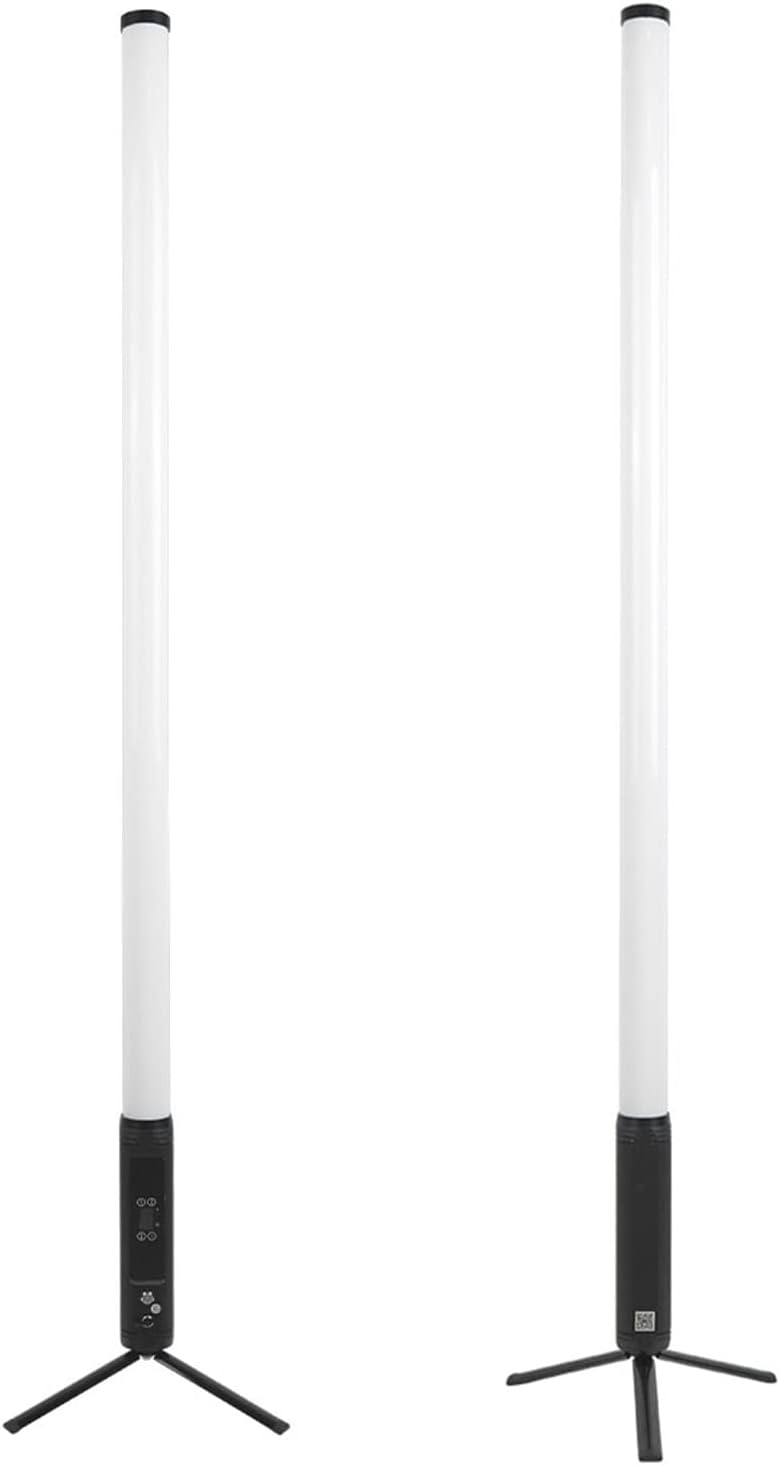
Figure 4.2: Key components of the LED Pixel Tube Light.
The tube light includes an OLED display and menu buttons for direct control, located on the lower section of the tube. It also comes with a foldable floor stand for stable placement and an eyebolt for hanging installations.

Figure 4.3: Product dimensions.
5. Setup
Follow these steps to set up your MOKA SFX 3D LED Pixel Tube Lights:
- Unpacking: Carefully remove all components from the packaging. Inspect for any signs of damage.
- Mounting Options:
- Floor Stand: Attach the foldable floor stand to the base of the tube light. Ensure it is securely fastened and placed on a stable, level surface.
- Hanging: Utilize the integrated eyebolt for overhead suspension. Ensure the hanging structure is capable of supporting the weight of the light and any associated cabling.
- Power Connection: Connect the provided charger to the power input port on the tube light. Plug the charger into a standard 110VAC, 60Hz power outlet.
- Initial Charge: For optimal performance, fully charge the lights before first use. Charging time is approximately 7 hours.
6. Operating Instructions
The MOKA SFX LPT002 offers multiple control methods for flexible operation.
6.1. OLED Display and Menu Buttons
The OLED display and menu buttons on the tube light allow for direct configuration of settings such as running time, dimming modes, and DMX channel settings. Refer to the on-screen menu for navigation and parameter adjustment.
6.2. Control Modes
- DMX Control: Connect the tube light to a DMX controller using standard DMX cables. Configure the DMX address and channel mode (4ch/5ch/6ch/7ch/12ch/40ch/80ch/160ch) via the OLED display. This allows for precise control over color, intensity, and effects.
- Mobile APP Control: Download the dedicated mobile application (refer to the product packaging or manufacturer's website for app details). Connect your smartphone or tablet to the device via Bluetooth or Wi-Fi (if applicable) to control various lighting parameters.
- Remote Control: Use the included remote control for basic functions such as power on/off, color selection, brightness adjustment, and mode changes. Ensure the remote control has fresh batteries and a clear line of sight to the tube light's receiver.
- Single Lamp Control: Operate each tube light independently using its onboard controls.
- Multi-Lamp Combination Master-Slave Control: Link multiple tube lights to synchronize their effects. Designate one unit as the master, and others as slaves, following the instructions in the OLED menu.
6.3. Lighting Features
- Color System: RGBWA mixed color for a wide spectrum of hues. Adjustable color temperature from 1750K to 10000K.
- Dimming: 4 dimming modes available for precise brightness control.
- Stroboscopic: Adjustable strobe rate from 0-30Hz.
- Running Time: Selectable maximum running times (full light): 1 to 12 hours. Maximum running time (solid light): up to 8 hours.

Figure 6.1: Various color displays and patterns.

Figure 6.2: Pixel tube lights displaying complex color patterns.

Figure 6.3: Example applications of the pixel tube lights in an outdoor environment.
7. Maintenance
Regular maintenance ensures optimal performance and longevity of your MOKA SFX 3D LED Pixel Tube Lights.
- Cleaning: Periodically wipe the exterior of the tube lights with a soft, dry cloth. For stubborn dirt, use a slightly damp cloth. Do not use harsh chemicals or abrasive cleaners.
- Inspection: Regularly check cables, connectors, and mounting hardware for any signs of wear or damage. Replace damaged components immediately.
- Storage: When not in use, store the tube lights in a cool, dry place, away from direct sunlight and extreme temperatures. Use original packaging or a protective case for transport and storage.
8. Troubleshooting
If you encounter issues with your MOKA SFX 3D LED Pixel Tube Lights, refer to the following common problems and solutions:
| Problem | Possible Cause | Solution |
|---|---|---|
| Light does not turn on | No power, discharged battery, faulty cable | Check power connection. Ensure battery is charged. Inspect power cable for damage. |
| Remote control not working | Dead batteries, obstructed signal, out of range | Replace remote control batteries. Ensure clear line of sight to the light. Move closer to the light. |
| DMX control issues | Incorrect DMX address, faulty DMX cable, incorrect channel mode | Verify DMX address and channel mode settings on the light and controller. Check DMX cable connections. |
| Inconsistent light patterns | Interference, master-slave configuration error | Ensure no strong electromagnetic interference. Reconfigure master-slave settings if applicable. |
If the problem persists after attempting these solutions, please contact MOKA SFX customer support.
9. Specifications
Detailed technical specifications for the MOKA SFX 3D LED Pixel Tube Lights LPT002:
| Feature | Specification |
|---|---|
| Light Source | 28W LED |
| Color System | RGBWA mixed color |
| Color Temperature | 1750K-10000K |
| Beam Angle | 360 Degrees |
| Maximum Running Time (Full Light) | 1-12 hours (selectable) |
| Maximum Running Time (Solid Light) | Up to 8 hours |
| Charging Time | 7 hours |
| Stroboscopic | 0-30Hz |
| Dimming Modes | 4 modes |
| Control Modes | DMX, Mobile APP, Remote Control, Single Lamp, Master-Slave |
| DMX Channels | 4ch/5ch/6ch/7ch/12ch/40ch/80ch/160ch |
| Display | OLED display screen |
| Input Voltage & Frequency | 110VAC, 60Hz |
| Dimensions (Length x Diameter) | 1435mm (57") x 50mm (19.6") |
| Weight | 2.5kg |
| Heat Dissipation System | Natural heat dissipation |
| Shell Material | Semi-light oxidized fine black sand (ABS) |
| Waterproof Rating | IP65 |
| Mounting Type | Eyebolt & Foldable Base |
10. Warranty and Support
MOKA SFX products are designed for reliability and performance. For warranty information, please refer to the warranty card included with your purchase or visit the official MOKA SFX website. For technical support, troubleshooting assistance, or spare parts, please contact MOKA SFX customer service through the contact information provided on our website or your purchase documentation.


