
1. Product Overview
The hygger Rechargeable Aquarium Pond Air Pump is designed to provide oxygenation for various aquatic environments, including small garden ponds, hydroponic systems, restaurant seafood tanks, and aquariums. Its dual AC/DC functionality ensures continuous operation, even during power outages, making it suitable for both home and outdoor use.

Image: The hygger air pump shown with its included accessories, including hoses, air stones, and a diverter valve.
Key Features:
- Professional Oxygenation: Suitable for diverse aquatic applications, supporting multiple small fish tanks simultaneously.
- Rechargeable & Portable: AC and DC dual-purpose operation with an internal battery for outdoor use or power outages.
- Power Outage Protection: Automatically switches to battery power during electricity failures.
- Adjustable Air Flow: Features a 9-level adjustable air volume control knob and a diverter valve for precise oxygen delivery.
- Quiet & Durable: Constructed with an ABS high-quality plastic shell, double shock-resistant design, and an all-copper motor for quiet, long-lasting performance.
2. Package Contents
Please verify that all items are present and in good condition upon unpacking.
- 1x hygger Rechargeable Air Pump
- 1x Power Adapter
- 1x Main Hose
- 4x Thin Hoses (for 238GPH model) or 6x Thin Hoses (for 301GPH model)
- 1x Diverter Valve (4-outlet for 238GPH, 6-outlet for 301GPH)
- 1x Check Valve
- 4x Air Stones (for 238GPH model) or 6x Air Stones (for 301GPH model)
3. Setup Instructions
Follow these steps to properly set up your hygger air pump.
3.1 Connecting Air Hoses and Air Stones
- Connect the main hose to the air outlet on the pump.
- Attach the diverter valve to the end of the main hose.
- Connect the thin hoses to the outlets of the diverter valve.
- Attach an air stone to the end of each thin hose.
- Place the air stones into your aquarium or pond. Ensure the air pump itself is placed above the water level to prevent back-siphoning.

Image: Example setup showing the air pump connected to a 4-outlet diverter valve and air stones.
3.2 Installing the Check Valve
A check valve is crucial to prevent water from flowing back into the air pump in case of a power failure or if the pump is placed below the water level. Install the check valve on the main hose between the pump and the diverter valve, ensuring the arrow on the check valve points towards the air stones (away from the pump).

Image: Illustration demonstrating the importance of a check valve to prevent water backflow into the pump.
3.3 Power Connection
Connect the power adapter to the power port on the air pump. Plug the adapter into a standard electrical outlet. The pump will operate on AC power and simultaneously charge the internal battery.

Image: Close-up of the power port on the air pump and the power adapter.
4. Operating Instructions
4.1 Powering On/Off and Mode Selection
Press the power button to turn the pump on or off. The pump will automatically switch between AC and DC power as needed. When plugged in, it uses AC power and charges the battery. If power is lost, it automatically switches to battery power.
4.2 Adjusting Air Flow
The air pump features a 9-level adjustable air volume control knob. Rotate the knob to increase or decrease the overall air output. Additionally, the diverter valve allows for individual adjustment or closure of specific air outlets, providing precise control over oxygen distribution.
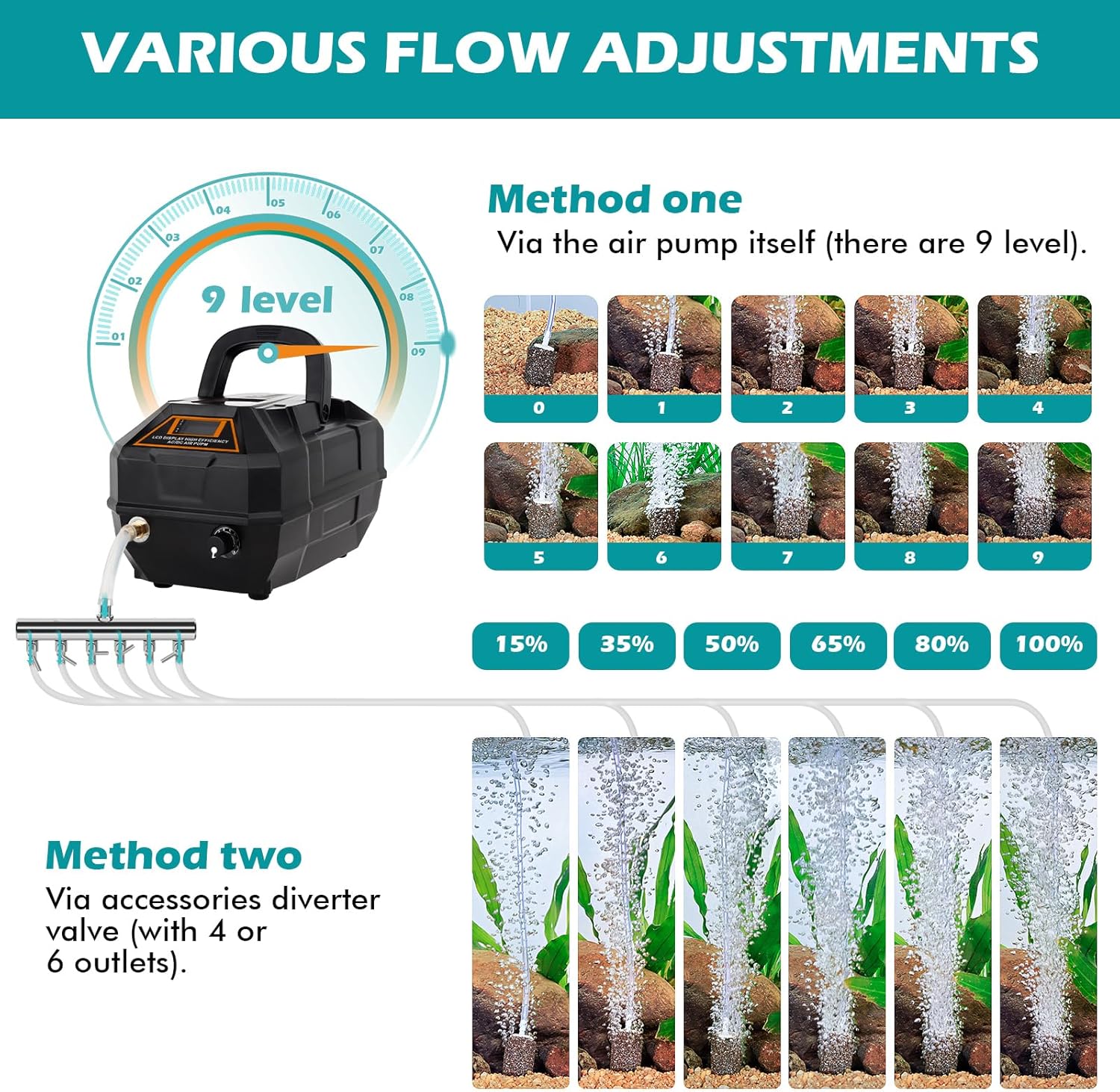
Image: Visual representation of the 9-level air flow adjustment knob and the effect of the diverter valve on bubble output.

Image: Close-up of the air outlet and the air volume adjustment knob on the pump.
4.3 LCD Display
The integrated LCD display shows important information such as voltage and battery status, allowing you to monitor the pump's performance and remaining battery life.

Image: The LCD display indicating current voltage and battery charge percentage.
4.4 Battery Life
When operating on battery power, the pump can run for approximately 8 hours at maximum air flow and up to 100 hours at minimum air flow (based on single air stone experiment). This extended battery life provides reliability during extended power outages or outdoor use.

Image: Illustration of the air pump's battery duration, showing 100 hours at minimum air flow and 8 hours at maximum air flow.
5. Maintenance
Regular maintenance ensures optimal performance and longevity of your air pump.
- Air Stones: Periodically clean or replace air stones as they can become clogged with algae or debris, reducing air flow.
- Hoses: Check hoses for kinks, cracks, or blockages. Replace if necessary.
- Pump Exterior: Wipe the exterior of the pump with a soft, damp cloth. Do not immerse the pump in water.
- Air Filter: (If applicable, check product diagram for location) Inspect and clean or replace the air filter regularly to prevent dust and debris from entering the pump.
6. Troubleshooting
If you encounter issues with your air pump, refer to the following common problems and solutions.
| Problem | Possible Cause | Solution |
|---|---|---|
| No air output |
|
|
| Weak air output |
|
|
| Unusual noise |
|
|
| Battery not charging |
|
|
7. Specifications
Technical details for the hygger Rechargeable Aquarium Pond Air Pump.

Image: Detailed diagram highlighting various components and their specifications.
| Feature | Detail |
|---|---|
| Model Name | HG-067 |
| Input Voltage/Frequency | AC 100-240V/50-60 Hz |
| Output Voltage | DC 7.8V |
| Power (238GPH model) | 10W |
| Power (301GPH model) | 18W |
| Air Flow Capacity (238GPH model) | 238 GPH (15 L/Min) |
| Air Flow Capacity (301GPH model) | 301 GPH (19 L/Min) |
| Pressure | 0.015 Mpa |
| Cord Length | 4.9 FT (1.5 M) |
| Recommended for Breeding | Up to 40 KG (10W), Up to 80 KG (18W) |
| Dimensions (LxWxH) | 10.8"L x 5.7"W x 5.1"H (27.5 x 14.5 x 13 cm) |
| Item Weight | 2.36 Kilograms |
| Material | Plastic |
| Color | Black |
8. Warranty Information
This hygger product comes with a 1-YEAR warranty from the date of purchase. This warranty covers manufacturing defects and material flaws under normal use. It does not cover damage caused by misuse, accident, unauthorized modification, or improper installation.
Please retain your proof of purchase for warranty claims.
9. Customer Support
For any questions, concerns, or technical assistance regarding your hygger Rechargeable Aquarium Pond Air Pump, please contact our customer support team.
You can typically find contact information on the product packaging, the official hygger website, or through your retailer's customer service portal.
