
Razer RZ05-04750100-R3U1
Razer Nommo V2 User Manual
Model: RZ05-04750100-R3U1
Introduction
The Razer Nommo V2 is a full-range 2.1 PC gaming speaker system with a wired subwoofer, designed to deliver high-fidelity, room-filling sound and powerful bass. Featuring THX Spatial Audio and Razer Chroma RGB, it provides an immersive audio-visual experience for gaming, movies, and music.
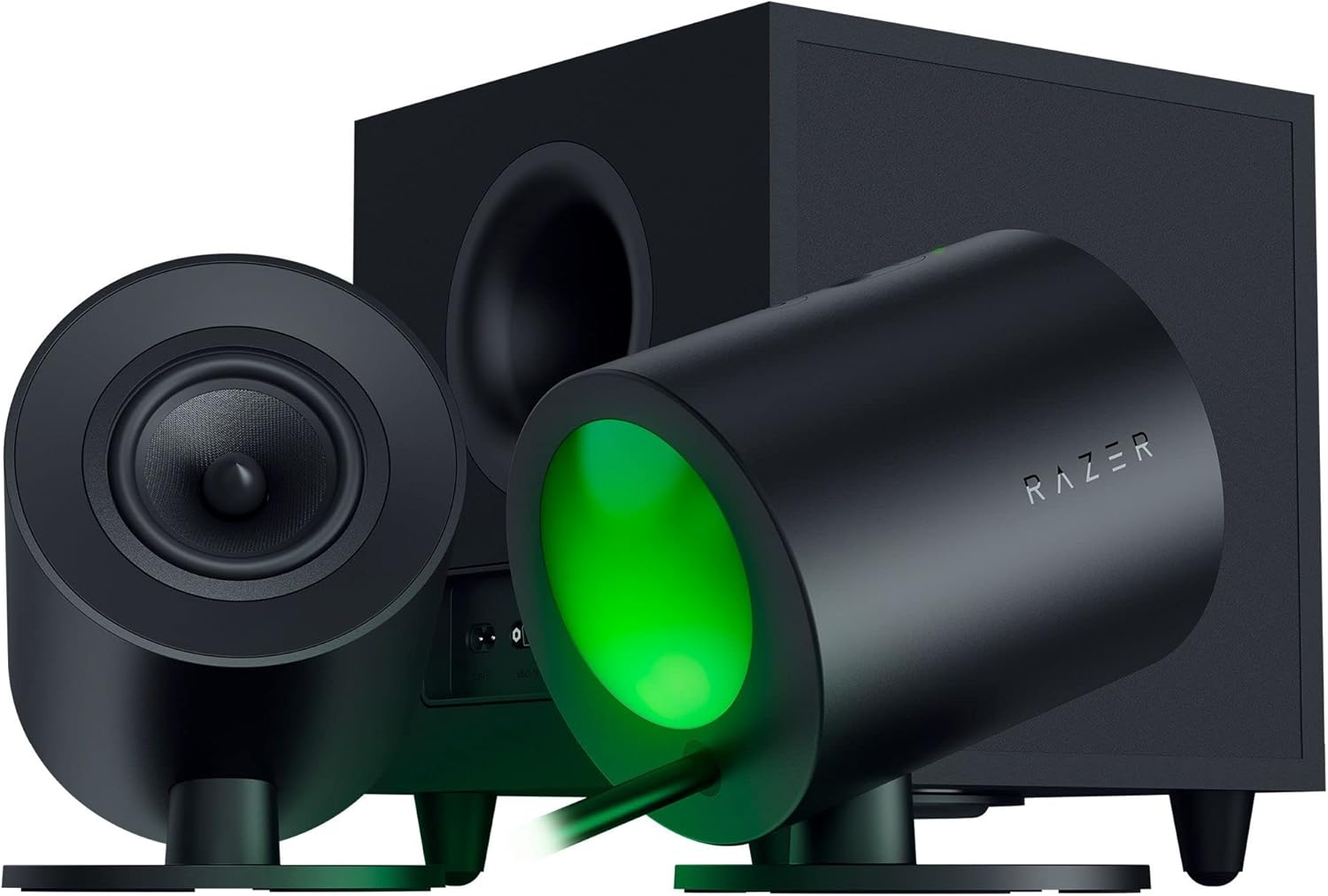
Image: The Razer Nommo V2 speaker system, showcasing the two satellite speakers and the wired subwoofer. The speakers feature a sleek black design with a green glow emanating from the rear projection.
What's in the Box
- Razer Nommo V2 Speakers (2 satellite speakers)
- Wired Subwoofer
- USB Type-A to USB Type-C Cable
- Regional Power Cords
- Important Product Information Guide
Features
Full-Range Drivers
Equipped with powerful 3-inch full-range drivers, each fitted with aluminum phase plugs. This design minimizes sound reflections within the speakers, ensuring accurate sound reproduction and optimal clarity across all frequencies.

Image: An exploded view of one of the Razer Nommo V2 satellite speakers, highlighting the internal 3-inch full-range driver and its aluminum phase plug, designed for clear acoustics.
THX Spatial Audio
Experience advanced 7.1 surround sound that delivers audio with pinpoint accuracy. This technology creates a realistic and detailed soundstage, enhancing immersion in movies, games, and music.

Image: A visual representation of THX Spatial Audio, showing a gamer immersed in a virtual world with a dragon, emphasizing the wide and true-to-life soundstage provided by the speakers.
Down-Firing Subwoofer
The system includes a powerful 5.5-inch down-firing subwoofer that delivers deep, rich lows. This enhances the overall entertainment experience with room-thumping bass that can be both heard and felt.

Image: A gaming setup featuring the Razer Nommo V2 speakers and the down-firing subwoofer positioned on the floor, highlighting its role in deep bass reproduction.
Rear Projection Chroma RGB
Amplify your battlestation's ambiance with customizable rear projection lighting zones on both satellite speakers. Choose from countless patterns and enhance immersion with dynamic in-game lighting effects.

Image: A gaming desk with Razer Nommo V2 speakers showcasing their rear projection Chroma RGB lighting, which adds to the immersive atmosphere.
Wireless Control Pod Ready
The Razer Nommo V2 is compatible with the Razer Wireless Control Pod (sold separately), allowing for easier adjustment of settings such as volume and audio EQ via Bluetooth, offering greater convenience.

Image: A hand adjusting the Razer Wireless Control Pod, positioned near a Razer Nommo V2 speaker, illustrating its readiness for convenient wireless control.
Cross-Platform Compatibility
Enjoy powerful, positional audio across various platforms. Connect to PC, PlayStation 4, and PlayStation 5 via USB, or pair with mobile devices and Nintendo Switch via Bluetooth.

Image: A gaming setup showing the Razer Nommo V2 speakers connected to a PC, with a smartphone on the desk, symbolizing its versatile cross-platform compatibility via USB and Bluetooth.
Setup Guide
1. Unboxing and Placement
- Carefully remove all components from the packaging.
- Place the two satellite speakers on your desktop, ideally equidistant from your listening position and at ear level for optimal sound imaging.
- Position the wired subwoofer on the floor, preferably near your desk. Its down-firing design allows for flexible placement while still delivering impactful bass.
2. Connecting the Speakers
- Connect the satellite speakers to the subwoofer using the integrated cables. Ensure a secure connection.
- Connect the USB Type-A to USB Type-C cable from the subwoofer to an available USB port on your PC or gaming console (PlayStation 4/5).
- Select the appropriate regional power cord and connect it to the subwoofer, then plug it into a power outlet.
3. Initial Power On and Software Installation
- Press the power button on one of the satellite speakers to turn on the system.
- For PC users, download and install the latest version of Razer Synapse software from the official Razer website. This software is essential for customizing audio settings, THX Spatial Audio, and Razer Chroma RGB lighting.
- Follow the on-screen prompts in Razer Synapse to configure your speakers and personalize your experience.
Operating Instructions
Volume Control
- Volume can be adjusted directly on one of the satellite speakers using the integrated controls.
- Alternatively, if you have the Razer Wireless Control Pod (sold separately), you can adjust volume and other settings wirelessly via Bluetooth.
- Volume can also be controlled through your connected device's operating system (PC, console, mobile).
Audio Customization (Razer Synapse)
- Open Razer Synapse on your PC to access advanced audio settings.
- Adjust the equalizer (EQ) to fine-tune the sound profile to your preference.
- Enable or disable THX Spatial Audio for immersive 7.1 surround sound.
- Configure audio profiles for different applications (games, movies, music).
Razer Chroma RGB Lighting
- Customize the rear projection RGB lighting effects using Razer Synapse.
- Choose from various lighting patterns, colors, and reactive effects that can sync with in-game actions.
Bluetooth Pairing
- To pair with a mobile device or Nintendo Switch, activate Bluetooth pairing mode on the speakers (refer to the Important Product Information Guide for specific steps).
- On your device, search for "Razer Nommo V2" in the Bluetooth settings and select it to connect.
Maintenance
- Cleaning: Use a soft, dry cloth to wipe down the speakers and subwoofer. Avoid abrasive cleaners or solvents.
- Dust: Regularly dust the speaker grilles and surfaces to prevent accumulation, which can affect sound quality.
- Cable Management: Ensure cables are neatly organized and not under tension to prevent damage.
- Ventilation: Ensure the subwoofer has adequate ventilation to prevent overheating. Do not block its vents.
Troubleshooting
| Problem | Possible Cause | Solution |
|---|---|---|
| No sound from speakers. | Power off; incorrect audio output; loose cables. | Ensure speakers are powered on. Check audio output settings on your device. Verify all cables are securely connected. |
| Subwoofer not producing bass. | Subwoofer cable loose; bass level too low in software. | Check the subwoofer's connection to the satellite speakers. Adjust bass levels in Razer Synapse or your device's audio settings. |
| RGB lighting not working. | Razer Synapse issue; lighting disabled. | Ensure Razer Synapse is running and updated. Check lighting settings within Synapse to ensure RGB is enabled and configured. |
| Bluetooth pairing issues. | Speakers not in pairing mode; device too far. | Put speakers into Bluetooth pairing mode. Ensure your device is within range (up to 10 meters). Try unpairing and re-pairing. |
Specifications
- Model Name: Nommo V2
- Model Number: RZ05-04750100-R3U1
- Brand: Razer
- Speaker Type: 2.1 PC Gaming Speakers with Wired Subwoofer
- Full-Range Drivers: 3-inch with Aluminum Phase Plugs
- Subwoofer Driver: 5.5-inch Down-Firing
- Audio Technology: THX Spatial Audio (7.1 Surround Sound)
- Lighting: Rear Projection Razer Chroma RGB
- Connectivity: USB (PC, PS4, PS5), Bluetooth (Mobile, Nintendo Switch)
- Wireless Control: Razer Wireless Control Pod Ready (sold separately)
- Max Output Power: 300 Watts
- Frequency Response: 20 KHz
- Signal-to-Noise Ratio: 98 dB
- Product Dimensions: 7.13"D x 5.12"W x 7.24"H (Satellite Speakers)
- Item Weight: 26 pounds (Total system weight)
Official Product Videos
Video: "Razer - Nommo V2 Line" - An official video from Razer showcasing the features and design of the Nommo V2 speaker line.
Warranty and Support
The Razer Nommo V2 comes with a Limited Warranty. For detailed warranty terms and conditions, please refer to the "Important Product Information Guide" included in your product packaging.
For technical support, troubleshooting assistance, or to access additional resources, please visit the official Razer Support website or contact their customer service. You can also find the User Manual (PDF) here.
Ask a question about this manual
Ask about setup, troubleshooting, compatibility, parts, safety, or missing instructions. Manuals+ will review the question and use this page’s manual context to help answer it.