
Introduction
Thank you for choosing the Vicloon Digital Watch for Kids. This manual provides detailed instructions for setting up, operating, and maintaining your new watch. Please read this manual carefully to ensure proper use and to enjoy all the features of your watch.
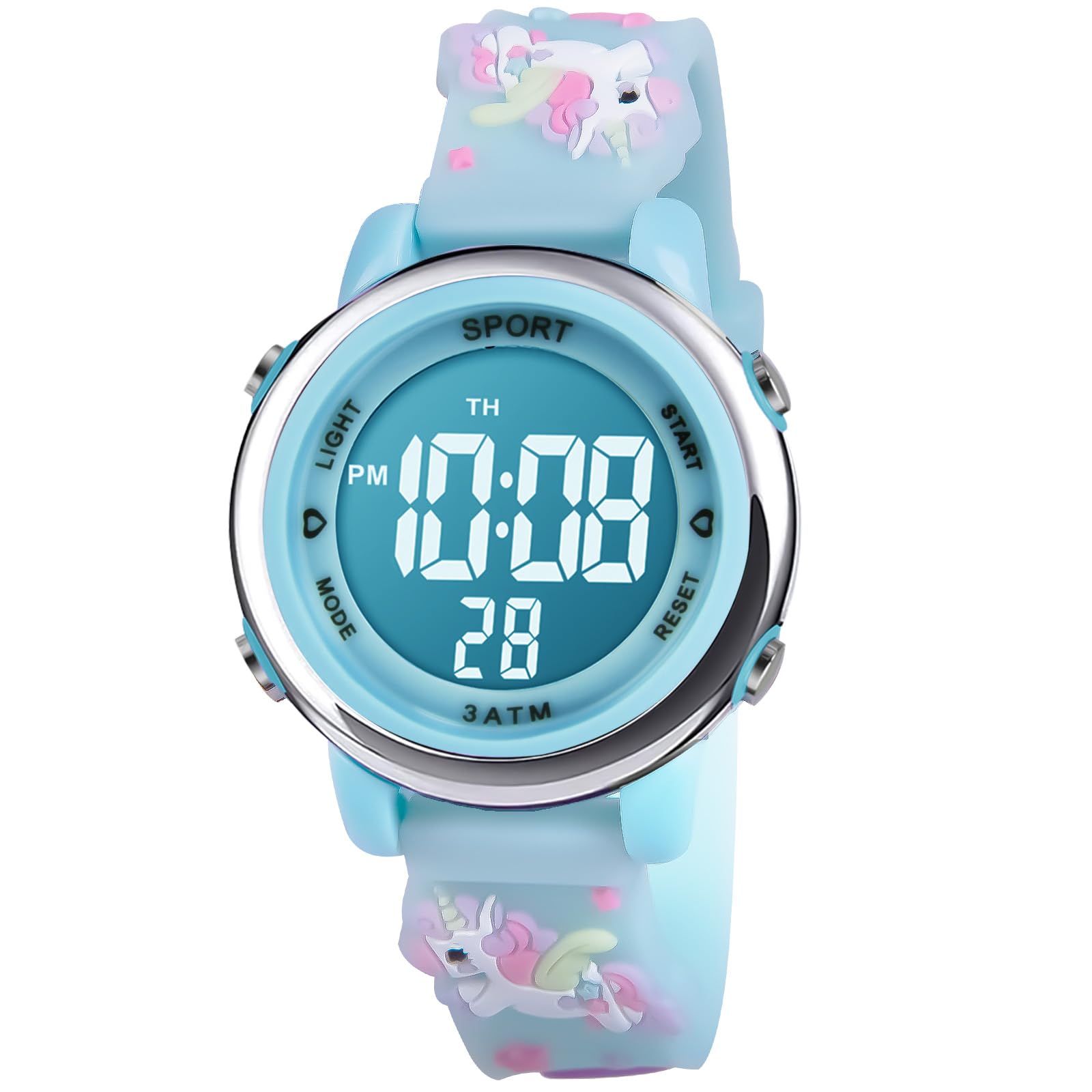
Image: Vicloon Digital Watch for Kids in Clear Blue with Unicorn design.
Safety Information
- This watch is 30m (3ATM / 98.4ft) water-resistant, suitable for splashes and rain.
- Do not use the watch for swimming, diving, showering, or in a sauna. Exposure to hot water or steam can damage the watch's seals.
- Avoid exposing the watch to extreme temperatures.
- Keep the watch away from strong magnetic fields.
- All watches come with a crown stopper to preserve battery life. Remove it before first use.

Image: Visual guide illustrating the water resistance limits of the watch, indicating it is suitable for splashes but not for swimming or showering.
Product Overview
The Vicloon Digital Watch features a clear digital display, a soft silicone strap, and multiple functions designed for children aged 3-12 years. It includes time display (12/24 hour format), date, day of the week, stopwatch, alarm, and a 7-color LED backlight.
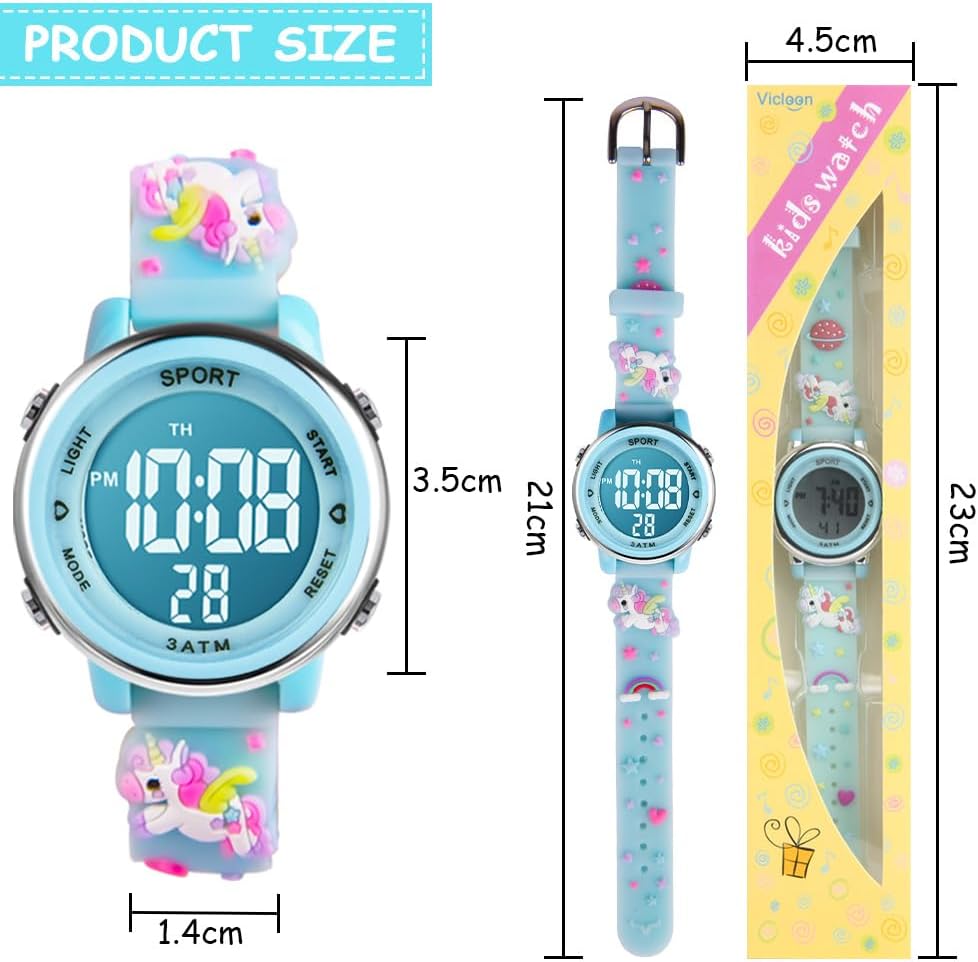
Image: Product dimensions, including watch face diameter (3.5cm), strap width (1.4cm), and total length (21cm).

Image: Close-up of the watch face, highlighting the four function buttons labeled A (LIGHT), B (MODE), C (START), and D (RESET).
Button Functions:
- Button A (LIGHT): Activates the backlight. Press and hold for 3 seconds to change backlight colors.
- Button B (MODE): Cycles through display modes (Time, Stopwatch, Alarm, Date).
- Button C (START): Used to start/stop stopwatch, adjust values during setting.
- Button D (RESET): Used to reset stopwatch, select values during setting.
Setup Instructions
1. Initial Activation:
Before first use, remove the plastic crown stopper from the side of the watch to activate the battery.
2. Setting Time and Date:
- From the normal time display, press Button B (MODE) three times to enter time setting mode. The seconds will start flashing.
- Press Button D (RESET) to move the flashing selection to the hour digit.
- Press Button C (START) to adjust the hour. (Note: 'A' or 'P' indicates AM/PM for 12-hour format).
- Press Button D (RESET) to move the flashing selection to the minute digit.
- Press Button C (START) to adjust the minutes.
- Continue pressing Button D (RESET) to cycle through month, date, and day of the week settings. Use Button C (START) to adjust each value.
- Once all settings are correct, press Button B (MODE) to exit setting mode and return to the normal time display.
3. Changing 12/24 Hour Format:
While in time setting mode (seconds flashing), press Button C (START) when the hour is flashing to toggle between 12-hour (with AM/PM indicator) and 24-hour formats.
Operating Instructions
1. Displaying Time, Date, and Day:
In normal mode, the watch displays the time. Press Button B (MODE) once to view the stopwatch, twice for the alarm, and three times to enter setting mode. The date and day of the week are typically displayed alongside the time.
2. Using the Stopwatch:
- Press Button B (MODE) once to enter stopwatch mode. The display will show "00:00:00".
- Press Button C (START) to begin timing.
- Press Button C (START) again to pause timing.
- Press Button D (RESET) to reset the stopwatch to "00:00:00".
- Press Button B (MODE) to return to normal time display.
3. Setting and Using the Alarm:
- Press Button B (MODE) twice to enter alarm setting mode. The hour digit will flash.
- Press Button C (START) to adjust the alarm hour.
- Press Button D (RESET) to move to the minute digit.
- Press Button C (START) to adjust the alarm minutes.
- Press Button B (MODE) to exit alarm setting mode.
- To activate/deactivate the alarm, press and hold Button C (START) and then press Button D (RESET) while in normal time display. An alarm icon will appear/disappear to indicate its status.
4. Activating and Changing Backlight Colors:
Press Button A (LIGHT) to illuminate the display. To cycle through the seven available backlight colors, press and hold Button A (LIGHT) for approximately 3 seconds.

Image: Overview of watch functions, including 12/24 hour format, calendar, night lights, stopwatch, 7-color backlight, 30m water resistance, and alarm clock.
Maintenance
Cleaning:
Wipe the watch with a soft, dry cloth. For stubborn dirt, a slightly damp cloth can be used, but ensure no water enters the watch. Avoid using chemical cleaners.
Battery Replacement:
The watch uses a standard button cell battery. When the display dims or functions become erratic, the battery may need replacement. It is recommended to have the battery replaced by a professional watch repair service to ensure the water resistance seal is maintained.
Water Resistance:
As mentioned in the safety information, the watch is 30m water-resistant, meaning it can withstand splashes and rain. Do not submerge the watch in water, use it for swimming, or expose it to hot water or steam. Always ensure the buttons are not pressed when the watch is wet.
Troubleshooting
- Display is dim or blank: The battery may be low or depleted. Replace the battery. Ensure the crown stopper was removed.
- Watch is not keeping accurate time: The battery may be low, or the watch may have been exposed to a strong magnetic field. Replace the battery or try resetting the time.
- Water inside the watch: If water appears inside the watch, stop using it immediately and take it to a professional for inspection. This indicates a breach in the water resistance, likely due to improper use (e.g., swimming, showering, or pressing buttons underwater).
- Hourly Chime is active/inactive unexpectedly: To toggle the hourly chime, press Button D (RESET) and then Button B (MODE) simultaneously while in normal time display. There might not be a visual indicator for this function.
- Backlight not working or stuck on one color: Ensure the battery is not low. Try pressing and holding Button A (LIGHT) for 3 seconds to cycle through colors. If the issue persists, the watch may require service.
Specifications
| Feature | Detail |
|---|---|
| Brand | Vicloon |
| Model Name | Unicorn |
| Model Number | B0C2VHZQWF |
| Display Format | Digital |
| Movement Type | Quartz |
| Special Features | Water Resistant, Luminous (7-color LED backlight) |
| Power Source | Battery |
| Strap Material | Silicone |
| Case Material | Resin |
| Water Resistance Level | 30 Meters (3ATM) |
| Clasp Type | Buckle |
| Case Diameter | Approximately 4.5 cm (1.73 inches) |
| Age Range Description | 3-12 years |
Warranty and Support
For any questions, issues, or warranty claims regarding your Vicloon Digital Watch, please contact the retailer where you purchased the product or refer to the contact information provided with your purchase. Keep your proof of purchase for warranty purposes.
For general inquiries or further assistance, you may visit the official Vicloon website (if available) or contact their customer service.