
1. Introduction
The MARBERO 148Wh Portable Power Station M822S is a versatile and compact power solution designed for various applications, including outdoor activities, home use, and emergency situations. With a 40000mAh battery capacity and multiple output interfaces, it provides reliable power for a wide range of electronic devices.

Image 1.1: MARBERO 148Wh Portable Power Station M822S. This image shows the compact design of the power station with its various ports and display.
2. Setup
2.1 Unboxing and Initial Charge
Upon unboxing, ensure all components are present:
- 1x MARBERO Portable Power Station M822S
- 1x AC Charger
- 1x DC to 12V Car Lighter Cable
- 1x User Manual
Before first use, fully charge the power station using the provided AC charger. Plug the AC charger into a wall outlet and connect the DC plug to the 15V Input port on the power station. The LCD display will indicate charging status. A full charge typically takes 5-6 hours.
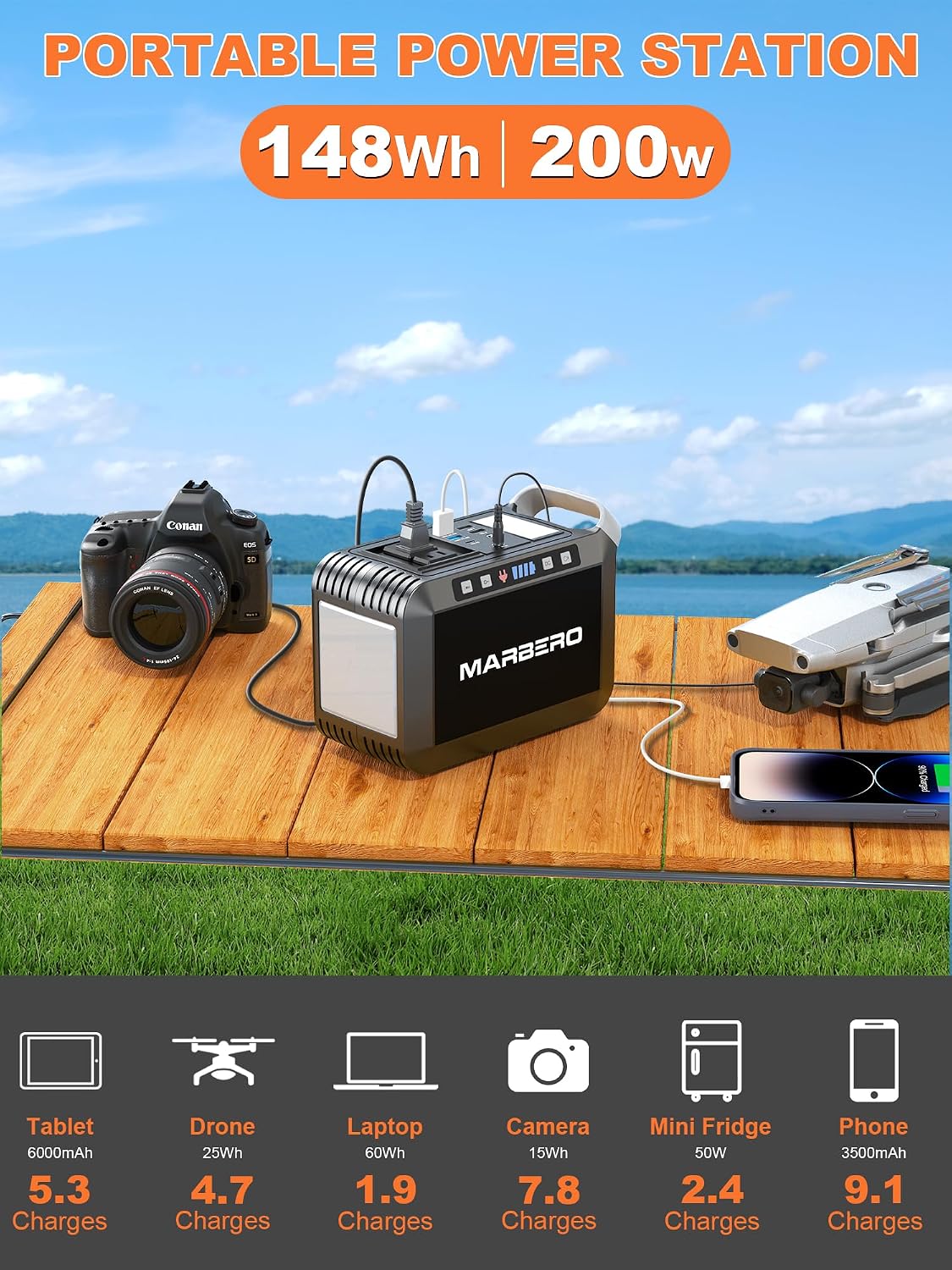
Image 2.1: The MARBERO Portable Power Station charging multiple devices simultaneously, including a tablet, drone, laptop, camera, mini fridge, and phone. This illustrates the versatility of the power station.
2.2 Solar Charging (Optional)
If you have compatible solar panels (15V-24V output), you can charge the power station using solar energy. Connect the solar panel to the 15V Input port. Ensure the solar panel receives direct sunlight for efficient charging.
3. Operating Instructions
3.1 Multiple Output Ports
The power station features a variety of output ports to accommodate different devices:
- AC Output: 2x AC ports (2-phase and 3-phase) for devices requiring 110V/60Hz (200W max).
- DC Output: 1x DC port (12-16.8V/10A).
- USB Output:
- 2x USB QC3.0 ports (5V/2A, 9V/2A, 12V/1.5A - 18W max).
- 2x standard USB ports (5V/2.4A).
- 1x USB-C port (5V/3A, 9V/2A, 12V/1.5A - PD2.0 18W max).

Image 3.1: Close-up view of the MARBERO Power Station's 8 versatile output ports, including AC, DC, USB-A, USB QC3.0, and USB-C.
3.2 Activating Outputs
To activate a specific output section (AC or DC/USB), press the corresponding button located near the ports. The LCD screen will display "AC Output" or "DC Output" and the battery level. Press the button again to turn off the output.
Video 3.1: This video demonstrates how to activate the AC and DC outputs on the MARBERO Portable Power Station and connect various devices like a laptop and a Nintendo Switch. It also shows the built-in flashlight function.
3.3 LED Lighting Function
The power station includes a large-size LED light on the side. Press the dedicated light button to cycle through 3 brightness levels and 2 lighting modes (including SOS flashing mode). This is useful for outdoor activities, emergencies, or as a night light.

Image 3.2: The MARBERO Power Station providing ambient light, demonstrating its night light function for camping or emergencies.
4. Maintenance
4.1 Charging Recommendations
To prolong the battery life, avoid completely depleting the power station before recharging. It is recommended to charge the unit at least once every two weeks when not in use. Store the unit in a cool, dry place away from direct sunlight and high temperatures.
4.2 Cleaning and Storage
Clean the exterior of the power station with a soft, dry cloth. Do not use harsh chemicals or abrasive materials. When storing for extended periods, ensure the unit is fully charged and stored in a temperature-controlled environment.
5. Troubleshooting
5.1 Power Output Limitations
The AC output has a maximum power rating of 200W. Some electrical appliances that exceed this rating (e.g., kettles, microwave ovens, hair dryers, desktop computers, high-power refrigerators) may trigger the over-power protection mechanism, causing the unit to shut down. Always check the power consumption of your appliance before connecting it.
Video 5.1: This video highlights the power output limitations of the MARBERO Portable Power Station, specifically mentioning that devices exceeding 80W (for a similar model) may not function, and advises checking appliance power consumption.
5.2 DC Output Voltage Fluctuation
The 12V DC output voltage range is between 9V-12.6V. The maximum output current is 10A. DC output voltage drops while battery capacity drops due to chemical characteristics of the battery. If your 12V appliance is not built for input voltage stabilizing function, it may shut down when the input voltage is too low. Please unplug your device from the unit and recharge the unit in time.
5.3 Safety Protection Features
The power station is equipped with multiple safety protection features, including short-circuit protection, overcharge protection, over-discharge protection, and over-voltage protection. If the unit shuts down unexpectedly, check for connected devices exceeding power limits or short circuits.
6. Specifications
| Feature | Detail |
|---|---|
| Model Number | M822S |
| Battery Capacity | 148Wh (40000mAh) |
| AC Output | 110V, 60Hz, 200W (Max) |
| DC Output | 12-16.8V/10A |
| USB-A Output | 2x QC3.0 (18W Max), 2x 5V/2.4A (15W Max) |
| USB-C Output | PD2.0 (18W Max) |
| DC Input | 15V/2A (for AC adapter or Solar Panel) |
| Product Dimensions | 7.56 x 3.62 x 5.35 inches |
| Item Weight | 3.3 pounds |
| Special Features | Extra-Long Run Time, Fast Charging, Flashlight, Portable |
7. Warranty & Support
For warranty information or technical support, please refer to the contact details provided in your product packaging or visit the official MARBERO website. Ensure to keep your purchase receipt for warranty claims.


