
COOAU AR-W630
Contents
COOAU 2K 3MP Solar Wireless Outdoor Security Camera User Manual
Model: AR-W630
1. Introduction
Thank you for choosing the COOAU 2K 3MP Solar Wireless Outdoor Security Camera. This manual provides detailed instructions for setting up, operating, and maintaining your camera to ensure optimal performance and security for your home or property. This camera features high-resolution video, AI human detection, two-way audio, and is powered by a solar panel for continuous operation.
2. Safety Information
- Ensure the camera is installed securely to prevent falling.
- Do not expose the camera to extreme temperatures outside its operating range (-10°C to 50°C).
- Keep the camera and solar panel away from fire or heat sources.
- Do not attempt to disassemble or modify the camera. This will void the warranty.
- Use only the provided accessories and power sources.
- Keep out of reach of children.
3. Package Contents
Please check the package for the following items:
- 1 x Camera
- 1 x Solar Panel
- 1 x Outdoor Stand
- 1 x USB Cable
- 1 x Reset Pin
- 6 x Rubber Plugs, Screws
- 1 x Japanese Instruction Manual (Please refer to this English manual for detailed instructions)
4. Product Overview
The COOAU AR-W630 camera system consists of a compact wireless camera and a solar panel for continuous power. The camera features a high-resolution lens, motion sensor, microphone, and speaker for two-way communication.


5. Setup
5.1 Initial Setup and App Connection
The camera is designed for easy setup. Simply download the dedicated app and scan the QR code on the camera to identify it. Follow the in-app instructions to complete the initial configuration.

5.2 Installation
The camera comes with a wall mount for flexible placement. No external power source or wiring work is required due to its battery and solar panel design. You can check the WiFi signal strength in the app to ensure stable communication at your chosen installation location.

5.3 Solar Charging
Connect the included solar panel to the camera. The high-capacity rechargeable battery combined with the solar panel ensures long-term operation without frequent manual charging, providing 365-day continuous monitoring.

6. Operation
6.1 High-Resolution Video and Night Vision
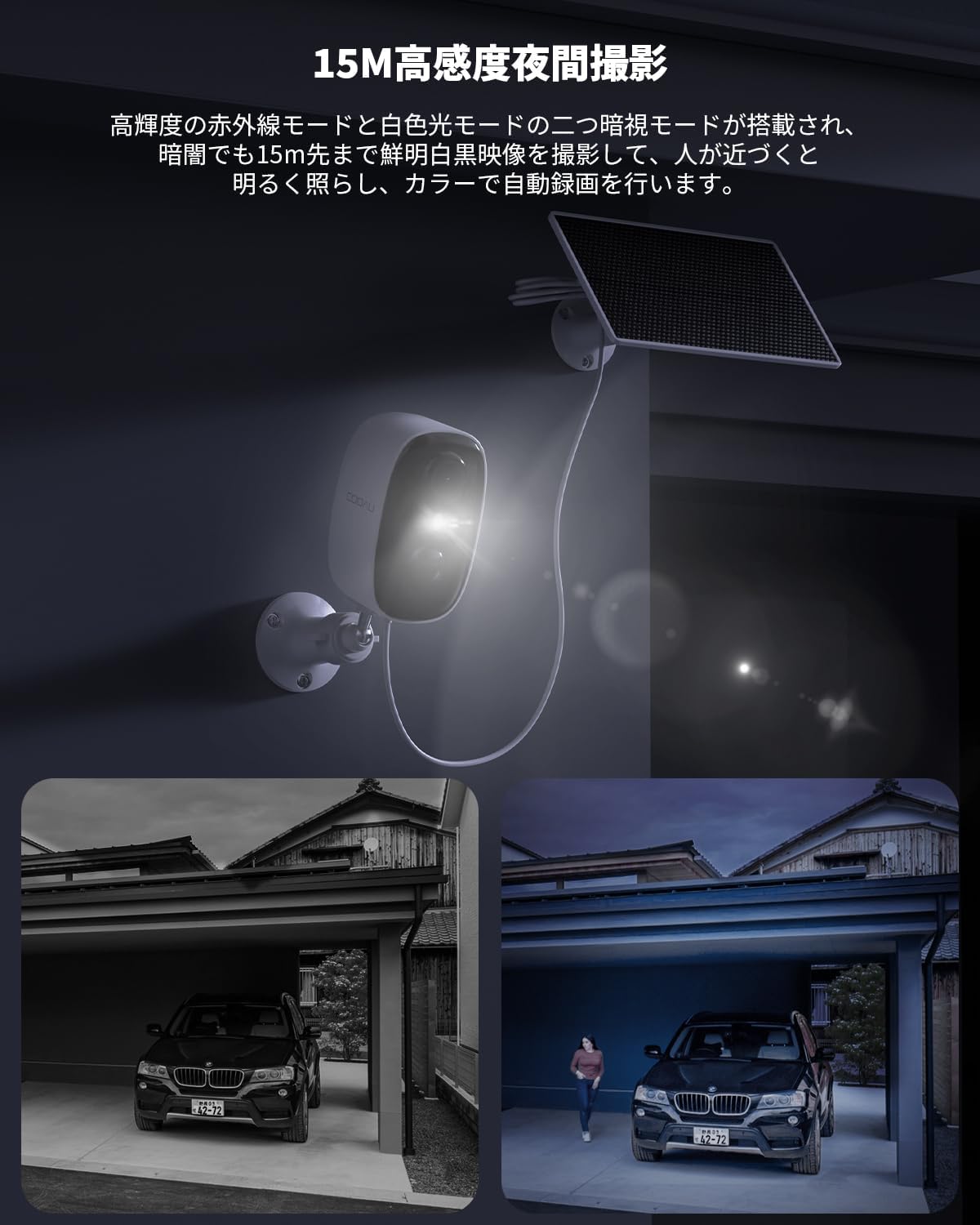
The camera records in 2K (2048x1536P) resolution, providing clear and vibrant images. It features two types of LEDs: infrared and sensor lights. In low light, it automatically switches to black and white infrared mode. When human motion is detected, the spotlight illuminates, allowing for color video recording even at night. This is ideal for monitoring entrances, corridors, garages, offices, or warehouses.
6.2 AI Human Detection and Smart Alerts
Equipped with a PIR thermal sensor, the camera detects human bodies and animals with temperature differences, sending instant alarm notifications to your smartphone with recorded video. AI human detection minimizes false alarms caused by light changes or insect movements by focusing only on human motion. Advanced AI image analysis (paid feature) can differentiate between pets, packages, cars, and humans, streamlining your search for specific events. You can also set specific detection areas to avoid unnecessary alerts from public pathways.

6.3 Two-Way Audio and Wide-Angle Viewing
The camera has a built-in high-sensitivity microphone and speaker, allowing for real-time two-way communication. This feature is useful for speaking with visitors at your door or checking on children playing in the yard. The 130° ultra-wide-angle lens covers large areas like entrances, gardens, or parking lots, providing comprehensive surveillance.

6.4 Recording and Playback
Recordings can be saved to a Micro SD card (up to 128GB) or to the cloud. The camera supports automatic overwriting, so you don't have to worry about storage limits. Free cloud storage is available for 6-second clips for one week. Important moments, such as evidence of car mischief or children returning home, can be recorded and played back. You can select from 4 playback speeds to efficiently review footage.

6.5 Smart Home Integration and Family Sharing
The camera is compatible with Alexa. You can simply ask Alexa to display the camera's real-time feed, allowing you to check on your outdoor environment while busy with other tasks. The sharing function allows multiple smartphones to view the camera feed simultaneously, enabling family members to share important moments and monitor the property together, regardless of distance.

7. Maintenance
The COOAU security camera is designed with IP65 waterproof and dustproof rating, ensuring reliable operation in various weather conditions, including strong sunlight and heavy rain. This allows for year-round, worry-free outdoor use.
- Regularly wipe the camera lens and solar panel with a soft, damp cloth to ensure clear vision and efficient charging.
- Do not use harsh chemicals or abrasive cleaners.
- Ensure the solar panel is free from obstructions (e.g., leaves, snow) to maximize sunlight exposure.

8. Troubleshooting
| Problem | Possible Cause | Solution |
|---|---|---|
| Camera not connecting to Wi-Fi. | Weak Wi-Fi signal; incorrect password; camera too far from router. | Ensure camera is within Wi-Fi range. Check Wi-Fi password. Restart router and camera. |
| No recording or missing events. | SD card full/corrupted; motion detection sensitivity too low; solar panel not charging. | Format or replace SD card. Adjust motion detection sensitivity in app. Ensure solar panel is clean and receiving direct sunlight. |
| Poor image quality. | Dirty lens; low light conditions; network bandwidth issues. | Clean the lens. Ensure sufficient lighting for color night vision. Check network speed. |
| Two-way audio not working. | Microphone/speaker blocked; app permissions; volume settings. | Ensure nothing is obstructing the microphone or speaker. Check app permissions for microphone access. Adjust volume settings in the app. |
If you encounter issues not listed here, please refer to the Warranty & Support section for contact information.
9. Specifications
| Feature | Detail |
|---|---|
| Model Name | AR-W630 |
| Brand | COOAU |
| Video Capture Resolution | 3MP (2048x1536P) |
| Color | White |
| Number of Items | 1 |
| Wireless Communication Technology | Wi-Fi |
| Field of View | 130 degrees |
| Mounting Type | Wall Mount |
| Night Vision Range | 15 meters |
| Material | Plastic |
| Voltage | 5 Volts (DC) |
| Product Dimensions (LxWxH) | 5.5 x 5 x 10.5 cm |
| Water Resistance Level | Waterproof (IP65) |
| Product Weight | 215 g |
| Light Source | LED |
| Battery Included | Yes |
| Battery Type | Lithium Ion |
| Recommended Uses For Product | Outdoor Security |
| Connectivity Technology | Wireless |
| Compatible Devices | Tablet, Smartphone |
| Power Source | Battery Powered |
| Controller Type | APP |
10. Warranty & Support
COOAU offers a 12-month quality guarantee for this product. We are committed to providing not only continuous product improvement but also the best possible support with sincerity. Our products have obtained technical and PSE certifications.
For support, please contact us via:
- Your order history: Go to your order history and contact the seller.
- Our official email address (details typically found on product packaging or official website).
We are dedicated to ensuring your satisfaction and providing assistance for any questions or issues you may have.
Documents and downloads
Ask a question about this manual
Ask about setup, troubleshooting, compatibility, parts, safety, or missing instructions. Manuals+ will review the question and use this page’s manual context to help answer it.