
Introduction
This manual provides essential information for the safe and efficient operation of your new Samsung 236L Frost Free Double Door Refrigerator, Model RT28C3053S8/HL. Please read these instructions thoroughly before using the appliance and retain them for future reference.
Important Safety Information
To reduce the risk of fire, electric shock, or injury when using your refrigerator, follow these basic precautions:
- Ensure the refrigerator is properly grounded.
- Do not use electrical appliances inside the food storage compartments unless they are of the type recommended by the manufacturer.
- Keep ventilation openings clear of obstruction.
- Do not damage the refrigerant circuit.
- Do not store explosive substances such as aerosol cans with a flammable propellant in this appliance.
- Unplug the appliance before cleaning or performing maintenance.
- Supervise children to ensure they do not play with the appliance.
Setup and Installation
Unpacking
Carefully remove all packaging materials. Ensure no parts are missing or damaged. Keep packaging materials away from children.
Placement
Place the refrigerator on a firm, level surface. Allow adequate space around the appliance for proper ventilation (at least 5 cm on sides and back, 10 cm on top). Avoid direct sunlight or heat sources. The refrigerator operates efficiently within a voltage range of 100V to 300V, eliminating the need for an external stabilizer.

Image: Refrigerator dimensions (55.5W x 154.5H x 63.7D cm) and energy efficiency guide. This image illustrates the physical size of the refrigerator and its energy consumption rating.
Leveling
Adjust the leveling feet to ensure the refrigerator is stable and level. This prevents vibrations and ensures proper door sealing.
Initial Power-On
After placement, wait at least 2-3 hours before plugging in the refrigerator to allow the refrigerant to settle. Plug the power cord into a dedicated wall outlet. The refrigerator will begin cooling. Allow several hours for the appliance to reach optimal temperature before storing food.
Operating Instructions
Digital Inverter Technology
Your refrigerator is equipped with a Digital Inverter Compressor that automatically adjusts its speed in response to cooling demand. This results in higher energy efficiency, reduced noise levels, and long-lasting performance.

Image: Diagram illustrating the benefits of Digital Inverter Technology, including energy saving, less noise, and durability.
All-Around Cooling
The All-Around Cooling system ensures that every corner of the refrigerator is cooled evenly. Cold air is blown out through multiple vents on every shelf level, maintaining a constant temperature and keeping food fresher for longer.

Image: Visual representation of the All-Around Cooling system, showing air circulation within the refrigerator compartments.
Coolpack
The Coolpack feature in the freezer helps keep food frozen for up to 12 hours during power outages, preventing spoilage and maintaining freshness.

Image: Close-up of the freezer compartment showing the Coolpack element and its function during a power cut.
Easy Slide Shelf
The Easy Slide Shelf is built on rolling hinges, allowing you to pull it out effortlessly. This provides easy access to items stored at the back and helps organize your food more effectively.

Image: Illustration of the Easy Slide Shelf being pulled out, demonstrating its accessibility for items at the back.
Movable Ice Maker
The Movable Ice Maker provides convenient access to ice. It can be easily detached and moved to create more space in the freezer when needed.

Image: Close-up of the Movable Ice Maker, showing its design and how it can be removed.
Deodorizer
The built-in Deodorizer filter eliminates strong odors, keeping the air inside your refrigerator fresh and preserving the natural flavor of your food.

Image: Diagram showing the Deodorizing Filter and how it circulates air to remove odors.
LED Lighting
The bright and energy-efficient LED lighting illuminates the interior of the refrigerator, making it easy to find items.

Image: View of the refrigerator interior highlighting the LED light providing illumination.
Toughened Glass Shelves
The refrigerator features toughened glass shelves designed to safely hold heavy items, up to 175 kg, providing durability and peace of mind.

Image: A large pot on a toughened glass shelf, demonstrating its strength and capacity to hold heavy items.
Other Features
- Fresh Room: A dedicated compartment for delicate items requiring specific cooling.
- Vegetable Drawer: Provides optimal humidity for storing fruits and vegetables.
- Big Bottle Guard: Deep door guard for storing large bottles and containers.
- Recess Handle: Integrated handle design for a sleek appearance.
- Adjustable Temperature Control: Allows you to set the desired cooling level for both the refrigerator and freezer compartments.
Maintenance and Cleaning
Regular cleaning and maintenance will ensure optimal performance and longevity of your refrigerator.
- Exterior Cleaning: Wipe the exterior surfaces with a soft cloth dampened with mild detergent and water. Dry thoroughly.
- Interior Cleaning: Remove all food items and shelves. Wash interior surfaces, shelves, and drawers with a solution of baking soda and warm water (2 tablespoons baking soda to 1 liter of water). Rinse and dry thoroughly before returning items.
- Door Gaskets: Clean door gaskets regularly with a damp cloth to ensure a tight seal.
- Defrosting: This is a frost-free model, so manual defrosting is not required. However, ensure the freezer compartment remains clear of excessive ice buildup.
- Power Disconnection: Always unplug the refrigerator before cleaning or performing any maintenance.
Troubleshooting
Before contacting service, check the following common issues:
| Problem | Possible Cause | Solution |
|---|---|---|
| Refrigerator not cooling | Power cord unplugged; temperature setting too high; door not closed properly; poor ventilation. | Check power connection; adjust temperature; ensure door is sealed; provide adequate space around the unit. |
| Unusual noises | Refrigerator not level; items rattling inside; compressor noise (normal). | Adjust leveling feet; rearrange items; compressor noise is normal during operation. |
| Water on floor (leakage) | Drain hose clogged; water dispenser tray overflowing (if applicable). | Clear drain hose; check water dispenser components. |
| Door does not close completely | Food packages blocking; door gasket dirty or damaged; refrigerator not level. | Rearrange food; clean or replace gasket; level the refrigerator. |
Specifications
| Feature | Detail |
|---|---|
| Model Number | RT28C3053S8/HL |
| Brand | Samsung |
| Capacity | 236 Litres (Fresh Food: 183 Ltr | Freezer: 53 Ltr) |
| Configuration | Freezer-on-Top, Double Door |
| Product Dimensions (D x W x H) | 63.7D x 55.5W x 154.5H Centimeters |
| Item Weight | 46 kg |
| Energy Rating | 3 Star (Annual Energy Consumption: 229 Kilowatt Hours Per Year) |
| Defrost System Type | Frost Free |
| Compressor Type | Digital Inverter Compressor |
| Voltage | 230 Volts (Stabilizer Free Operation: 100V - 300V) |
| Shelf Type | Toughened Glass Shelves (3 shelves) |
| Refrigerant | R-600A |
| Included Components | 1 Refrigerator unit, User Manual, Warranty Card, Egg Tray, Movable Ice Maker |
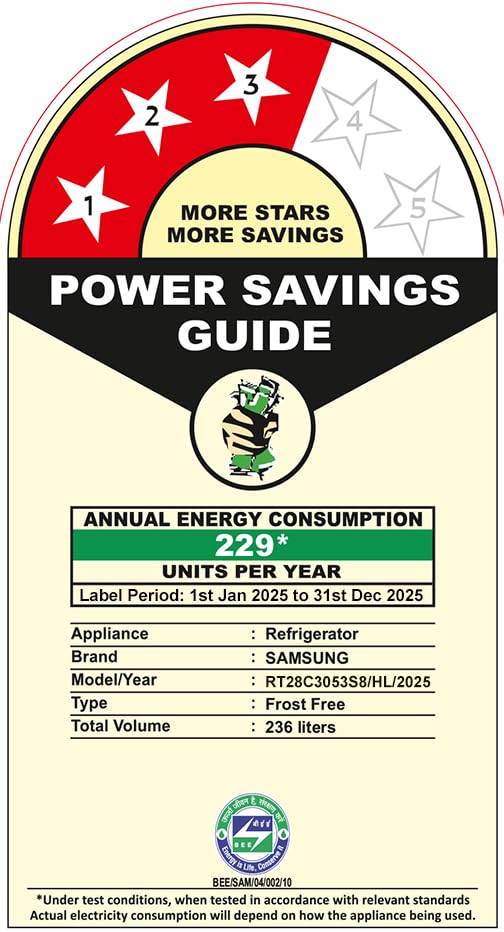
Image: The Power Savings Guide label for the refrigerator, indicating its 3-star energy rating and annual energy consumption of 229 units.
Warranty Information
Your Samsung Refrigerator comes with the following warranty:
- Comprehensive Warranty: 1 year on the entire appliance.
- Digital Inverter Compressor Warranty: 10 years.
- Extended Digital Inverter Compressor Warranty: 20 years for purchases made between 1st Dec 2022 and 31st March 2026.
To avail warranty service, please retain your seller invoice. Terms and Conditions apply. Contact Samsung for details.
Customer Support
For any queries, assistance, or to schedule service, please contact Samsung customer support:
- Telephone (Toll Free): 1800 40 7267864 (1800 40 SAMSUNG)
- WhatsApp: 1800-57-267864
- Email: support.india@samsung.com
When contacting support, please provide your product's model name (RT28C3053S8/HL) and the seller's details as mentioned on your invoice.