
1. Important Safety Instructions
Please read this instruction manual carefully before using the appliance and keep it for future reference. Incorrect use may result in injury or damage to the appliance.
- This appliance is intended for indoor household use only.
- Do not use the appliance to pick up water or other liquids, hot ashes, sharp objects, or flammable/explosive substances.
- Keep the appliance away from children and pets.
- Do not immerse the appliance, battery, or charging adapter in water or other liquids.
- Always ensure the dust container and filters are correctly installed before use.
- Use only the original charging adapter and battery provided with the appliance.
- Do not operate the appliance if it is damaged or malfunctioning. Contact authorized service for repairs.
- Unplug the charging adapter from the power outlet before cleaning or performing maintenance.
2. Package Contents
Carefully unpack the appliance and check that all components are present and undamaged. The package should contain:
- Main vacuum unit with detachable handheld unit
- Motorized floor brush
- Cat&Dog mini motorized brush with UV-C light
- Wet mopping attachment with textile pad
- Charging base with integrated accessory holder
- Charging adapter
- Various accessory nozzles (e.g., crevice tool, dusting brush, flexible hose)
- User Manual
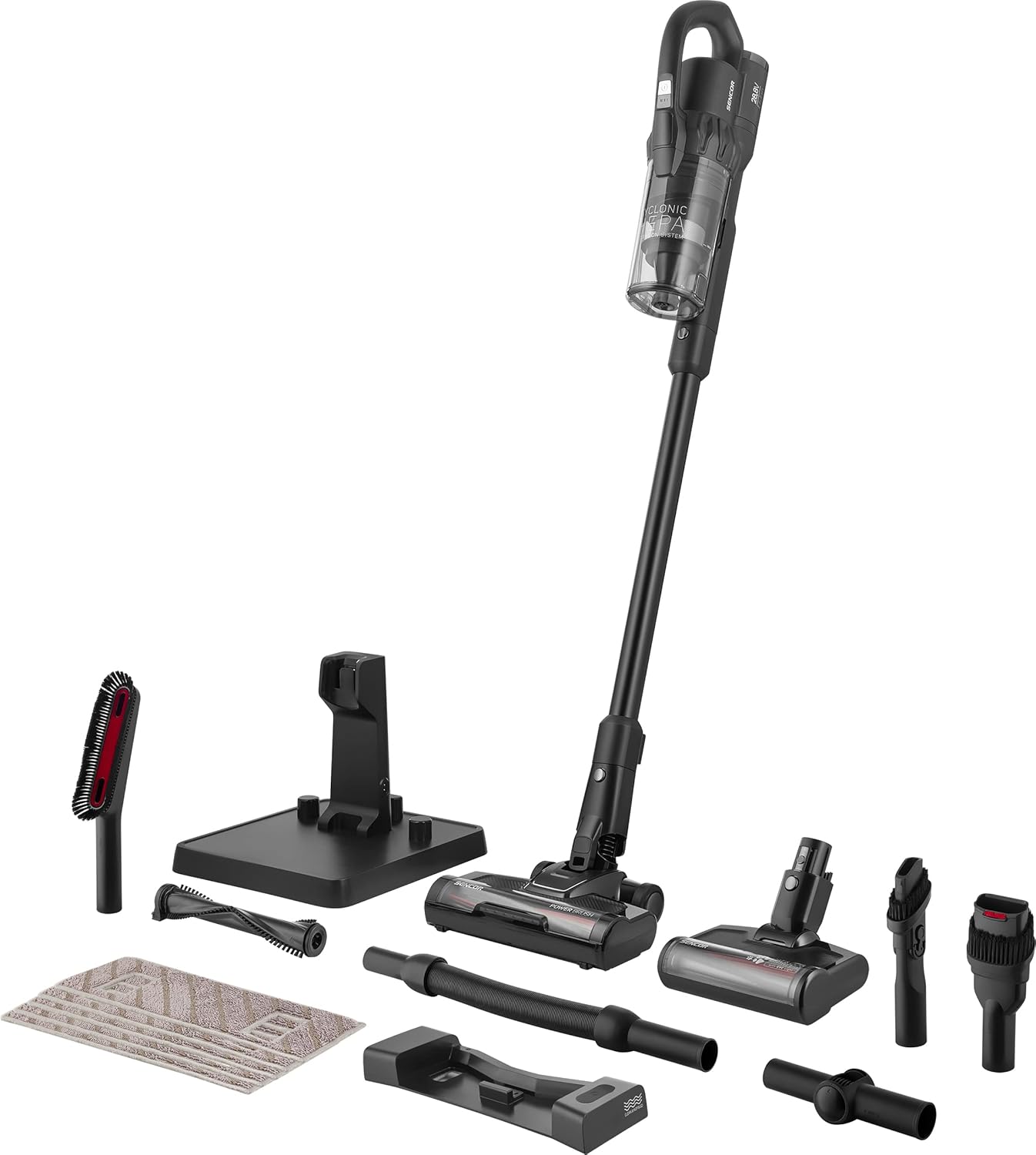
Figure 2.1: Sencor SVC 9879BK vacuum cleaner with all included accessories, including the main unit, various brushes, mopping pad, and charging stand.
3. Product Overview and Assembly
3.1 Main Components
Familiarize yourself with the main parts of your Sencor SVC 9879BK vacuum cleaner:
- Digital Display: Shows battery status and current power mode.
- Power Button: Turns the vacuum on/off.
- Mode Selection Button: Cycles through power modes (Turbo, High Performance, Extended, AUTO).
- Dust Container: Collects dust and debris.
- HEPA Filter: Part of the three-level cyclonic filtration system.
- Extension Tube: Connects the main unit to the floor brush.
- Motorized Floor Brush: For cleaning various floor types.
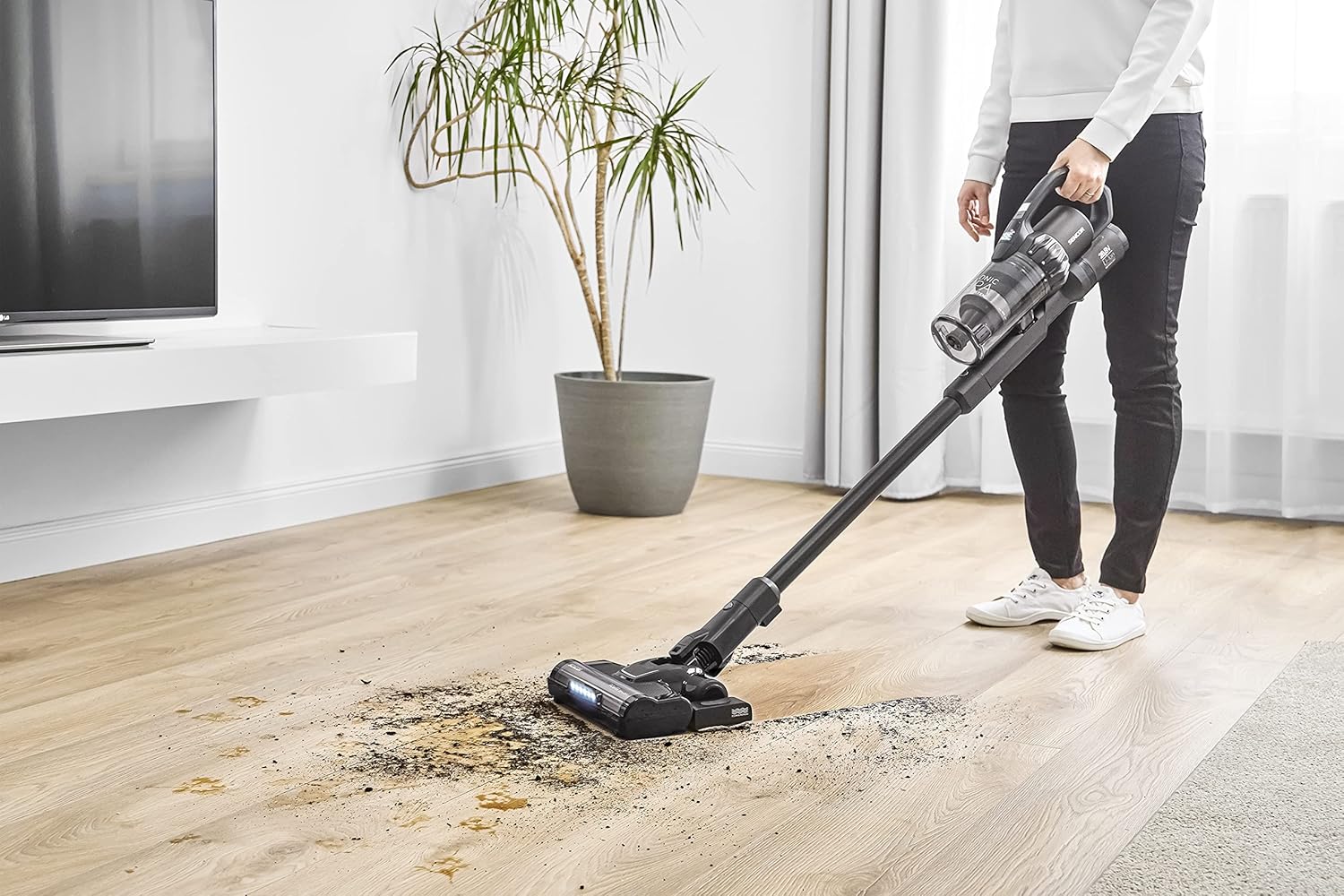
Figure 3.1: Close-up view of the digital display on the Sencor SVC 9879BK, indicating battery charge percentage and the active cleaning mode (e.g., AUTO).
3.2 Initial Assembly
- Insert the extension tube into the main vacuum unit until it clicks into place.
- Attach the motorized floor brush to the other end of the extension tube, ensuring it locks securely.
- For handheld use, detach the extension tube and attach desired accessories directly to the main unit.

Figure 3.2: The Sencor SVC 9879BK cordless stick vacuum cleaner fully assembled, ready for use.
4. Charging the Battery
Before first use, fully charge the vacuum cleaner's battery. The appliance is powered by a 28.8V 3000mAh Li-ion battery.
- Place the vacuum cleaner on its charging base. Ensure the charging contacts align.
- Connect the charging adapter to the charging base and then plug it into a power outlet.
- The digital display will indicate the charging status. A full charge takes approximately 3 hours.
- Once fully charged, the display will show 100%. Disconnect the adapter from the power outlet.
A fully charged battery provides up to 70 minutes of runtime, depending on the selected power mode.
5. Operating Instructions
5.1 Powering On and Mode Selection
- Press the power button to turn the vacuum cleaner on. It will start in the default power mode.
- Press the mode selection button to cycle through the available power modes:
- TURBO: For intensive cleaning of heavily soiled areas (up to 12 min runtime).
- HIGH PERFORMANCE: For regular cleaning tasks (up to 28 min runtime).
- EXTENDED: For prolonged cleaning sessions (up to 70 min runtime).
- AUTO: Automatically adjusts suction power based on floor type and dust concentration for optimal performance.
- Press the power button again to turn the vacuum cleaner off.
5.2 Stick Vacuum Mode (Dry Cleaning)
Use the assembled stick vacuum with the motorized floor brush for cleaning hard floors and carpets.
- Ensure the motorized floor brush is attached.
- Select the appropriate power mode for your cleaning needs.
- The 180° swivel head and lightweight design provide excellent maneuverability around furniture.
- The interchangeable rotating brushes (soft for hard floors, hard bristles for carpets) ensure effective cleaning on all surfaces.

Figure 5.1: A user operating the Sencor SVC 9879BK in stick vacuum mode to clean a hard floor surface.
5.3 Handheld Vacuum Mode
The detachable handheld unit is ideal for cleaning furniture, tables, car interiors, and other hard-to-reach areas.
- Press the release button to detach the handheld unit from the extension tube.
- Attach the desired accessory (e.g., crevice tool, dusting brush, flexible hose) directly to the handheld unit.
- Turn on the handheld unit and proceed with cleaning.
5.4 Cat&Dog Mini Motorized Brush with UV-C Light
This specialized brush is designed for deep cleaning upholstered furniture, mattresses, and car seats, effectively removing pet hair and sanitizing surfaces.
- Attach the Cat&Dog mini motorized brush to the handheld unit.
- When activated, the integrated UV-C lamp helps eliminate potential infectious organisms from the cleaned surfaces.
- Move the brush slowly over the surface to ensure thorough cleaning and UV-C exposure.
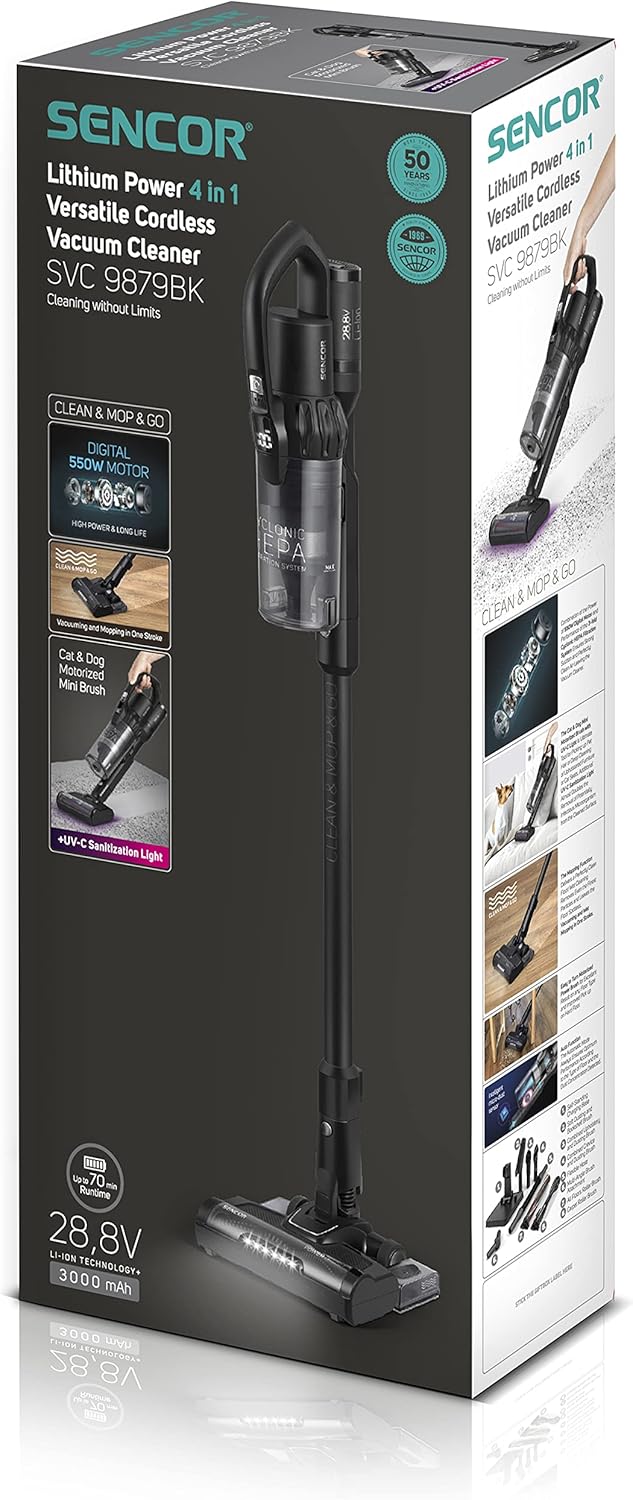
Figure 5.2: A user cleaning a sofa with the Sencor SVC 9879BK handheld unit and the Cat&Dog mini motorized brush, ideal for pet hair removal and upholstery.
5.5 Wet Mopping Function
The wet mopping attachment allows for simultaneous vacuuming and mopping of hard floors.
- Attach the wet mopping attachment to the motorized floor brush.
- Dampen the textile mopping pad with water (and a suitable floor cleaner if desired) and attach it to the mopping attachment.
- Operate the vacuum cleaner as usual. The mopping pad will clean the floor surface as you vacuum.
- After use, remove and clean the mopping pad.
6. Maintenance and Cleaning
Regular maintenance ensures optimal performance and extends the lifespan of your vacuum cleaner.
6.1 Emptying the Dust Container
- Ensure the vacuum cleaner is turned off.
- Press the dust container release button and remove the container.
- Empty the contents into a waste bin. The dust container has an XL capacity of 0.5 liters.
- Reattach the dust container securely.
6.2 Cleaning Filters
The Sencor SVC 9879BK features a three-level cyclonic HEPA filtration system. Clean filters regularly to maintain suction power.
- Remove the dust container.
- Carefully remove the HEPA filter and other filter components.
- Tap the filters gently to remove loose dust. For thorough cleaning, the HEPA filter is washable. Rinse it under running water until clean.
- Allow all filter components to air dry completely before reassembling. Do not use the vacuum with wet filters.
6.3 Cleaning Brushes
- Regularly check the motorized floor brush and Cat&Dog mini motorized brush for tangled hair or debris.
- Use scissors or a brush cleaning tool to remove any obstructions from the brush rolls.
- Ensure the brush rolls spin freely after cleaning.
6.4 Cleaning Mopping Pad
- After each wet mopping use, detach the textile mopping pad from the attachment.
- Rinse the pad thoroughly with water and allow it to air dry before storing.
7. Troubleshooting
If you encounter issues with your Sencor SVC 9879BK, refer to the following common problems and solutions:
| Problem | Possible Cause | Solution |
|---|---|---|
| Vacuum does not turn on | Battery is discharged Power button not pressed correctly | Charge the battery fully Press the power button firmly |
| Reduced suction power | Dust container full Filters are clogged Brush roll obstructed Nozzle/tube blocked | Empty the dust container Clean or replace filters Remove obstructions from brush roll Check and clear any blockages |
| Battery not charging | Charging adapter not connected Charging contacts not aligned Faulty adapter/battery | Ensure adapter is securely plugged in Reposition vacuum on charging base Contact customer support |
| Motorized brush not rotating | Brush roll obstructed Brush attachment not secured | Clear any hair or debris from brush Ensure brush is correctly attached and locked |
If the problem persists after attempting these solutions, please contact Sencor customer support.
8. Specifications
| Feature | Specification |
|---|---|
| Model Number | SVC 9879BK |
| Power | 550 Watts |
| Voltage | 28.8 Volts (AC) |
| Battery Type | Lithium-ion (3000 mAh) |
| Runtime | Up to 70 minutes |
| Charging Time | Approximately 3 hours |
| Dust Container Volume | 0.5 Liters |
| Filter Type | HEPA, Washable |
| Noise Level | 83 Decibels |
| Dimensions (L x W x H) | 19 x 30 x 100 cm |
| Weight | 3.1 Kilograms |
| Special Features | 4-in-1 (Dry, Wet, Handheld, Cat&Dog), UV-C Light, Digital Display, 3 Power Modes, AUTO Mode, 360° Technology |
9. Warranty and Support
Sencor provides a warranty for this product in accordance with local regulations. Please refer to your purchase documentation for specific warranty terms and conditions.
Spare parts for the Sencor SVC 9879BK are available for a period of 5 years from the date of purchase.
For technical assistance, troubleshooting beyond this manual, or to inquire about spare parts, please contact Sencor customer support through their official website or the contact information provided with your product.


