
TDR FORCE FL-540f 12v dc
TDRFORCE 12V DC RV Fresh Water Pump User Manual
Model: FL-540f 12v dc
Brand: TDR FORCE
Product Overview
The TDRFORCE 12V DC RV Fresh Water Pump (Model FL-540f 12v dc) is a self-priming, on-demand diaphragm pump designed for reliable fresh water transfer and pressure boosting in RVs, marine vessels, and boats. It delivers a powerful 5 GPM (300 GPH) flow rate and increases water pressure up to 70 PSI, ensuring consistent water supply for various applications.
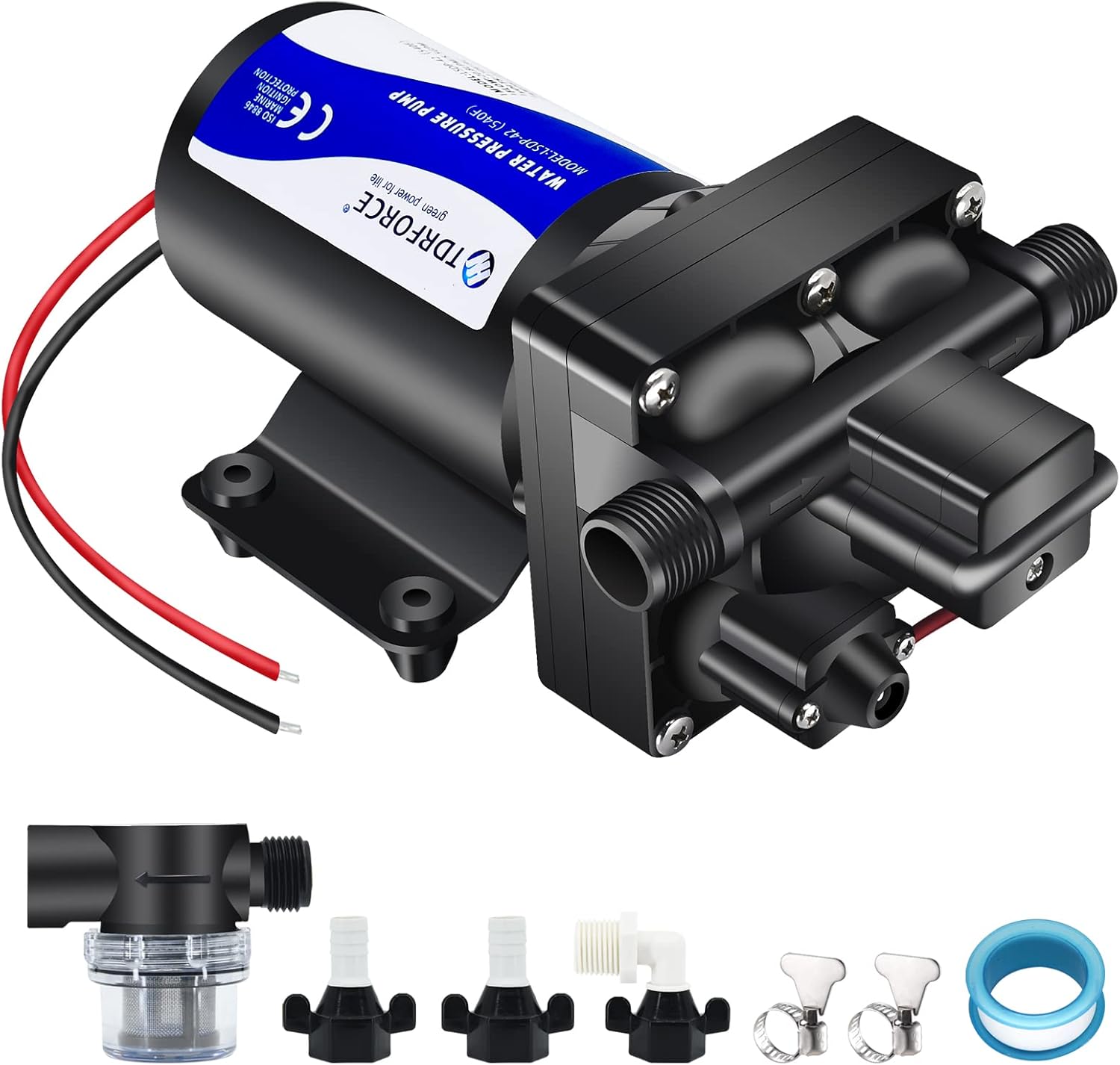
This image shows the TDRFORCE 12V DC RV Fresh Water Pump along with its various connection accessories and a water filter.
Installation Guide
This pump is designed for easy installation. Ensure all connections are secure to prevent leaks.
Components Included:
- TDRFORCE 12V DC Water Pump
- 3/4'' male inlet/outlet connectors
- 1/2'' male inlet connector
- 50-mesh inlet strainer
- Teflon tape
- Various hose attachments (common connectors, right-angled connector)
Step-by-Step Installation:
- Mounting: Securely mount the pump using its integrated mounting base. Ensure it is in a dry, protected area.
- Inlet Connection: Connect your fresh water supply to the pump's inlet. The pump is assembled with 3/4'' male inlet/outlet and 1/2'' male inlet connector. Use the provided 50-mesh inlet strainer on the input side to filter impurities.

This diagram illustrates the proper connection of the 1/2-inch hose inlet, including the debris filter, and the 1/2-inch hose outlet on the pump.
- Outlet Connection: Connect your water distribution system (e.g., RV plumbing, boat washdown hose) to the pump's outlet.
- Electrical Connection: Connect the pump to a 12V DC power source. The pump features red and black wires for positive and negative connections, respectively. Ensure correct polarity.

This image demonstrates that the pump can be powered via a cigarette lighter socket in a car, camper, or trailer, or mounted to a wall socket using an AC/DC adapter (adapters not included).
- Sealing: Use the provided Teflon tape on all threaded connections to prevent water leakage.

This image illustrates the application of Teflon tape to a threaded connection to ensure a watertight seal and prevent leaks.
Operation
The TDRFORCE water pump is an on-demand system, meaning it automatically turns on when water flow is detected (e.g., a faucet is opened) and turns off when the flow stops.
Initial Startup:
- Ensure all connections are secure and the water supply is open.
- Apply power to the pump.
- Open a faucet or outlet to allow the pump to prime and begin water flow.
Pressure Adjustment:
The pump features an adjustable pressure switch, factory set around 50 PSI, capable of reaching up to 70 PSI.
To adjust pressure:
- Locate the pressure adjustment screw under the cover near the top front of the pump (secured by one Phillips screw).
- Use a 2mm or 2.5mm Allen wrench to turn the screw.
- Turn clockwise to increase pressure.
- Turn counter-clockwise to decrease pressure.
- Monitor pressure with a gauge if precise adjustment is needed.

This diagram illustrates the proper adjustment of the pressure switch on the TDRFORCE water pump.
Bypass Switch:
The built-in bypass switch ensures smooth and consistent flow throughout all operating ranges while consuming low current.

This image highlights the location of the bypass switch on the pump, which helps ensure smooth water flow.
Maintenance
Inlet Strainer Cleaning:
Regularly inspect and clean the 50-mesh inlet strainer to prevent debris from entering the pump and affecting performance.

This image displays the components of the inlet water filter, emphasizing its role in filtering out impurities from the water supply.
Winterization:
For cold weather, ensure the pump is drained to prevent freezing and damage. Consult your RV or boat manual for specific winterization procedures.
General Care:
Operate only with fresh water. Solid particles and corrosive liquids may cause damage to the diaphragm pump.
Troubleshooting
| Problem | Possible Cause | Solution |
|---|---|---|
| Pump not running | No power; Loose wiring; Blown fuse; Pressure switch issue | Check power supply and connections; Inspect fuse; Verify pressure switch operation. |
| Low water pressure | Clogged inlet strainer; Low input water supply; Pressure switch setting | Clean inlet strainer; Ensure adequate water supply; Adjust pressure switch (see Operation section). |
| Pump runs continuously | Leak in system; Pressure switch malfunction; Air in system | Check for leaks in plumbing; Inspect pressure switch; Bleed air from system by opening all faucets until flow is steady. |
| Overheating | Not designed for continuous use; Blocked flow | This pump is not for continuous use. Ensure clear flow path. Allow pump to cool. |
Product Specifications
- Brand: TDR FORCE
- Model: FL-540f 12v dc
- Power Source: DC Powered
- Voltage: 12 Volts
- Maximum Flow Rate: 5 Gallons Per Minute (300 GPH)
- Maximum Pressure: 70 PSI
- Item Weight: 6.58 pounds
- Package Dimensions: 12.36 x 6.14 x 5.16 inches
- Construction: Thermoplastic
- Motor: 12V DC Solid Copper Motor
Warranty and Support
TDRFORCE offers presale and after-sale services and an 180-day warranty for this product.
For any questions or support, please contact TDRFORCE directly.
Visit the official TDR FORCE Store for more information: TDR FORCE Store
Ask a question about this manual
Ask about setup, troubleshooting, compatibility, parts, safety, or missing instructions. Manuals+ will review the question and use this page’s manual context to help answer it.