
Fortdows 717577864835
Contents
Fortdows 5GWiFi 8 Core Android 12 Car Stereo Radio User Manual
Model: 717577864835
For Jeep Grand Cherokee WK 2011-2013
1. Introduction
This manual provides detailed instructions for the installation, operation, and maintenance of your Fortdows 5GWiFi 8 Core Android 12 Car Stereo Radio. This head unit is designed to integrate seamlessly into your Jeep Grand Cherokee WK (2011-2013) dashboard, offering advanced features and an enhanced in-car entertainment experience.

Image: The Fortdows 9-inch Android 12 Car Stereo Radio, featuring a large touchscreen display with app icons, integrated into a vehicle's dashboard.
2. Compatibility
This car stereo is specifically designed for Jeep Grand Cherokee WK models manufactured between 2011 and 2013. Ensure your vehicle's air conditioning control panel matches the compatible configuration shown below for proper fitment.

Image: A visual guide illustrating the compatible (A) and incompatible (B) air conditioning control panel configurations for the Jeep Grand Cherokee, based on screw hole placement.
Important: Please verify the position of the screw holes on your vehicle's air conditioning control panel before proceeding with installation. If the screw holes are located above the air conditioning control panel, this car radio will not fit your vehicle.
3. Package Contents
Please check the package for the following items:
- 1x Car Stereo Radio Unit
- 1x Crowbar (for trim removal)
- 1x Microphone (MIC)
- 1x Backup Camera
- 1x RCA Input Cable
- 1x Power Cable
- 1x Camera Input Cable
- 1x Output Cable
- 2x USB Cables
- 1x Canbus Decoder
- 1x Extension Cable
- 1x GPS Antenna
4. Setup and Installation
Installation of the car stereo involves removing the factory unit and connecting the new head unit using the provided wiring harnesses. It is recommended to consult the detailed installation manual (PDF) available on the product page for specific step-by-step instructions. Professional installation is advised if you are unfamiliar with car audio system wiring.
4.1 General Installation Steps (Overview)
- Preparation: Disconnect the vehicle's battery to prevent electrical shorts.
- Remove Factory Unit: Carefully remove the existing car stereo and trim using the provided crowbar and appropriate tools.
- Connect Wiring: Connect the main power harness, RCA cables, USB cables, GPS antenna, and backup camera input to the new head unit. Ensure all connections are secure.
- Canbus Connection: Connect the Canbus decoder to integrate with vehicle features like steering wheel controls.
- Amplifier Wiring: If your vehicle has a factory amplifier, ensure the amplifier control wire (typically blue) from the new radio is connected to the corresponding amplifier activation wire in your vehicle's harness.
- Test Functionality: Before fully reassembling, reconnect the battery and test all functions of the new stereo (power, audio, touch screen, radio, GPS, Bluetooth, camera).
- Reassemble: Secure the new head unit in the dashboard and reattach all trim pieces.

Image: A wiring diagram illustrating the connection of an amplifier cable, showing how to expose and connect the core wires.
5. Operating Instructions
Your Fortdows car stereo runs on Android 12, providing a familiar and intuitive interface. The 9-inch 1280x800P IPS touchscreen offers clear visuals and responsive control.
5.1 System Overview
- Processor: 8-Core for fast and smooth operation.
- Memory: 4GB RAM + 64GB ROM for ample storage and multitasking.
- Display: 9-inch 1280x800 IPS touchscreen with 178° full view angle and 2.5D multi-touch capability.

Image: A visual representation of the upgraded 8-core processor, highlighting the 4GB RAM and 64GB ROM for enhanced performance.
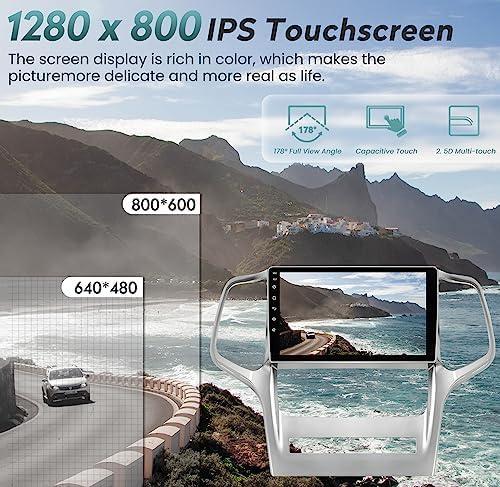
Image: A graphic demonstrating the clarity and color richness of the 1280x800 IPS touchscreen compared to lower resolution displays.
5.2 Wireless CarPlay & Android Auto
Connect your smartphone wirelessly or via USB to access Apple CarPlay or Android Auto. This allows for seamless integration of navigation, music, calls, and messages directly on the car stereo display.
- Voice Control: Use voice commands (e.g., "Hey Siri," "OK Google") for hands-free operation.
- Navigation: Utilize your phone's map applications for real-time navigation.
- Media: Stream music and podcasts from your favorite apps.

Image: The car stereo displaying both Apple CarPlay and Android Auto interfaces, demonstrating voice command functionality for music and navigation.
5.3 Bluetooth Connectivity
Pair your mobile device via Bluetooth for hands-free calling and audio streaming.
- Hands-Free Calls: Make and receive calls safely while driving.
- Audio Streaming: Play music from your phone through the car's speakers.
- Phonebook Access: Sync your phone's contacts for easy dialing.

Image: An icon representing Bluetooth 5.0 connectivity.
5.4 GPS Navigation
The unit supports various online and offline navigation applications, including Google Maps, Waze, and others. The built-in GPS antenna ensures accurate positioning.

Image: The car stereo screen showing a GPS navigation route, with a smartphone displaying a similar map application for comparison.
5.5 FM/AM RDS Radio
Enjoy a wide range of radio stations with the built-in FM/AM tuner, featuring RDS (Radio Data System) for displaying station information.
- Frequency Range: FM 87.5-108MHz.
- Digital Tuning: High-performance digital tuning for clear reception.
- Automatic Scanning: Easily find and save your favorite stations.

Image: The car stereo showing the FM radio interface, with a person's hand interacting with the vehicle's climate controls below the screen.
5.6 Mirror Link
Mirror your smartphone's screen directly onto the head unit display, allowing you to view content from your phone on the larger screen.

Image: The car stereo screen mirroring a smartphone's display, showing video content, with a hand holding the phone for demonstration.
5.7 Steering Wheel Control
The unit supports original steering wheel controls, allowing you to manage audio, calls, and other functions without taking your hands off the wheel.

Image: The car stereo interface showing various control options, with a steering wheel in the foreground, illustrating the integration of steering wheel controls.
5.8 Backup Camera Function
The included AHD backup reversing camera automatically displays the rear image when the vehicle is shifted into reverse gear, enhancing safety during parking and maneuvering.
- Night Vision: Provides clear visibility in low-light conditions.
- Waterproof: Durable design for various weather conditions.
- HD 1080P: High-definition video output.
- 170° Viewing Angle: Wide field of view for comprehensive coverage.
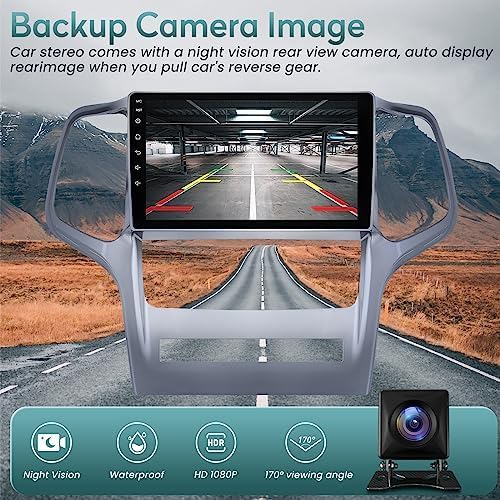
Image: The car stereo screen showing the live feed from the backup camera with parking assist lines, alongside a small image of the camera unit itself.
5.9 Wi-Fi Connectivity
Connect to a Wi-Fi hotspot to access online content, download apps from the Google Play Store, and browse the internet directly from your car stereo.

Image: An icon representing 5G WiFi connectivity.
5.10 DSP Sound
Experience enhanced audio quality with the built-in Digital Signal Processor (DSP), allowing for fine-tuning of sound settings to optimize your listening experience.

Image: The car stereo screen showing a graphic equalizer for DSP sound adjustments, with visual representations of sound output from speakers.
6. Specifications
| Feature | Specification |
|---|---|
| Model Number | 717577864835 |
| Operating System | Android 12 |
| Processor | 8-Core |
| RAM | 4GB |
| ROM | 64GB |
| Display Size | 9 Inches |
| Display Resolution | 1280x800 IPS |
| Connectivity Technology | Wireless Wi-Fi, Bluetooth, USB |
| Bluetooth Version | 5.0 |
| Special Features | AM/FM Radio, RDS, Mirror Link, Split Screen, Touchscreen, DSP Sound |
| Compatible Devices | Amplifier, Speaker |
| Audio Output Mode | Stereo |
| Surround Sound Channel | 2.0 |
| Video Encoding | H.264, H.265/HEVC, MPEG-4 |
| Item Weight | 4.18 pounds |
| Package Dimensions | 17.95 x 13.46 x 4.69 inches |
7. Maintenance
To ensure the longevity and optimal performance of your car stereo, follow these maintenance guidelines:
- Screen Cleaning: Use a soft, lint-free cloth to clean the touchscreen. Avoid abrasive cleaners or harsh chemicals that could damage the display.
- Software Updates: Periodically check for and install software updates to ensure optimal performance and access to new features.
- Cable Connections: Ensure all cables are securely connected and free from damage. Loose connections can lead to intermittent issues.
- Environmental Conditions: Avoid exposing the unit to extreme temperatures or direct sunlight for prolonged periods, as this can affect performance and lifespan.
8. Troubleshooting
If you encounter issues with your car stereo, refer to the following common troubleshooting steps:
- No Power:
- Check the vehicle's fuse box for blown fuses related to the car stereo.
- Ensure the power cable is securely connected to both the unit and the vehicle's power source.
- Verify the vehicle's battery is properly connected and charged.
- No Sound or Poor Sound Quality:
- Check speaker connections for proper wiring and secure fit.
- Ensure the amplifier control wire (blue wire) is correctly connected if your vehicle has a factory amplifier.
- Adjust volume levels and DSP settings.
- Verify that the correct audio source is selected.
- Touchscreen Unresponsive:
- Restart the unit by turning off the vehicle's ignition and then restarting.
- Ensure the screen is clean and free of debris.
- GPS Not Working/Inaccurate:
- Ensure the GPS antenna is properly connected and placed in a location with a clear view of the sky.
- Check GPS settings within the unit to ensure it is enabled.
- Backup Camera Not Displaying:
- Verify the camera input cable is securely connected to the unit.
- Ensure the camera's power supply is correctly wired to the reverse light circuit.
- Check camera settings in the unit.
- Unit Resets Frequently:
- Ensure stable power supply and proper grounding.
- Check for loose wiring connections.
- If the issue persists, contact customer support.
For more complex issues or if troubleshooting steps do not resolve the problem, please contact Fortdows customer support.
9. Warranty & Support
Fortdows is committed to providing quality products and customer satisfaction.
- Warranty: 1-Year Warranty from the date of purchase.
- Return Policy: 7-Day Return Policy for eligible products.
- Defects: Returns accepted for manufacturing defects.

Image: Visual representation of the warranty and return policy details.
Customer Support
For technical assistance, warranty claims, or any product-related inquiries, please contact us:
- Email: fortdows.cam@gmail.com
- Website: www.fancygod.com
Ask a question about this manual
Ask about setup, troubleshooting, compatibility, parts, safety, or missing instructions. Manuals+ will review the question and use this page’s manual context to help answer it.