
1. Introduction
The AURSINC SDR Radioberry HF SDR Transceiver Pi Hat is designed to convert your Raspberry Pi 4 into a powerful Software Defined Radio (SDR) transceiver. This radio board utilizes the Analog Devices AD9866 12-bit broadband modem and an Intel Cyclone 10LP FPGA (10CL025) to cover the entire HF spectrum (0-30 MHz). It supports direct down and up conversion, offering a maximum receiving bandwidth of 384 kHz with A and B dual receiving modes, and an output power of up to 10 dBm.
2. Setup
Setting up your AURSINC SDR Radioberry is straightforward. Follow these steps to prepare your device for operation:
- Connect the Radioberry Board: Carefully align and connect the Radioberry v2.0 board to your Raspberry Pi 4/4B. Ensure all pins are correctly seated.
- Install the Heat Dissipation Fan: Attach the included heat dissipation fan to the Radioberry board. Proper cooling is essential for optimal performance and longevity, as the board can generate heat during operation.
- Prepare the Raspberry Pi Image: Use the ready-to-use image file provided for Raspberry Pi 4B. This image typically requires no additional settings.
- Power and Network Connection: Connect a 5V and 2A power supply to your Raspberry Pi. Connect a network cable for network access.
- Software Configuration: For software configuration, refer to the provided images for guidance. You will typically need to input the IP address of your Raspberry Pi into the SDR client software.

Figure 1: AURSINC SDR Radioberry v2.0 board with the heat dissipation fan.

Figure 2: Top view of the Radioberry board, showing the Intel Cyclone 10LP FPGA and AD9866 modem.

Figure 3: Bottom view of the Radioberry board, showing the Raspberry Pi connector pins.
Video 1: AURSINC Radioberry: Turn your RPi 4/4B to SDR Transceiver. This video provides a detailed guide on how to set up and configure the Radioberry board with a Raspberry Pi 4/4B for SDR transceiver functionality.
3. Operating
Once the hardware is assembled and the Raspberry Pi is powered on with the correct image, you can begin operating your SDR transceiver. The Radioberry supports various SDR client software for Windows, Linux, and Mac, including pihpsdr and SparkSDR.
Key Features:
- HF Spectrum Coverage: The device covers the entire HF spectrum from 0 to 30 MHz.
- Dual Receiving Modes: Supports A and B dual receiving modes with a maximum receiving bandwidth of 384 kHz.
- Power Output: Provides an output power of up to 10 dBm.
- Gateway Mode: Supports gateway working mode for enhanced connectivity.
- Power Amplifier Expansion: Compatible with PA5Wv2 power amplifiers for 3W mode, capable of driving amplifiers above 100W.
Software Interface Examples:
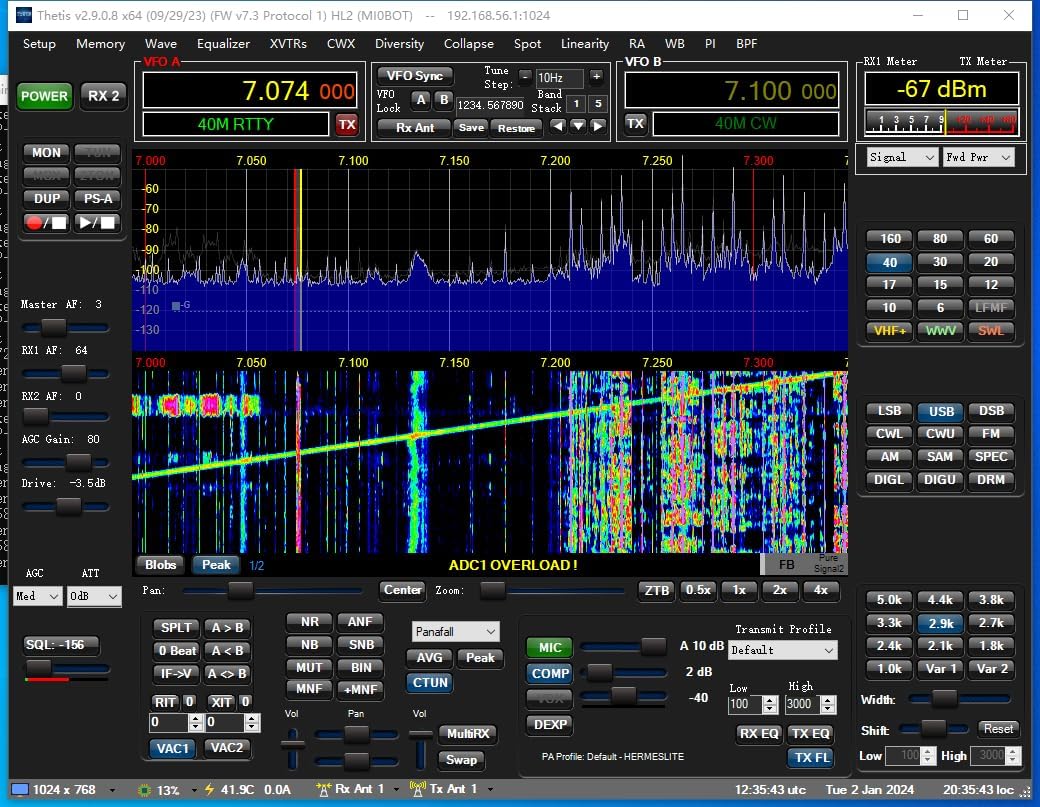
Figure 4: Example of a SDR client software interface (Thetis), showing frequency spectrum and controls.

Figure 5: Example of SDR client software settings, including network configuration for connecting to the Raspberry Pi.
4. Maintenance
To ensure the longevity and stable performance of your AURSINC SDR Radioberry, consider the following maintenance tips:
- Cooling: The Radioberry board can generate significant heat. Always ensure the heat dissipation fan is properly installed and functioning. Consider additional cooling solutions if operating in warm environments or for extended periods.
- Power Supply: Use a stable 5V 2A power supply for the Raspberry Pi to prevent power-related issues.
- Software Updates: Regularly check for and apply updates to your Raspberry Pi OS and SDR client software to benefit from performance improvements and bug fixes.
5. Troubleshooting
If you encounter issues during setup or operation, consider the following:
- Software Configuration Challenges: Some users may find the software setup complex due to varying Linux distributions and configurations. Refer to online forums and community resources for specific guidance related to your Raspberry Pi OS version and chosen SDR client.
- Hardware Compatibility: Ensure your Raspberry Pi model is compatible (Raspberry Pi 4/4B recommended).
- Connection Issues: Double-check all physical connections, including the Radioberry hat to the Raspberry Pi, network cable, and power supply.
- Overheating: If the device becomes excessively hot, it may automatically shut down. Verify the heat dissipation fan is working and ensure adequate airflow.
6. Specifications
| Feature | Detail |
|---|---|
| Product Dimensions | 3.14 x 1 x 3.14 inches |
| Item Weight | 1.9 ounces |
| Item Model Number | radioberry |
| Brand | AURSINC |
| Connectivity Technology | GPIO, USB |
| Compatible Devices | Raspberry Pi 4 |
| Color | green |
| Microcontroller | AD9866 12-bit |
| FPGA | Intel Cyclone 10LP (10CL025) |
| HF Spectrum | 0-30 MHz |
| Max Receiving Bandwidth | 384 kHz |
| Output Power | Up to 10 dBm |
7. Support
For any issues or questions regarding your AURSINC SDR Radioberry, please feel free to reach out to the AURSINC support team. They are available to assist you.


