
1. Introduction
Thank you for choosing the HOREVO LED Ceiling Light with Remote Control and Bluetooth Speaker. This flush mount light fixture is designed to provide versatile lighting and audio entertainment for various indoor spaces. It features dimmable and color-changing LED lights, an integrated Bluetooth speaker, and convenient remote control operation. Please read this manual thoroughly before installation and use to ensure proper function and safety.
2. Safety Information
- Electrical Safety: Installation should be performed by a qualified electrician or a person with sufficient electrical knowledge to avoid electric shock or fire hazards. Always turn off the main power supply at the circuit breaker before beginning installation or maintenance.
- Voltage: Ensure the power supply voltage matches the fixture's requirement (110 Volts).
- Location: This fixture is designed for indoor use. To ensure long-term durability and optimal performance, avoid installation in areas with sustained high humidity, such as certain bathrooms, despite its water resistance level.
- Handling: Handle the light fixture with care to prevent damage. Do not modify the product in any way.
3. Package Contents
Verify that all components are present before installation:
- HOREVO LED Ceiling Light Fixture
- Remote Control
- Installation Hardware (screws, wire nuts, etc. - may vary, refer to actual packaging)
- User Manual (this document)
4. Product Features
- Integrated Bluetooth Speaker: Connect your smartphone or other Bluetooth-enabled devices to play audio directly through the light fixture.
- Dimmable Lighting: Adjust brightness from 1% to 100% using the remote control.
- Color Changing (RGB) & Color Temperature Adjustment: Choose from 7 single RGB colors, gradient color modes, or adjustable white light from 2700K (warm) to 6500K (cool daylight).
- Remote Control: Conveniently manage all light and speaker functions.
- Energy Efficient LED: 24W power consumption, equivalent to a 150W incandescent bulb, saving over 85% on energy bills.
- High CRI 80+: Renders colors vividly and accurately.
- Memory Function: Retains last used settings for light color and brightness.
- Timing Function: Set a timer for automatic shut-off.
5. Installation Instructions
This is a wired light fixture and requires proper electrical installation. If you are unsure about any steps, consult a qualified electrician.
- Turn Off Power: Before starting, ensure the power supply to the installation area is completely turned off at the main circuit breaker.
- Prepare Mounting Surface: Ensure the ceiling surface is clean, dry, and capable of supporting the fixture's weight.
- Mount Bracket: Attach the mounting bracket to the junction box in the ceiling using the provided screws.
- Wire Connections: Connect the fixture's wires to the household electrical wires according to local electrical codes. Typically, connect the black wire from the fixture to the black wire from the ceiling (live), the white wire from the fixture to the white wire from the ceiling (neutral), and the ground wire to the ground wire. Secure connections with wire nuts.
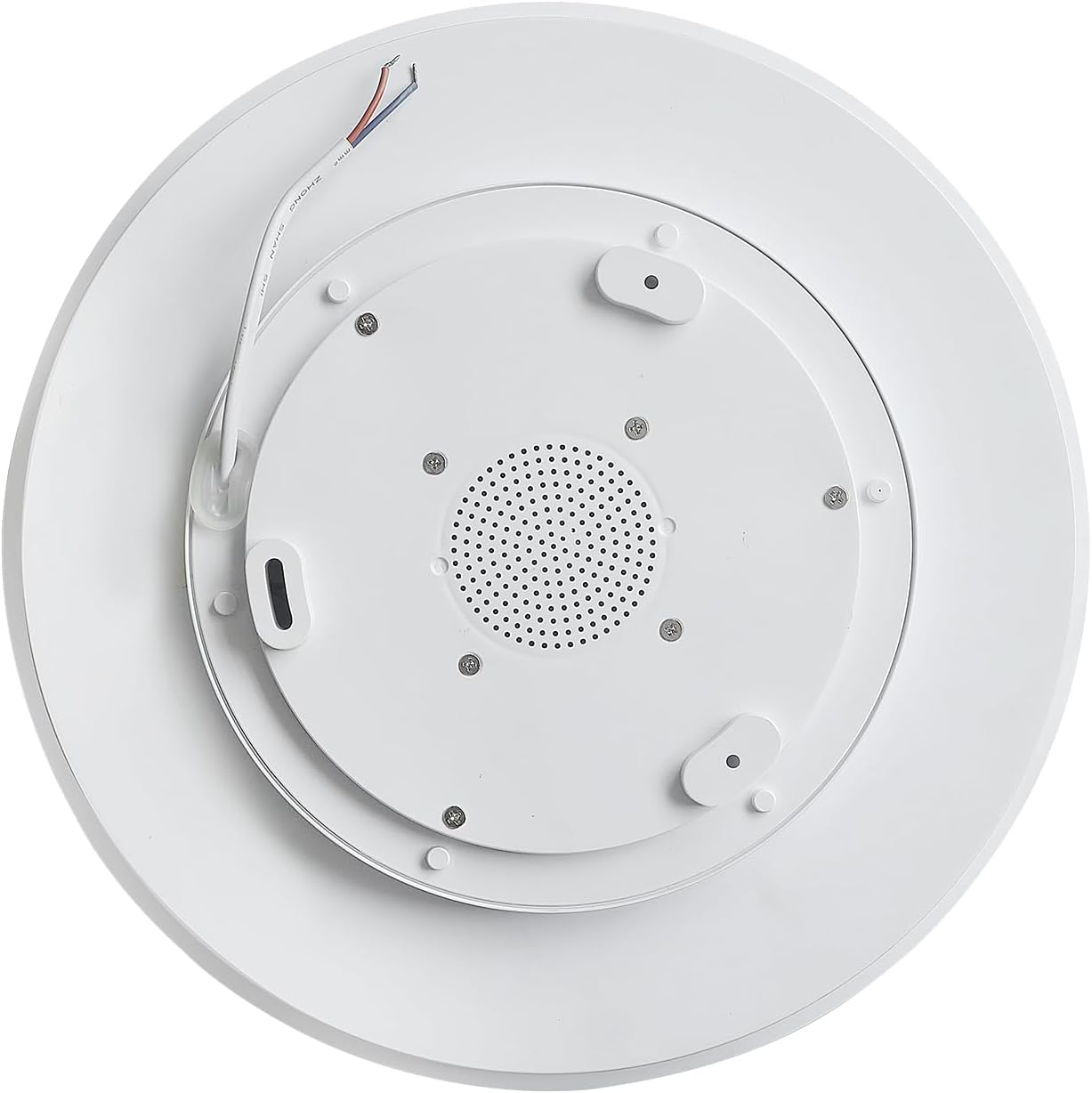
- Secure Fixture: Carefully push the wired connections into the junction box. Align the fixture with the mounting bracket and secure it in place with the provided screws.
- Restore Power: Once the fixture is securely installed, turn the main power supply back on at the circuit breaker.
6. Operating Instructions
6.1 Remote Control Functions
The included remote control allows full command over the light and speaker features.

- Power Button: Turns the light on or off.
- Brightness Adjustment: Increase or decrease light intensity.
- Color Temperature (K) Buttons: Adjust white light from warm (2700K) to neutral (4000K) to cool (6500K).
- RGB Button: Cycles through various single color and gradient RGB modes.
- Music Controls: Play/Pause, Skip Forward/Backward, Volume Up/Down for the Bluetooth speaker.
- Timing Function: Activates a timer for automatic light shut-off.
6.2 Bluetooth Pairing
To connect your device to the integrated Bluetooth speaker:
- Ensure the light fixture is powered on.
- On your smartphone or Bluetooth-enabled device, go to the Bluetooth settings.
- Search for available devices and select "AnSLong".
- If prompted for a password, enter "1111".
- Once connected, you will hear a confirmation tone from the speaker. You can now play audio through the light fixture.
Note: Only one mobile phone can be connected to the light's Bluetooth at the same time. Disconnect the current device to connect another.
6.3 Color Changing and Dimming
The light offers a wide range of lighting options:
- White Light Modes: Use the 'K' buttons on the remote to cycle between 2700K (warm), 4000K (neutral), and 6500K (cool daylight) white light.
- RGB Color Modes: Press the 'RGB' button to activate the full-spectrum color-changing feature. This includes 7 single color light modes and gradient colorful lights.
- Dimming: Use the brightness adjustment buttons to set the light intensity from 1% to 100% for any chosen color or white light setting.

7. Maintenance
- Cleaning: Ensure the power is off before cleaning. Wipe the fixture with a soft, dry cloth. Do not use abrasive cleaners or solvents, as they may damage the finish.
- Bulb Replacement: The LED light source is integrated and not user-replaceable.
8. Troubleshooting
| Problem | Possible Cause | Solution |
|---|---|---|
| Light does not turn on. | No power, loose wiring, faulty fixture. | Check circuit breaker. Verify wiring connections. If problem persists, contact support. |
| Remote control is unresponsive. | Remote battery low, remote not paired, interference. | Replace remote batteries. Try switching between warm and cool light by quickly pressing the wall switch. Ensure no obstructions between remote and light. |
| Bluetooth connection issues. | Incorrect pairing, device too far, interference. | Ensure "AnSLong" is selected and password "1111" is used. Move device closer to the light. Disconnect other Bluetooth devices. |
| Light color changes unexpectedly when using wall switch. | This is a feature. | The light is designed to cycle through warm and cool white light by quickly toggling the wall switch. Use the remote for precise control. |
9. Specifications
| Feature | Detail |
|---|---|
| Model Number | X002 |
| Brand | HOREVO |
| Power Source | Corded Electric |
| Wattage | 24 Watts |
| Voltage | 110 Volts |
| Brightness | 1800 Lumens |
| Color Temperature | 2700K - 6500K (Dimmable) |
| Light Color | RGB, White |
| Control Method | Remote Control |
| Material | Metal, Plastic |
| Dimensions (L x W x H) | 11.02"L x 11.02"W x 2.36"H |
| Item Weight | 1.1 Pounds |
| Installation Type | Flush Mount |
| Indoor/Outdoor Usage | Indoor |
10. Warranty and Support
This HOREVO LED Ceiling Light comes with a Limited Warranty. For specific details regarding warranty coverage, duration, and terms, please refer to the product packaging or contact the seller directly through your purchase platform.
For technical support, troubleshooting assistance beyond this manual, or to inquire about replacement parts, please contact HOREVO customer service or the seller from whom you purchased the product. Please have your model number (X002) and purchase details ready when contacting support.