
GATEXPERT SL500DCL
GATEXPERT SL500DCL Sliding Automatic Gate Operator Kit User Manual
Model: SL500DCL
1. Introduction
This user manual provides comprehensive instructions for the installation, operation, and maintenance of your GATEXPERT SL500DCL Sliding Automatic Gate Operator Kit. This powerful gate opener is designed for sliding gates weighing up to 1100 pounds and up to 40 feet in length. It features a 150W motor and operates on 110V/60Hz power supply.
The system includes an infrared sensor for enhanced safety, ensuring the gate reverses if an obstruction is detected during closing. It also offers various customizable settings such as running speed, slow stop speed, auto-reverse sensitivity, and auto-close function. For optimal performance and safety, please read this manual thoroughly before installation and use.

Figure 1.1: Typical applications of the GATEXPERT SL500DCL gate opener in various environments, including residential, courtyard, farm, and ranch properties.
2. Safety Information
WARNING: Improper installation or use can lead to serious injury or death. Always follow all safety precautions and instructions.
- Ensure all electrical connections are made by a qualified electrician and comply with local electrical codes.
- Do not allow children to operate or play near the gate opener. Keep remote controls out of reach of children.
- Regularly inspect the gate and opener for signs of wear, damage, or misalignment. Do not operate if damaged.
- The infrared sensor is a critical safety feature. Ensure it is installed correctly and remains unobstructed.
- In case of power failure or remote control loss, use the provided manual release keys to operate the gate.
- Do not attempt to repair the gate opener yourself. Contact qualified service personnel.
- Keep hands and clothing clear of the gate and chain mechanism during operation.

Figure 2.1: Overview of the GATEXPERT SL500DCL kit components, highlighting the main gate operator unit, drive chains, remote controls, and infrared safety sensors.
3. Package Contents
Verify that all components listed below are present in your package:
- 1 x SL500DCL Gate Operator Unit
- 2 x Remote Controls
- 2 x Manual Release Keys
- 1 x Set of Infrared Sensors
- 2 x 20ft Chains (total 40ft)
- Mounting Hardware (bolts, nuts, brackets)
- Installation Manual
- Warning Sign
Figure 3.1: All items included in the GATEXPERT SL500DCL Sliding Automatic Gate Operator Kit.
4. Specifications
| Feature | Specification |
|---|---|
| Model | SL500DCL |
| Max Gate Weight | 1100 lbs (500 kg) |
| Max Gate Length | 40 ft (12 m) |
| Motor Power | 150W |
| Power Supply | 110V/60Hz |
| Item Weight | 38.8 pounds |
| Product Dimensions (L x W x H) | 12.76 x 9.21 x 20.08 inches (324 x 234 x 509.5 mm) |
| Battery Cell Type (for remotes) | Lithium Manganese Dioxide (2 included) |
| Color | Dark Green |

Figure 4.1: Detailed dimensions of the SL500DCL gate operator unit.
5. Setup and Installation
This section outlines the general steps for installing your GATEXPERT SL500DCL gate opener. Refer to the detailed installation manual included in your kit for specific diagrams and instructions.
5.1 Site Preparation
- Ensure the gate slides smoothly and is properly aligned.
- Clear any debris or obstructions from the gate's path.
- Prepare a stable, level concrete pad or foundation for mounting the gate opener unit.
5.2 Mounting the Gate Operator
Securely mount the SL500DCL unit to the prepared foundation using the provided mounting hardware. Ensure the unit is level and positioned correctly relative to the gate and chain path.
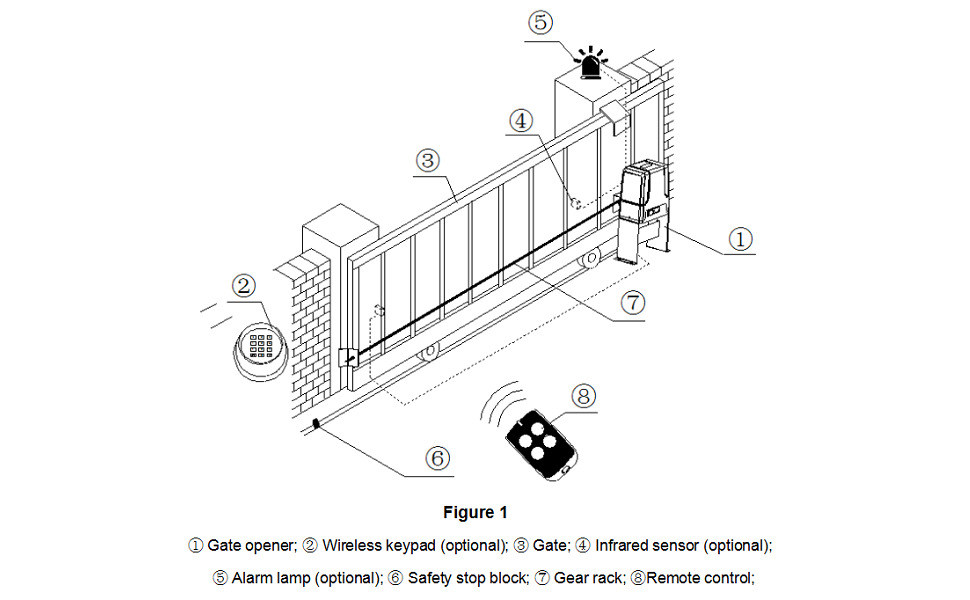
Figure 5.1: System diagram illustrating the placement of the gate opener and optional accessories. (1) Gate opener; (2) Wireless keypad (optional); (3) Gate; (4) Infrared sensor (optional); (5) Alarm lamp (optional); (6) Safety stop block; (7) Gear rack; (8) Remote control.
5.3 Installing the Chain and Gear Rack
Attach the provided chains to the gate and route them through the gate opener's sprocket. Ensure the chain is taut but allows for smooth movement. If using a gear rack system, securely attach the gear rack to the gate, ensuring proper engagement with the opener's drive gear.
5.4 Electrical Connections
Connect the gate opener to a 110V/60Hz power source. Install the infrared safety sensors according to the manual's instructions, ensuring they are aligned and properly wired. Additional accessories like solar panels, wireless keypads, or alarm lamps can be connected as per the detailed wiring diagrams.

Figure 5.2: Internal components of the SL500DCL unit, illustrating the motor and control board for wiring reference.
6. Operating Instructions
6.1 Remote Control Operation
The gate opener is operated using the provided remote controls. Pressing a button on the remote will initiate the gate's movement (open or close). A second press will stop the gate. A third press will reverse its direction.
6.2 Manual Release
In case of power outage or remote control malfunction, the gate can be operated manually. Insert one of the manual release keys into the lock on the side of the unit and turn it to disengage the motor. This allows you to push the gate open or closed by hand.
6.3 Adjustable Settings
The SL500DCL offers several adjustable settings to optimize performance:
- Running Speed: Adjust the overall speed of the gate.
- Slow Stop Speed: Configure the speed at which the gate slows down before reaching its limit.
- Slow Stop Distance: Set the distance over which the gate will slow down.
- Auto-reverse When Meeting Obstacles: Sensitivity setting for the safety reversal feature.
- Auto-close Function: Enable or disable automatic closing after a set delay.
- Acceleration: Adjust the initial acceleration of the gate.
- Start-up Delay: Configure a brief delay before the gate begins to move.
Refer to the detailed programming section in your included installation manual for instructions on how to access and modify these settings.
7. Maintenance
Regular maintenance ensures the longevity and safe operation of your gate opener.
- Monthly: Inspect the gate for smooth operation, ensuring no binding or dragging. Check the chain tension and lubricate if necessary.
- Quarterly: Clean the infrared sensors to ensure they are free of dirt, dust, or spiderwebs. Test the safety reversal feature by placing an object in the gate's path during closing.
- Annually: Inspect all mounting hardware for tightness. Check electrical connections for corrosion or damage.
- Keep the area around the gate opener clear of vegetation and debris.
8. Troubleshooting
This section addresses common issues you might encounter. For more complex problems, contact customer support.
| Problem | Possible Cause | Solution |
|---|---|---|
| Gate does not move. | No power; remote battery dead; manual release engaged; safety sensor obstructed. | Check power supply; replace remote battery; disengage manual release; clear sensor path. |
| Gate reverses unexpectedly. | Obstruction in path; faulty safety sensor; sensitivity set too high. | Remove obstruction; clean/check sensor; adjust sensitivity setting. |
| Remote control not working. | Dead battery; out of range; remote not programmed. | Replace battery; move closer to unit; reprogram remote (refer to manual). |
| Gate makes unusual noises. | Lack of lubrication; worn chain/gear; misalignment. | Lubricate chain; inspect chain/gear for wear; check gate alignment. |
9. Warranty and Support
Your GATEXPERT SL500DCL Sliding Automatic Gate Operator Kit is backed by a 1-year warranty from the date of purchase. This warranty covers defects in materials and workmanship under normal use.
Additionally, we offer a free product return and exchange service within 30 days of purchase. For any issues encountered during product installation or use, or to claim warranty service, please contact us via service email. Our team is committed to providing comprehensive system solutions and support.
For further assistance, please refer to the contact information provided in your product packaging or visit the official GATEXPERT website.
Related documentsSL500DCL


Ask a question about this manual
Ask about setup, troubleshooting, compatibility, parts, safety, or missing instructions. Manuals+ will review the question and use this page’s manual context to help answer it.