1. Introduction
Thank you for choosing the GOYOJO Digital Torque Wrench. This precision tool is designed for accurate torque application, ensuring fasteners are tightened to their specified values. It is suitable for a wide range of applications, including automotive, motorcycle, bicycle maintenance, and general home repairs. This manual provides essential information for the safe and effective use of your digital torque wrench.

Image 1.1: The GOYOJO Digital Torque Wrench is versatile for various applications, including railway maintenance, motorcycle repair, automotive maintenance, and DIY home improvement tasks.
2. Safety Information
- Always read and understand this instruction manual before operating the torque wrench.
- Wear appropriate personal protective equipment, such as eye protection, when using the tool.
- Do not exceed the maximum torque capacity specified for your wrench model. Over-torquing can damage the fastener, the tool, or the object being worked on.
- Do not use the digital torque wrench as a breaker bar.
- Keep the tool clean and free from oil, grease, and other contaminants.
- Store the wrench in its protective case in a dry, clean environment when not in use.
- Ensure the correct socket or attachment is securely fitted to the drive head before applying torque.
3. Product Overview
The GOYOJO Digital Torque Wrench features a durable carbon steel construction and a 72-tooth bidirectional ratchet head for reliable performance. It includes a large LCD display for clear readings and user-friendly controls.
3.1. Models and Specifications
This series includes several models, each with specific drive sizes and torque ranges:
- GM-10: 1/4 inch drive, Operating range: 10 N.m (7.37 ft.lb)
- GM-30: 1/4 inch drive, Operating range: 30 N.m (22.12 ft.lb)
- GM-60: 3/8 inch drive, Operating range: 60 N.m (44.25 ft.lb)
- GM-100: 1/2 inch drive, Operating range: 100 N.m (73.70 ft.lb)

Image 3.1: Overview of GOYOJO Digital Torque Wrench models, showing their operating ranges and drive sizes.
3.2. Key Components
- Ratchet Head: 72-tooth design for strong grip and smooth operation.
- Digital Display: Large LCD screen for clear torque readings.
- Control Buttons: For power, unit selection, mode selection, and value adjustment.
- Handle: Ergonomically designed for comfortable and secure grip.

Image 3.2: Detail of the 72-tooth ratchet head, designed for strong grip without slipping.
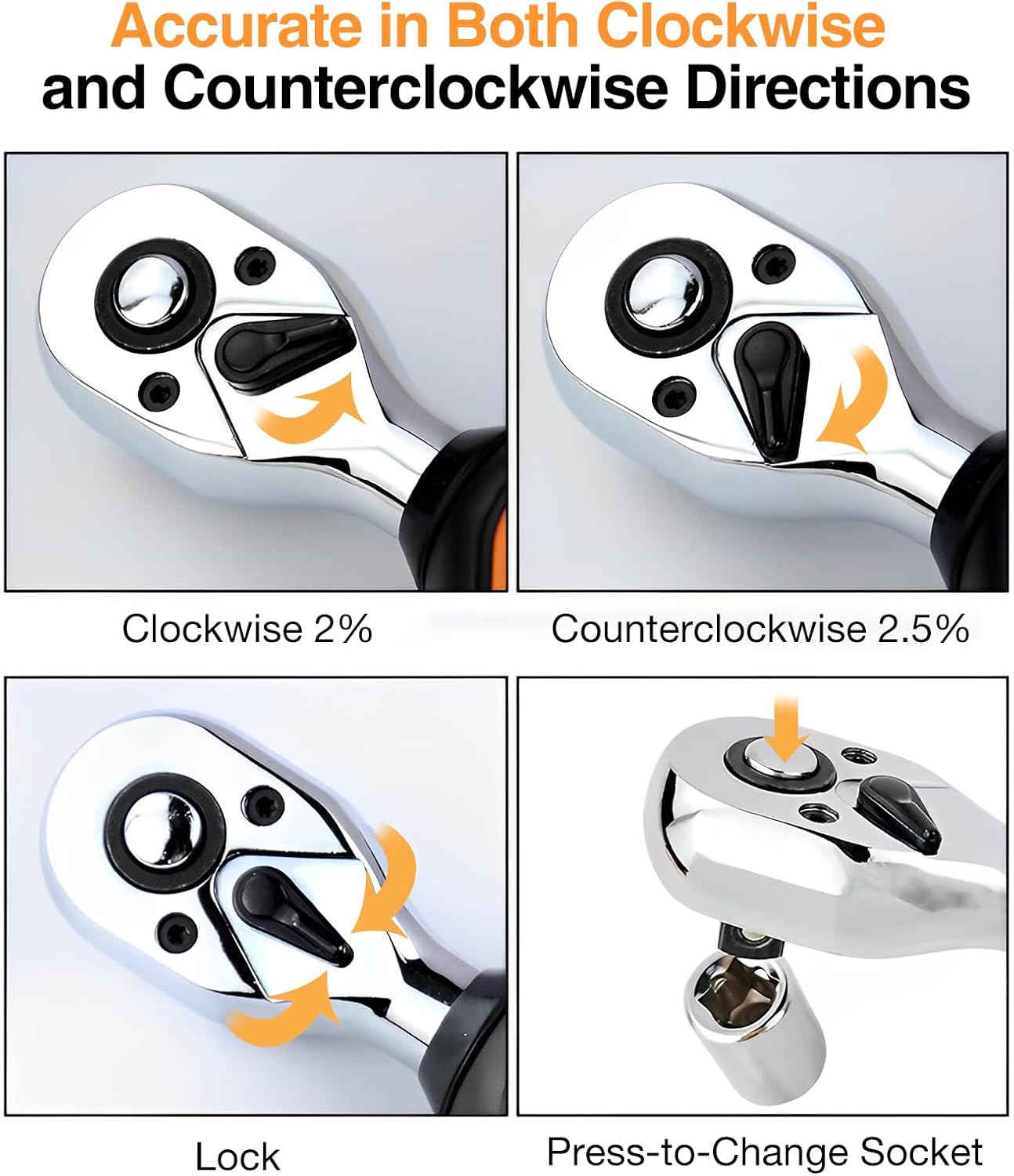
Image 3.3: The wrench is accurate in both clockwise (2% precision) and counter-clockwise (2.5% precision) directions, featuring a lock mechanism and a press-to-change socket function.

Image 3.4: The wrench comes with a blow-molded case for better protection and includes AAA batteries.
4. Setup
4.1. Battery Installation
The GOYOJO Digital Torque Wrench requires two (2) AAA alkaline batteries for operation. These are typically included with the product.
- Locate the battery compartment on the handle of the wrench.
- Using a small screwdriver, carefully remove the screws securing the battery compartment cover.
- Insert two AAA batteries, ensuring correct polarity (+/-) as indicated inside the compartment.
- Replace the battery compartment cover and secure it with the screws.
For prolonged storage, it is recommended to remove the batteries to prevent leakage and potential damage to the tool.
5. Operating Instructions
5.1. Button Functions

Image 5.1: User-friendly panel instructions detailing the function of each button and indicator light.
- P/C Button (Power/Mode): Press to power on/off. Short press to switch between Peak (P) and Real-time (R) modes.
- U/S Button (Unit Switch): Press to cycle through measurement units (N.m, lbf.ft, lbf.in, kgf.cm).
- M Button (Function/Preset): Used for accessing and setting preset torque values.
- Up (▲) / Down (▼) Buttons: Used to adjust torque values or navigate settings.
5.2. Power On/Off
To power on the wrench, press the P/C button. The LCD display will illuminate. To power off, press and hold the P/C button for a few seconds until the display turns off. The wrench will automatically power off after a period of inactivity to conserve battery life.
5.3. Unit Selection
After powering on, press the U/S button to cycle through the available measurement units: Newton-meters (N.m), foot-pounds (lbf.ft), inch-pounds (lbf.in), and kilogram-force centimeters (kgf.cm). Select the desired unit for your task.

Image 5.2: The digital display allows easy switching between four measurement units with one click.
5.4. Mode Selection
The wrench offers two primary operating modes:
- Real-time Mode (R): Displays the live torque value as force is applied.
- Peak Mode (P): Captures and displays the maximum torque value achieved during the tightening process.
Press the P/C button (short press) to toggle between these modes. The display will indicate the active mode (P or R).
5.5. Setting Target Torque (Preset Mode)
The wrench allows you to set a target torque value. When this value is reached, the wrench will provide an audible and visual alarm.
- Enter the preset mode by pressing the M button.
- Use the Up (▲) and Down (▼) buttons to adjust the target torque value to your desired setting.
- Once the desired value is set, press the M button again to confirm and exit the setting mode.

Image 5.3: The wrench provides sound and light alarms when the preset torque value is reached.
5.6. Applying Torque
Attach the appropriate socket to the wrench's drive head. Place the socket onto the fastener. Apply steady, increasing force to the wrench handle. Observe the digital display for the real-time torque reading. When the target torque is reached (in preset mode), the wrench will emit an audible beep and an indicator light will flash, signaling that the desired torque has been achieved. Stop applying force immediately.
6. Maintenance
- Cleaning: Wipe the wrench with a soft, dry cloth after each use. Do not use abrasive cleaners or solvents, as these can damage the display or finish.
- Storage: Store the digital torque wrench in its original blow-molded case to protect it from dust, moisture, and impact. Keep it in a dry, clean, and temperature-controlled environment.
- Battery Care: Remove the AAA batteries if the wrench will not be used for an extended period to prevent battery leakage and corrosion.
- Calibration: Digital torque wrenches are precision instruments. Regular calibration by a qualified service center is recommended to maintain accuracy, especially after heavy use or impact.
7. Troubleshooting
| Problem | Possible Cause | Solution |
|---|---|---|
| Wrench does not power on. | Dead or incorrectly installed batteries. | Check battery polarity. Replace with fresh AAA alkaline batteries. |
| Inaccurate torque readings. | Incorrect unit selected; Wrench needs calibration; Exceeding max torque. | Verify the correct measurement unit is selected. Do not exceed the wrench's maximum torque capacity. Consider professional calibration if issues persist. |
| No audible/visual alarm. | Preset torque not set; Alarm function disabled (if applicable). | Ensure a target torque value is set in preset mode. Refer to operating instructions for alarm settings. |
| Display is dim or flickering. | Low battery power. | Replace batteries with fresh AAA alkaline batteries. |
8. Specifications
| Feature | Detail |
|---|---|
| Manufacturer | GOYOJO |
| Material | Carbon Steel |
| Style | Digital |
| Finish | Electrostatic Paint |
| Head Type | Fixed Square, 72-tooth Ratchet |
| Battery Type | 2 x AAA Alkaline (included) |
| Accuracy (Clockwise) | ±2% |
| Accuracy (Counter-clockwise) | ±2.5% |
| Measurement Units | N.m, lbf.ft, lbf.in, kgf.cm |
| Operating Modes | Peak (P), Real-time (R), Preset |
| Model GM-10 Drive Size | 1/4 inch |
| Model GM-10 Torque Range | 0.9-10 N.m (0.66-7.37 ft.lb) |
| Model GM-30 Drive Size | 1/4 inch |
| Model GM-30 Torque Range | 0.9-30 N.m (0.66-22.12 ft.lb) |
| Model GM-60 Drive Size | 3/8 inch |
| Model GM-60 Torque Range | 1.8-60 N.m (1.33-44.25 ft.lb) |
| Model GM-100 Drive Size | 1/2 inch |
| Model GM-100 Torque Range | 3-100 N.m (2.21-73.70 ft.lb) |
| Dimensions (GM-100) | 34.04 x 6.1 x 8.38 cm (13.4 x 2.4 x 3.3 inches) |
| Weight (GM-100) | 1.04 kg (2.29 lbs) |
9. Warranty and Support
The GOYOJO Digital Torque Wrench comes with a 1-year warranty from the date of purchase, covering manufacturing defects. This warranty does not cover damage caused by misuse, unauthorized repairs, or normal wear and tear.
For technical support, warranty claims, or any questions regarding your GOYOJO product, please contact GOYOJO customer service through the retailer's platform or the official GOYOJO website. Please have your purchase receipt and product model information ready when contacting support.


