
1. Introduction
Thank you for choosing the ANENG SZ301 Multimeter and A3009 Pen Type Multimeter. These versatile electronic tools are designed for measuring a wide range of electrical properties, including AC/DC voltage, current, resistance, continuity, diode, and live wire detection. The A3009 also features voice broadcast and phase sequence detection. This manual provides essential information for safe operation, setup, and maintenance of your devices.
2. Safety Information
Always adhere to the following safety precautions to prevent personal injury or damage to the multimeters:
- Do not exceed the maximum input values for any measurement range.
- Exercise extreme caution when working with live circuits.
- Ensure the test leads are properly connected and in good condition before use.
- Never use the multimeter if it appears damaged or is not operating correctly.
- Replace batteries promptly when the low battery indicator appears.
- Always disconnect power to the circuit before measuring resistance, continuity, or diodes.
3. Package Contents
Upon opening your package, please verify that all the following items are included:
- 1 x ANENG SZ301 Multimeter
- 1 x ANENG A3009 Pen Type Multimeter
- 2 x Test Leads (for SZ301)
- 2 x 1.5V AAA Batteries (for A3009)
- 2 x AA Batteries (for SZ301)
- 2 x User Manuals (one for each device)
- 1 x Combination Parts Set, including:
- 1 x Alligator clip
- 1 x U-shaped insert
- 2 x Copper needles
- 1 x Tapered Needle
- 2 x Gilded Needles
- 1 x Banana Tip

Image 1: Contents of the ANENG Multimeter package, showing both the SZ301 and A3009 multimeters along with various test leads, probes, and batteries.
4. Product Features
4.1. ANENG SZ301 Multimeter
- Measures AC/DC Voltage, Current, Resistance, Continuity, Diode, and Capacitance.
- User-friendly display for clear measurement values.
- Rotary dial for easy function selection.
- Data Hold function.
- Automatic shutdown after 5 minutes of inactivity to conserve battery.

Image 2: Close-up of the ANENG SZ301 Multimeter, emphasizing its rotary function selection dial.
4.2. ANENG A3009 Pen Type Multimeter
- Compact pen-type design for portability and ease of use.
- Voice Broadcast Function for audible readings.
- Phase Sequence Detection.
- Non-Contact Voltage (NCV) sensing.
- Live Wire detection.
- Flashlight for illumination in dark areas.
- Detachable metal nib for various testing scenarios.
- VA Reverse Display for improved readability.
- Automatic shutdown for power saving.
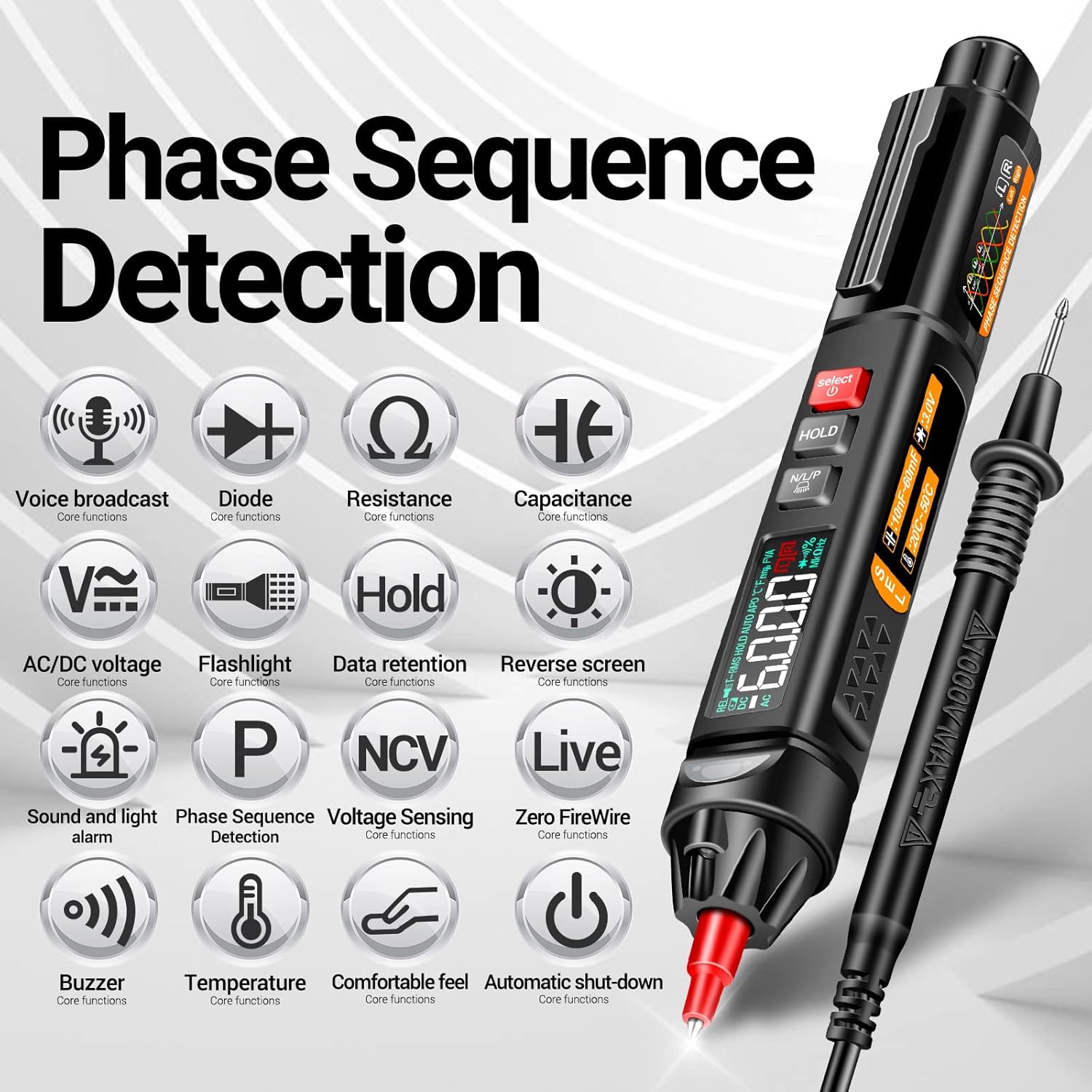
Image 3: The ANENG A3009 Pen Type Multimeter, illustrating its multiple core functions such as voice broadcast, diode, resistance, capacitance, AC/DC voltage, and non-contact voltage sensing.
5. Setup
5.1. Battery Installation
For SZ301 Multimeter: Locate the battery compartment on the back of the device. Open the cover and insert 2 x AA batteries, ensuring correct polarity. Close the cover securely.
For A3009 Pen Type Multimeter: Unscrew the cap at the bottom of the pen. Insert 2 x 1.5V AAA batteries, observing the correct polarity. Replace the cap and tighten it.
5.2. Connecting Test Leads (SZ301)
Insert the black test lead into the 'COM' (Common) jack. Insert the red test lead into the 'VΩmA+' jack for voltage, resistance, or current measurements. For 10A current measurements, insert the red lead into the '10A' jack.
6. Operating Instructions
6.1. SZ301 Multimeter Operation
Turn the rotary dial to the desired measurement function. The display will show the reading. Use the 'SEL' button to switch between AC/DC modes or other sub-functions if applicable. The 'HOLD' button freezes the current reading on the display.

Image 4: The ANENG SZ301 Multimeter being used to take a measurement, demonstrating its application in an automotive environment.
6.1.1. AC Voltage Test
Set the rotary dial to the 'V~' (AC Voltage) range. Insert the test leads into the appropriate jacks ('COM' and 'VΩmA+'). Carefully touch the probes to the AC voltage source. The reading will appear on the display.

Image 5: The ANENG SZ301 Multimeter connected to an electrical outlet, demonstrating an AC 110V voltage test.
6.2. A3009 Pen Type Multimeter Operation
Press the power button to turn on the device. Use the 'Select' button to cycle through different measurement modes (e.g., voltage, resistance, diode, continuity). The 'Hold' button will freeze the display. The 'N/L/P' button is used for phase sequence detection and live wire identification.
6.2.1. Non-Contact Voltage (NCV) Sensing
Activate the NCV mode. Bring the tip of the A3009 close to a live wire or electrical outlet. The device will emit an audible beep and/or visual indication (LED) when it detects AC voltage without direct contact.

Image 6: The ANENG A3009 Pen Type Multimeter demonstrating its non-contact voltage sensing capability near an electrical outlet.
6.2.2. Phase Sequence and Live Wire Measurement
Use the 'N/L/P' button to engage phase sequence detection. Follow the on-screen prompts or indicators for proper sequence identification. For live wire measurement, touch the probe to the wire; the device will indicate if it's a live wire.
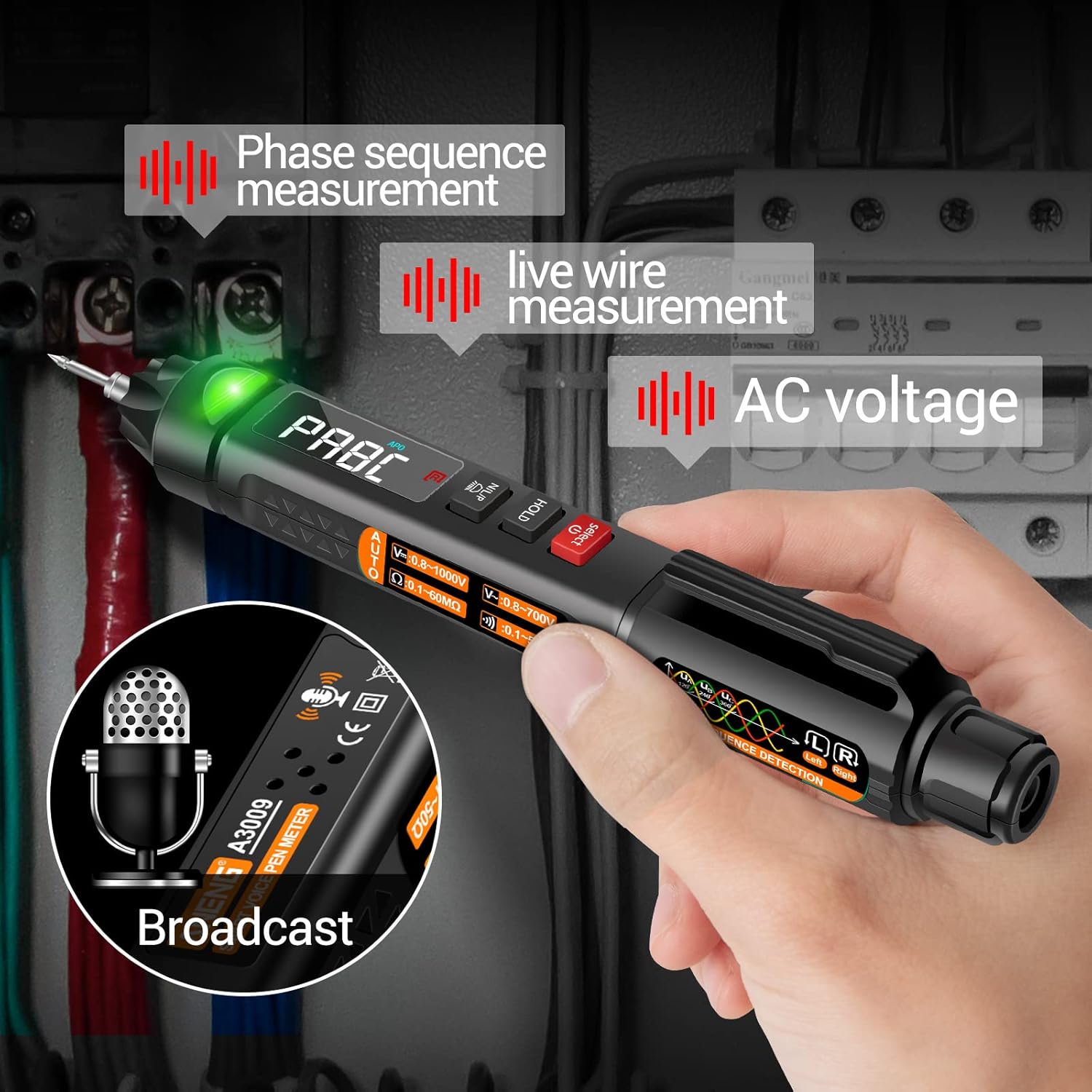
Image 7: The ANENG A3009 Pen Type Multimeter displaying its capabilities for phase sequence measurement, live wire detection, and AC voltage measurement, along with its voice broadcast feature.
6.2.3. Detachable Metal Nib
The A3009 features a detachable metal nib, allowing for easy replacement or attachment of specialized probes from the combination parts set, such as the U-shaped insert or copper needles, for different testing requirements.

Image 8: The ANENG A3009 Pen Type Multimeter highlighting its detachable metal nib feature and the VA reverse display for enhanced visibility.
7. Maintenance
7.1. Battery Replacement
When the low battery indicator appears on the display, replace the batteries as described in the 'Setup' section. Always use new batteries of the specified type.
7.2. Cleaning
Clean the multimeter casing with a soft, damp cloth. Do not use abrasive cleaners or solvents. Ensure the device is dry before storage or next use.
7.3. Storage
If the multimeter will not be used for an extended period, remove the batteries to prevent leakage and damage. Store the device in a cool, dry place, away from direct sunlight and extreme temperatures.
8. Troubleshooting
This section addresses common issues you might encounter:
- No Display/Power: Check battery installation and ensure batteries are not depleted. Replace if necessary.
- Incorrect Readings: Verify that the correct measurement function is selected and test leads are properly connected. Ensure the circuit is de-energized for resistance/continuity tests.
- No Continuity Beep: Ensure the multimeter is set to continuity mode and the circuit is not live.
- A3009 Voice Broadcast Not Working: Check battery level. Ensure the volume is not muted if applicable (refer to A3009 specific manual for detailed settings).
If problems persist, refer to the detailed user manuals provided with each device or contact customer support.
9. Specifications
| Feature | Description |
|---|---|
| Brand | ANENG |
| Models | SZ301, A3009 |
| Measurement Type | Voltmeter, Multimeter |
| Power Source (SZ301) | 2 x AA Batteries |
| Power Source (A3009) | 2 x 1.5V AAA Batteries |
| Automatic Shutdown | Yes (after 5 mins of inactivity) |
| Color | Black |
10. Warranty and Support
ANENG provides service and technical support for its electrical testers. For any inquiries, technical assistance, or warranty claims, please refer to the contact information provided in the original product packaging or visit the official ANENG website. Please retain your proof of purchase for warranty purposes.


