1. Introduction
The ATOTO S8MS S8G2094MS is a 9-inch QLED Android Car Stereo designed to enhance your in-car entertainment and connectivity experience. Featuring a high-resolution 1280x720 QLED touchscreen, this unit offers a wide 178° viewing angle and anti-glare technology for optimal visibility. Powered by an efficient Octa-Core ARM Cortex processor with 4GB RAM and 32GB ROM, running on Android 10.0 (Q) with ATOTO AICE UI 11.0, it ensures smooth multitasking and a responsive user interface. Key features include wireless and wired CarPlay/Android Auto, Mirror Link, integrated 4G LTE, Dual Bluetooth, advanced Digital Signal Processor (DSP) for superior audio, GPS tracking with the exclusive TrackHU app, and support for various driving aids like Live Rear View (LRV) and Virtual Surround View (VSV).
2. Package Contents
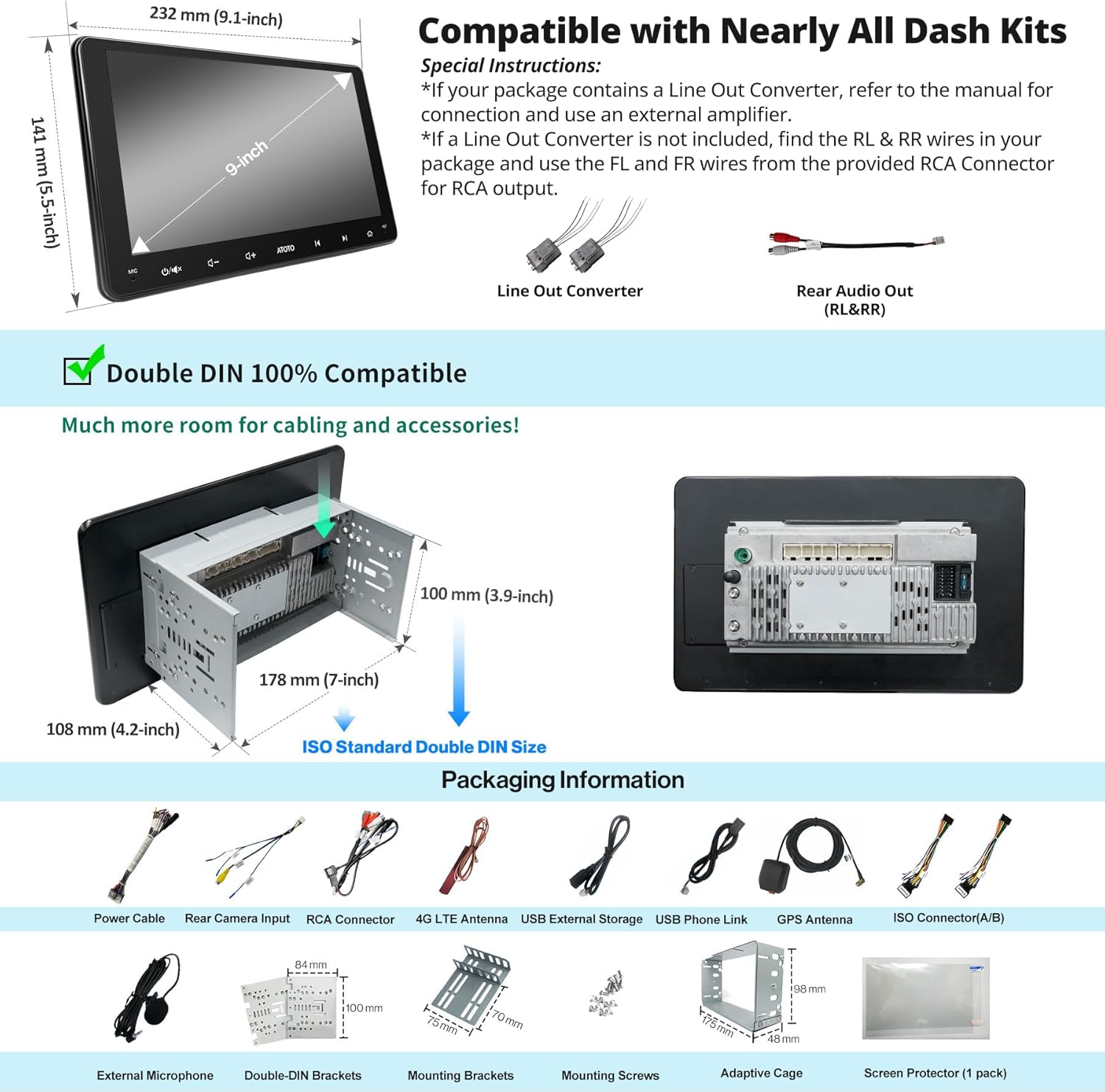
The following items are included in your ATOTO S8MS S8G2094MS package:
- ATOTO S8MS Car Stereo Unit
- GPS Antenna
- External Microphone
- Line Out Converter
- Power Cable
- USB Cables
- Mounting Brackets and Screws
- Screen Protector
- User Manual (this document)

The image above displays the various components included with your ATOTO S8MS unit, such as the main stereo, GPS antenna, external microphone, power cable, USB cables, and mounting hardware.
3. Setup and Installation
The ATOTO S8MS S8G2094MS utilizes the IAH09D mounting style (Integrated and Adaptive Head-unit of 9-inch Display), which is compatible with most double DIN dash kits. For a seamless installation in your specific vehicle, additional accessories such as dash kits, wiring harnesses, and antenna adapters may be required and are sold separately. It is recommended to consult the ATOTO SBV (Search By Vehicle) online tool for compatible accessories for your car model.
3.1 Wiring Diagram
Refer to the detailed wiring diagram below for proper connection of the car stereo to your vehicle's electrical system and peripherals. Ensure all connections are secure before powering on the unit.

This diagram illustrates the various input and output ports, including power, speaker connections, camera inputs (FCAM, RCAM), USB ports, and antenna connections (FM-ANT, WiFi, GPS, 4G). Pay close attention to the pin assignments for correct installation.
4. Operating Instructions
4.1 Basic Operation
The ATOTO S8MS features a quick boot-up time, allowing access to the system within 2 seconds of starting your vehicle. The intuitive ATOTO AICE UI 11.0, based on Android Q (10.0), provides a customizable and user-friendly experience.

The home screen provides quick access to frequently used applications such as the Play Store, BT Music, Spotify, Torque, CarbitLink, and Gallery. You can customize the layout and add widgets as desired.
4.2 Touch Gestures
The S8MS supports six touch gestures for quick access to various functions, enhancing driving safety by minimizing distractions:
- Three-finger swipe up: Access multitasking menu.
- Two-finger swipe up: Adjust screen brightness.
- Two-finger double tap: Access equalizer modes.
- Two-finger swipe down: Return to home screen.
- Two-finger swipe left/right: Navigate between screens.
- Three-finger double tap: Digital photo frame activation.

These gestures allow for quick and intuitive control of the system without needing to look away from the road for extended periods.
4.3 DriveChat AI Voice Assistant
The DriveChat app, powered by AI, provides advanced voice control for safer driving. You can manage the car stereo, answer calls, control music, and more using simple voice commands. Multiple AI chatbots and customizable wake-up words are supported.

The image demonstrates how to interact with the DriveChat AI, allowing for hands-free operation of various functions.
4.4 Smartphone Integration (CarPlay, Android Auto, Mirror Link)
The S8MS supports both wireless and wired CarPlay and Android Auto, allowing seamless integration of your smartphone for navigation, calls, messages, and music. The pre-installed CarbitLink app enables phone mirroring (USB/WiFi) to display your smartphone screen directly on the S8MS, providing access to video apps like YouTube or Hulu not typically available on CarPlay/Android Auto.

This image illustrates the various ways to connect and integrate your smartphone with the ATOTO S8MS, offering flexibility and extended functionality.
4.5 GPS Tracking with TrackHU
The exclusive TrackHU app is pre-installed on the S8MS, offering global real-time GPS tracking, route playback, and geofencing capabilities. It operates without needing a separate battery or SIM card, simplifying cost reduction and management. The app automatically activates upon vehicle startup.

The image highlights the core functionalities of the TrackHU app, providing comprehensive vehicle tracking and monitoring.
Video 4.1: An overview of the TrackHU GPS tracking application, demonstrating its features and ease of use.
4.6 Audio Customization (DSP)
The integrated Digital Signal Processor (DSP) allows for precise audio customization. Features include a 32-band adjustable equalizer (16 bands for front, 16 for rear), time alignment, bass boost, and crossover settings. This enables you to fine-tune the audio output for an optimal listening experience.

The image displays the various DSP settings available, allowing users to adjust sound parameters like equalization, time correction, and bass levels to match their preferences.
4.7 Speed Compensated Volume Control (SCVC)
The SCVC feature automatically adjusts the system's volume based on vehicle speed, compensating for road and wind noise. This ensures clear audio and a more comfortable driving experience.
4.8 Live Rear View (LRV) & Virtual Surround View (VSV)
With optional ATOTO HD cameras (AC-HD02LR or AC-HD03LR, sold separately), the S8MS supports Live Rear View (LRV) and Virtual Surround View (VSV). LRV provides a real-time view of what's behind your vehicle even when moving forward, eliminating blind spots caused by passengers or vehicle structures. VSV offers a simulated panoramic view for safer parking maneuvers.
This image illustrates how the VSV and LRV features provide a comprehensive view around the vehicle, significantly improving parking and driving safety.
4.9 Dual Bluetooth
The S8MS features Dual Bluetooth connectivity. Bluetooth 1 handles hands-free calls (HFP/HSP/A2DP/AVRCP/PBAP protocols) and audio streaming, including voice assistant activation (Siri, Google Assistant). Bluetooth 2 is used for internet tethering, connecting to OBD2 scanners (e.g., ATOTO AC-4450), and TPMS sensors (e.g., ATOTO AC-UTP1). This allows for simultaneous connection of multiple devices.
4.10 Internet Access Options
The S8MS offers four methods for internet access:
- Integrated 4G LTE Modem: Supports Micro SIM card (data plan not included) for direct internet access.
- Wi-Fi Hotspot: Connects to your phone's hotspot via 2.4 GHz or 5 GHz Wi-Fi.
- Bluetooth Tethering: Connects to your phone's hotspot via Bluetooth, offering lower power consumption than Wi-Fi.
- USB Tethering: Shares phone data with the S8MS via a USB connection, which can also help save phone battery.
These options ensure continuous connectivity for online maps, music streaming, and app downloads from the Google Play Store.
5. Maintenance
5.1 Software Updates
ATOTO regularly releases firmware updates for the S8MS S8G2094MS to introduce new features and improve performance. These updates are typically delivered Over-The-Air (OTA) via the FindApps application. Ensure your unit is connected to the internet to receive and install updates.
Video 5.1: Demonstration of the software update process for the ATOTO S8MS, showing the progress bar and completion notification.
The video above illustrates the straightforward process of updating the system firmware, ensuring your device always has the latest features and improvements.
5.2 Cleaning the Screen
To clean the QLED touchscreen, use a soft, lint-free cloth. For stubborn smudges, lightly dampen the cloth with water or a screen-safe cleaning solution. Avoid harsh chemicals or abrasive materials that could damage the screen coating.
6. Troubleshooting
If you encounter any issues with your ATOTO S8MS S8G2094MS, please refer to the following common troubleshooting tips:
- Unit not powering on: Check all power connections and ensure the vehicle's ignition is on.
- No audio: Verify speaker connections, check volume levels, and ensure the correct audio source is selected.
- GPS signal issues: Ensure the GPS antenna is properly installed and has a clear view of the sky.
- Bluetooth/Wi-Fi connectivity problems: Restart the unit and your phone. Check network settings.
- Screen unresponsive: Perform a soft reset by pressing the RST button (if available) or power cycling the unit.
For further assistance, please contact ATOTO customer support at support@myatoto.com.
7. Specifications
| Feature | Specification |
|---|---|
| Brand | ATOTO |
| Model | S8G2094MS |
| Display Size | 9 inches |
| Display Type | QLED 1280*720 Full HD |
| Operating System | ATOTO AICE UI 11.0 (based on Android Q 10.0) |
| SoC Chip | UIS 7862 ARM Cortex Octa-Core (up to 1.8 GHz) CPU with ARM Mali-G52 MP2 GPU, 12nm process |
| RAM | 4 GB |
| Internal Storage | 32 GB |
| Connectivity | Integrated 4G LTE, Dual Bluetooth (BT1 5.0, BT2 4.1), Wi-Fi (2.4G/5G), USB Tethering |
| Smartphone Integration | Wireless/Wired CarPlay, Wireless/Wired Android Auto, Mirror Link (CarbitLink) |
| Audio Output Power | Max 4*45W BTL, RMS 4*24W (Vcc=14.4V, THD=10%) |
| DSP | Integrated Digital Signal Processor, 32-band EQ, Time Alignment, Bass Boost, Crossover |
| GPS | Integrated GPS receiver with external antenna, TrackHU app |
| Video Decoding | H.263, H.264, DIVX4-6, XVID Decoder |
| Compatible Peripherals | Speakers, Amplifier, Smartphone, DAB+ receiver (sold separately), DVR, OBD II, TPMS, HD Rear Camera |
| Dimensions (Package) | 29.5 x 25.1 x 10.9 cm |
| Weight (Item) | 2.06 kg |
8. Warranty and Support
ATOTO offers 12+6 months of product care for the S8MS S8G2094MS. For any technical support, warranty claims, or inquiries, please contact ATOTO customer service. You can reach them via email at support@myatoto.com. Please provide your product model and purchase details for efficient assistance.
Additionally, ATOTO provides continuous software updates to ensure optimal performance and introduce new features. You can also utilize the ATOTO SBV (Search By Vehicle) online tool to find compatible accessories and installation parts for your specific vehicle.


