Introduction
Thank you for choosing the Symphony Ice Cube 2500 Evaporative Air Cooler. This manual provides essential information for the safe and efficient operation, maintenance, and troubleshooting of your new air cooler. Please read it thoroughly before use and retain it for future reference.
The Symphony Ice Cube 2500 is designed to provide efficient and environmentally friendly cooling for your home. It utilizes the natural process of evaporation to cool the air, offering a low power consumption alternative to traditional air conditioners.
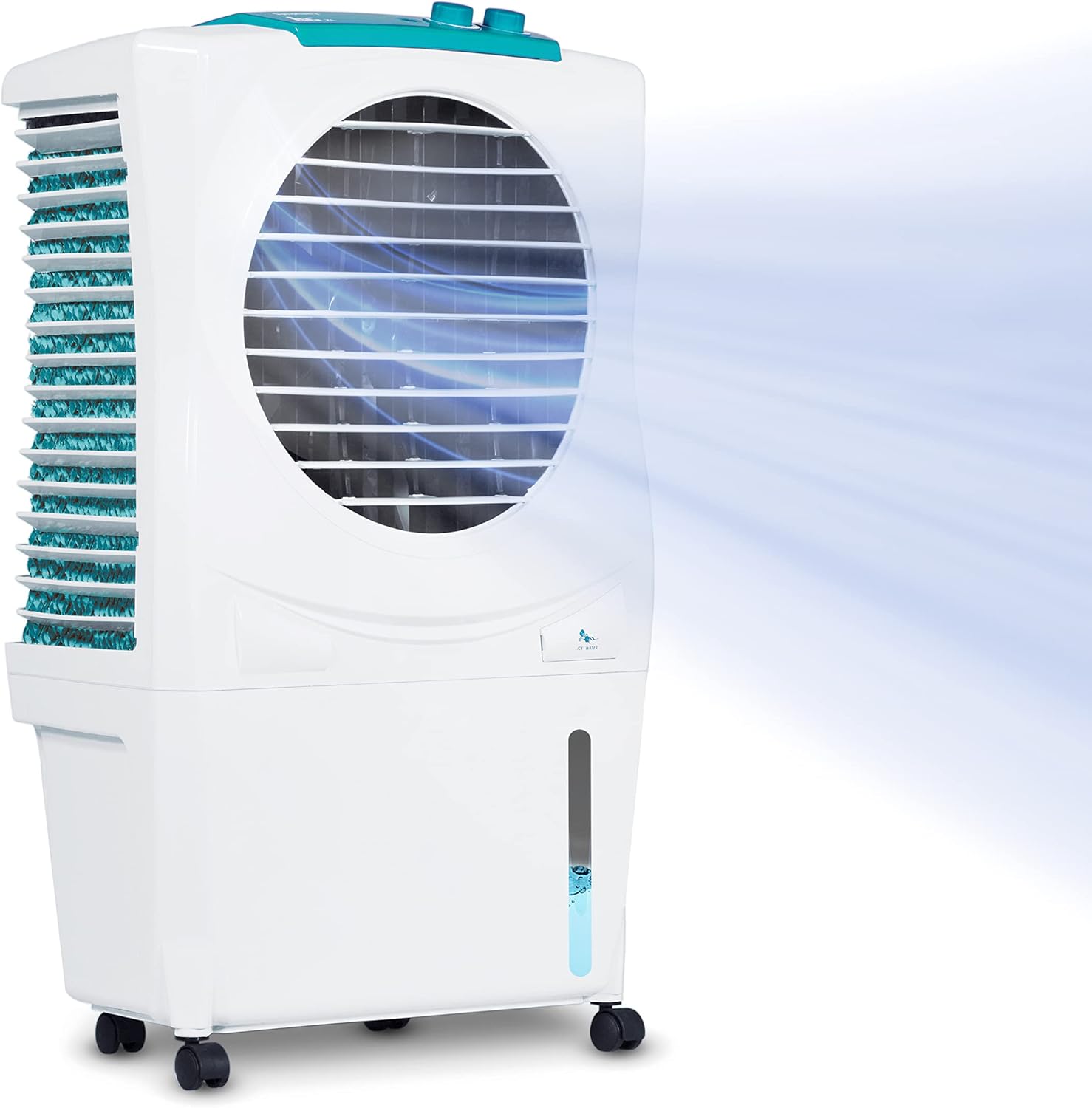
Figure 1: Symphony Ice Cube 2500 Evaporative Air Cooler
This image shows the Symphony Ice Cube 2500 Evaporative Air Cooler, a white and teal unit with a large circular fan grille on the front. A blue mist effect emanates from the front, indicating airflow. The unit is on wheels, suggesting portability, and has a water level indicator on the side.
Safety Information
- Always ensure the power supply matches the voltage specified on the cooler's rating label (120 Volts AC).
- Do not operate the cooler with a damaged cord or plug. If the cord is damaged, it must be replaced by the manufacturer, its service agent, or similarly qualified persons to avoid a hazard.
- Unplug the cooler from the power outlet before filling with water, cleaning, or performing any maintenance.
- Do not immerse the cooler or its electrical components in water or other liquids.
- Keep children and pets away from the cooler during operation.
- Ensure the cooler is placed on a stable, level surface to prevent tipping.
- For optimal performance and to prevent humidity buildup, always keep a window or door open for effective cross-ventilation when operating the evaporative cooler.
- This appliance is not intended for use by persons (including children) with reduced physical, sensory or mental capabilities, or lack of experience and knowledge, unless they have been given supervision or instruction concerning use of the appliance by a person responsible for their safety.
Product Overview
Familiarize yourself with the components of your Symphony Ice Cube 2500 Evaporative Air Cooler.

Figure 2: Front Components
This diagram highlights the key features on the front of the Symphony Ice Cube 2500. These include the Control Panel at the top, horizontal adjustable/vertical auto louvers for directing airflow, a Water/Ice Inlet for filling the tank, a Water Level Indicator to monitor water volume, and Front Lockable Castors for easy movement and stability.

Figure 3: Rear and Side Components
This diagram illustrates the features on the rear and side of the Symphony Ice Cube 2500. It shows the 3-sided Honeycomb Pads, which are crucial for the evaporative cooling process, an Overflow Outlet, a Water Hose Port for continuous water supply, the large 4.35 Gallon Water Tank, and a Water Drain Plug for easy emptying.
Key Features:
- Efficient Cooling: Dura pump and 3-sided honeycomb cooling pads for even water and air distribution.
- Cooling Area: Suitable for rooms up to 200 sq. ft.
- Low Power Consumption: Uses approximately 105 Watts, inverter compatible.
- Ample Cooling Time: 4.3-gallon water tank with water level indicator.
- Water Hose Connectivity: Includes water hose connector and float valve for continuous water supply.
- Environmentally Friendly: No refrigerants or poisonous gases.
- Mobility: Equipped with castor wheels for easy movement.
Setup
Follow these steps to set up your Symphony Ice Cube 2500 for the first time.
- Unpacking: Carefully remove the air cooler from its packaging. Ensure all components are present: 1 Air Cooler, 4 Castor Wheels, 1 Cover.
- Attach Castor Wheels: If not pre-attached, insert the four castor wheels into the designated slots at the base of the cooler. Ensure they are securely fastened.
- Positioning: Place the cooler on a flat, stable surface in the desired room. Remember to keep a window or door open for effective cross-ventilation.
- Fill Water Tank:
- Open the water/ice inlet.
- Pour clean water into the tank until the water level indicator reaches the "MAX" mark. Do not overfill. The tank capacity is 4.3 gallons.
- Alternatively, for continuous cooling, connect a garden hose to the water hose port. The built-in float valve will automatically maintain the water level.
- Power Connection: Plug the power cord into a standard 120V AC electrical outlet.

Figure 4: Quick Setup Guide
This graphic illustrates the four easy steps for using the cooler: 1. Add Water, 2. Plug In, 3. Open Windows (for cross-ventilation), and 4. Enjoy Cool Air. It emphasizes the importance of ventilation for optimal performance.

Figure 5: Garden Hose Connectivity
This image demonstrates the cooler's large water tank and its garden hose connection feature, allowing for continuous water supply without manual refilling. The cooler is shown on a patio, suggesting its suitability for both indoor and outdoor use.
Operation
The Symphony Ice Cube 2500 features simple knob controls for fan speed and cooling mode.

Figure 6: Control Panel
This image provides a close-up view of the control panel located on top of the cooler, featuring two rotary knobs for adjusting settings. The labels indicate functions such as 3-Speed Fan, Cool Mode, Auto Swing, and Mobility, suggesting intuitive operation.
- Power On/Off: Turn the left knob to the "ON" position to power on the unit. Turn to "OFF" to power off.
- Fan Speed Adjustment: The cooler has 3 fan speeds. Rotate the fan speed knob to select your desired airflow: Low, Medium, or High.
- Cooling Mode: To activate evaporative cooling, ensure the water tank is filled and turn the cooling mode knob to the "COOL" position. This will activate the water pump and cooling pads.
- Louvers: The cooler features horizontal adjustable and vertical auto louvers. Adjust the horizontal louvers manually to direct airflow left or right. The vertical louvers will automatically swing to distribute air up and down.
For optimal cooling, ensure there is adequate cross-ventilation in the room. Evaporative coolers work best in dry climates and require fresh air circulation.
Maintenance
Regular maintenance ensures the longevity and efficient performance of your air cooler.
Daily/Weekly Maintenance:
- Water Tank Cleaning: Regularly drain and clean the water tank to prevent algae and mold growth. Use a mild detergent and rinse thoroughly.
- Exterior Cleaning: Wipe the exterior of the cooler with a soft, damp cloth. Do not use abrasive cleaners or solvents.
Seasonal Maintenance (Winter Shutdown):
Before storing the cooler for an extended period, especially during winter:
- Drain Water: Empty the water tank completely using the water drain plug.
- Dry Cooler: Operate the cooler in fan-only mode for a few hours to ensure the honeycomb pads and internal components are thoroughly dry.
- Clean Pads: If necessary, gently clean the honeycomb pads according to manufacturer recommendations (usually rinsing with water). Ensure they are dry before storage.
- Cover and Store: Cover the cooler with the provided FREE COVER to protect it from dust and store it in a dry place.

Figure 7: Air Cooler Cover
This image displays the Symphony Ice Cube 2500 air cooler with its included black protective cover, designed to keep the unit clean and dust-free during storage or periods of non-use.
Troubleshooting
If you encounter issues with your Symphony Ice Cube 2500, refer to the following common problems and solutions.
| Problem | Possible Cause | Solution |
|---|---|---|
| Cooler not turning on. | No power supply; power cord not plugged in; power outlet faulty. | Check if the power cord is securely plugged into a working outlet. Test the outlet with another appliance. |
| No cooling effect. | Water tank empty; pump not working; cooling pads dry; room not ventilated. | Ensure water tank is filled. Check if the pump is operating. Verify cooling pads are wet. Open a window or door for cross-ventilation. |
| Unpleasant odor. | Stagnant water or algae/mold growth in the tank/pads. | Drain and thoroughly clean the water tank and cooling pads. Use fresh water. |
| Water leakage. | Overfilling the water tank; cooler not level; drain plug not secured. | Do not overfill the tank. Ensure the cooler is on a level surface. Check that the drain plug is tightly closed. |
If the problem persists after attempting these solutions, please contact customer support.
Specifications
Detailed technical specifications for the Symphony Ice Cube 2500 Evaporative Air Cooler.
- Model Name: ICE CUBE 2500
- Brand: SYMPHONY
- Mounting Type: Freestanding
- Color: White
- Air Flow Capacity: 2200 Cubic Feet Per Minute (CFM) / 740 CFM (1250 m³/hr)
- Controls Type: Knob
- Reservoir Capacity: 4.35 Gallons (27 Liters)
- Floor Area Coverage: Up to 200 Square Feet
- Included Components: 1 Cover, 4 Castor Wheels, 1 Air Cooler
- Standby Power Consumption: 105 Watts
- Noise Level: <50 dB (Note: Official specifications state 64 dB, but marketing materials indicate less than 50 dB for low noise operation.)
- Number of Speeds: 3
- Product Dimensions: 17.7"D x 12"W x 32.7"H
- Voltage: 120 Volts (AC)
- Item Weight: 18.92 pounds
- Power Source: Electric

Figure 8: Product Dimensions
This image provides a visual representation of the cooler's dimensions, showing its height (32.7 inches), depth (17.7 inches), and width (12 inches). A person is shown next to the cooler to give a sense of its scale.

Figure 9: Performance Metrics
This graphic highlights key performance metrics of the cooler, including its airflow capacity of 740 CFM (1250 m³/hr), a low noise level of less than 50 dB, and an air throw distance of up to 30 feet. It also reiterates the suitable room size of up to 200 sq. ft.
Warranty and Support
Your Symphony Ice Cube 2500 Evaporative Air Cooler comes with a 1 Year Warranty from the date of purchase.
For warranty claims, technical support, or any inquiries, please contact Symphony customer service. Refer to the product packaging or the official Symphony website for the most current contact information.
When contacting support, please have your model number (ICE CUBE 2500) and purchase details ready.


