
Introduction
This manual provides comprehensive instructions for the installation, operation, maintenance, and troubleshooting of your Zoom HB876 4-Piston Hydraulic Disc Brake system. Designed for mountain bikes, this system offers enhanced stopping power and consistent performance. Please read this manual thoroughly before installation and use to ensure proper function and safety.
Product Overview
Key Features
- Four-Piston Design: Delivers exceptional stopping power and improved wear resistance compared to double-piston systems.
- Hydraulic System: Provides smooth modulation and consistent braking performance across various terrains.
- Durable Construction: Made with high-quality aluminum for resistance against harsh conditions and corrosion.
- Ergonomic Brake Lever: Designed for comfortable and effortless braking.
Components Included
A complete brake kit, typically including:
- Front hydraulic disc brake assembly (lever, hose, caliper)
- Rear hydraulic disc brake assembly (lever, hose, caliper)
- Mounting hardware (bolts, adapters if necessary)

Image: Illustration of the four-piston caliper design, demonstrating how hydraulic pressure activates the pistons for braking. This design enhances braking efficiency and durability.

Image: The ergonomic aluminum alloy brake handle with an integrated cylinder design, alongside the caliper. This design contributes to a 25% increase in braking force and 150% increase in wear resistance.
Setup
Installation Guide
- Prepare Your Bicycle: Ensure your bicycle is stable, preferably on a repair stand. Remove any existing brake components if upgrading.
- Mount the Calipers: Attach the front and rear brake calipers to your bike's frame and fork using the appropriate mounting hardware. Ensure the calipers are aligned correctly with the disc rotors. The front brake typically has an 800mm hose, and the rear brake has a 1400mm hose.
- Install Brake Levers: Mount the brake levers onto your handlebars. Position them ergonomically for comfortable reach and operation. Secure them firmly.
- Connect Hoses: Route the hydraulic hoses from the calipers to the respective brake levers. Ensure hoses are not kinked or stretched and have sufficient slack for handlebar movement.
- Bleed the System (if necessary): If the brakes feel spongy or air is present in the system, a bleed procedure may be required. Refer to a professional bicycle mechanic or a detailed hydraulic brake bleeding guide for your specific system.
- Adjust Caliper Alignment: Fine-tune the caliper position to ensure the brake pads are centered over the rotor and do not rub when the brake is not engaged.
- Test Braking: Before riding, test the brakes thoroughly at a slow speed in a safe area. Ensure both front and rear brakes engage firmly and smoothly.
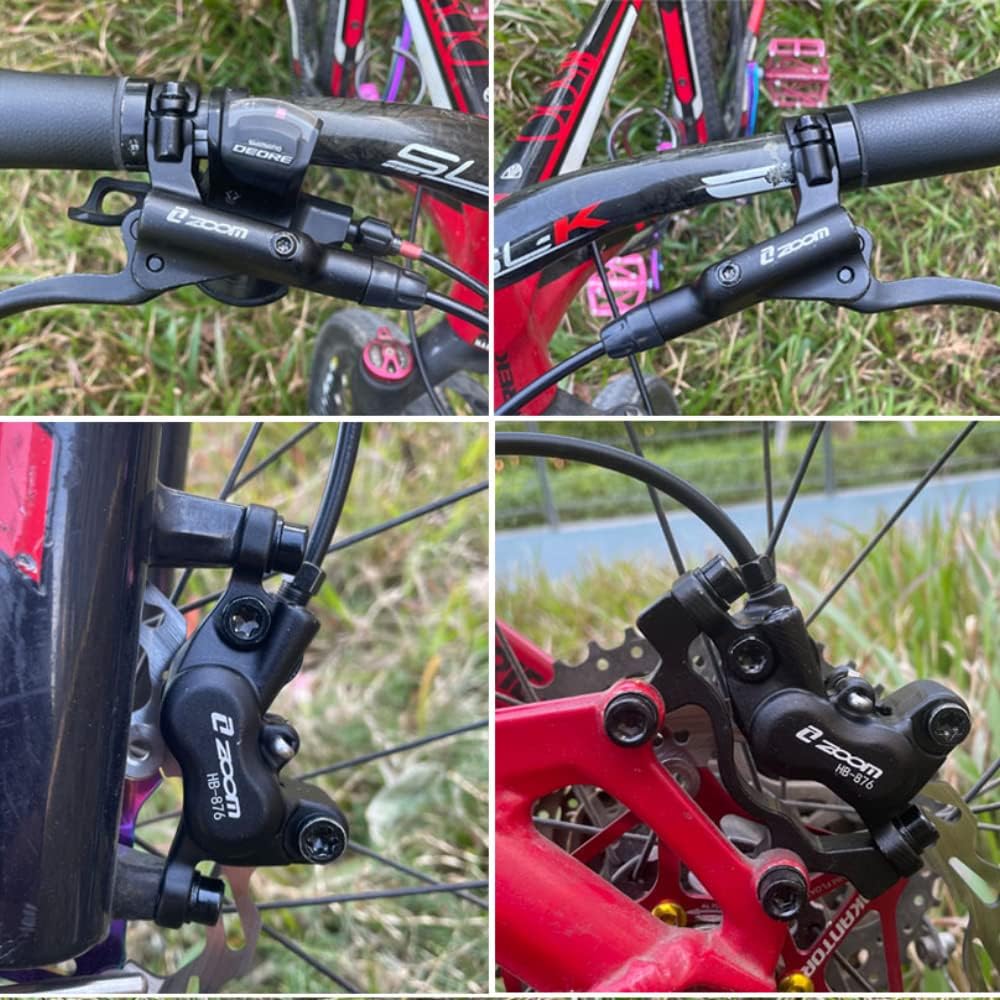
Image: The Zoom HB876 hydraulic disc brake system fully installed on a mountain bike, showing the brake levers on the handlebars and the calipers mounted on the front and rear wheels.

Image: Front and rear brake sets with their respective hydraulic hose lengths: 800mm for the front and 1400mm for the rear, designed for standard mountain bike configurations.
Operating Instructions
Using Your Hydraulic Disc Brakes
The Zoom HB876 hydraulic disc brakes provide powerful and consistent stopping performance. To operate:
- Gentle Application: For controlled deceleration, apply gentle pressure to the brake levers. The hydraulic system allows for fine control over braking force.
- Progressive Braking: Increase pressure progressively for stronger braking. Avoid sudden, hard braking unless in an emergency, as this can lead to loss of traction or control.
- Front vs. Rear Brake: Use both brakes simultaneously for optimal stopping power and control. The front brake provides most of the stopping power, while the rear brake helps with stability and speed modulation. Practice using both brakes to understand their individual and combined effects.
- Wet Conditions: In wet or muddy conditions, braking performance may be slightly reduced. Apply brakes earlier and with more caution.
Maintenance
Care and Maintenance Tips
Regular maintenance ensures the longevity and optimal performance of your hydraulic disc brakes.
- Cleaning: Keep calipers, rotors, and brake pads clean. Use a clean cloth and disc brake cleaner. Avoid using oil-based lubricants or cleaners near brake components, as this can contaminate pads and reduce braking effectiveness.
- Brake Pad Inspection: Regularly check brake pad wear. Replace pads when they are worn down to the minimum thickness indicated by the manufacturer, or if they show signs of contamination (e.g., squealing, reduced performance).
- Rotor Inspection: Inspect rotors for bends, cracks, or excessive wear. Replace damaged rotors immediately.
- Fluid Check: While a sealed system, periodically check for any leaks around the calipers or levers. If brake feel becomes spongy, the system may need bleeding or a fluid top-up. This should ideally be performed by a qualified mechanic.
- Hose Inspection: Check hydraulic hoses for any signs of damage, kinks, or fraying. Replace damaged hoses to prevent fluid leaks and brake failure.
- Bolt Torque: Periodically check that all mounting bolts for calipers and levers are tightened to the manufacturer's recommended torque specifications.
Troubleshooting
Common Issues and Solutions
| Problem | Possible Cause | Solution |
|---|---|---|
| Spongy Brake Lever | Air in the hydraulic system, low fluid level. | Bleed the brake system to remove air. Check fluid level and top up if necessary. |
| Reduced Braking Power | Worn brake pads, contaminated pads/rotor, air in system, improper caliper alignment. | Inspect and replace worn pads. Clean contaminated pads/rotor with disc brake cleaner. Bleed system. Realign caliper. |
| Brake Squealing/Noise | Contaminated pads/rotor, misaligned caliper, loose bolts, worn pads. | Clean pads/rotor. Realign caliper. Check and tighten all bolts. Replace worn pads. |
| Brake Rubbing | Misaligned caliper, bent rotor, sticky pistons. | Realign caliper. Inspect and true/replace bent rotor. Clean and lubricate caliper pistons (consult a mechanic). |
Specifications
Technical Details
| Feature | Detail |
|---|---|
| Model Name | Bicycle four-piston oil brake (HB876) |
| Material | Aluminum |
| Brake Type | Hydraulic Disc Brake |
| Piston Count | 4-Piston |
| Front Hose Length | 800mm |
| Rear Hose Length | 1400mm |
| Caliper Mount (B-pillar) | 51mm |
| Caliper Mount (A-pillar) | 74.2mm |
| Suggested Users | Cycling enthusiasts |

Image: Detailed caliper specifications for both front and rear brakes, illustrating the B-pillar (51mm) and A-pillar (74.2mm) mounting dimensions for compatibility.
Warranty and Support
Warranty Information
This product is provided without an explicit warranty. Please inspect the product upon receipt for any manufacturing defects.
Customer Support
For further assistance, technical questions, or if you encounter issues not covered in this manual, please contact the retailer or manufacturer's customer service department. Always provide your product model (HB876) and a detailed description of the issue when seeking support.


