
1. Introduction
This manual provides essential information for the proper installation, operation, and maintenance of your Iszo GPON OLT C+++ Optical PON Module. Please read this guide thoroughly before using the product to ensure optimal performance and longevity.
The Iszo GPON OLT C+++ module is designed for high-performance Passive Optical Network (PON) applications, offering robust connectivity and compatibility with various OLT systems.
2. Product Features
- High Performance: Supports transmission rates of 2.5 Gbps downstream and 1.25 Gbps upstream, ensuring efficient data flow.
- Maximum Compatibility: Designed to integrate seamlessly with popular OLT devices from brands such as BDCOM, HIOSO, VSOL, THINK, and TPLINK.
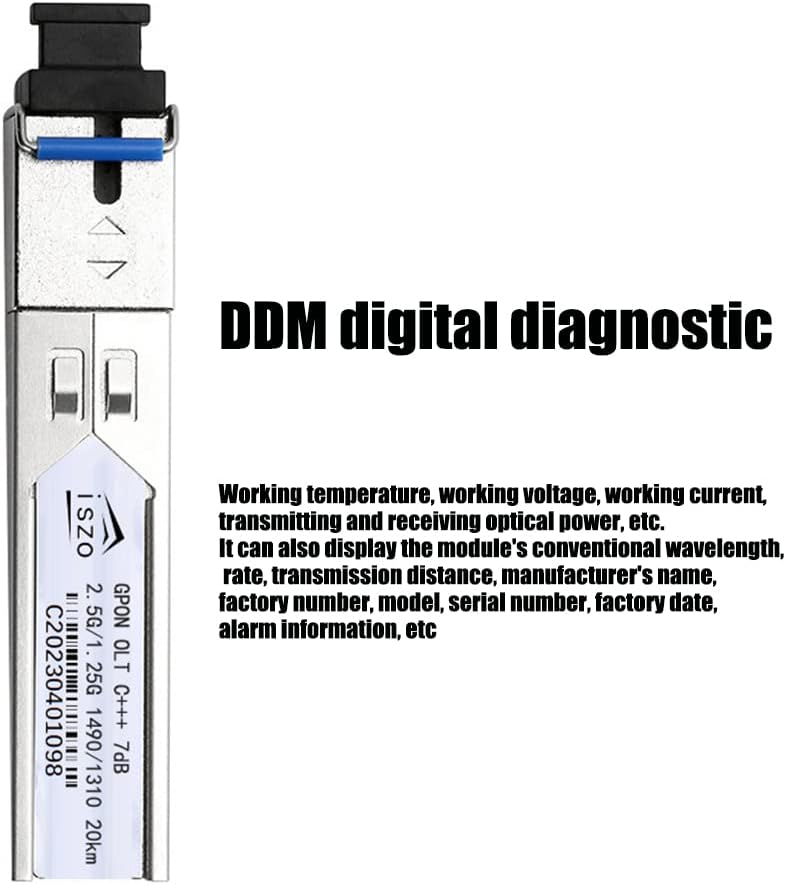
- Reliable Diagnostic Tool: Features Digital Diagnostic Monitoring (DDM) functions for real-time monitoring of operational parameters, aiding in troubleshooting.
- Long-Range Connectivity: Capable of transmitting data over distances up to 20 kilometers.
- Durable Design: Built for long-term stability and reliability, featuring thickened gold plating on contacts for good conductivity and repeated plugging/unplugging cycles.
3. Setup Instructions
The Iszo GPON OLT C+++ module is designed for plug-and-play installation in compatible OLT systems.
- Preparation: Ensure your OLT device is powered off before inserting or removing any modules.
- Module Insertion: Carefully align the GPON OLT C+++ module with the designated SFP/SFP+ slot on your OLT device. Gently push the module into the slot until it clicks into place. Ensure the latch mechanism is engaged.
- Fiber Connection: Connect the SC UPC fiber optic cable to the module's port. Ensure the connector is clean and properly seated.
- Power On: Power on your OLT device. The module should be detected and initialized automatically by the OLT system.
- Verification: Check the OLT system's interface for module status and link indicators to confirm successful installation and operation.


4. Operating Instructions
Once installed, the Iszo GPON OLT C+++ module operates automatically as part of your OLT system. No direct user configuration is typically required on the module itself.
- Monitoring: Utilize the Digital Diagnostic Monitoring (DDM) function to observe the module's performance. DDM provides real-time data on parameters such as working temperature, working voltage, transmitting and receiving optical power, and more. This information is accessible through your OLT system's management interface.
- Link Status: Refer to the LED indicators on your OLT device for the status of the module's optical link. A steady green light typically indicates a stable connection.
5. Maintenance
Proper maintenance ensures the longevity and reliable performance of your GPON OLT module.
- Cleaning Optical Connectors: Regularly inspect and clean the fiber optic connectors (SC UPC) using appropriate fiber cleaning tools. Dust and contaminants can significantly degrade optical performance.
- Handling: Always handle the module by its metal casing. Avoid touching the optical ports or electrical contacts directly.
- Environmental Conditions: Ensure the OLT device and modules are operated within specified temperature and humidity ranges to prevent damage.
- Gold Plating: The module features thickened gold plating on its electrical contacts, which enhances conductivity and allows for repeated insertions and removals without significant wear.

6. Troubleshooting
If you encounter issues with your Iszo GPON OLT C+++ module, consider the following troubleshooting steps:
- No Link/Low Signal:
- Verify that the fiber optic cable is securely connected at both ends.
- Inspect the fiber optic cable for any physical damage or sharp bends.
- Clean the fiber optic connectors on both the module and the cable.
- Check the DDM readings for transmit and receive optical power levels. If levels are outside the normal range, it may indicate a cable issue or a faulty module.
- Module Not Detected:
- Ensure the module is fully seated in the OLT slot. Remove and reinsert it firmly.
- Verify that the OLT device is compatible with GPON OLT C+++ modules.
- Restart the OLT device.
- Intermittent Connectivity:
- Check for loose fiber connections.
- Monitor DDM parameters for fluctuations in optical power or temperature.
- Ensure the OLT device's firmware is up to date.
If problems persist after performing these steps, consult your OLT system's documentation or contact technical support.
7. Specifications
| Feature | Specification |
|---|---|
| Model | GPON OLT C+++ |
| Transmission Rate | 2.5 Gbps (Downstream) / 1.25 Gbps (Upstream) |
| Output Power | Greater than 7 dBm |
| Connector Type | SC UPC |
| Wavelength | 1490 nm (Tx) / 1310 nm (Rx) |
| Max Distance | 20 km |
| Diagnostic Function | DDM (Digital Diagnostic Monitoring) |
| Compatibility | OLT BDCOM, HIOSO, VSOL, THINK, TPLINK, and more |
| Manufacturer | iszo |
| ASIN | B0C2KGR3JQ |
| Date First Available | April 15, 2023 |


8. Warranty and Support
For warranty information and technical support regarding your Iszo GPON OLT C+++ Optical PON Module, please refer to the documentation provided with your purchase or visit the official Iszo website. Support resources typically include FAQs, troubleshooting guides, and contact information for customer service.


