Introduction
The Westinghouse WGen20000c Portable Generator is an ultra-duty generator engineered for strength and reliability. Designed for your toughest power needs, it provides 28,000 peak Watts and 20,000 running Watts, making it suitable for powering major appliances and sensitive electronics during outages or on job sites.
This generator features a robust 999cc V-Twin OHV Westinghouse Engine, offering up to 11 hours of run time on a 17.17 gallon gas tank. Key features include Push-Button Electric Start, Remote Start Key Fob, and a CO Sensor for enhanced safety. Its low Total Harmonic Distortion (THD) ensures safe operation for sensitive electronics.

Figure 1: Westinghouse WGen20000c Portable Generator.
Setup and Assembly
Before operating your Westinghouse WGen20000c Portable Generator, ensure proper assembly and initial setup. This includes attaching the wheels, adding engine oil, and connecting the battery.
1. Unpacking and Wheel Assembly
The generator is heavy and may require assistance for unpacking and assembly. Carefully remove the generator from its packaging. Attach the heavy-duty, never-flat wheels to the frame using the provided axles and cotter pins. The reinforced steel handles can be adjusted for height.
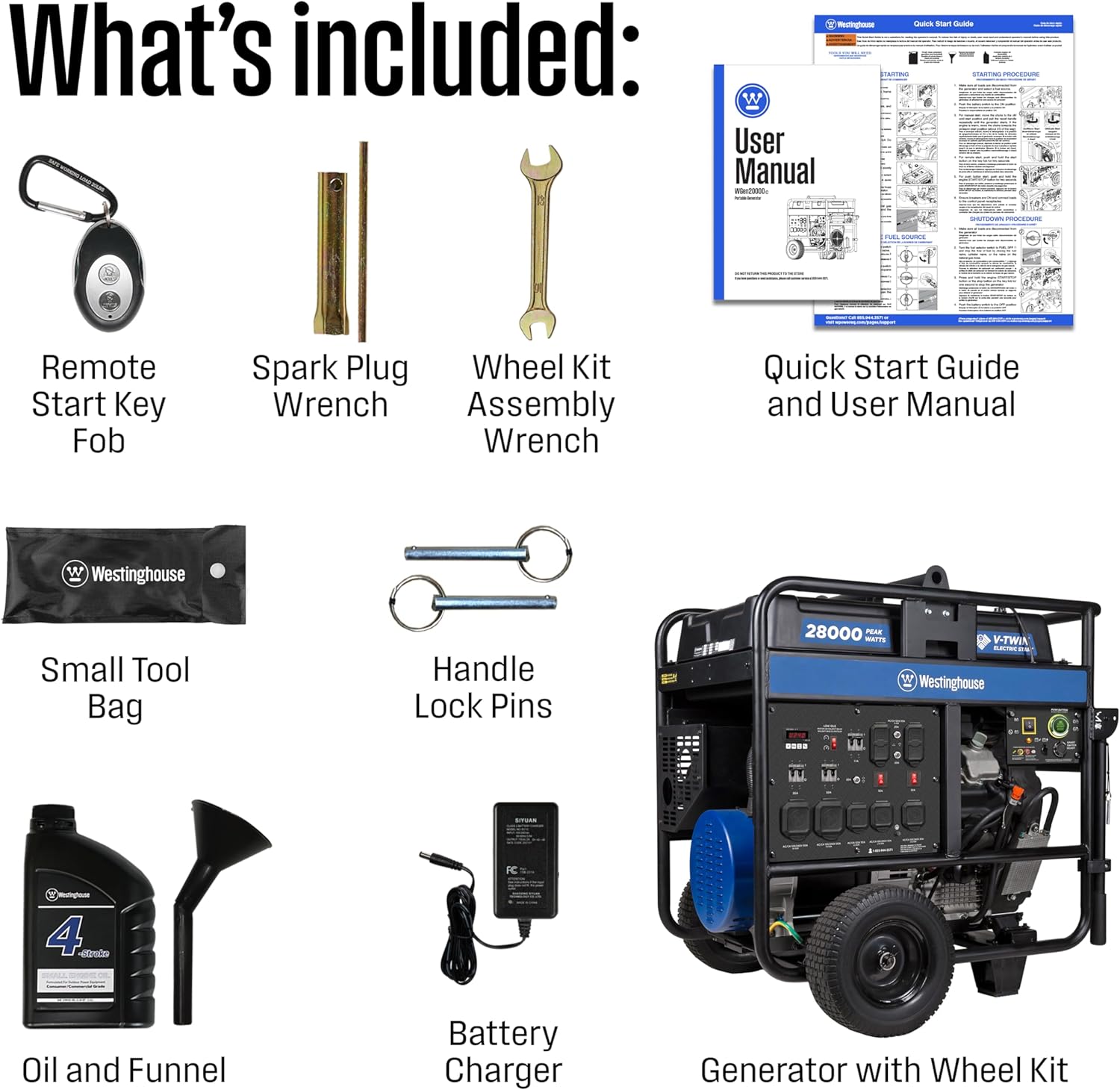
Figure 2: Included components for setup.
2. Adding Engine Oil
The generator comes with the correct amount of 4-stroke SAE 10W30 small engine oil. Carefully pour the entire contents of the oil bottle into the engine's oil fill port using the provided funnel. Ensure the oil level is correct before starting the engine.
3. Connecting the Battery
The generator's battery is typically partially disconnected for shipping. Connect the negative terminal of the battery. The positive terminal should already be connected. Ensure all connections are secure.
4. Fueling the Generator
Fill the 17.17 gallon fuel tank with unleaded gasoline. Always use fresh, clean, unleaded gasoline with an octane rating of 87 or higher. Do not use E85 fuel. The tank includes a built-in fuel gauge.
Video 1: Demonstrates the unboxing, wheel assembly, oil filling, and battery connection process.
Operating Instructions
Familiarize yourself with the control panel and starting procedures before operating the generator.
1. Control Panel Overview
The control panel features various outlets, circuit breakers, and a VFT Data Center display. It includes four GFCI 120V 5-20R standard household outlets, two 50A 120/240V 14-50R outlets, two 30A 120/240V L14-30R outlets, and one 30A 120V L5-30R outlet. All outlets have rubber covers for added safety.

Figure 3: Detailed view of the control panel.
2. Starting the Generator
The WGen20000c offers both Push-Button Electric Start and Remote Start via a key fob.
- Manual Electric Start: Ensure the battery main disconnect switch is in the 'ON' position. Turn the fuel valve to 'ON'. If the engine is cold, engage the choke. Press and hold the 'ENGINE START/STOP' button until the engine starts.
- Remote Start: Ensure the battery main disconnect switch is in the 'ON' position. Turn the fuel valve to 'ON'. Press the start button on the remote key fob.
Once the engine starts, allow it to warm up for a few minutes before applying a load. Disengage the choke if used.
Video 2: Demonstrates the initial startup process of the WGen20000c generator.
Video 3: Provides a detailed overview of the control panel and its various outlets and features.
3. Connecting Appliances
Connect your appliances or transfer switch to the appropriate outlets on the control panel. Ensure the total load does not exceed the generator's running wattage. The low THD makes it safe for sensitive electronics.

Figure 4: Low THD ensures safe power for sensitive electronics.
Maintenance
Regular maintenance is crucial for the longevity and optimal performance of your generator.
1. VFT Data Center
The VFT Data Center on the control panel displays real-time performance information, including voltage, frequency, and lifetime run hours. Monitor these readings to stay informed about regular maintenance schedules.
2. Oil Changes
Refer to the owner's manual for the recommended oil change intervals. Regularly check the oil level and change it as specified to ensure engine health.
3. Air Filter and Spark Plug
Inspect and clean or replace the air filter and spark plug according to the maintenance schedule in your owner's manual. These components are vital for efficient engine operation.
Troubleshooting
If you encounter issues with your generator, consult the following common troubleshooting tips.
1. Engine Not Starting
- Check fuel level and ensure the fuel valve is in the 'ON' position.
- Verify the battery is connected and charged.
- Ensure the engine switch is in the 'ON' position.
- Check the spark plug for proper connection and condition.
2. No Power Output
- Check all circuit breakers on the control panel; reset if tripped.
- Ensure all connected devices are functioning correctly.
- Verify the generator is running at the correct RPM and voltage using the VFT meter.
3. CO Sensor Activation
The Carbon Monoxide (CO) sensor adds safety by monitoring the air near the generator. If the CO sensor activates, the generator will automatically shut down. Move the generator to an open, well-ventilated area immediately. Do not operate the generator indoors or in enclosed spaces.
Specifications
| Feature | Specification |
|---|---|
| Brand | Westinghouse |
| Model Name | WGen20000c |
| Peak Wattage | 28000 Watts |
| Running Wattage | 20000 Watts |
| Fuel Type | Gasoline |
| Engine Type | 999cc V-Twin OHV 4-Stroke |
| Tank Volume | 17 Gallons |
| Run Time (25% load) | Up to 11 Hours |
| Voltage | 120V / 240V |
| Total Power Outlets | 10 |
| Item Weight | 541.1 Pounds |
| Product Dimensions | 38"L x 35"W x 40.4"H |
| Special Features | Automatic Idle Control, Automatic Voltage Regulation, CO Sensor, Electric Start, Fuel Gauge, Hour Meter |
Warranty and Support
The Westinghouse WGen20000c Portable Generator comes with a 3-year Limited Warranty and Lifetime Technical Support. This support is backed by Westinghouse's nationwide customer service and support network.
For technical assistance or warranty claims, please refer to the contact information provided in your Owner's Manual or Quick-Start Guide. You may also find support by calling the number often displayed on the control panel: 1-855-944-3571.


