
Introduction
The Dyson Gen5detect is Dyson's most powerful cordless vacuum cleaner, engineered for deep and hygienic cleaning. It features advanced HEPA filtration, intelligent suction optimization, and illumination technology to reveal invisible dust. This manual provides essential information for setting up, operating, maintaining, and troubleshooting your Dyson Gen5detect.

The Dyson Gen5detect, Dyson's most powerful cordless vacuum, showcasing its advanced internal motor and filtration system.
Included Components
Your Dyson Gen5detect package includes the following components:
- Cordless vacuum main body
- Digital Motorbar™ cleaner head
- Fluffy Optic™ cleaner head
- Hair screw tool
- Combination tool
- Built-in dusting and crevice tool (integrated into the wand)
- Wand
- Charger
- Docking Station
- Battery (1)
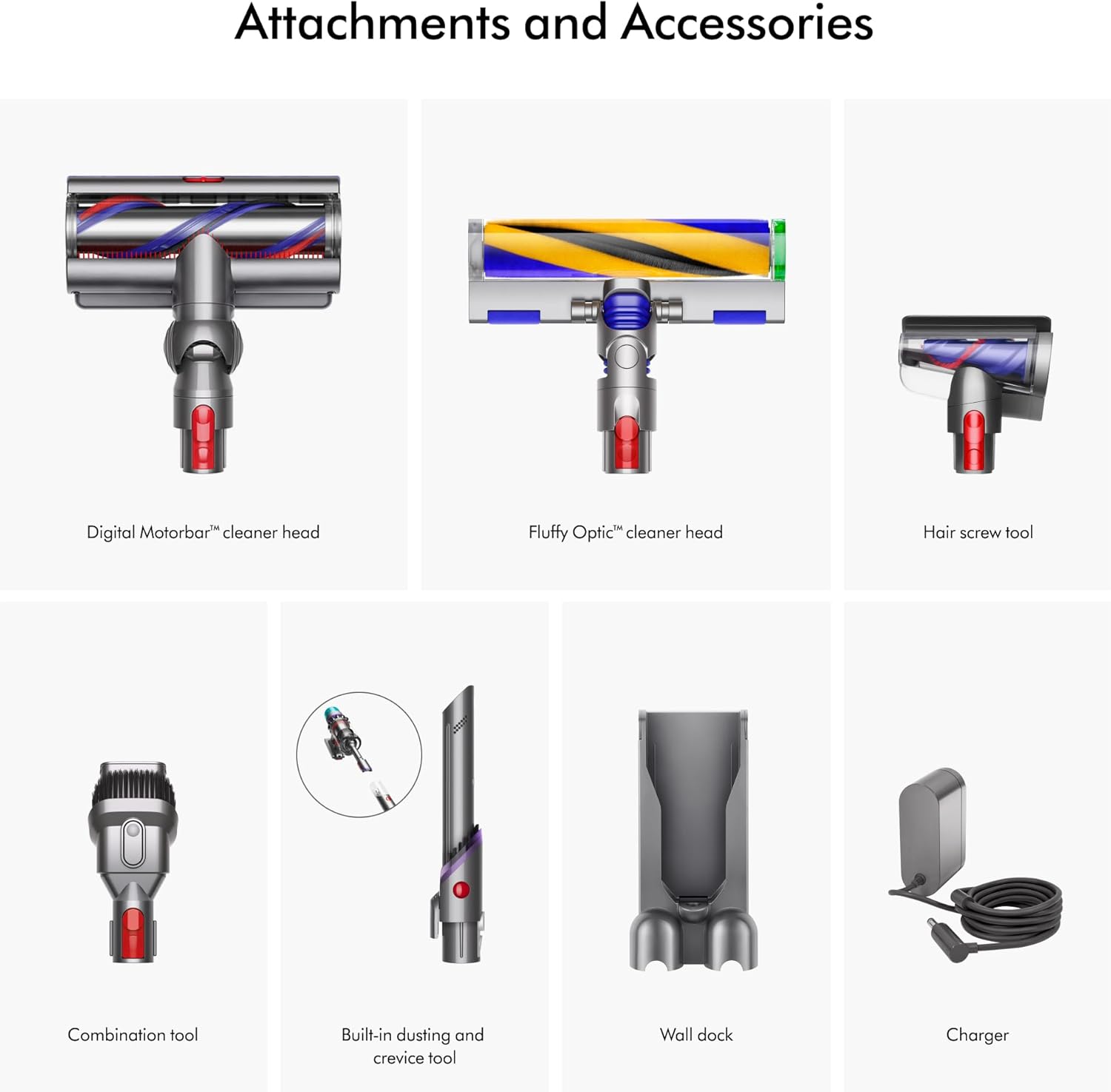
A comprehensive view of all included attachments and accessories for the Dyson Gen5detect, including the Digital Motorbar cleaner head, Fluffy Optic cleaner head, Hair screw tool, Combination tool, Built-in dusting and crevice tool, Wall dock, and Charger.
Setup
Initial Charging
The vacuum ships partially charged. For optimal performance, fully charge the battery before first use. Connect the charger to the docking station or directly to the vacuum's charging port. A full charge typically takes approximately 4.5 hours.
Assembly
- Attach the Wand: Align the wand with the main body of the vacuum and push until it clicks securely into place.
- Attach a Cleaner Head: Select either the Digital Motorbar™ cleaner head or the Fluffy Optic™ cleaner head. Align it with the end of the wand and push until it clicks.
- Install Docking Station: The docking station can be mounted to a wall for convenient storage and charging. Refer to the separate installation guide for detailed wall-mounting instructions.

The Dyson Gen5detect cordless vacuum assembled with the Fluffy Optic cleaner head, alongside its various attachments and wall-mounted docking station.
Operating Instructions
Powering On and Off
The Dyson Gen5detect is operated by a power button for continuous cleaning. Press the red power button on the handle to turn the vacuum on. Press it again to turn it off.
Power Modes
The vacuum features multiple power modes to suit different cleaning tasks and surfaces:
- Eco Mode: Provides the longest run time for lighter cleaning tasks.
- Auto Mode: Intelligently adapts suction power based on floor type and debris detected, optimizing performance and run time.
- Boost Mode: Delivers maximum suction for intensive spot cleaning or heavily soiled areas, with a shorter run time.
You can switch between power modes using the button on the LCD screen at the back of the vacuum.

Key features of the Dyson Gen5detect: up to 70 minutes run time, 115% more power than Dyson V8, intelligent suction adaptation, and Fluffy Optic illumination.
Cleaner Heads and Attachments
- Digital Motorbar™ Cleaner Head: Designed for deep cleaning carpets and hard floors, automatically de-tangling long hair and pet hair.
- Fluffy Optic™ Cleaner Head: Features precisely angled light to reveal microscopic dust on hard floors, making invisible dust visible.
- Hair Screw Tool: Ideal for removing long hair and pet hair from upholstery and tight spaces without tangles.
- Combination Tool: A versatile tool with a wide nozzle and brush for switching between cleaning and dusting tasks.
- Built-in Dusting and Crevice Tool: Integrated into the wand, this tool allows for quick transitions to handheld cleaning for tight corners and delicate surfaces.

The Digital Motorbar cleaner head for deep cleaning all floor types, and the Fluffy Optic cleaner head which reveals invisible dust on hard floors.
LCD Screen Display
The LCD screen provides real-time information during cleaning and a summary after each clean:
- Dust Particle Count: In Auto mode, the screen displays bars that grow and shrink according to the volume of particles removed, indicating when an area is clean.
- Power Mode: Shows the current power mode (Eco, Auto, Boost).
- Remaining Run Time: Displays the battery run time to the second.
- Maintenance Alerts: Provides notifications for filter cleaning or blockages.

The LCD screen on the Dyson Gen5detect displays color-coded bars indicating high to low levels of dust, showing when your floor is clean.

Examples of Dyson Gen5detect usage: powering on with a button press, cleaning high and low areas, de-tangling long hair and pet hair, and switching between tough cleaning and gentle dusting.
Maintenance
Emptying the Bin
To maintain optimal suction, empty the dust bin when debris reaches the MAX fill line. The Dyson Gen5detect features a no-touch bin emptying mechanism:
- Hold the vacuum over a trash can.
- Push the red lever down firmly to release the bin and eject debris.
- Close the bin until it clicks securely.

Illustrations of the no-touch bin emptying process and the easy wall-mounted docking and charging of the Dyson Gen5detect.
Filter Maintenance
The Dyson Gen5detect features advanced whole-machine HEPA filtration that traps 99.99% of particles as small as 0.1 microns. The filter is washable and should be cleaned regularly according to the instructions on the LCD screen or when suction performance drops.
- Twist the filter counter-clockwise to remove it from the top of the main body.
- Wash the filter under cold running water until the water runs clear.
- Shake off excess water and leave to dry completely for at least 24 hours in a warm, dry place. Do not dry in a tumble dryer, microwave, or near a naked flame.
- Once completely dry, reinsert the filter and twist clockwise to secure.

A detailed diagram illustrating the HEPA filtration system of the Dyson Gen5detect, which traps particles as small as 0.1 microns.
Cleaner Head Maintenance
- Digital Motorbar™ Cleaner Head: Periodically check the brush bar for tangled hair or debris. The de-tangling feature minimizes this, but manual removal may occasionally be necessary.
- Fluffy Optic™ Cleaner Head: The soft roller brush bar can be removed and washed under cold water. Ensure it is completely dry before reattaching.
Troubleshooting
If you encounter issues with your Dyson Gen5detect, refer to the common problems and solutions below. For more detailed assistance, visit the official Dyson support website or contact customer service.
| Problem | Possible Cause | Solution |
|---|---|---|
| No power / Not turning on | Battery not charged; Power button not pressed correctly. | Ensure battery is fully charged. Press the power button firmly for continuous operation. |
| Reduced suction power | Dust bin full; Filter needs cleaning; Blockage in wand or cleaner head. | Empty the dust bin. Wash and dry the filter. Check for and clear any blockages in the airways. |
| Cleaner head not spinning | Blockage in brush bar; Cleaner head not properly attached. | Remove any obstructions from the brush bar. Ensure the cleaner head is securely clicked into place. |
| LCD screen error message | Specific issue indicated by the message (e.g., filter, blockage). | Follow the instructions displayed on the screen. Refer to the Dyson support website for specific error codes. |
Specifications
| Feature | Detail |
|---|---|
| Brand | Dyson |
| Model Name | Gen5detect |
| Model Number | 447930-01 |
| Special Feature | Bagless, Cordless, Washable HEPA Filter, Illumination Technology |
| Filter Type | HEPA Filter |
| Is Cordless? | Yes |
| Capacity | 0.2 Gallons |
| Wattage | 350 watts |
| Charging Time | 4.5 Hours |
| Hose Length | 47.8 Inches |
| Recommended Uses | Carpets and Hard Floors |
| Form Factor | Stick |
| Color | Purple/Purple |
| Product Dimensions | 10.9"L x 9.8"W x 47.8"H |
| Item Weight | 7.6 pounds |
| Battery Type | Lithium-Ion |
| Noise Level | 82 dB |
| Battery Life | Up to 70 minutes |
| Controller Type | Push Button |
| Control Method | Touch |
| Number of Speeds | 1 |
| Number of Power Levels | 2 |
| Indoor/Outdoor Usage | Indoor |
| UPC | 885609031156 |
Warranty and Support
The Dyson Gen5detect Cordless Vacuum Cleaner comes with a 2-year warranty covering parts and labor. This warranty ensures your product is free from defects in material and workmanship under normal household use.
For personalized machine guides, maintenance tips, and support, it is recommended to register your machine on the MyDyson™ app or the official Dyson website. You can also find comprehensive support resources, FAQs, and contact information for customer service on the Dyson Support website.


