
NOIROT 7358-5TPRO
Contents
Noirot 1500W Spot Plus Panel Heater
Model: 7358-5TPRO User Manual
1. Introduction
Thank you for choosing the Noirot 1500W Spot Plus Panel Heater. This manual provides essential information for the safe and efficient operation of your new heater. Please read it thoroughly before installation and use, and retain it for future reference.
The Noirot Spot Plus Panel Heater is designed to provide efficient and consistent heating using convection technology, suitable for various indoor spaces. It features a timer, WiFi connectivity for smart control, and a child lock function for enhanced safety.

Figure 1: Front view of the Noirot 1500W Spot Plus Panel Heater.
2. Safety Information
WARNING: Failure to follow these safety instructions could result in fire, electric shock, or injury.
- Read all instructions before using this heater.
- Do not use this heater in the immediate vicinity of a bath, shower, or swimming pool.
- Do not immerse the heater in water or other liquids.
- Ensure the voltage indicated on the rating label corresponds to your mains voltage.
- Keep combustible materials such as furniture, curtains, and other flammable items at least 1 meter (3 feet) from the front and sides of the heater.
- Do not cover the heater. Covering the heater can cause overheating and fire.
- Do not operate the heater with a damaged cord or plug, or after the heater malfunctions or has been dropped or damaged in any manner.
- This appliance is not intended for use by persons (including children) with reduced physical, sensory or mental capabilities, or lack of experience and knowledge, unless they have been given supervision or instruction concerning use of the appliance by a person responsible for their safety.
- Children should be supervised to ensure that they do not play with the appliance.
- Always unplug the heater when not in use.
3. Package Contents
Please check the contents of the box upon unpacking:
- Noirot 1500W Spot Plus Panel Heater unit
- Wall mounting bracket (pre-attached or separate)
- Caster wheels (2 sets)
- Instruction Manual (this document)
- Mounting screws and wall plugs (for wall mounting)
4. Setup
4.1 Unpacking
Carefully remove the heater and all accessories from the packaging. Retain the packaging for future storage or transport. Inspect the heater for any signs of damage. If damaged, do not operate and contact customer support.
4.2 Placement
Position the heater on a flat, stable surface if using caster wheels, or on a suitable wall if wall-mounting. Ensure there is adequate clearance around the heater for proper air circulation. Maintain a minimum distance of 1 meter (3 feet) from any combustible materials.
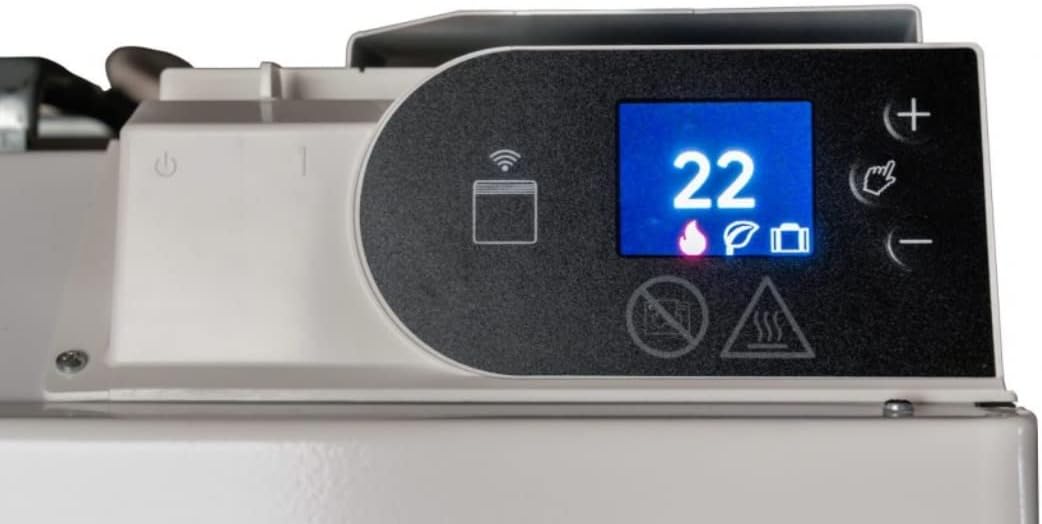
Figure 2: Example of wall-mounted heater placement.
4.3 Mounting Options
Your Noirot heater offers flexibility for either freestanding use with caster wheels or permanent wall mounting.
4.3.1 Attaching Caster Wheels (Freestanding Use)
If you intend to use the heater as a portable unit, attach the provided caster wheels. Locate the attachment points on the bottom of the heater. Securely fasten the two sets of caster wheels using the provided screws. Ensure they are firmly attached before moving the heater.

Figure 3: Caster wheel assemblies.
4.3.2 Wall Mounting
For permanent installation, the heater can be wall-mounted. The heater comes with a pre-attached wall mounting bracket. To detach the bracket, refer to the specific instructions provided with the bracket. Mark the desired drilling points on the wall, ensuring the heater will be level and at a safe distance from the floor and ceiling. Drill holes, insert wall plugs, and secure the bracket to the wall. Carefully hang the heater onto the bracket, ensuring it clicks securely into place.

Figure 4: Heater shown with both freestanding and wall-mounted options.
5. Operating Instructions
5.1 Control Panel Overview
The control panel is located on the top right side of the heater. It features a digital display and touch-sensitive buttons for operation.

Figure 5: Control Panel with display and buttons.
- Power Button: Turns the heater on/off.
- '+' / '-' Buttons: Adjust temperature settings, timer, or navigate menus.
- Mode/Menu Button (Hand Icon): Cycles through operating modes or enters menu options.
- WiFi Indicator: Shows WiFi connection status.
- Child Lock Indicator: Shows if child lock is active.
5.2 Basic Operation
Plug the heater into a suitable power outlet. The heater will enter standby mode.
5.2.1 Power On/Off
Press the Power button (usually indicated by a circle with a vertical line) on the control panel to turn the heater on or off.

Figure 6: Control panel displaying the power symbol.
5.2.2 Temperature Adjustment
Once powered on, the display will show the current temperature or set temperature. Use the '+' and '-' buttons to adjust the desired temperature. The heater will automatically maintain the set temperature.

Figure 7: Setting the temperature to 22 degrees Celsius.
5.3 Timer Function
The integrated timer allows you to program the heater to turn on or off at specific times. Refer to the detailed instructions in the full manual for setting daily or weekly schedules. Typically, you will press the Mode/Menu button to access timer settings, then use '+' and '-' to set the desired time and duration.
5.4 WiFi Connectivity and App Control
The Noirot Spot Plus heater can be controlled remotely via a smartphone app. To connect:
- Download the official Noirot app from your device's app store.
- Ensure your heater is in pairing mode (refer to the display for a specific icon, often a cloud or WiFi symbol). This may involve pressing and holding a button on the control panel.
- Follow the in-app instructions to connect the heater to your home WiFi network.
- Once connected, the WiFi indicator on the heater's display will illuminate steadily.

Figure 8: Control panel displaying WiFi/Cloud icon for connectivity.
The app allows for remote temperature adjustment, scheduling, and monitoring of your heater.
5.5 Child Lock Function
To prevent accidental changes to settings, the heater features a child lock. To activate/deactivate, typically press and hold the '+' and '-' buttons simultaneously for a few seconds until the child lock indicator appears/disappears on the display.
6. Maintenance
Regular maintenance ensures the longevity and efficient operation of your heater.
- Cleaning: Always unplug the heater and allow it to cool completely before cleaning. Wipe the exterior surfaces with a soft, damp cloth. Do not use abrasive cleaners or solvents.
- Dust Removal: Periodically vacuum the air inlets and outlets to remove dust accumulation.
- Storage: If storing the heater for an extended period, clean it thoroughly and store it in its original packaging in a dry, cool place.
7. Troubleshooting
If you encounter issues with your heater, please consult the table below before contacting customer support.
| Problem | Possible Cause | Solution |
|---|---|---|
| Heater does not turn on. | No power supply; Power button not pressed; Overheat protection activated. | Check power outlet and plug; Press the Power button; Unplug and allow to cool for 30 minutes. |
| Heater not heating effectively. | Temperature setting too low; Room too large; Air inlets/outlets blocked. | Increase set temperature; Ensure heater is appropriately sized for the room; Clear any obstructions. |
| WiFi connection fails. | Incorrect WiFi password; Heater too far from router; Router issues. | Re-enter password; Move heater closer to router; Restart router and heater. |
| Control panel unresponsive. | Child lock activated; Temporary electronic glitch. | Deactivate child lock; Unplug heater for a few minutes, then plug back in. |
8. Specifications
| Feature | Detail |
|---|---|
| Brand | NOIROT |
| Model Number | 7358-5TPRO |
| Power Output | 1500W |
| Colour | White |
| Dimensions (Package) | 67.8 x 49.5 x 13 cm |
| Item Weight | 5.94 kg |
| Special Features | Timer, WiFi Connectivity, Child Lock |
| Form Factor | Pedestal (with optional wall mount) |
| Indoor/Outdoor Usage | Indoor |
9. Warranty and Support
Your Noirot 1500W Spot Plus Panel Heater comes with a manufacturer's warranty. Please refer to the warranty card included in your packaging for specific terms and conditions, including the warranty period and coverage details.
For technical support, troubleshooting assistance beyond this manual, or warranty claims, please contact Noirot customer service. Contact details can typically be found on the manufacturer's website or on your purchase receipt.
- Keep your proof of purchase for warranty purposes.
- Do not attempt to repair the heater yourself. This may void the warranty and pose safety risks.
Ask a question about this manual
Ask about setup, troubleshooting, compatibility, parts, safety, or missing instructions. Manuals+ will review the question and use this page’s manual context to help answer it.