
1. Introduction
This manual provides detailed instructions for the assembly, operation, and maintenance of your VIHELM MD4030 Metal Detector. Please read this manual thoroughly before using the device to ensure proper function and safety. The MD4030 is designed for detecting various metal objects, including coins, gold, silver, and other metallic items, with adjustable sensitivity and discrimination features.
2. Safety Information
- Always operate the metal detector in a safe environment, away from active electrical lines or hazardous areas.
- Do not use the detector during thunderstorms or in extreme weather conditions.
- Ensure the search coil is securely attached before use.
- When digging, be aware of potential underground utilities or objects. Always obtain permission before searching on private property.
- Keep batteries out of reach of children. Dispose of used batteries responsibly.
- The search coil is waterproof, but the control housing is not. Avoid submerging the control housing in water.
3. Package Contents
Carefully unpack your MD4030 Metal Detector and verify that all components are present and in good condition. The package should include the following items:

Figure 3.1: All components included in the MD4030 package.
- Control Housing with View Meter
- Adjustable Stem (Upper and Lower)
- Waterproof Search Coil
- Arm Rest
- Knob Threaded Bolt and Locking Collar
- User Manual
4. Product Overview
4.1. Components
Familiarize yourself with the main parts of your metal detector:

Figure 4.1: Key components of the MD4030 Metal Detector.
- View Meter: Displays target indication.
- Waterproof Search Coil: Detects metal objects.
- Adjustable Stem: Allows for length adjustment.
- Anti-slip Handle: Provides a secure grip.
- Arm Rests: Supports the forearm for comfortable operation.
- Control Housing: Contains the electronics and controls.
4.2. Control Panel
The control panel provides access to all operational settings:
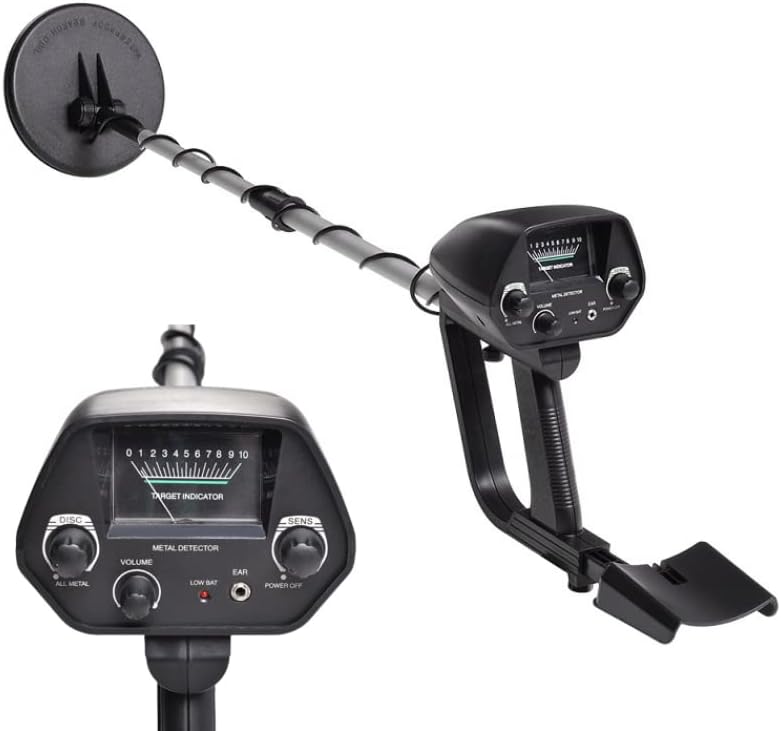
Figure 4.2: Detailed view of the MD4030 control panel.
- DISC (Discrimination) Knob: Used to eliminate unwanted metals from detection.
- ALL METAL / DISC Switch: Selects between all-metal detection and discrimination modes.
- VOLUME Knob: Adjusts the audio output level.
- LOW BAT: Indicator light for low battery.
- EAR (Earphone Jack): For connecting headphones (not included).
- POWER OFF: Turns the detector off.
- SENS (Sensitivity) Knob: Adjusts the detector's sensitivity to targets.
5. Assembly Instructions
Follow these steps to assemble your MD4030 Metal Detector:

Figure 5.1: Assembly diagram of the MD4030.
- Attach the Search Coil: Connect the waterproof search coil to the lower stem using the knob threaded bolt. Ensure it is secure but allows for slight angle adjustment.
- Connect Stems: Insert the lower stem into the upper stem. Secure it with the locking collar.
- Attach Control Housing: Slide the control housing onto the upper stem. The handle should align with the armrest.
- Secure Arm Rest: Attach the armrest to the control housing assembly.
- Wrap Cable: Carefully wrap the search coil cable around the stem, ensuring it is not too tight or loose, and plug the connector into the control housing.
- Adjust Length: Adjust the stem length to a comfortable operating height (30"-42" / 78-107cm) and tighten the locking collar.
6. Operating Instructions
6.1. Battery Installation
The MD4030 requires two (2) 6F22 9V batteries (not included). Open the battery compartment on the control housing, insert the batteries according to the polarity indicators, and close the compartment securely.
6.2. Powering On/Off
To power on the detector, rotate the SENS (Sensitivity) knob clockwise from the OFF position. To power off, rotate the SENS knob counter-clockwise until it clicks into the OFF position.
6.3. Operating Modes
The MD4030 offers two primary operating modes:

Figure 6.1: All Metal and Discrimination modes explained.
- ALL METAL Mode: Detects all types of metal. This mode offers the greatest detection depth and is ideal for general searching or when the target metal type is unknown.
- DISC (Discrimination) Mode: Allows the user to eliminate certain types of unwanted metals (e.g., iron trash) from detection. Use the DISC knob to adjust the level of discrimination.

Figure 6.2: Visual representation of metal detection in different modes.
6.4. Sensitivity Adjustment
Rotate the SENS knob to adjust the detector's sensitivity. Higher sensitivity settings increase detection depth but may also increase false signals from ground mineralization or electrical interference. Start with a medium setting and adjust as needed.
6.5. Discrimination Adjustment
In DISC mode, rotate the DISC knob clockwise to increase the level of discrimination. This will progressively filter out smaller or less conductive metals. Rotate counter-clockwise to decrease discrimination and detect more types of metal.
6.6. Volume Control
Adjust the VOLUME knob to a comfortable listening level. Using headphones (connected to the EAR jack) can help conserve battery life and improve the clarity of faint target signals.
6.7. Target Indication
When a metal object is detected, the MD4030 provides two forms of indication:
- Mechanical Pointer Mode: The pointer on the view meter will swing to the right. The farther to the right it swings, the stronger the signal, indicating a larger or closer target.
- Audio Mode: An audible tone will be emitted. The pitch and intensity of the tone may vary depending on the target's size, depth, and metal type.
6.8. Detection Depth
The typical detection depth ranges from 10-30cm (3.94-11.81 inches), with a minimum sensitivity of 130mm (5.12 inches) for a US Φ 25 coin. Actual depth can vary based on target size, ground conditions, and sensitivity settings.

Figure 6.3: Example of detection depth for various objects.
6.9. Adjustable Stem
The detector's stem length can be adjusted from 78cm to 107cm (30.71 to 42.12 inches) to suit the user's height and comfort. Loosen the locking collar, extend or retract the stem, and then tighten the collar to secure the desired length.
Figure 6.4: The adjustable stem allows for comfortable use by different individuals.
7. Detection Tips
- Swing the Search Coil: Hold the search coil parallel to the ground and swing it slowly from side to side in overlapping sweeps.
- Ground Balance: While the MD4030 does not have a manual ground balance, adjusting sensitivity can help minimize false signals from mineralized ground.
- Pinpointing: Once a target is detected, narrow down its location by slowly moving the coil in a cross-pattern over the signal area.
- Practice: Practice in an area with known metal objects to become familiar with the detector's responses.
8. Maintenance
- Cleaning: Wipe down the detector with a damp cloth after each use. Do not use abrasive cleaners.
- Search Coil: The search coil is waterproof and can be rinsed with fresh water. Ensure the cable connection to the control housing remains dry.
- Storage: Store the detector in a dry, cool place when not in use. Remove batteries if storing for extended periods to prevent leakage.
- Battery Care: Replace batteries when the LOW BAT indicator illuminates. Always use fresh, high-quality 9V batteries.
9. Troubleshooting
| Problem | Possible Cause | Solution |
|---|---|---|
| No power | Batteries are dead or incorrectly installed. | Replace batteries or check polarity. |
| Constant false signals | High sensitivity setting, ground mineralization, electrical interference. | Reduce sensitivity. Move to a different location away from power lines or other electronics. |
| Detector does not find metal | Low sensitivity, high discrimination, target too deep. | Increase sensitivity. Reduce discrimination. Ensure proper swinging technique. |
| Weak or intermittent signal | Low batteries, loose coil cable connection. | Replace batteries. Check and tighten the search coil cable connection. |
10. Specifications
| Feature | Specification |
|---|---|
| Model | MD4030 |
| Color | Black |
| Material | ABS Plastic + Aluminum |
| Operating Frequency | 5KHz |
| Operating Voltage Range | 9V |
| Power Supply | 2 x 6F22 9V Batteries (Not Included) |
| Operating Current | Standby: 10mA (LCD with backlight 80mA), Max: 70mA (LCD with backlight 150mA) |
| Detection Indication | Mechanical Pointer Mode, Audio Mode |
| Detection Modes | All Metal, Discrimination |
| Sensitivity (Min.) | 130mm / 5.12" (for US Φ 25 coin) |
| Detection Depth | 10-30cm / 3.94-11.81inch (varies by target and conditions) |
| Adjustable Height | 78-107cm / 30.71-42.12inch |
| Operating Temperature | -15~45°C / 5~113°F |
| Storage Temperature | -20~60°C / -4~140°F |
| Item Size | 107 x 27 x 16.5cm / 42.12 x 10.63 x 6.50in |
| Item Weight | 862g / 1.90 lb |
| Package Size | 54 x 22 x 11cm / 21.26 x 8.66 x 4.33in |
| Package Weight | 1.28kg / 2.83 lb |
| International Protection Rating | IP68 (Search Coil only) |
11. Warranty and Support
Your VIHELM MD4030 Metal Detector comes with a standard manufacturer's warranty. Please refer to the product packaging or the retailer's website for specific warranty terms and conditions. For technical support, troubleshooting assistance, or inquiries regarding parts, please contact your point of purchase or the VIHELM customer service department.