Introduction
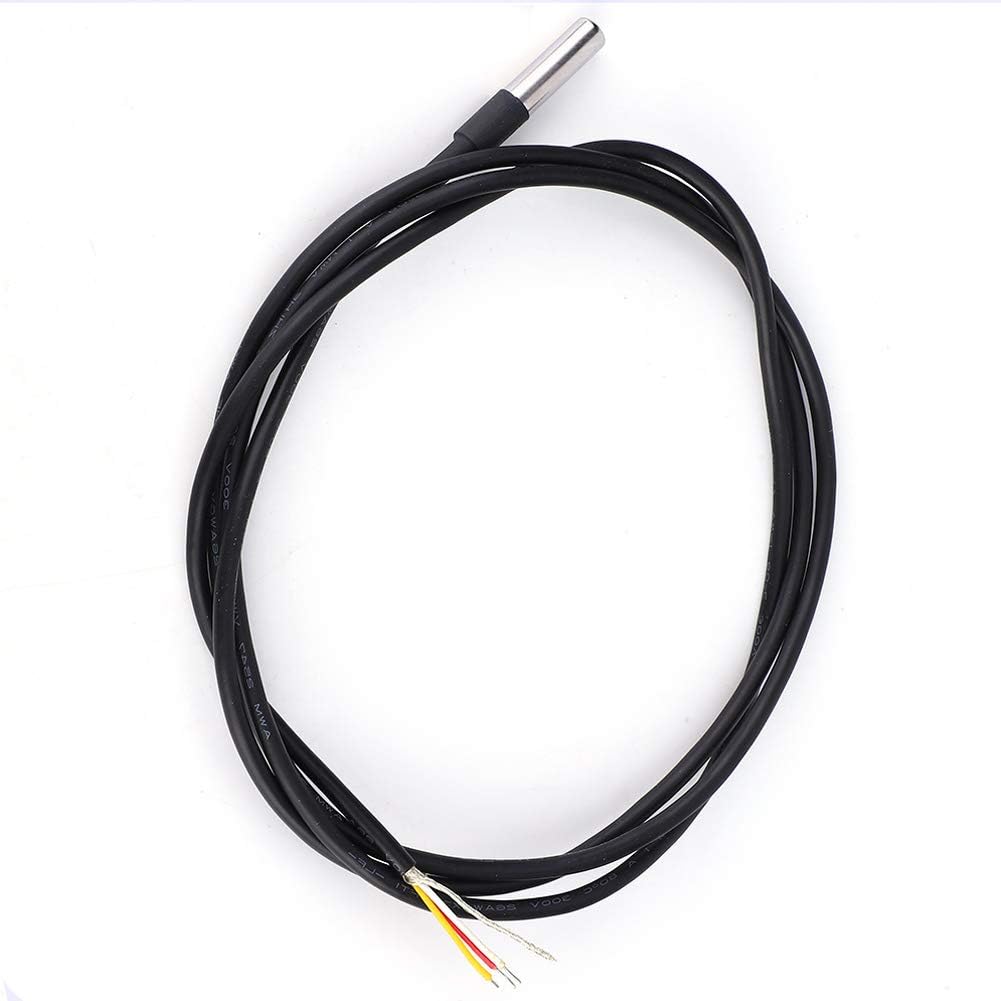
Image: A set of five WanRomJun DS18B20 digital temperature sensors, showcasing their compact design and durable construction.
The WanRomJun DS18B20 Digital Temperature Sensor is a high-accuracy, waterproof temperature probe designed for various applications. Featuring a robust stainless steel tube and a 1.2-meter cable, this sensor offers reliable temperature measurements in diverse environments. Its digital output and strong anti-interference capabilities make it suitable for precise environmental monitoring, industrial control, and DIY projects.
This manual provides essential information for the proper setup, operation, maintenance, and troubleshooting of your DS18B20 temperature sensor to ensure optimal performance and longevity.
Setup Instructions
Before connecting the sensor, ensure your control system or microcontroller is powered off. The DS18B20 sensor operates on a DC 3-5.5V power supply and communicates via a 1-Wire interface, requiring only one data line (plus power and ground) for communication.
Wiring Diagram (Typical)
The sensor cable typically contains three wires:
- Red: VCC (Power supply, DC 3-5.5V)
- Yellow/White: Data (DQ)
- Black: GND (Ground)
Connect these wires to your microcontroller or data acquisition system according to its 1-Wire communication protocol. A pull-up resistor (typically 4.7kΩ) is usually required between the Data line and VCC for proper 1-Wire communication.

Image: Close-up view of the sensor's cable ends, showing the red (VCC), yellow (Data), and black (Ground) wires. This illustrates the connection points for integration into a circuit.
Physical Installation
The stainless steel probe is waterproof and can be immersed in liquids or placed in environments where moisture is present. Ensure the probe is securely positioned in the desired measurement location. Avoid bending the cable sharply near the probe housing to prevent damage.

Image: Detailed view of the stainless steel probe tip and its robust connection to the main cable, highlighting its waterproof design and construction.
Operating Instructions
Once the sensor is correctly wired and powered, you will need to implement software to communicate with it using the 1-Wire protocol. Most microcontrollers (e.g., Arduino, Raspberry Pi) have libraries available for DS18B20 sensors.
Reading Temperature Data
- Initialize 1-Wire Bus: Your software must first initialize the 1-Wire communication bus.
- Search for Devices: The DS18B20 has a unique 64-bit serial code. Your software can search for connected 1-Wire devices.
- Send Convert T Command: Issue the "Convert T" command to the sensor to initiate a temperature conversion. This process takes approximately 750ms.
- Read Scratchpad: After conversion, read the sensor's scratchpad memory, which contains the temperature data.
- Calculate Temperature: Parse the raw data from the scratchpad to calculate the actual temperature in Celsius or Fahrenheit.
Refer to the specific 1-Wire library documentation for your chosen platform for detailed programming examples.

Image: An example illustrating the application of the DS18B20 sensor, shown alongside a digital thermometer for comparative temperature measurement.
Maintenance
The DS18B20 sensor is designed for durability and requires minimal maintenance. However, following these guidelines can help ensure its longevity and accuracy:
- Cleaning: If the stainless steel probe becomes dirty, gently wipe it with a soft, damp cloth. Avoid abrasive cleaners or solvents that could damage the probe or cable insulation.
- Cable Inspection: Periodically inspect the cable for any signs of wear, cuts, or damage. Damaged cables can lead to intermittent readings or sensor failure.
- Storage: When not in use, store the sensor in a clean, dry environment, away from extreme temperatures and direct sunlight.
- Calibration: While the DS18B20 is factory-calibrated, if you suspect inaccuracies, compare its readings with a known accurate thermometer in a stable environment. Recalibration typically involves software adjustments rather than physical sensor modification.
Troubleshooting
If you encounter issues with your DS18B20 temperature sensor, consider the following troubleshooting steps:
- No Readings or Error Codes:
- Check Wiring: Verify that the VCC, Data, and GND connections are correct and secure. Ensure the pull-up resistor is correctly installed on the Data line.
- Power Supply: Confirm that the sensor is receiving the correct voltage (DC 3-5.5V).
- 1-Wire Bus Issues: Ensure no other devices are interfering with the 1-Wire bus. Try connecting only the DS18B20 sensor.
- Software Library: Double-check your software code and ensure the 1-Wire library is correctly implemented and initialized.
- Inaccurate Readings:
- Environmental Factors: Ensure the probe is measuring the intended temperature and not influenced by external heat sources or drafts.
- Conversion Time: Allow sufficient time (approx. 750ms) for the temperature conversion to complete before reading the scratchpad.
- Multiple Sensors: If using multiple DS18B20 sensors on the same bus, ensure your software correctly addresses each sensor by its unique serial number.
- Intermittent Readings:
- Loose Connections: Inspect all wiring for loose connections or poor solder joints.
- Cable Length: While the 1.2-meter cable is standard, very long 1-Wire buses can sometimes experience signal degradation. Ensure proper shielding if extending the cable significantly.
Product Specifications
| Feature | Specification |
|---|---|
| Model | DS18B20 |
| Working Voltage | DC 3-5.5V |
| Probe Diameter | Approx. 6mm / 0.2in |
| Probe Length | Approx. 30mm / 1.2in |
| Cable Length | 1.2 Meters |
| Probe Material | Stainless Steel |
| Interface | 1-Wire Digital |
| Waterproof | Yes |
| Item Weight | 1.06 ounces (approx. per sensor) |
Warranty Information
This WanRomJun DS18B20 Digital Temperature Sensor comes with a 30-day refund or exchange guarantee from the date of purchase. This warranty covers manufacturing defects and ensures customer satisfaction. Please retain your proof of purchase for any warranty claims.
Customer Support
For any questions, technical assistance, or if you are not completely satisfied with your product, please do not hesitate to contact us. We offer lifetime customer support to ensure you have the best experience with your WanRomJun product.
Please refer to your purchase platform or the seller's contact information for the most direct way to reach customer service.


