
Bobtot ET29-BT
Bobtot Portable Karaoke Machine User Manual
Model: ET29-BT
Introduction
The Bobtot Portable Karaoke Machine is a versatile audio device designed for both indoor and outdoor entertainment. It combines a powerful Bluetooth speaker with a wireless microphone, offering multiple connectivity options and customizable sound features. This manual provides detailed instructions to help you get the most out of your device.
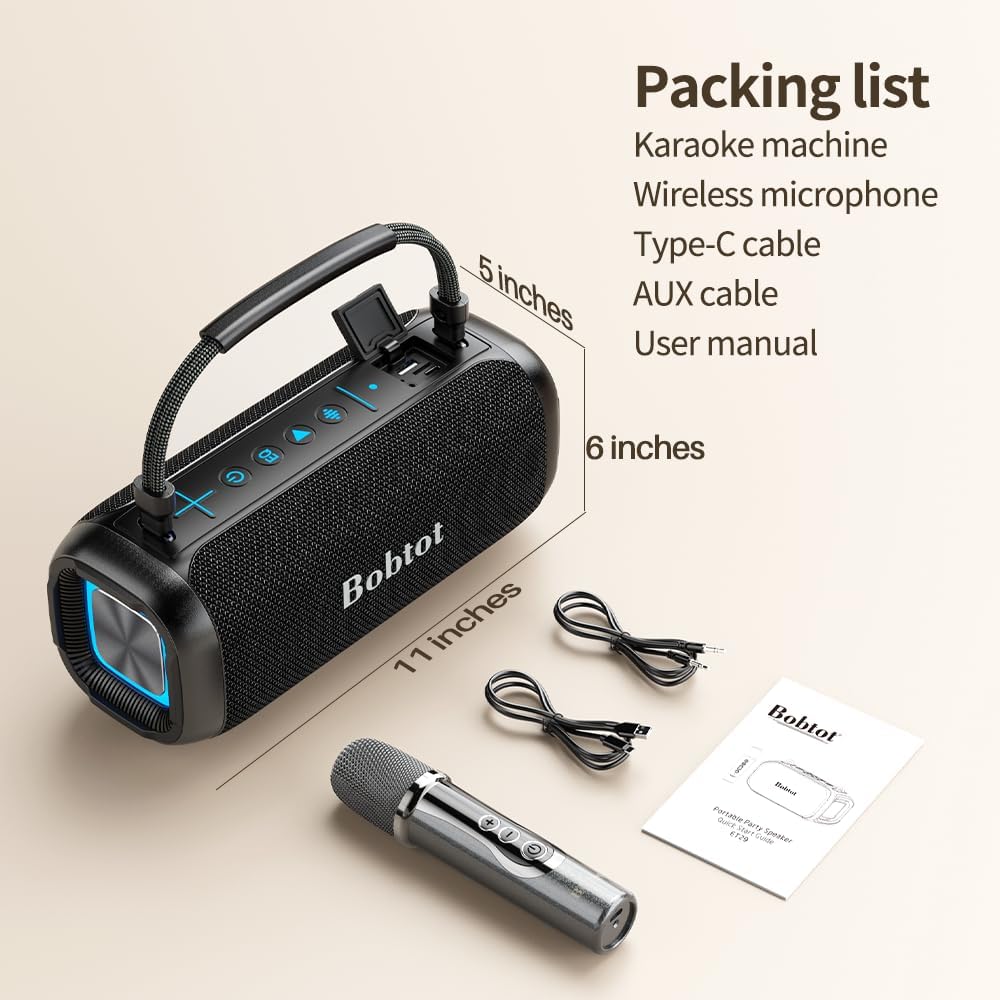
What's in the Box
Upon unboxing your Bobtot Portable Karaoke Machine, please ensure all the following components are present:
- Karaoke machine (Main Speaker Unit)
- Wireless Microphone
- Charging Cord (Type-C cable)
- Auxiliary Cable
- User Manual (this document)
Specifications
| Product Dimensions | 11 x 6 x 6 inches |
| Item Weight | 3 pounds |
| Model Number | ET29-BT |
| Power Output | 40W |
| Bluetooth Version | 5.3 |
| Waterproof Rating | IPX6 |
| Battery Capacity | 8800 mAh |
| Play Time | Approximately 20 hours (varies with volume and music type) |
| Connectivity | Bluetooth, AUX, TF Card, USB |
Setup
1. Charging the Device
Before first use, fully charge the karaoke machine and the wireless microphone using the provided Type-C charging cord. The charging port for the speaker is located under a protective flap on the control panel. The microphone also has a USB-C charging port.
2. Powering On/Off
To power on the karaoke machine, press and hold the Power button ( ) on the control panel until the indicator lights illuminate. To power off, press and hold the same button.
For the wireless microphone, press and hold its power button until the indicator light turns on. The microphone will automatically pair with the speaker.

3. Connecting Your Device (Bluetooth)
Once powered on, the speaker will automatically enter Bluetooth pairing mode. On your smartphone, tablet, or other Bluetooth-enabled device, search for "Bobtot ET29-BT" in the Bluetooth settings and select it to connect. A voice prompt will confirm successful pairing.

4. Other Connectivity Options
- AUX Input: Connect external audio devices using the provided auxiliary cable to the AUX port.
- TF Card: Insert a TF (microSD) card with audio files into the TF card slot.
- USB Playback: Insert a USB flash drive with audio files into the USB port.

Operating Instructions
1. Volume Control
Use the + and - buttons on the speaker's control panel to adjust the main volume. The wireless microphone also has its own volume controls.
2. Echo Levels (Karaoke Mode)
The speaker offers three echo levels for karaoke. Short press the EQ button ( ) to cycle through Much Echo, Medium Echo, and No Echo modes. This allows for customization based on your preference or environment.

3. Indoor and Outdoor Modes
The speaker features distinct indoor and outdoor modes to optimize sound output for different environments. Press the EQ button to switch to outdoor mode for a louder voice output, suitable for open spaces.

4. RGB Ambient Lighting
The speaker features customizable RGB ambient lighting that syncs with your music. Double press the EQ button to turn the RGB lights on or off, adding a vibrant atmosphere to your gatherings.
5. Microphone Usage
The wireless microphone connects automatically to the speaker. Use the volume buttons on the microphone to adjust your vocal output independently. The microphone also features a power button and indicator lights.
Maintenance
1. Cleaning
Wipe the speaker and microphone with a soft, dry cloth. For stubborn stains, a slightly damp cloth can be used. Do not use harsh chemicals or abrasive cleaners.
2. Water Resistance (IPX6)
The Bobtot Karaoke Machine is IPX6 water-resistant, meaning it can withstand powerful water jets. It is suitable for use in environments like pool parties or beach outings. However, it is not designed for submersion in water. Ensure all port covers are securely closed before exposing the device to water.
3. Storage
Store the device in a cool, dry place away from direct sunlight and extreme temperatures when not in use for extended periods.
Troubleshooting
| Problem | Possible Cause | Solution |
|---|---|---|
| Device does not power on | Low battery; Power button not pressed correctly | Charge the device fully; Press and hold the Power button for 3-5 seconds |
| Cannot pair via Bluetooth | Device not in pairing mode; Too far from speaker; Interference | Ensure speaker is in pairing mode; Move device closer to speaker; Disconnect other Bluetooth devices |
| Microphone not working | Microphone not powered on; Not paired; Low battery | Power on microphone; Ensure microphone is paired; Charge microphone |
| Sound distortion | Volume too high; Audio source issue | Lower the volume; Check audio source connection and quality |
Warranty and Support
For detailed warranty information and further technical support, please refer to the official Bobtot website or contact their customer service. You may also find additional resources in the digital Instructions for Use (IFU) PDF document available online.
Link to Instructions for Use (IFU) (PDF): https://manuals.plus/m/c4d919476f3f26ad1ce8dec61536fb58467878b63fb9dc5287882fef7cc45606
Related documentsET29-BT


Ask a question about this manual
Ask about setup, troubleshooting, compatibility, parts, safety, or missing instructions. Manuals+ will review the question and use this page’s manual context to help answer it.