
1. Introduction
This manual provides essential information for the safe and efficient operation of your ANDELI CUT60Y Plasma Cutter. The CUT60Y is a professional single-function plasma cutting machine featuring a full LCD screen for easy parameter adjustment and automatic current matching based on material thickness. It is designed to assist both beginners and experienced fabricators in various cutting tasks.
2. Safety Information
WARNING: Plasma cutting involves high voltage, high temperatures, and intense light. Always follow safety precautions to prevent injury or damage.
- Always wear appropriate personal protective equipment (PPE), including welding helmets with proper shade, safety glasses, gloves, and protective clothing.
- Ensure adequate ventilation in the work area to disperse fumes and gases.
- Never operate the machine in wet conditions or near flammable materials.
- Ensure proper grounding of the equipment to prevent electrical shock.
- Keep children and unauthorized personnel away from the operating area.
- Disconnect power before performing any maintenance or troubleshooting.
3. Product Overview
The ANDELI CUT60Y Plasma Cutter is a compact and powerful unit designed for precision cutting. Its intuitive digital display and robust construction make it suitable for a range of applications.

Figure 3.1: Front view of the ANDELI CUT60Y Plasma Cutter, showing the digital display and control knob.
Key Features:
- Pilot Arc Function: The pilot arc function initiates the arc without direct contact with the workpiece, extending tip life and making it easier to cut rusty or uneven metal.
- Large Digital Display: A clear LCD screen on the front panel allows for easy reading and adjustment of cutting parameters.
- Air Test Button: This feature allows testing the air pressure without activating the torch, simplifying regulator setup.
- 2T/4T Function: Offers semi-automatic (2T) and automatic (4T) control modes for varied cutting needs.
- Low Frequency: Reduces electromagnetic interference, enhancing user safety and arc stability.

Figure 3.2: Dimensions of the ANDELI CUT60Y Plasma Cutter, illustrating its compact size for portability.
4. Setup and Installation
Proper setup is crucial for safe and effective operation. Follow these steps carefully.
4.1 Power Line Connection
The CUT60Y supports dual voltage input (220V/380V). Ensure the correct wiring for your power supply. The machine does not come with a power plug, requiring manual connection.

Figure 4.1: Wiring diagram for single-phase 220V, three-phase 220V, and three-phase 400V connections.
- Single Phase 220V: Connect the blue and brown wires to the live terminals. Connect the green/yellow wire to the ground terminal.
- Three Phase 220V: Connect all three live wires (blue, brown, grey) to the live terminals. Connect the green/yellow wire to the ground terminal.
- Three Phase 380V-400V: Connect all three live wires (blue, brown, grey) to the live terminals. Connect the green/yellow wire to the ground terminal.
IMPORTANT: Always ensure the power is disconnected before making any wiring connections. Consult a qualified electrician if you are unsure about the wiring process.
4.2 Gas Bottle Connection
Connect your gas bottle to the machine's gas inlet. The machine will display a warning if gas pressure is insufficient or absent. Ensure the gas bottle is securely connected and the valve is open before operation.
4.3 Torch and Ground Clamp Connection
Connect the plasma torch and ground clamp to their respective ports on the front panel of the machine. Ensure connections are secure.
Video 4.1: This video demonstrates the installation and basic operation of the CUT60 plasma cutter, including gas connection, torch setup, and panel controls.
5. Operating Instructions
Familiarize yourself with the control panel and operating modes before beginning cutting operations.
5.1 Panel Operation
The large digital display allows for easy adjustment of parameters. Use the control knob to navigate and select settings.

Figure 5.1: The digital display showing selectable cutting modes and current settings (e.g., 50A for 220V, 60A for 380V).
5.2 2T/4T Function
The machine offers two torch control modes:
- 2T (Semi-Automatic): Press and hold the torch trigger to start cutting. Release the trigger to stop cutting. This mode is suitable for short cuts or when precise control over arc initiation and termination is needed.
- 4T (Automatic): Press the torch trigger once to start cutting. The arc will remain active even after releasing the trigger. Press the trigger again to stop cutting. This mode is ideal for long, continuous cuts, reducing hand fatigue.
5.3 Post-Flow Adjustment
The post-flow setting controls the duration of gas flow after the arc is extinguished. This helps cool the torch and workpiece, extending consumable life. Adjust this setting using the control knob on the panel.
6. Cutting Capabilities
The ANDELI CUT60Y is capable of cutting various metal types with impressive thickness.
- Maximum Cutting Thickness: Recommended maximum cutting thickness is 30mm at 220V and 35mm at 380V.
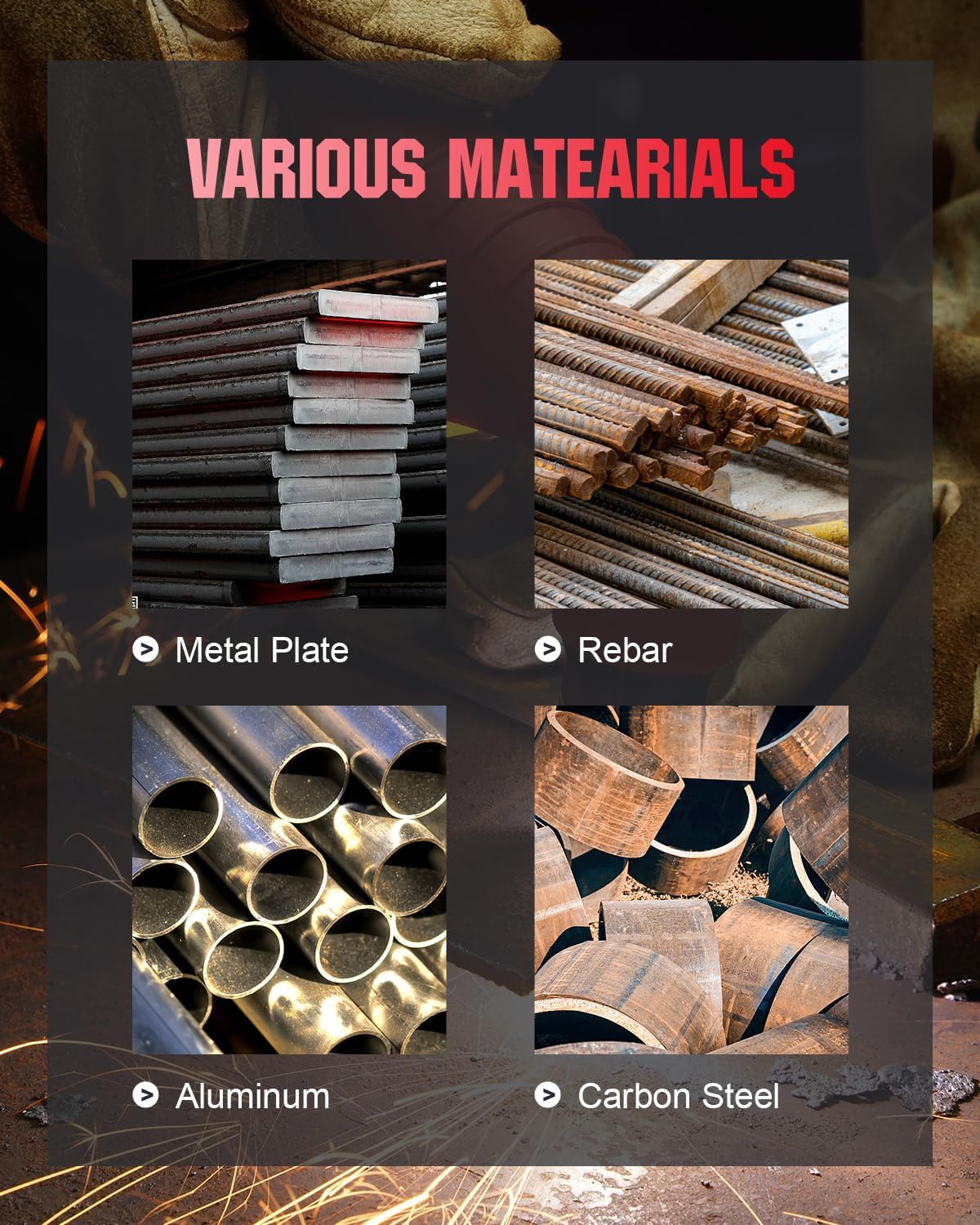
Figure 6.1: Examples of materials that can be cut with the plasma cutter, including metal plate, rebar, aluminum, and carbon steel.
7. Specifications
Detailed technical specifications for the ANDELI CUT60Y Plasma Cutter.
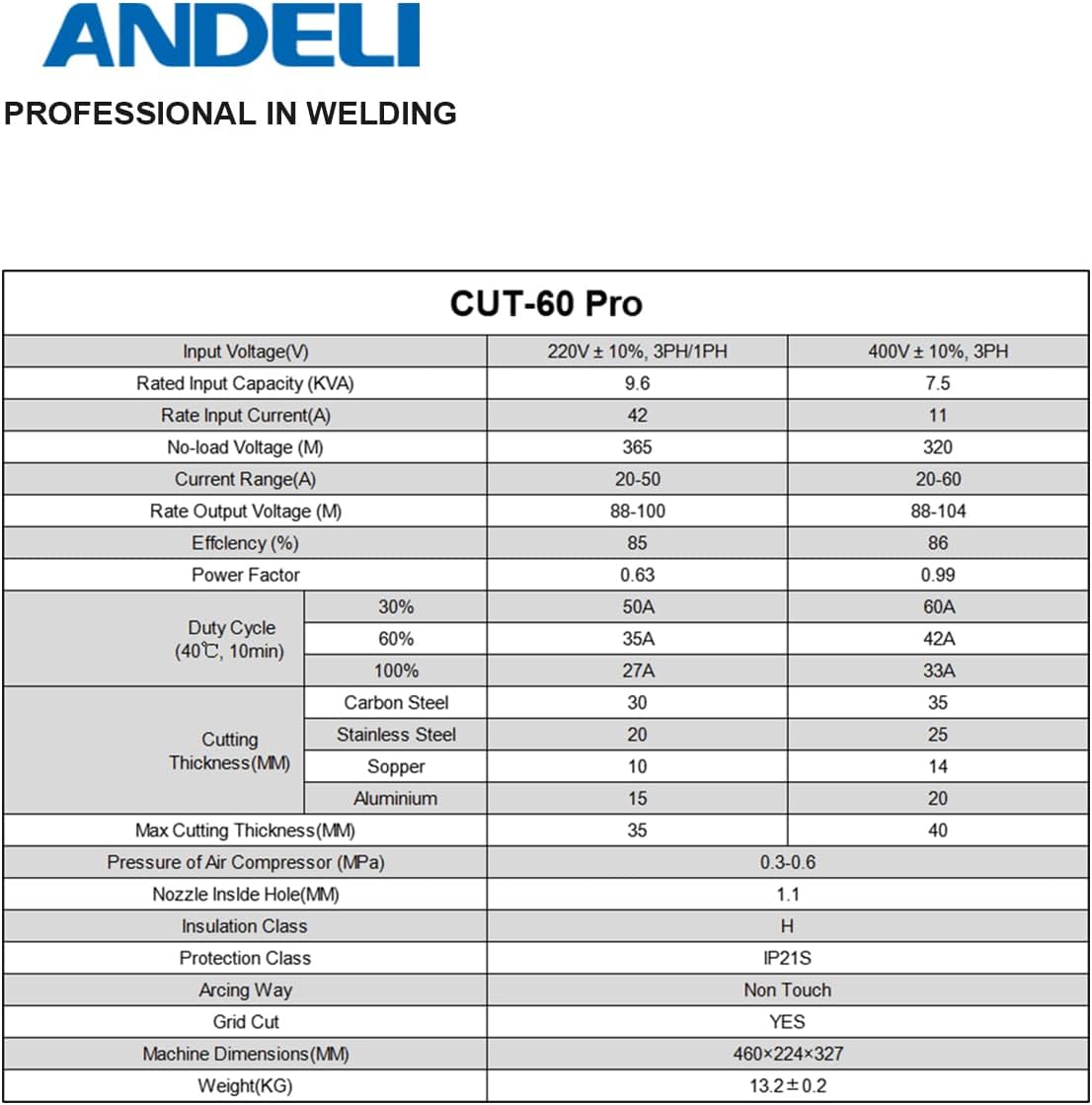
Figure 7.1: Comprehensive table of technical specifications for the CUT60Y Plasma Cutter.
| Specification | 220V ± 10%, 3PH/1PH | 400V ± 10%, 3PH |
|---|---|---|
| Input Voltage(V) | 220V ± 10%, 3PH/1PH | 400V ± 10%, 3PH |
| Rated Input Capacity (KVA) | 9.6 | 7.5 |
| Rate Input Current(A) | 42 | 11 |
| No-load Voltage (V) | 365 | 320 |
| Current Range(A) | 20-50 | 20-60 |
| Rate Output Voltage (V) | 88-100 | 88-104 |
| Efficiency (%) | 85 | 86 |
| Power Factor | 0.63 | 0.99 |
| Duty Cycle (40℃, 10min) - 30% | 50A | 60A |
| Duty Cycle (40℃, 10min) - 60% | 35A | 42A |
| Duty Cycle (40℃, 10min) - 100% | 27A | 33A |
| Cutting Thickness (MM) - Carbon Steel | 30 | 35 |
| Cutting Thickness (MM) - Stainless Steel | 20 | 25 |
| Cutting Thickness (MM) - Copper | 10 | 14 |
| Cutting Thickness (MM) - Aluminium | 15 | 20 |
| Max Cutting Thickness (MM) | 35 | 40 |
| Pressure of Air Compressor (MPa) | 0.3-0.6 | |
| Nozzle Inside Hole (MM) | 1.1 | |
| Insulation Class | H | |
| Protection Class | IP21S | |
| Arcing Way | Non Touch | |
| Grid Cut | YES | |
| Machine Dimensions (MM) | 460x224x327 | |
| Weight (KG) | 13.2 ± 0.2 | |
8. Troubleshooting
This section provides general guidance for common issues. For complex problems, contact customer support.
- No Power: Check power connections, circuit breaker, and ensure the machine's power switch is ON.
- No Arc: Verify gas supply, air pressure, torch consumables (electrode, nozzle, shield cup), and ground clamp connection. Ensure the correct operating mode (2T/4T) is selected.
- Poor Cut Quality: Check air pressure, cutting speed, torch height, and consumable wear. Ensure the workpiece is clean and free of rust or paint.
- Overheating: Allow the machine to cool down. Ensure proper ventilation and that the duty cycle is not exceeded.
9. Maintenance
Regular maintenance helps ensure the longevity and optimal performance of your plasma cutter.
- Consumables: Regularly inspect and replace torch consumables (nozzle, electrode, shield cup, swirl ring) as they wear out.
- Air Filter: Check and clean or replace the air filter on the air regulator to ensure clean, dry air supply.
- Cleaning: Keep the machine clean and free of dust and debris. Use compressed air to blow out internal components periodically, ensuring power is disconnected.
- Cables: Inspect all cables for damage, cuts, or frayed insulation. Replace damaged cables immediately.
10. Warranty and Support
For warranty information, technical support, or service inquiries, please refer to the documentation provided with your purchase or contact ANDELI customer service directly. Keep your purchase receipt as proof of purchase for warranty claims.


