
DOOGEE V20 Pro Silver
DOOGEE V20 PRO Rugged Smartphone User Manual
Model: V20 Pro Silver
1. Introduction
The DOOGEE V20 PRO is a robust 5G rugged smartphone designed for demanding environments, featuring advanced thermal imaging capabilities, a high-resolution AMOLED display, and powerful performance. This manual provides essential information for setting up, operating, and maintaining your device.
2. What's in the Box
- DOOGEE V20 Pro Rugged Smartphone x1
- Type-C USB Cable x1
- Charger (33W) x1
- Anti-explosion film (pre-applied) x1
- Anti-explosion film x1

Image: Contents of the DOOGEE V20 Pro retail box, including the smartphone, charging cable, charger, and screen protectors.
3. Initial Setup
3.1 Charging the Device
Before first use, fully charge your DOOGEE V20 Pro. Use the provided 33W charger and Type-C USB cable for optimal charging speed.
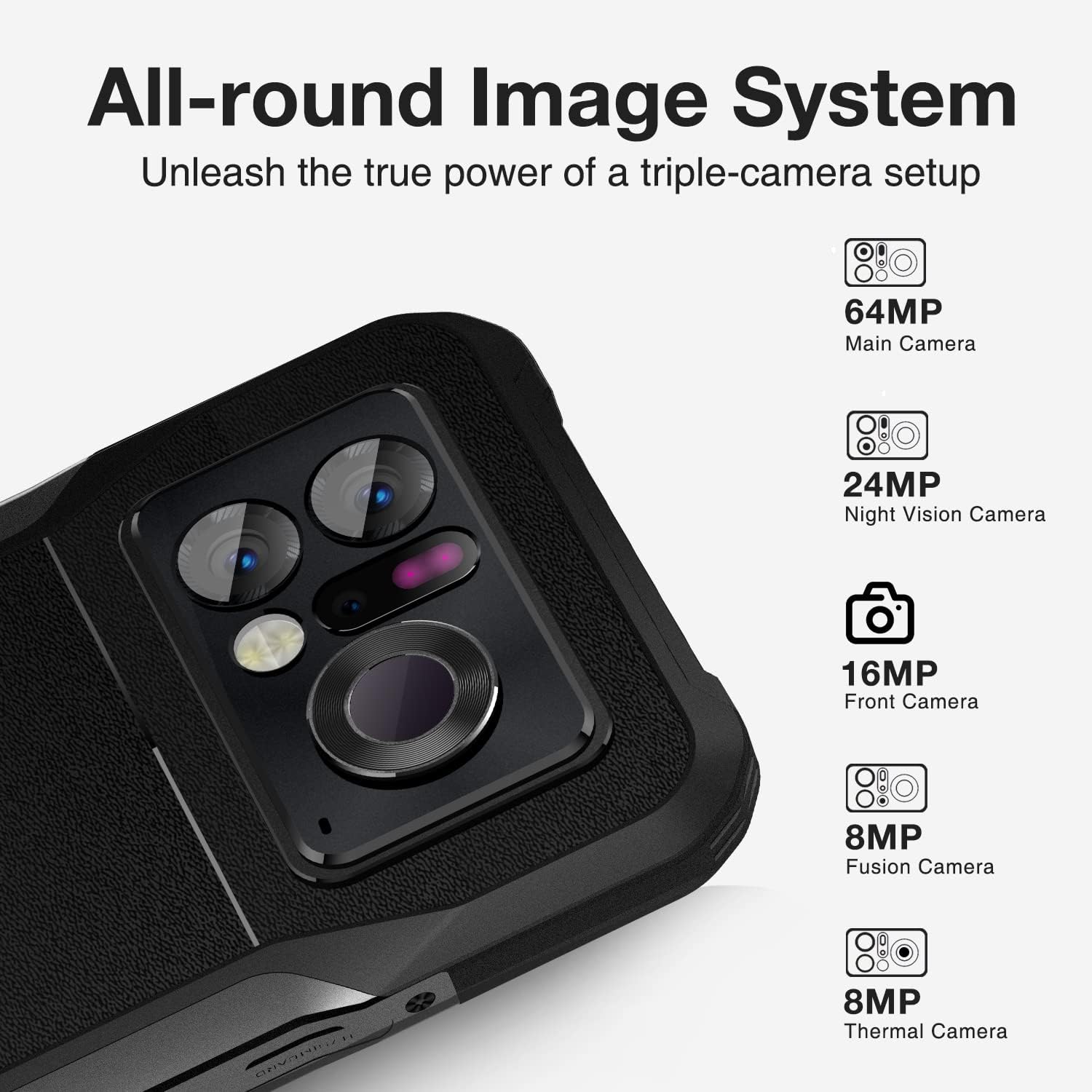
Image: The DOOGEE V20 Pro connected to its charger, illustrating the charging process.
Video: An unboxing and initial setup demonstration of the DOOGEE V20 Pro, showing the contents and first power-on.
3.2 SIM Card and Storage Installation
The device supports Dual SIM 5G or one SIM card and one expandable TF card (up to 2TB). Locate the SIM tray on the side of the phone, insert your Nano-SIM cards and/or TF card as indicated, and close the tray securely.
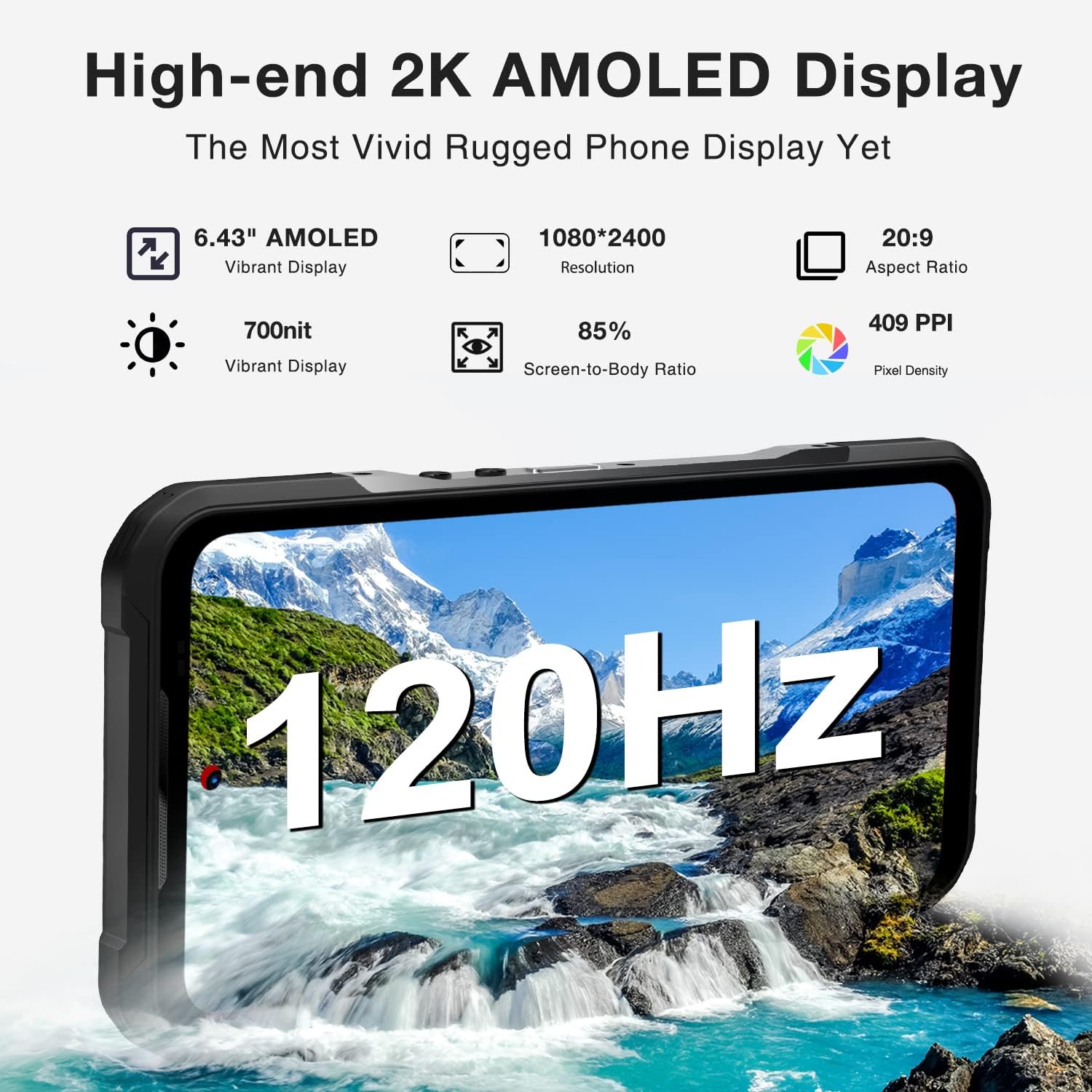
Image: Close-up of the DOOGEE V20 Pro's SIM card tray, illustrating the dual SIM and TF card slots.
3.3 Powering On and Initial Configuration
Press and hold the power button until the DOOGEE logo appears. Follow the on-screen prompts to complete the initial setup, including language selection, Wi-Fi connection, and Google account sign-in.
For enhanced security, configure the convenient side fingerprint recognition and face unlock features during setup or later in the device settings.

Image: The side-mounted power button with integrated fingerprint scanner on the DOOGEE V20 Pro.
4. Operating Instructions
4.1 Thermal Imaging Camera
The DOOGEE V20 Pro features a cutting-edge thermal imaging system with a 1440*1080 resolution and a 25Hz frame rate. It can detect heat sources up to 1000m away, making it ideal for various applications such as home inspections, firefighting, and outdoor observation.

Image: A visual representation of the 1000-meter thermal imaging range of the DOOGEE V20 Pro.

Image: Examples of multi-application scenarios for the thermal camera, including first responders, hunting, electrical maintenance, and moisture detection.
Video: A demonstration of the DOOGEE V20 Pro's 1000M thermal imaging capabilities, showcasing its high resolution and various uses.
4.2 Night Vision Camera
Equipped with a 24MP infrared night vision camera, the V20 Pro allows for clear photography and video recording in low-light or complete darkness. This feature is particularly useful for outdoor activities or security monitoring.

Image: An example of an image captured using the 24MP night vision camera, showing a fox in darkness.
4.3 Display Features
The 6.43-inch 2K AMOLED display offers vibrant visuals with 700 nits brightness, ensuring clarity even in direct sunlight. The 120Hz refresh rate provides a smooth and responsive user experience, ideal for gaming and scrolling.

Image: The high-end 2K AMOLED display of the DOOGEE V20 Pro, highlighting its 120Hz refresh rate.
4.4 Performance and Storage
Powered by a 7nm 5G chip, the V20 Pro delivers fast and efficient performance. With 20GB RAM (12GB physical + 8GB expandable) and 256GB ROM (expandable up to 2TB via TF card), it provides ample space and speed for multitasking, gaming, and storing large files.

Image: Infographic detailing the 20GB RAM and 256GB ROM of the DOOGEE V20 Pro, along with CPU and 5G support.
Video: A promotional video showcasing the DOOGEE V20 Pro's features, including its thermal camera and overall performance.
4.5 Smart Key Function
The customizable Smart Key allows you to assign various functions to single clicks, double-clicks, or long-presses. Access this feature via Settings > Easy Key to configure shortcuts for recording, flashlight, screenshots, underwater camera, or walkie-talkie mode.
4.6 Connectivity and Navigation
The V20 Pro supports Bluetooth 5.0, 2.4G/5G dual-band Wi-Fi, and NFC for Google Pay. It integrates four satellite navigation systems (GPS, Beidou, GLONASS, and Galileo) for precise positioning.
5. Maintenance and Care
The DOOGEE V20 Pro is built to be rugged, with IP68/IP69K and MIL-STD-810H certifications, making it resistant to water, dust, and drops. However, proper care is still essential to ensure its longevity.
- Cleaning: Use a soft, damp cloth to clean the device. Avoid harsh chemicals or abrasive materials.
- Water Exposure: While water-resistant, ensure all port covers are securely closed before exposing the device to water. Rinse with fresh water after exposure to saltwater and dry thoroughly.
- Temperature: Avoid exposing the device to extreme temperatures (very hot or very cold) for extended periods.
- Impact: Despite its rugged design, severe impacts can still cause damage. Handle with care.

Image: The DOOGEE V20 Pro submerged in water, demonstrating its IP68/IP69K water resistance.
6. Troubleshooting
| Problem | Possible Cause | Solution |
|---|---|---|
| Device does not power on | Low battery; software crash | Charge the device for at least 30 minutes. Perform a forced restart by holding the power button for 10-15 seconds. |
| Poor network signal | Out of network coverage; SIM card issue | Move to an area with better signal. Reinsert the SIM card. Contact your network provider. |
| Thermal camera not working | Software glitch; app permissions | Restart the camera app or the device. Check camera permissions in settings. |
| Device is slow or lagging | Too many apps running; low storage | Close background apps. Clear cache and unnecessary files. Consider a factory reset if issues persist (backup data first). |
7. Technical Specifications
| Feature | Detail |
|---|---|
| Model Name | V20 Pro Silver |
| Product Dimensions | 6.71 x 3.2 x 0.55 inches |
| Item Weight | 10.4 ounces (296 Grams) |
| Operating System | Android 12.0 |
| RAM | 12 GB (expandable to 20GB) |
| Memory Storage Capacity | 256 GB (expandable up to 2TB) |
| Screen Size | 6.43 Inches |
| Resolution | 2K (1080*2400) |
| Refresh Rate | 120 Hz |
| Thermal Camera Resolution | 1440*1080 |
| Night Vision Camera | 24MP |
| Main Camera | 64MP |
| Front Camera | 16MP |
| Battery Capacity | 6000 Milliamp Hours |
| Charging | 33W Fast Charge |
| Wireless Communication | NFC, Bluetooth 5.0, 2.4G/5G Wi-Fi |
| Navigation Systems | GPS, Beidou, GLONASS, Galileo |
| Ruggedness | IP68/IP69K, MIL-STD-810H |
8. Warranty and Support
DOOGEE offers comprehensive support for your V20 Pro Rugged Smartphone:
- 30-Day Money Back Guarantee: If you are not satisfied with your purchase, you may return it within 30 days for a full refund.
- 2-Year Limited Warranty: Your device is covered by a 2-year limited warranty against manufacturing defects.
- 24/7 Online Support: Access online support anytime for assistance with your device.

Image: An illustration representing DOOGEE's customer service, highlighting money-back guarantee, warranty, and online support.
Ask a question about this manual
Ask about setup, troubleshooting, compatibility, parts, safety, or missing instructions. Manuals+ will review the question and use this page’s manual context to help answer it.