Introduction
This manual provides essential information for the safe and efficient use of your Faber FBIO 80L 4F BK Built-In Oven. Please read these instructions carefully before installation and operation, and retain them for future reference.
Safety Information
Electrical Safety: Ensure the oven is correctly installed by a qualified technician and connected to a properly grounded electrical outlet. Do not use extension cords.
Hot Surfaces: The oven interior and exterior surfaces become hot during operation. Use oven mitts and avoid direct contact. Keep children away from the appliance.
Cleaning: Always disconnect the power supply before cleaning. Allow the oven to cool completely.
Ventilation: Ensure adequate ventilation around the oven as specified in the installation instructions.
Product Overview
The Faber FBIO 80L 4F BK is an 80-liter capacity built-in electric oven featuring a sleek black glass finish and intuitive push/pull knob controls. It offers various cooking functions to cater to diverse culinary needs.
Components and Controls
Familiarize yourself with the main components and control panel of your oven.

Figure 1: Front view of the Faber FBIO 80L 4F BK Built-In Oven, showing the control panel, oven door, and handle.

Figure 2: Interior view of the oven, highlighting the grill rack, universal pan, and convection fan.
The oven features a three-layer glass door for improved insulation and a cool touch handle for safer operation. The inner glass is also designed to be cool to the touch.
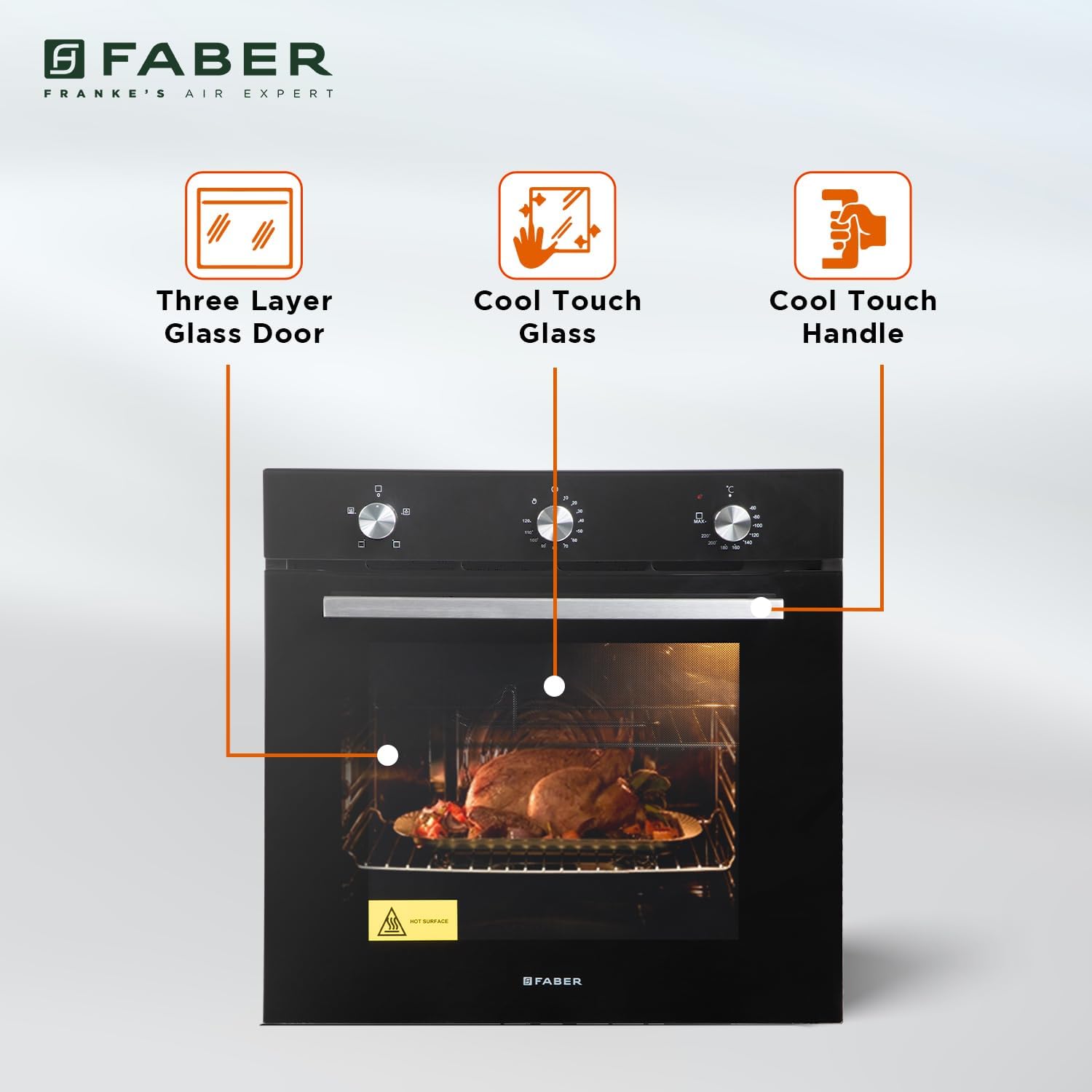
Figure 3: Illustration of the oven's door features, including three-layer glass, cool touch glass, and cool touch handle.
The control panel consists of push/pull knobs for function selection and temperature adjustment, along with a digital display for the mechanical timer.
Installation
The Faber FBIO 80L 4F BK is designed for built-in installation. It is highly recommended that installation be performed by a qualified professional to ensure proper functioning and safety.
Pre-Installation Checks
Verify that the electrical supply matches the oven's requirements (240 Volts, 2875 Watts).
Ensure the cabinet opening dimensions are correct.
Cabinet Opening Dimensions
The required cut-out dimensions for installation are crucial for proper fit and ventilation.

Figure 4: Diagram showing the product dimensions (Width x Depth x Height: 594mm x 548mm x 594mm) and cut-out dimensions (Width x Depth: 594mm x 594mm).
Product Dimensions (W x D x H): 594mm x 548mm x 594mm
Cut-Out Dimensions (W x D): 594mm x 594mm
Mounting the Oven
Carefully slide the oven into the prepared cabinet opening.
Secure the oven to the cabinet using the provided screws, typically through mounting holes on the oven frame.
Ensure the oven is level and stable.
Operation
Your Faber FBIO 80L 4F BK oven offers a range of cooking functions and precise temperature control for optimal cooking results.
Control Panel Overview
The oven features three main controls:
Function Selector Knob: Used to select the desired cooking mode.
Temperature Control Knob: Used to set the oven temperature from 50°C to 250°C.
Mechanical Timer: A digital display timer for setting cooking durations.
Cooking Functions
The oven provides multiple cooking functions, each designed for specific cooking needs:

Figure 5: Overview of the oven's cooking functions, including Light, Grill, Top Heating, Conventional Heating, Convection Heating, Fan with Bottom Heat, and Defrost & Fan Assisted Grilling.
Light: Illuminates the oven interior for visibility without heating.
Grill: Ideal for crisping pizza and chicken, providing direct top heat.
Top Heating: Suitable for dishes like lasagna and pie, focusing heat from the top element.
Conventional Heating: Uses both top and bottom elements for traditional baking, suitable for breads and fruitcakes.
Convection Heating (Bake Mode): Utilizes a fan to circulate hot air evenly throughout the oven, ideal for baking multiple items or achieving uniform results.
Fan with Bottom Heat: Combines the bottom heating element with the convection fan for crisp pies and pastry bases.
Defrost & Fan Assisted Grilling: A combination for defrosting and achieving crispy food with fan assistance during grilling.
Setting the Oven
Select Function: Turn the Function Selector Knob to the desired cooking mode.
Set Temperature: Turn the Temperature Control Knob to the required temperature (50°C - 250°C).
Set Timer (Optional): Use the Mechanical Timer to set the cooking duration. The oven will switch off automatically once the set time elapses.
Preheating: For best results, preheat the oven to the desired temperature before placing food inside.
Shelf Positions
The oven features 5 shelf positions, allowing flexibility for different dish sizes and cooking requirements.

Figure 6: Diagram illustrating the five available shelf positions within the oven cavity.
Choose the appropriate shelf position based on the food item and cooking function. For grilling, use higher positions. For baking, middle positions are generally recommended.
Maintenance
Regular cleaning and maintenance will ensure the longevity and optimal performance of your oven.
General Cleaning
Before Cleaning: Always switch off the oven and disconnect it from the power supply. Allow the oven to cool completely.
Exterior: Clean the black glass finish and control panel with a soft cloth and mild detergent. Avoid abrasive cleaners or harsh chemicals.
Interior: Remove racks and accessories. Wipe the interior with a damp cloth and a non-abrasive oven cleaner. For stubborn stains, follow the instructions on your chosen oven cleaner product.
Oven Door: Clean the glass panels with a glass cleaner. Ensure no liquid seeps into the door mechanism.
Replacing the Oven Light
If the oven light needs replacement, ensure the oven is cool and disconnected from power. Consult a qualified technician if you are unsure how to proceed.
Troubleshooting
This section addresses common issues you might encounter with your oven. Before contacting customer service, please review these solutions.
| Problem | Possible Cause | Solution |
|---|---|---|
| Oven does not heat up. | No power supply; incorrect function/temperature setting; faulty heating element. | Check power connection and circuit breaker. Ensure function and temperature knobs are correctly set. If problem persists, contact service. |
| Oven light is not working. | Light bulb is burnt out. | Replace the oven light bulb (ensure oven is cool and disconnected from power). |
| Uneven cooking results. | Incorrect shelf position; overcrowding the oven; door not fully closed. | Adjust shelf position. Avoid overcrowding. Ensure oven door is securely closed. Use convection function for more even heat distribution. |
| Digital timer not functioning. | Power interruption; timer setting error. | Reset the timer. Check power supply. |
Specifications
Detailed technical specifications for the Faber FBIO 80L 4F BK Built-In Oven.
| Feature | Specification |
|---|---|
| Brand | Faber |
| Model Number | 116.0680.002 |
| Capacity | 80 Liters |
| Installation Type | Built-In |
| Control Type | Push/Pull Knob, Digital Display |
| Finish | Black Glass |
| Energy Efficiency | A Class Energy Efficient |
| Timer Type | Mechanical Timer |
| Primary Cooking Functions | 4 (Grill, Top Heating, Conventional Heating, Convection Heating) |
| Temperature Range | 50°C - 250°C |
| Item Weight | 88.6 pounds |
| Product Dimensions (W x D x H) | 594mm x 548mm x 594mm |
| Cut-Out Dimensions (W x D) | 594mm x 594mm |
| Voltage | 240 Volts |
| Wattage | 2875 watts |
| Fuel Type | Electric |
| Oven Cooking Mode | Conduction |
| Defrost | Auto Defrost |
| Door Hinges | Front |
| Material Type | Glass |
| Included Components | Grill Rack, Universal Pan, Tong |
| Date First Available | September 14, 2023 |
Warranty and Support
Your Faber FBIO 80L 4F BK Built-In Oven comes with a 1-Year Comprehensive Warranty from the date of purchase.
Warranty Coverage
Covers manufacturing defects and functional issues under normal use.
Excludes damage due to improper installation, misuse, accidents, or unauthorized repairs.
Customer Support
For warranty claims, technical assistance, or service requests, please contact Faber customer support. Keep your purchase receipt and product model number (116.0680.002) readily available.
For further assistance, please refer to the official Faber website or contact their authorized service centers.


