
Instant 140-0095-01
Instant Solo WIFI Connect Single Serve Coffee Maker Instruction Manual
Model: 140-0095-01
Introduction
This manual provides essential instructions for the safe and efficient operation, maintenance, and troubleshooting of your Instant Solo WIFI Connect Single Serve Coffee Maker. Please read all instructions thoroughly before first use and retain this manual for future reference.
Important Safeguards
When using electrical appliances, basic safety precautions should always be followed to reduce the risk of fire, electric shock, and/or injury to persons, including the following:
- Read all instructions.
- Do not touch hot surfaces. Use handles or knobs.
- To protect against fire, electric shock, and injury to persons, do not immerse cord, plugs, or the appliance in water or other liquid.
- Close supervision is necessary when any appliance is used by or near children.
- Unplug from outlet when not in use and before cleaning. Allow to cool before putting on or taking off parts, and before cleaning the appliance.
- Do not operate any appliance with a damaged cord or plug or after the appliance malfunctions, or has been damaged in any manner.
- The use of accessory attachments not recommended by the appliance manufacturer may result in fire, electric shock, or injury to persons.
- Do not use outdoors.
- Do not let cord hang over edge of table or counter, or touch hot surfaces.
- Do not place on or near a hot gas or electric burner, or in a heated oven.
- Always attach plug to appliance first, then plug cord into the wall outlet. To disconnect, turn any control to "off", then remove plug from wall outlet.
- Do not use appliance for other than intended use.
- Scalding may occur if the lid is removed during the brewing cycles.
Product Overview
Familiarize yourself with the components of your Instant Solo WIFI Connect Single Serve Coffee Maker.

Image: The Instant Solo WIFI Connect Coffee Maker, shown brewing coffee into a mug, with a smartphone displaying the Instant Brands Connect app interface.

Image: A detailed view of the coffee maker's top control panel with touch buttons for power, Wi-Fi, brew sizes (8oz, 10oz, 12oz), and the reusable coffee pod being inserted.
Key Components:
- Control Panel: Touch-sensitive buttons for power, Wi-Fi, and brew size selection.
- Water Reservoir: Removable 40oz capacity for water.
- Brew Head: Area where K-Cup pods or the reusable coffee pod are placed.
- Drip Tray: Removable and dishwasher-safe tray to catch drips and accommodate travel mugs.
- Reusable Coffee Pod: Included for brewing with ground coffee.
Setup
Initial Cleaning:
- Remove all packaging materials and stickers from the coffee maker.
- Wash the water reservoir, reusable coffee pod, and drip tray in warm, soapy water. Rinse thoroughly and dry.
- Wipe the exterior of the coffee maker with a damp cloth.
First Use (Cleaning Cycle):
- Fill the water reservoir with fresh water up to the MAX fill line.
- Place a large mug (at least 12oz) on the drip tray.
- Do not insert a K-Cup pod or the reusable coffee pod.
- Press the power button to turn on the coffee maker.
- Select the 12oz brew size. The machine will perform a hot water cycle to clean the internal components.
- Discard the hot water. Repeat this process 2-3 times to ensure thorough cleaning.
Water Reservoir Refill:

Image: A hand pouring water into the transparent, removable 40oz water reservoir of the Instant Solo coffee maker, highlighting its slim design and dimensions.
The 40oz removable water reservoir allows for multiple brews before refilling. To refill, simply lift the reservoir from the back of the unit and fill with fresh, cold water. Replace it securely on the coffee maker.
Operating Instructions
Brewing Hot Coffee:
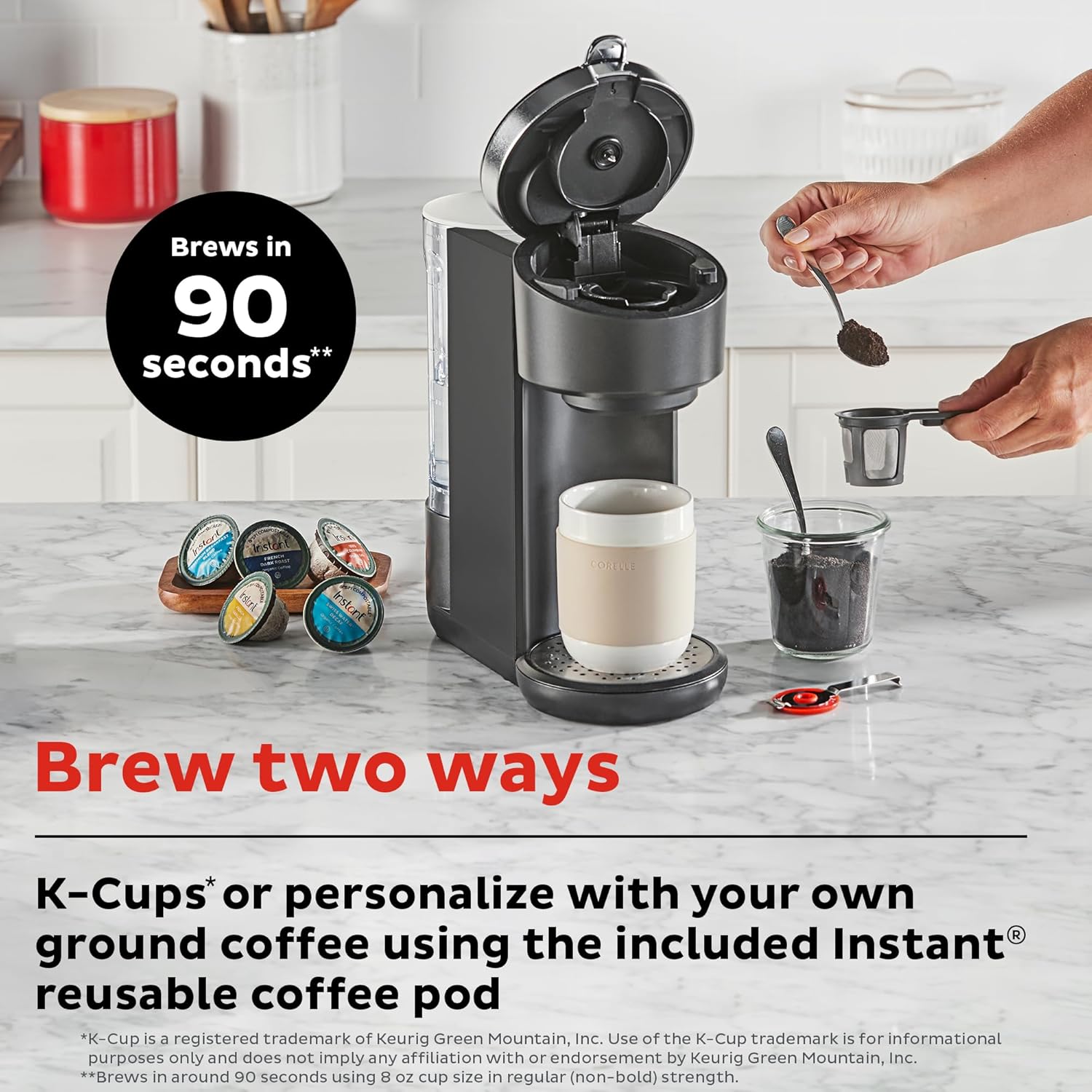
Image: The Instant Solo coffee maker on a countertop, illustrating the two brewing methods: using K-Cup compatible pods or filling the reusable coffee pod with ground coffee.
Using K-Cup Compatible Pods:
- Ensure the water reservoir is filled.
- Lift the brew head handle.
- Insert a K-Cup compatible pod into the pod holder. Close the handle firmly.
- Place a mug on the drip tray.
- Press the power button. Select your desired brew size (8oz, 10oz, or 12oz).
- The coffee maker will begin the brewing process.
Using Ground Coffee with Reusable Pod:
- Ensure the water reservoir is filled.
- Open the reusable coffee pod and fill it with your preferred ground coffee. Do not overfill.
- Close the reusable pod and insert it into the brew head. Close the handle firmly.
- Place a mug on the drip tray.
- Press the power button. Select your desired brew size (8oz, 10oz, or 12oz).
- The coffee maker will begin the brewing process.
Bold Setting and Pre-Infusion:

Image: A cutaway diagram showing the three stages of the pre-infusion brew process: Infuse (grounds soaked), Pause (grounds saturate), and Brew (remaining water extracted).
The Instant Solo features a pre-infusion brew process that gently soaks the coffee grounds before full brewing. This process enhances flavor and aroma. To activate the Bold setting for a stronger brew, select the 'Bold' option on the control panel or through the Instant Brands Connect app before selecting your brew size.
Brewing Iced Coffee:

Image: A graphic illustrating the customization capabilities of the coffee maker, including brew sizes (8, 10, 12 oz on device; 4, 8 oz via app), the Bold setting for deeper flavor, and the Iced Coffee mode accessible through the app.
To prepare iced coffee, fill your glass with ice cubes. Select the 'Bold' feature and choose an 8, 10, or 12oz brew size. The machine will brew a concentrated coffee over the ice. You may add milk or other ingredients after brewing to complete your iced coffee.
Wi-Fi Connect & App Usage:

Image: The Instant Solo coffee maker on a kitchen counter, with a hand holding a smartphone showing the Instant Brands Connect app, indicating remote control functionality.
The Instant Solo WIFI Connect coffee maker can be controlled remotely using the Instant Brands Connect app. This app allows you to initiate brewing, customize settings, and receive notifications.
- Download the Instant Brands Connect app from your device's app store (available for iOS and Android).
- Follow the in-app instructions to connect your coffee maker to your home Wi-Fi network.
- Once connected, you can use the app to select brew sizes (including additional 4oz and 6oz options), adjust brew strength, activate Iced Coffee mode, and schedule brewing.
- The app also provides notifications regarding brewing status and maintenance reminders.
Maintenance
Cleaning:
- Exterior: Wipe the exterior with a damp, soft cloth. Do not use abrasive cleaners.
- Water Reservoir: The 40oz removable water reservoir is dishwasher safe (top rack recommended) or can be hand-washed with warm, soapy water.
- Drip Tray: The removable drip tray is dishwasher safe (top rack recommended) or can be hand-washed.
- Reusable Coffee Pod: Wash with warm, soapy water after each use.
- Brew Head: Periodically wipe the area around the brew head with a damp cloth.
Descaling:
Over time, mineral deposits (scale) can build up in your coffee maker, affecting performance. Descaling should be performed regularly, depending on water hardness and frequency of use.
- Empty the water reservoir.
- Fill the reservoir with a mixture of white vinegar and water (e.g., 1:1 ratio) or a commercial descaling solution according to product instructions.
- Place a large mug on the drip tray.
- Run several 12oz brew cycles until the reservoir is empty. Do not insert a coffee pod during descaling.
- After descaling, rinse the reservoir thoroughly and fill it with fresh water.
- Run several 12oz brew cycles with fresh water to flush out any remaining descaling solution.
Troubleshooting
| Problem | Possible Cause | Solution |
|---|---|---|
| Coffee not brewing | No water in reservoir; brew head not closed; power issue. | Fill reservoir; ensure brew head handle is fully down; check power connection. |
| Weak coffee | Insufficient coffee grounds; incorrect brew size; descaling needed. | Use more grounds or a finer grind; select smaller brew size; activate Bold setting; descale the machine. |
| Coffee overflows | Mug too small; reusable pod overfilled. | Use a larger mug; do not overfill reusable pod. |
| Wi-Fi connection issues | Incorrect Wi-Fi password; router too far; app not updated. | Verify password; move coffee maker closer to router; update Instant Brands Connect app. |
| Machine flashes lights | Error indicator; descaling reminder. | Refer to app for specific error codes; perform descaling if due. |
Specifications
- Brand: Instant
- Model Name: Instant Solo WIFI Connect
- Model Number: 140-0095-01
- Color: Black
- Product Dimensions: 12.2"D x 5.3"W x 12.4"H (31 cm D x 13.5 cm W x 31.5 cm H)
- Item Weight: 4.6 pounds
- Water Reservoir Capacity: 40 oz
- Brew Sizes: 8oz, 10oz, 12oz (additional 4oz, 6oz via app)
- Special Feature: App-Controlled, Pre-Infusion Brew Process, Bold Setting, Iced Coffee Mode
- Compatibility: K-Cup compatible pods, ground coffee with reusable pod
- Operation Mode: Fully Automatic
- Human Interface Input: Touchscreen
- UPC: 810028589940
Warranty and Support
For warranty information and customer support, please refer to the warranty card included with your product or visit the official Instant Brands website. You can also find additional resources and frequently asked questions on the Instant Brands Connect app.
Related documents140-0095-01


Ask a question about this manual
Ask about setup, troubleshooting, compatibility, parts, safety, or missing instructions. Manuals+ will review the question and use this page’s manual context to help answer it.