
1. Introduction
This manual provides essential information for the safe and effective use of your Anchilly Fz31-9 Electric Oven Function Selector Switch. Please read these instructions carefully before installation and operation to ensure proper functionality and to prevent damage or injury. This switch is designed for electric ovens requiring a 3-pin, 4-position selector for various heating functions.
2. Safety Information
WARNING: Risk of Electric Shock.
- Installation and replacement should only be performed by a qualified electrician or appliance technician.
- Always disconnect power to the oven at the circuit breaker or fuse box before attempting any installation, maintenance, or inspection.
- Ensure all wiring connections are secure and correctly matched to prevent electrical hazards.
- Verify that the replacement switch (Fz31-9) matches the original switch in terms of pin configuration, gear positions, and physical appearance to ensure compatibility and safe operation.
- Do not operate the oven if the switch is damaged or improperly installed.
3. Product Overview
The Anchilly Fz31-9 is a robust 3-pin, 4-position function selector switch designed for electric ovens. It allows users to select different heating modes or elements within the oven. Its durable construction ensures reliable and long-lasting performance.
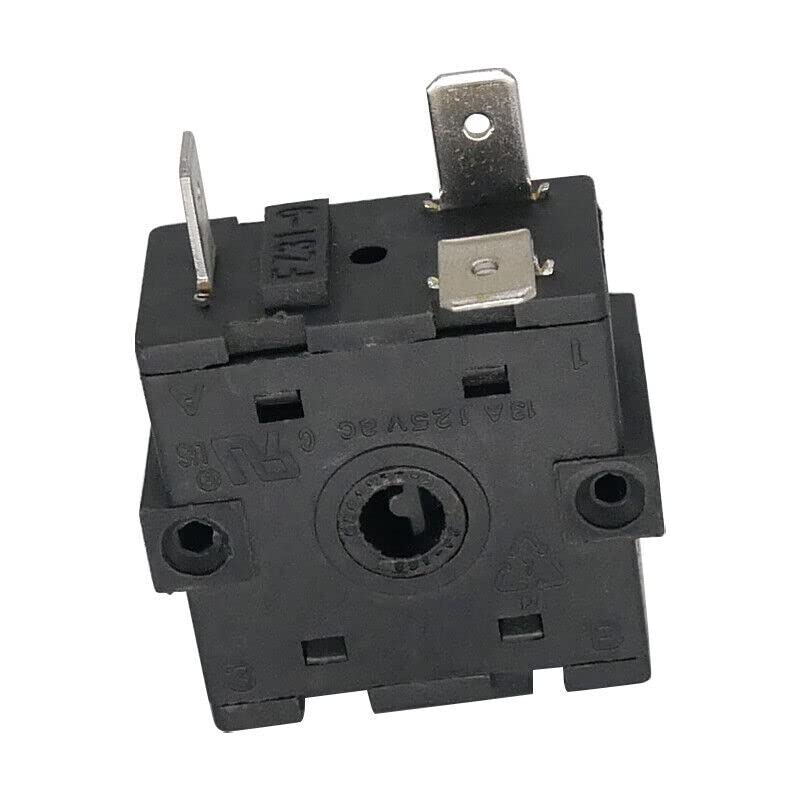
Figure 1: Anchilly Fz31-9 Electric Oven Function Selector Switch. This image displays the front view of the Fz31-9 switch, highlighting its rotary knob and mounting points, essential for identifying the correct replacement part.
4. Setup and Installation
Follow these general steps for installing or replacing the Fz31-9 function selector switch. Always refer to your specific oven's service manual for detailed wiring diagrams and instructions.
- Disconnect Power: Turn off the main power supply to the oven at the circuit breaker or fuse box. Verify that the power is off using a voltage tester.
- Access Switch: Carefully remove the oven's control panel or access cover to expose the existing function selector switch.
- Document Wiring: Before disconnecting any wires, take clear photos or draw a diagram of the existing wiring connections to the old switch. Note which wire connects to each pin (e.g., A-1, A-2, etc.).
- Remove Old Switch: Disconnect all wires from the old switch and unmount it from the control panel.
- Install New Switch: Mount the new Anchilly Fz31-9 switch into the control panel.
- Connect Wiring: Connect the wires to the corresponding pins on the new Fz31-9 switch, following your documented diagram. Ensure all connections are tight and secure.
- Reassemble: Carefully reattach the oven's control panel or access cover.
- Restore Power: Turn the main power supply back on at the circuit breaker.
- Test Functionality: Test all oven functions to ensure the switch operates correctly and selects the intended heating elements.
5. Operating Instructions
The Fz31-9 switch features 4 distinct positions, each typically corresponding to a different oven function. The switch rotates in 45-degree increments to select these positions.
- Position 0 (Off): This is the default position where all oven heating elements are deactivated.
- Position 1 (A-2 feet): Activates a specific heating element or function, often the lower heating element for baking.
- Position 2 (A-1 foot): Activates another specific heating element or function, commonly the upper heating element for broiling.
- Position 3 (A-1-2 feet): Activates a combination of heating elements or a specialized function, such as both upper and lower elements for convection baking.
Refer to your oven's user manual for the exact functions associated with each switch position for your specific appliance model.
6. Maintenance
The Anchilly Fz31-9 function selector switch is designed for durability and requires minimal maintenance.
- Cleaning: Keep the area around the switch on the oven's control panel clean and free from grease or food debris. Use a soft, damp cloth for cleaning. Do not use abrasive cleaners or solvents, as these can damage the switch or control panel.
- Inspection: Periodically, if you experience issues, and with the power disconnected, you may inspect the wiring connections for any signs of loosening or corrosion.
- Avoid Force: Do not apply excessive force when turning the switch knob, as this can cause internal damage.
7. Troubleshooting
If you encounter issues with your Fz31-9 function selector switch, consider the following troubleshooting steps:
- Switch Not Responding:
- Ensure the oven has power and the circuit breaker has not tripped.
- With power disconnected, check all wiring connections to the switch for looseness or incorrect placement.
- If the switch is physically damaged (e.g., broken knob, loose internal components), it may need replacement.
- Incorrect Function Selection:
- Verify that the switch was installed correctly and that the wires are connected to the appropriate pins as per your oven's wiring diagram.
- Ensure the switch knob is properly aligned with the internal mechanism.
- Intermittent Operation:
- Loose wiring connections can cause intermittent operation. Disconnect power and re-secure all connections.
- Internal wear or damage to the switch contacts can also cause this; replacement may be necessary.
If these steps do not resolve the issue, it is recommended to contact a qualified appliance technician for further diagnosis and repair.
8. Specifications
| Feature | Detail |
|---|---|
| Model | Fz31-9 |
| Part Number | switch0022 |
| Pin Configuration | 3-pin |
| Number of Positions | 4 (0, 1, 2, 3) |
| Rotation Angle per Position | 45 degrees |
| Manufacturer | Anchilly |
| ASIN | B0C2DC9GR5 |
| Color | Multicolored |
| Material | Not specified |
9. Warranty and Support
For information regarding product warranty, please refer to the terms and conditions provided by your retailer or the official Anchilly website. For technical assistance, installation guidance, or troubleshooting beyond the scope of this manual, it is recommended to contact a certified appliance service professional or a qualified electrician.