1. Introduction
The LIEMKE SPERBER-1 thermal aiming scope represents a new standard in optical design and performance. Featuring a robust aluminum housing that emulates the classic style of a daylight optic, the SPERBER-1 seamlessly integrates into your hunting setup. This device offers an impressive detection range of 1750 meters and delivers exceptional image quality, making it suitable for diverse hunting environments, including both dense forests and open fields. This manual provides essential information for the proper use, care, and maintenance of your SPERBER-1 scope.
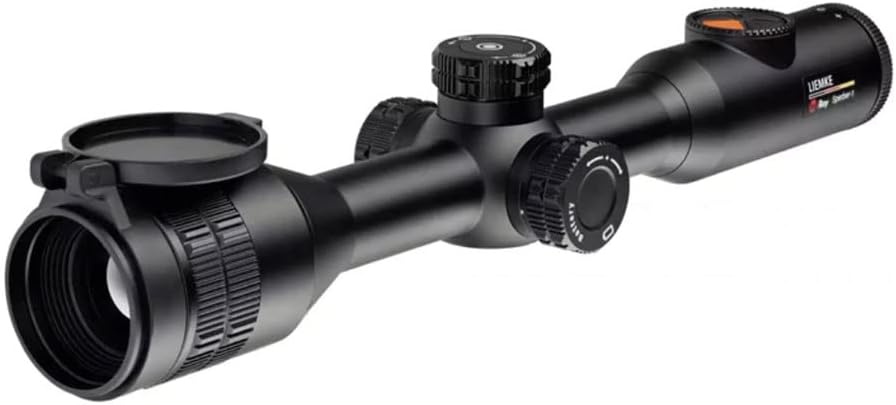
Figure 1.1: The LIEMKE SPERBER-1 Thermal Aiming Hunting Scope, showcasing its classic design and control turrets.
2. Safety Information
Please read and understand all safety instructions before operating the SPERBER-1 scope. Failure to follow these guidelines may result in injury or damage to the device.
- Eye Safety: Never look directly at the sun or other intense light sources through the scope, as this can cause permanent eye damage.
- Handling: Handle the scope with care. Avoid dropping or subjecting it to severe impacts, which can damage internal components.
- Battery Safety: Use only the specified battery types. Do not attempt to open, puncture, or short-circuit batteries. Dispose of batteries according to local regulations.
- Environmental Conditions: Avoid exposing the device to extreme temperatures, high humidity, or corrosive substances.
- Unauthorized Modifications: Do not attempt to disassemble or modify the scope. This will void the warranty and may cause malfunction.
3. Package Contents
Verify that all items are present in your SPERBER-1 package:
- LIEMKE SPERBER-1 Thermal Aiming Hunting Scope
- Integrated Rechargeable Battery
- Additional Replaceable Battery
- USB-C Charging Cable
- User Manual (this document)
- Protective Lens Caps
4. Setup
4.1 Mounting the Scope
The SPERBER-1 is designed for easy integration with standard mounting systems, such as a Picatinny mount. Ensure the mount is securely fastened to your firearm according to the mount manufacturer's instructions. Position the scope to achieve optimal eye relief and a clear field of view.

Figure 4.1: The SPERBER-1 scope securely mounted on a rifle, demonstrating its integration with a firearm.
4.2 Battery Installation and Charging
The SPERBER-1 features an integrated rechargeable battery and includes an additional replaceable battery for extended operation. The combined battery life can reach up to 15 hours.
- Charging: Connect the supplied USB-C cable to the scope's USB-C interface and to a compatible power source (e.g., wall adapter, power bank). The charging indicator will show the charging status.
- Replacing Battery: Locate the battery compartment (refer to Figure 4.2). Open the compartment, insert the additional replaceable battery with correct polarity, and close securely.

Figure 4.2: Rear-left view of the SPERBER-1, highlighting the battery compartment and the intuitive arrangement of control elements.
5. Operating the SPERBER-1
5.1 Power On/Off
To power on the device, press and hold the power button located on the control panel until the display illuminates. To power off, press and hold the power button again until the display shuts down.
5.2 Basic Controls
The SPERBER-1 features an intelligent arrangement of control elements designed for intuitive use in the field. These controls allow for quick adjustments to settings such as brightness, contrast, and color palettes.
5.3 Focusing
The 35mm objective lens can be manually focused to achieve the sharpest possible image. Rotate the focus ring on the objective lens until the target appears clear and crisp in the display.
5.4 Magnification Adjustment
The SPERBER-1 offers a variable magnification range from 3x to 12x. Use the magnification control (typically a rotary knob or button) to adjust the zoom level to suit your observation needs.
5.5 Image Modes and Display
Equipped with a 384 x 288 pixel ceramic VOx detector with 12 µm pixel pitch and a 1280 x 960 LCOS color display, the SPERBER-1 delivers highly detailed image sharpness and outstanding imaging performance in real-time at a 50Hz frame rate. Various color palettes (e.g., White Hot, Black Hot, Red Hot) can be selected to optimize target detection based on environmental conditions.

Figure 5.1: Thermal image display in 'White Hot' palette, showing target animals with a red aiming reticle.

Figure 5.2: Thermal image display in a color palette, providing enhanced contrast for target identification.
5.6 Recording and Storage
The SPERBER-1 includes a 16GB internal memory, allowing you to capture images and videos of your hunting experiences. Utilize the wireless connection feature to transfer recorded data to compatible devices.
6. Maintenance
Proper maintenance ensures the longevity and optimal performance of your SPERBER-1 scope.
- Cleaning Lenses: Use a soft, lint-free cloth specifically designed for optical lenses. Gently wipe the lens surfaces to remove dust and smudges. For stubborn dirt, use a small amount of lens cleaning fluid applied to the cloth, not directly to the lens.
- Cleaning Housing: Wipe the scope's aluminum housing with a damp, soft cloth. Avoid abrasive cleaners or solvents.
- Storage: Store the scope in a cool, dry place, away from direct sunlight and extreme temperatures. Use the provided lens caps to protect the objective and eyepiece lenses when not in use.
- Battery Care: If storing for an extended period, ensure batteries are partially charged (around 50%) and remove replaceable batteries to prevent discharge or leakage.
7. Troubleshooting
This section addresses common issues you might encounter with your SPERBER-1 scope.
| Problem | Possible Cause | Solution |
|---|---|---|
| Device does not power on | Low or depleted battery; Incorrect battery installation | Charge the integrated battery or replace the external battery. Ensure batteries are inserted with correct polarity. |
| Poor image quality / Blurry image | Lens is dirty; Improper focus; Extreme environmental conditions | Clean the objective lens. Adjust the manual focus ring. Allow the device to acclimate to ambient temperature. |
| Controls are unresponsive | Temporary software glitch; Low battery | Restart the device. Ensure battery is sufficiently charged. If issue persists, contact customer support. |
| Cannot connect via wireless | Wireless function not activated; Out of range; Interference | Ensure wireless function is enabled in settings. Move closer to the connected device. Reduce potential interference sources. |
8. Technical Specifications
Key specifications for the LIEMKE SPERBER-1 Thermal Aiming Hunting Scope:
| Feature | Specification |
|---|---|
| Model Name | SPERBER-1 |
| Objective Lens Diameter | 35 Millimeters |
| Detector Resolution | 384 x 288 pixels (Ceramic VOx) |
| Pixel Pitch | 12 µm |
| Display Type | LCOS Color Display |
| Display Resolution | 1280 x 960 |
| Frame Rate | 50Hz |
| Magnification | 3-12x |
| Detection Range | 1750 m |
| Field of View (at 100m) | 13.2 m |
| Battery Life | Up to 15 hours (integrated + additional replaceable battery) |
| Charging Interface | USB-C |
| Internal Memory | 16GB |
| Housing Material | Aluminum |
| Mounting Type | Picatinny Mount |
| Item Package Dimensions | 17.99 x 5.16 x 4.29 inches |
| Package Weight | 2.18 Kilograms |
| UPC | 810496024226 |
9. Warranty and Support
LIEMKE products are manufactured to high quality standards and are backed by a manufacturer's warranty against defects in materials and workmanship. Please refer to the warranty card included with your product or visit the official LIEMKE website for detailed warranty terms and conditions.
For technical support, service, or inquiries regarding your SPERBER-1 thermal scope, please contact LIEMKE customer service through their official channels. Provide your product model and serial number when seeking assistance to ensure efficient service.


