
CLAONER CLCLSD289AB-USAS1
CLAONER Solar Outdoor Lights Instruction Manual
Model: CLCLSD289AB-USAS1
Introduction
This manual provides detailed instructions for the installation, operation, and maintenance of your CLAONER Solar Outdoor Lights. Please read this manual thoroughly before using the product to ensure proper function and longevity.
Product Overview
The CLAONER Solar Outdoor Lights are designed to provide efficient and reliable outdoor illumination. Featuring a split design with a separate solar panel and four adjustable light heads, these lights offer flexible placement and wide coverage. Equipped with a sensitive PIR motion sensor and multiple lighting modes, they enhance security and convenience for various outdoor applications.

Image: Two sets of CLAONER Solar Outdoor Lights, each with four adjustable LED heads, a motion sensor, a separate solar panel, and a remote control. The lights are shown with their components, including the 16.4ft cable for the solar panel.
Key Features:
- Advanced Solar Panel: 2 times larger solar panel for 30% increased conversion rate and 50% faster charging.
- Enhanced PIR Motion Sensor: 350° wide illumination angle, up to 2500 sq ft coverage, 26 feet detection range with 180° angle.
- 4 Adjustable Heads: Allows for precise light direction.
- Split Design: 16.4 ft cable connects the lamp to the solar panel for flexible indoor/outdoor installation.
- 4 Lighting Modes: Customizable illumination for various needs.
- IP67 Waterproof: Engineered to withstand harsh weather conditions.
- Remote Control: Convenient operation and mode selection.

Image: A collage showing the CLAONER solar lights installed in various settings, including a garage, house exterior, RV campsite, and patio, demonstrating their versatility for both indoor and outdoor use.
Package Contents
Please verify that all items listed below are included in your package:
- 2 x Solar Security Light & Solar Panel
- 4 x Wall Buckle
- 2 x Remote Control
- 8 x Installing Screws & Plastic Anchor
- 1 x User Manual
Setup & Installation
Follow these steps for optimal installation and performance:
- Choose a Location: Select a location for the solar panel that receives direct sunlight for at least 6-8 hours daily. The light unit can be installed indoors or outdoors, connected by the 16.4 ft cable.
- Drill Holes: Drill holes on your chosen surface for mounting the wall buckle.
- Install Wall Buckle: Secure the wall buckle using the provided screws and plastic anchors. Ensure the open groove of the buckle is facing upwards.
- Mount the Light: Place the adjustable pivot arm connected to the outdoor light into the wall buckle. Ensure the solar motion sensor light is positioned downwards, not upwards.
- Adjust Light Heads: Adjust the four solar light heads to your desired angle for optimal illumination coverage.
- Connect Solar Panel: Connect the plug from the solar panel to the light unit.
- Activate: Press the power button on the back of the light unit or use the remote control to turn it on.

Image: A visual guide illustrating the four main steps for installing the solar motion sensor light, including drilling holes, installing the wall buckle, placing the light, and connecting the solar panel.

Image: A detailed diagram showcasing the CLAONER 288-LED split solar flood lights, highlighting the four adjustable heads, the 16.4ft cable, and key dimensions for both the light unit and the solar panel.
Operating Instructions
Charging
The CLAONER Solar Outdoor Lights are powered by an integrated solar panel. For optimal performance, ensure the solar panel is placed in an area that receives maximum direct sunlight throughout the day. The advanced monocrystalline technology boosts efficiency by 30%, allowing for rapid daytime charging that delivers up to 15 hours of illumination coverage.

Image: An infographic illustrating the solar charging capabilities, showing that the solar panel surface area is 48% larger, boosting efficiency by 30%, and providing 50% faster charging for 15 hours of illumination.
Motion Sensor
The built-in PIR motion sensor detects movement up to 26 feet away with a 180° detection angle, providing a wide illumination coverage of up to 2500 square feet. This feature is ideal for enhancing security around your property by activating bright light upon detecting motion.

Image: A visual representation of the CLAONER solar light's motion sensor capabilities, showing a 270° lighting angle, 180° sensor angle, and a 26ft maximum detecting distance, illuminating an area of 2500 sq ft.

Image: A scene depicting a dog walking in a yard at night, with the CLAONER solar light activating due to its smart motion detection for humans, animals, and vehicles.
Lighting Modes
The motion sensor light offers four distinct lighting modes, controllable via the switch on the back of the unit or the included remote control. The lights will flash to indicate a mode change.
- Mode 1: Dusk to Dawn
Maintains 50% brightness throughout the entire night, providing continuous ambient light.

Image: A fence line illuminated by CLAONER solar lights set to Mode 1, showing a consistent medium brightness throughout the night.
- Mode 2: Dim-Bright-Dim Sensor Mode
Provides strong light (100% brightness) for 20 seconds when motion is detected, then switches to low light (30% brightness) when no motion is detected.
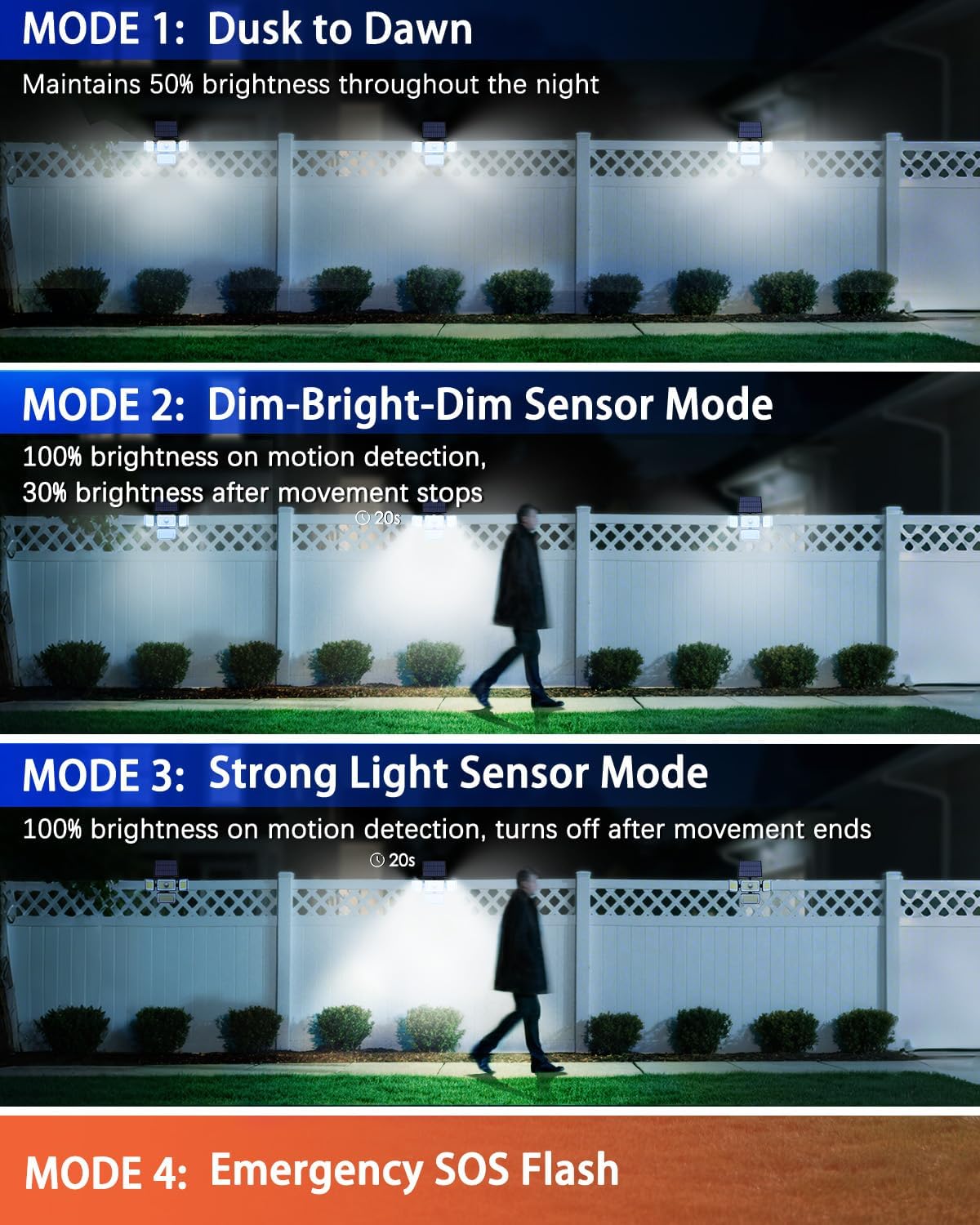
Image: A person walking along a fence line, triggering the CLAONER solar light to full brightness (Mode 2), with other lights in the background remaining at a dim level.
- Mode 3: Strong Light Sensor Mode
Activates strong light (100% brightness) for 20 seconds when triggered by motion, and then turns off completely when no motion is detected.

Image: A person walking along a fence line, triggering the CLAONER solar light to full brightness (Mode 3), with other lights in the background remaining off, demonstrating the light turning off after motion ceases.
- Mode 4: Emergency SOS Flash
Provides a fast flashing lighting mode throughout the night, suitable for emergency signaling or drawing attention.

Image: A fence line with CLAONER solar lights flashing rapidly, indicating the Emergency SOS Flash mode (Mode 4).
Maintenance
To ensure the long-term performance and efficiency of your CLAONER Solar Outdoor Lights, follow these maintenance guidelines:
- Clean Solar Panel: Regularly wipe the solar panel with a soft, damp cloth to remove dust, dirt, leaves, or snow. A clean panel ensures maximum sunlight absorption and charging efficiency.
- Clear Obstructions: Ensure no trees, buildings, or other objects are blocking direct sunlight from reaching the solar panel, especially during peak sunlight hours.
- Inspect Wiring: Periodically check the 16.4 ft cable for any signs of damage or wear.
- Weather Resistance: The lights are engineered with IP67 waterproof and dustproof materials to withstand harsh weather conditions. However, extreme conditions may temporarily affect performance.

Image: A CLAONER solar light installed on a brick wall, with water droplets visible, illustrating its excellent weather resistance and IP65 waterproof rating (note: product description says IP67, image says IP65, I will use IP67 as per feature bullets).

Image: An infographic emphasizing the IP67 Waterproof & Dustproof features of the CLAONER solar lights, suitable for various weather conditions, along with icons for impact-resistant ABS housing and 1800mAh rechargeable battery.
Troubleshooting
If you encounter issues with your CLAONER Solar Outdoor Lights, please refer to the following common problems and solutions:
| Problem | Possible Cause | Solution |
|---|---|---|
| Light does not turn on at night. | Insufficient solar charge; switch is off; solar panel is dirty or obstructed. | Ensure solar panel receives 6-8 hours of direct sunlight daily. Check if the power switch on the back of the light is ON. Clean the solar panel surface. |
| Light stays on for a short duration. | Insufficient solar charge; frequent motion activation; battery degradation. | Relocate solar panel for more sunlight. Reduce unnecessary motion triggers. If issues persist after prolonged use, the battery may need replacement (contact support). |
| Motion sensor not detecting movement. | Sensor obstructed; incorrect installation angle; extreme temperatures. | Ensure the sensor is clear of obstructions. Adjust the light unit and sensor angle. Allow the unit to acclimate to normal operating temperatures. |
| Remote control not working. | Battery depleted; remote not aimed correctly; interference. | Replace the remote control battery. Ensure direct line of sight to the light's sensor. Remove any potential sources of interference. |
Specifications
| Feature | Detail |
|---|---|
| Brand | CLAONER |
| Model Name | SD289AB |
| Item Model Number | CLCLSD289AB-USAS1 |
| Light Source Type | LED (288 LEDs) |
| Brightness | 3500 Lumen |
| Color Temperature | 7000 Kelvin (Cold White) |
| Power Source | Solar Powered |
| Voltage | 5.5 Volts |
| Wattage | 5 watts |
| Motion Sensor Range | Up to 26 feet |
| Motion Sensor Angle | 180° |
| Illumination Coverage | Up to 2500 square feet |
| Water Resistance Level | IP67 Waterproof |
| Material | Plastic (Impact-resistant ABS housing) |
| Product Dimensions | 9.6"L x 2.2"W x 4.64"H |
| Item Weight | 2.73 Pounds |
| Cable Length (Solar Panel) | 16.4 ft |
| Control Method | Remote Control, Toggle Switch |
| Average Life | 50000 Hours |
Warranty & Support
CLAONER stands behind the quality of its products. Your Solar Outdoor Lights come with a 2-year warranty, ensuring peace of mind regarding manufacturing defects and performance issues under normal use.
Additionally, we offer a 60-day no-questions-asked return policy from the date of purchase. If you are not completely satisfied with your product within this period, you may return it for a full refund.
For technical assistance, warranty claims, or any other inquiries, please contact CLAONER customer support through the retailer's platform or visit the official CLAONER store for contact information. Please have your model number (CLCLSD289AB-USAS1) and purchase details ready when contacting support.
Visit the CLAONER Store for more information and products.
Related documentsCLCLSD289AB-USAS1


Ask a question about this manual
Ask about setup, troubleshooting, compatibility, parts, safety, or missing instructions. Manuals+ will review the question and use this page’s manual context to help answer it.