
Introduction
This manual provides comprehensive instructions for the assembly, operation, maintenance, and troubleshooting of your Marsail 55-inch Electric Standing Desk. Please read this manual thoroughly before assembly and use to ensure proper function and safety.
Safety Information
WARNING: Failure to follow these safety instructions may result in injury or damage to the product.
- Always keep children and pets away from the desk during height adjustment.
- Be cautious of fingers and other body parts when using the desk to avoid injury.
- Do not attempt to repair or modify the desk, as this may void the warranty and cause electrical hazards.
- Always follow the assembly instructions carefully to ensure the desk is stable and secure.
- Ensure the power cord is not pinched or damaged during operation or movement.
- Do not overload the desk. Refer to the specifications for maximum weight capacity.
Package Contents
Verify that all components listed below are present before beginning assembly:
- Electric Standing Desk Frame
- Desktop (Maple, 55-inch)
- Keyboard Tray
- Headphone Hook (2 units)
- Control Panel with Memory Presets
- Power Adapter and Cable
- Installation Instruction Manual
- Necessary installation tools (Allen Wrench)
- Cable Management Accessories
Setup and Assembly
Assembly of the Marsail Electric Standing Desk is designed to be straightforward. It is recommended that two people assemble the desk for ease and safety.
- Unpack Components: Carefully remove all parts from the packaging and lay them out on a clean, soft surface to prevent scratches.
- Assemble Desk Frame: Follow the detailed diagrams in the included Installation Instruction Manual to connect the desk legs to the crossbar and feet. Ensure all screws are tightened securely.
- Attach Desktop: Place the desktop upside down on the soft surface. Carefully align the assembled frame with the pre-drilled holes on the underside of the desktop and secure it with the provided screws.
- Install Control Panel: Mount the control panel to the underside of the desktop in the designated location. Connect the motor cables and power cable to the control box as per the manual.
- Install Keyboard Tray: Attach the keyboard tray rails to the underside of the desktop, then slide the keyboard tray into place. Ensure smooth operation.
- Attach Accessories: Install the headphone hooks and any cable management accessories as desired.
- Cable Management: Route all cables neatly using the provided cable management solutions to prevent tangles and ensure safety.
- Initial Power-Up: Connect the power adapter to the desk and then to a power outlet. The desk may perform an initial calibration cycle.

Image: Fully assembled Marsail 55-inch Electric Standing Desk, showcasing its spacious desktop and integrated keyboard tray.

Image: The Marsail standing desk in a typical home office environment, illustrating its compact footprint when used in a sitting position.
Operating Instructions
Height Adjustment
The desk features an electric lifting mechanism for smooth height adjustments.
- Raise Desk: Press and hold the "Up" arrow button on the control panel to raise the desk. Release the button when the desired height is reached.
- Lower Desk: Press and hold the "Down" arrow button on the control panel to lower the desk. Release the button when the desired height is reached.
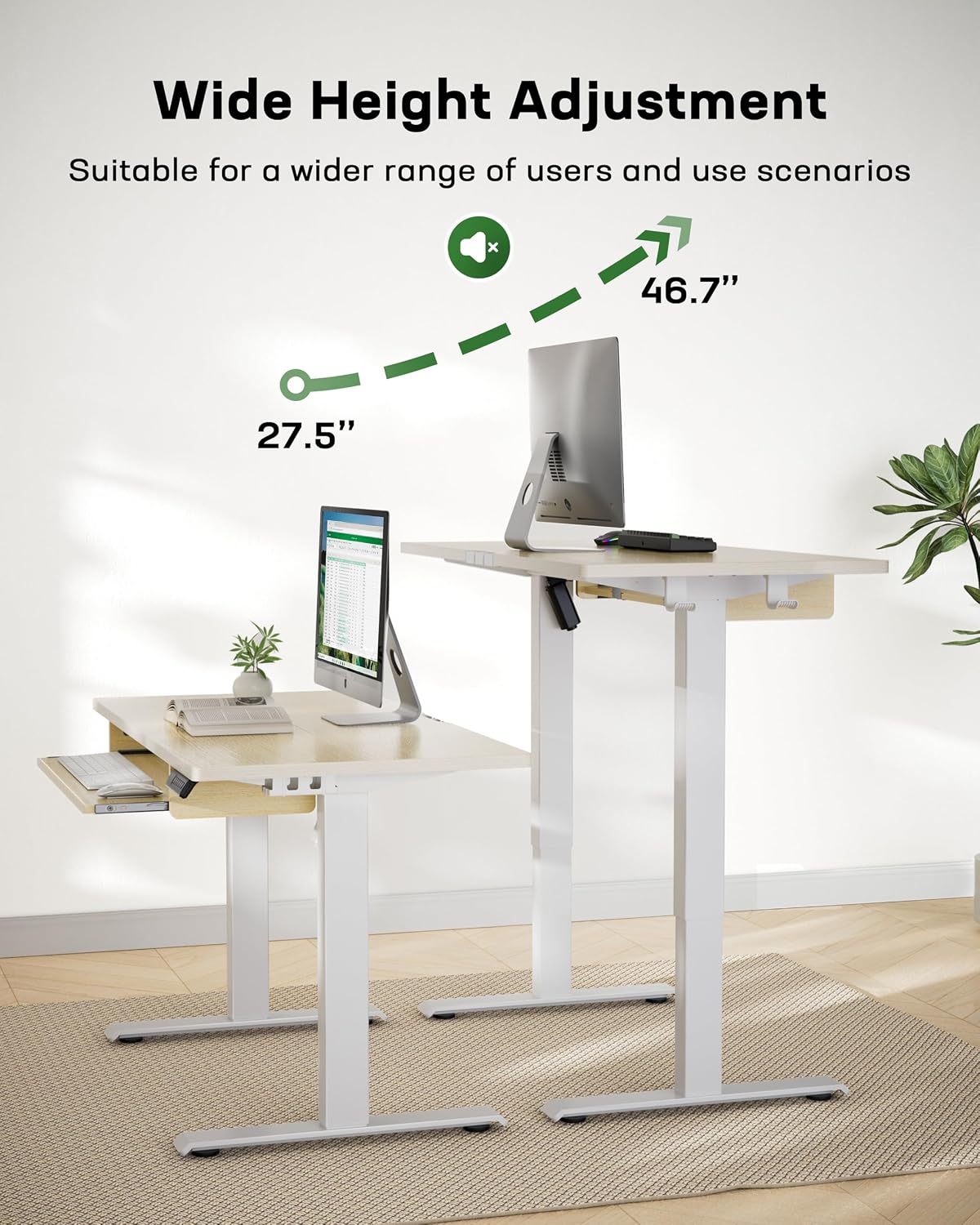
Image: Illustration of the desk's wide height adjustment range, from 27.5 inches to 46.7 inches, accommodating various user preferences.
Memory Presets
The control panel allows you to save up to 4 preferred height settings for quick transitions.
- Set a Memory Position:
- Adjust the desk to your desired height using the Up/Down buttons.
- Press the "M" button. The display will show "S-".
- Immediately press one of the number buttons (1, 2, 3, or 4). The display will show "S-1", "S-2", etc., confirming the height is saved.
- Recall a Memory Position: Press the corresponding number button (1, 2, 3, or 4). The desk will automatically move to the saved height.
Anti-Collision System
The desk is equipped with an anti-collision system for safety. If the desk encounters an obstacle during height adjustment, it will automatically stop and reverse slightly to prevent damage or injury.
- If the anti-collision system is triggered, remove the obstacle and then resume adjustment.
- This feature protects children, pets, and objects from being crushed.
Keyboard Tray Usage
The extra-large keyboard tray provides an ergonomic typing position and helps free up desktop space.
- Slide the keyboard tray out when in use.
- Slide the keyboard tray back under the desktop when not in use to maximize desktop space.
- The tray is designed to hold a full-size keyboard and mouse.

Image: Detailed view of the spacious keyboard tray, measuring 26.7 inches by 9.8 inches, accommodating a full-size keyboard and mouse.

Image: The keyboard tray demonstrating its stability and load capacity, supporting up to 22 lbs.
Maintenance
Regular maintenance ensures the longevity and optimal performance of your Marsail Standing Desk.
- Cleaning: Wipe the desk surfaces with a damp cloth. Avoid harsh chemicals or abrasive cleaners that could damage the finish.
- Cable Inspection: Periodically check all cables for signs of wear, fraying, or damage. Replace any damaged cables immediately.
- Screw Tightness: Occasionally check and tighten any loose screws on the frame and desktop to maintain stability.
- Motor Care: The electric motor is designed for durability. Avoid obstructing its movement or exceeding the maximum weight capacity to prevent strain.
Troubleshooting
If you encounter issues with your Marsail Standing Desk, refer to the following common solutions:
| Problem | Possible Cause | Solution |
|---|---|---|
| Desk does not move. | Power cable disconnected; Motor overload; Control panel error. | Check power connections. Reduce weight on desk. Unplug for 10 seconds, then plug back in to reset. |
| Desk moves unevenly or makes unusual noises. | Loose screws; Obstruction; Uneven weight distribution. | Check and tighten all assembly screws. Ensure no obstructions. Distribute weight evenly on the desktop. |
| Anti-collision system frequently triggers. | Obstacle in path; Sensitivity setting (if adjustable). | Ensure clear path during adjustment. Refer to the full manual for sensitivity adjustment if available. |
| Memory presets not working. | Presets not saved correctly. | Re-save the memory positions following the "Set a Memory Position" instructions. |
If the problem persists, please contact Marsail customer support for assistance.
Specifications
| Brand | Marsail |
| Model Name | TZESD15N |
| Product Dimensions (D x W x H) | 61D x 139.7W x 118.1H Centimeters (approx. 24D x 55W x 46.5H Inches) |
| Colour | Maple |
| Style | Mid-Century Modern |
| Base Material | Alloy Steel |
| Top Material Type | Engineered Wood (CARB P2 Certificated) |
| Finish Type | Laminated |
| Special Features | Spacious Keyboard Tray, Ergonomic Design, 4 Programmable Height Settings, Space-Saving Feature, Easier Assembly Process, Anti-Collision System |
| Room Type | Office |
| Recommended Uses | Drafting, Gaming, Working, Writing |
| Maximum Weight Recommendation | 79.83 kg (176 lbs) |
| Lifting Mechanism | Electric |
| Minimum Height | 27.5 Inches |
| Maximum Height | 46.7 Inches |
| Keyboard Tray Dimensions | 26.7" x 9.84" (approx.) |
| Keyboard Tray Clearance | 5.9" |
| Assembly Required | Yes (Recommended 2 people) |
| Product Grade | FCC Authentication |

Image: Comprehensive diagram detailing the dimensions and maximum load capacity of the Marsail standing desk.
Warranty and Support
Marsail provides a warranty for this product to ensure your satisfaction and product dependability.
- Warranty Period: The Marsail Electric Standing Desk is covered by a 5-year warranty. This warranty covers 100% of the desk components.
- Contact Support: For any questions, concerns, or warranty claims, please refer to the contact information provided in the separate warranty card or on the official Marsail website.
- Online Resources: Additional support, FAQs, and video tutorials may be available on the Marsail product support page.


