
LIMENAMICS ZD68
LIMENAMICS 80GB Digital Voice Activated Recorder User Manual
Model: ZD68
1. Introduction
Thank you for choosing the LIMENAMICS 80GB Digital Voice Activated Recorder. This device is designed for high-quality audio capture in various settings, including lectures, meetings, and interviews. With its ample storage, advanced noise reduction, and user-friendly features, it provides a reliable solution for all your recording needs.
2. Package Contents
Please verify that all items are present in your package:
- LIMENAMICS Digital Voice Recorder (ZD68)
- 64GB TF Card (pre-installed or separate)
- USB Data Cable
- Earbuds
- USB Card Reader
- User Manual

3. Product Overview
Familiarize yourself with the components and controls of your digital voice recorder.

Key Components:
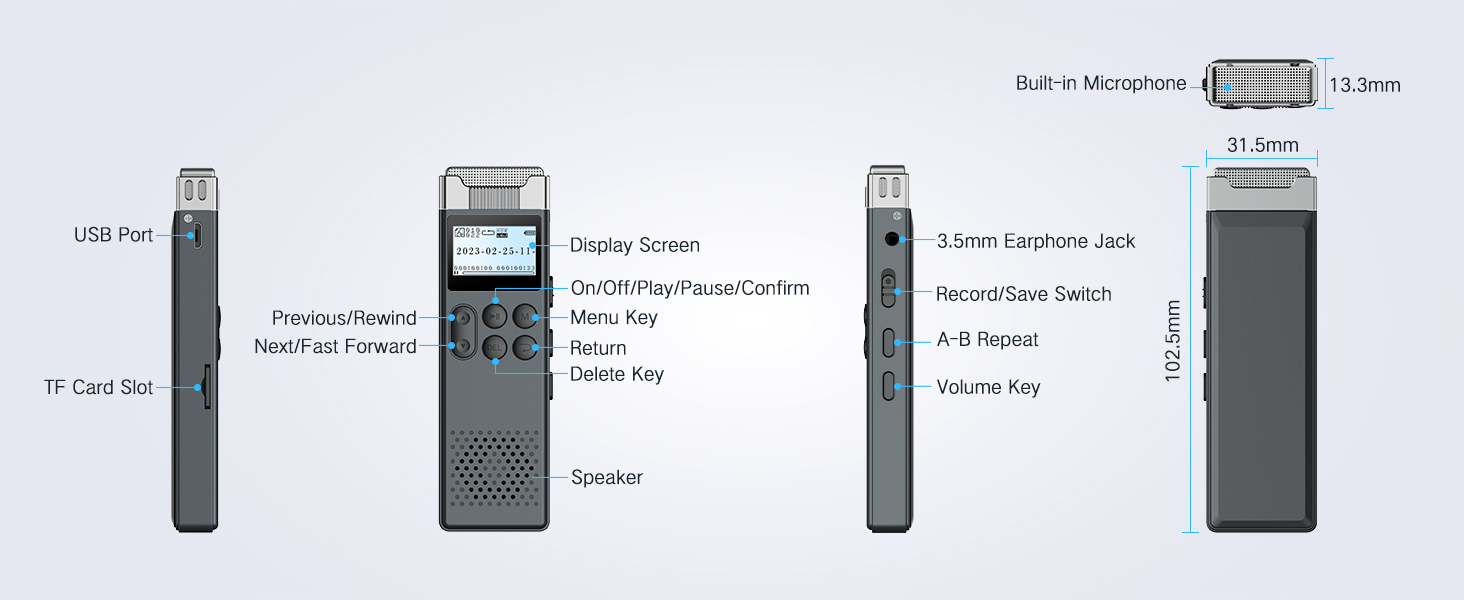
- Display Screen: Shows recording status, time, battery, and menu options.
- Control Buttons: Play/Pause, Menu, Return, Delete, Navigation (Previous/Rewind, Next/Fast Forward).
- Record/Save Switch: Slide switch on the side for quick recording initiation and saving.
- Volume Keys: Adjust playback volume.
- 3.5mm Earphone Jack: For private listening.
- USB Port: For charging and data transfer.
- TF Card Slot: For expandable memory up to 128GB.
- Built-in Microphone: High-sensitivity stereo condenser microphones.
- Built-in Speaker: For direct playback.

4. Setup
4.1 Charging the Device
Before first use, fully charge the recorder. Connect the supplied USB cable to the recorder's USB port and the other end to a computer's USB port or a compatible USB wall adapter. The battery indicator on the display will show charging status.

4.2 Memory and Storage
The recorder comes with a built-in 16GB flash memory and a 64GB TF card, providing a total of 80GB storage. It supports TF cards up to 128GB for expanded capacity.


5. Operating Instructions
5.1 Basic Recording
To start recording, simply slide the Record/Save switch upwards. The device will begin recording immediately. To save the recording, slide the switch downwards. The file will be saved with a timestamp (Year, Month, Day, Hour, Seconds) for easy organization.

5.2 Voice Activated Recording (VOR)
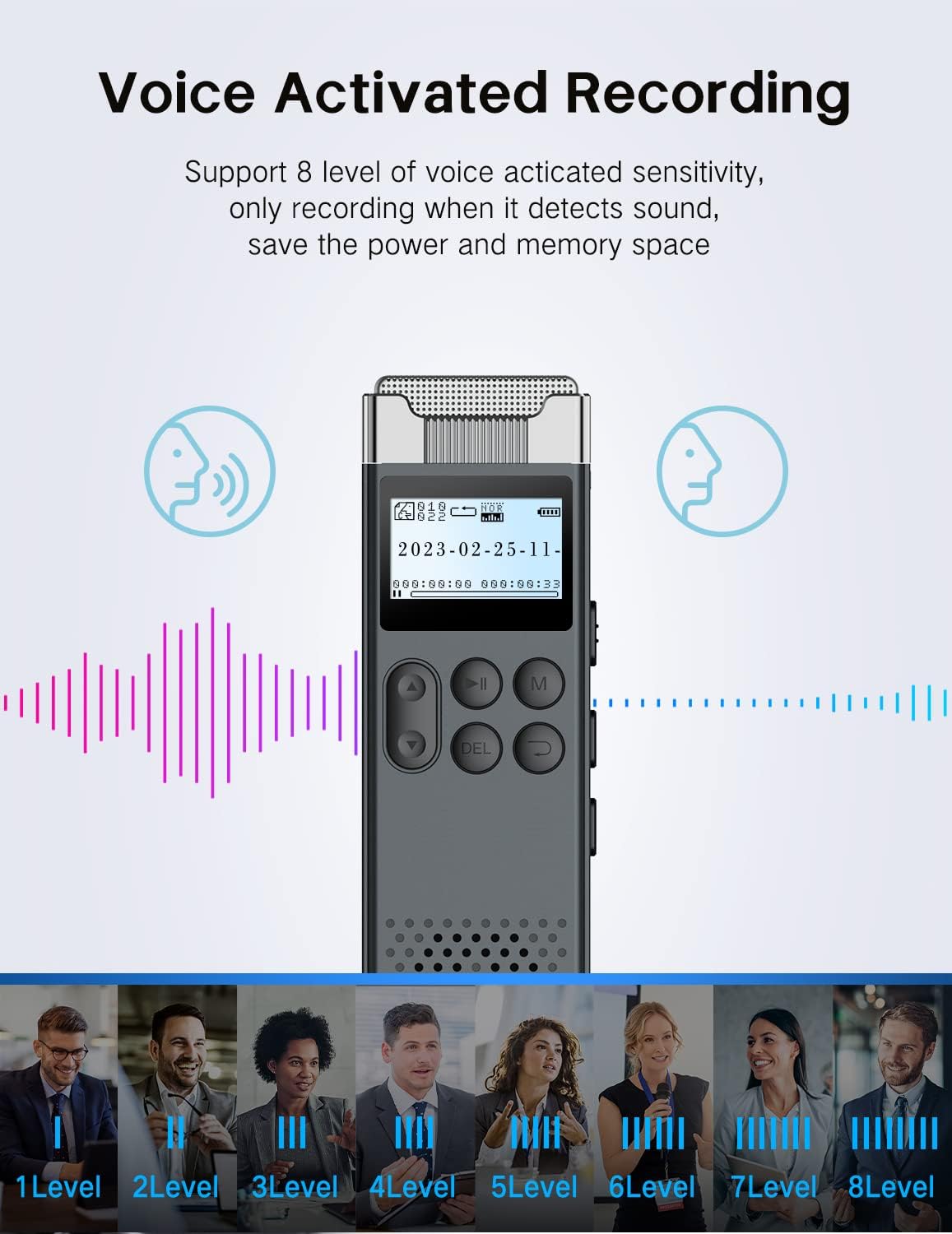
The VOR function allows the recorder to automatically start recording when sound is detected and pause when there is silence, saving memory and battery. You can adjust the sensitivity with 8 different levels to suit your environment.

5.3 Playback
Navigate through your recorded files using the navigation buttons. Press the Play/Pause button to start or pause playback. The device supports A-B repeat for looping specific sections and variable speed playback for faster review or detailed analysis.

5.4 File Management and Transfer
Files are automatically named with a timestamp (Year, Month, Day, Hour, Seconds) for easy organization. To transfer files to your computer, connect the recorder using the supplied USB cable. The device is compatible with both Windows and Mac operating systems. For Mac connections, a USB-C to USB-A cable may be required (the supplied cable is USB 2.0 Type A).

5.5 Password Protection
Secure your recordings with password protection. Access this feature through the device's menu settings to set and manage your password.
5.6 Timing Auto Recording
Schedule recordings to start automatically at a specific time, ensuring you don't miss important events.

5.7 Recording Quality and Noise Reduction
The recorder features a 3072kbps professional recording ratio and built-in stereo condenser microphones. It utilizes upgraded DSP powerful noise reduction technology for ultra-clear recordings by filtering out environmental noise.


5.8 Additional Features
The recorder supports 22 languages, functions as an MP3 player, and handles MP3/WMA formats.

6. Maintenance
To ensure the longevity and optimal performance of your recorder, follow these maintenance guidelines:
- Keep the device dry. Avoid exposure to moisture or liquids.
- Clean the device with a soft, dry cloth. Do not use abrasive cleaners or solvents.
- Avoid dropping or subjecting the device to strong impacts.
- Store the device in a cool, dry place away from direct sunlight and extreme temperatures.
- Regularly back up your important recordings to a computer or external storage device.
7. Troubleshooting
Common Issues and Solutions:
- Device not turning on: Ensure the battery is charged. Connect to a power source and try again.
- Cannot transfer files to computer:
- Ensure the USB cable is securely connected to both the recorder and the computer.
- Try a different USB port on your computer.
- If using a Mac, ensure you are using a compatible USB-C to USB-A cable if necessary.
- Test with a different USB cable, as some cables may be faulty or only support charging.
- Restart both the recorder and your computer.
- Poor recording quality:
- Ensure the microphone is not obstructed.
- Adjust the microphone sensitivity settings (VOR levels) to match your environment.
- Record in a quieter environment if possible.
- Short battery life:
- Reduce screen brightness.
- Use VOR mode to conserve power.
- Ensure the device is fully charged before use.
8. Specifications
| Feature | Detail |
|---|---|
| Model Number | ZD68 |
| Storage Capacity | 16GB Built-in + 64GB TF Card (supports up to 128GB) |
| Battery | 880mAh Lithium Ion (included) |
| Recording Formats | WAV, MP3 |
| Recording Quality | Up to 3072kbps |
| Microphone | Built-in Stereo Condenser Microphones |
| Headphones Jack | 3.5mm |
| Interface | USB 2.0 Type A |
| Product Dimensions | 0.52"D x 1.24"W x 4.05"H (approx.) |
| Item Weight | 7.7 Ounces |
9. Official Product Video
Watch the official product video for a visual guide to the LIMENAMICS 80GB Voice Activated Recorder with Playback.
Video: Official overview of the LIMENAMICS 80GB Voice Activated Recorder with Playback, demonstrating its features and functionality.
10. Warranty and Support
For warranty information or technical support, please refer to the official LIMENAMICS website or contact customer service directly.
Customer Service Email: customer-service@limenamics.com
User Manual (PDF): Download PDF
Related documentsZD68

Ask a question about this manual
Ask about setup, troubleshooting, compatibility, parts, safety, or missing instructions. Manuals+ will review the question and use this page’s manual context to help answer it.