
1. Introduction
Thank you for choosing the TONEMAC W17 Freebuds Earbuds. This manual provides essential information for the safe and efficient use of your new wireless earbuds. Please read this guide thoroughly before use and retain it for future reference.
2. Safety Information
To ensure safe operation and prevent damage, please observe the following precautions:
- Do not expose the earbuds or charging case to extreme temperatures, humidity, or liquids.
- Avoid dropping, impacting, or disassembling the device.
- Keep out of reach of children and pets.
- Use only the provided charging cable or a certified Type-C cable for charging.
- Prolonged listening at high volume levels may cause hearing damage. Adjust volume to a safe level.
3. Package Contents
Verify that all items are present in your package:
- TONEMAC W17 Freebuds Earbuds (Left and Right)
- Transparent Charging Case
- USB Type-C Charging Cable
- Ear Cushions (various sizes)
- Welcome Guide (Printed Document)

This image shows the complete contents of the TONEMAC W17 Freebuds package. It includes the earbuds, the transparent charging case, a set of ear cushions, a USB Type-C charging cable, and a welcome guide.
4. Product Overview
The TONEMAC W17 Freebuds are wireless in-ear earbuds designed for audio playback and communication. They feature Bluetooth 5.2 connectivity, Active Noise Cancellation (ANC), and bass boost technology for an enhanced listening experience. The transparent charging case provides additional battery life and protects the earbuds when not in use.
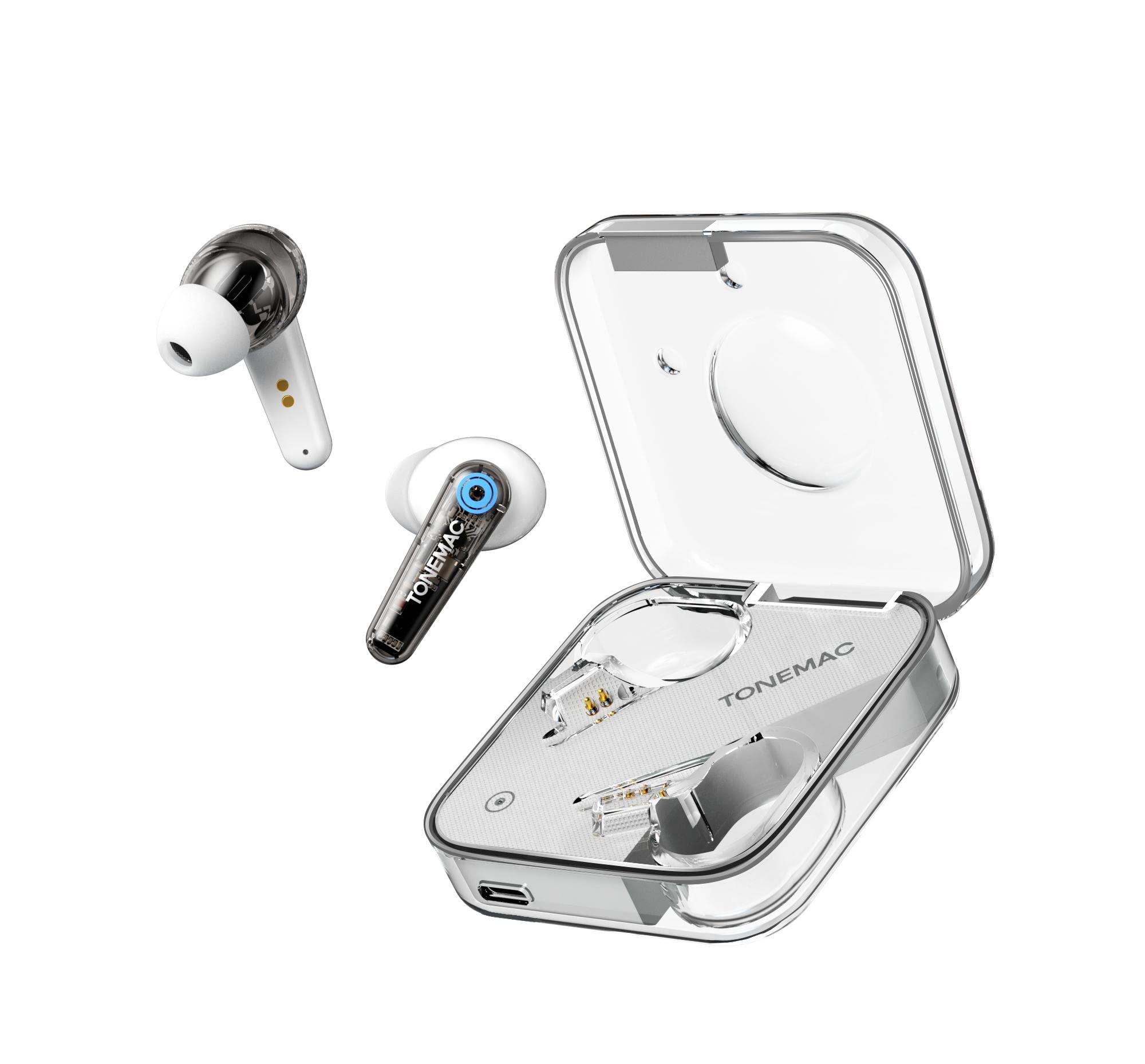
This image displays the TONEMAC W17 Freebuds earbuds resting inside their clear charging case. The case features a sleek design, showcasing the earbuds and their charging contacts.

An earbud from the TONEMAC W17 Freebuds set is shown comfortably placed in a human ear, highlighting its ergonomic in-ear design. Visual cues indicate sound transmission and the presence of two microphones with ENC algorithm.
5. Setup
5.1 Charging the Earbuds and Case
- Place the earbuds into the charging case, ensuring they are correctly seated. The indicator lights on the earbuds will show their charging status.
- Connect the USB Type-C charging cable to the charging port on the case and plug the other end into a compatible USB power source (e.g., wall adapter, computer USB port).
- The charging case indicator will show charging status. A full charge for the earbuds provides up to 5 hours of playback, and the fully charged case provides an additional 17 hours, totaling 22 hours of playtime.
5.2 Pairing with a Bluetooth Device
- Open the charging case. The earbuds will automatically enter pairing mode, indicated by a flashing light on the earbuds.
- On your device (smartphone, tablet, etc.), enable Bluetooth and search for available devices.
- Select "TONEMAC W17" from the list of found devices.
- Once connected, a voice prompt will confirm successful pairing, and the earbud indicator lights will turn off or show a steady light.
- The earbuds have a wireless range of up to 10 meters (33 feet) in an open environment.
6. Operating Instructions
6.1 Power On/Off
- Power On: Open the charging case, and the earbuds will automatically power on. Alternatively, press and hold the touch control area on both earbuds for 3 seconds.
- Power Off: Place the earbuds back into the charging case and close the lid. They will automatically power off and begin charging. Alternatively, disconnect Bluetooth and the earbuds will power off after a few minutes of inactivity, or press and hold the touch control area on both earbuds for 5 seconds.
6.2 Music Playback
- Play/Pause: Tap the touch control area on either earbud once.
- Next Track: Double-tap the touch control area on the right earbud.
- Previous Track: Double-tap the touch control area on the left earbud.
- Volume Up: Triple-tap the touch control area on the right earbud.
- Volume Down: Triple-tap the touch control area on the left earbud.
6.3 Call Management
- Answer/End Call: Tap the touch control area on either earbud once.
- Reject Call: Press and hold the touch control area on either earbud for 2 seconds.
6.4 Active Noise Cancellation (ANC) / Transparency Mode
The TONEMAC W17 features Active Noise Cancellation. Specific touch controls for switching between ANC, Transparency, and Normal modes may vary. Refer to the quick start guide for precise instructions or experiment with pressing and holding the touch control area for 2-3 seconds on one earbud while not on a call.
6.5 Voice Assistant
To activate your device's voice assistant (e.g., Siri, Google Assistant), press and hold the touch control area on either earbud for approximately 2 seconds (when not on a call).
7. Maintenance
Proper maintenance ensures the longevity of your TONEMAC W17 Freebuds:
- Cleaning: Use a soft, dry, lint-free cloth to clean the earbuds and charging case. Do not use abrasive cleaners or solvents.
- Storage: When not in use, store the earbuds in their charging case to protect them from dust and damage.
- Battery Care: To preserve battery life, charge the device regularly, even if not used frequently. Avoid fully discharging the battery for extended periods.
- Water Resistance: These earbuds are not water-resistant. Avoid exposure to water, sweat, or rain.
8. Troubleshooting
If you encounter issues with your TONEMAC W17 Freebuds, try the following solutions:
| Problem | Solution |
|---|---|
| Earbuds do not power on. | Ensure the earbuds are charged. Place them in the charging case and charge the case if necessary. |
| Cannot pair with device. | Make sure Bluetooth is enabled on your device. Ensure the earbuds are in pairing mode (flashing light). Forget "TONEMAC W17" from your device's Bluetooth list and try pairing again. Ensure earbuds are within 10 meters of the device. |
| No sound from one or both earbuds. | Check the volume level on both your device and the earbuds. Ensure earbuds are properly paired. Try resetting the earbuds (refer to specific reset instructions in the quick start guide if available). |
| Charging case not charging. | Verify the USB Type-C cable is securely connected to both the case and the power source. Try a different cable or power adapter. |
9. Specifications
| Feature | Detail |
|---|---|
| Model | W17 |
| Brand | TONEMAC |
| Color | Black |
| Ear Placement | In-Ear |
| Form Factor | In-Ear |
| Noise Control | Active Noise Cancellation (ANC) |
| Connectivity Technology | Wireless (Bluetooth 5.2) |
| Bluetooth Version | 5.2 |
| Wireless Range | Up to 10 meters (33 feet) |
| Earbud Battery Life | Up to 5 hours (single charge) |
| Total Playtime (with case) | Up to 22 hours |
| Charging Case Input | USB Type-C |
| Control Method | Touch Control |
| Special Features | Lightweight, Bass Boost Technology |
| Water Resistance | Not Water Resistant |
| Materials | Plastic |
10. Warranty and Support
For warranty information or technical support, please refer to the documentation included with your purchase or contact the retailer where the product was acquired. Keep your proof of purchase for warranty claims.


