
Ninja PB041ST
Ninja Pods & Grounds Single-Serve Coffee Maker Instruction Manual
Model: PB041ST
Introduction
The Ninja PB041ST Pods & Grounds Single-Serve Coffee Maker is designed for versatile coffee brewing, accommodating both ground coffee and single-serve pods. Its compact design makes it suitable for various kitchen spaces. This manual provides comprehensive instructions for setup, operation, maintenance, and troubleshooting to ensure optimal performance and longevity of your appliance.
What's in the Box
Verify that all components are present before initial setup:
- Ninja Pods & Grounds Single-Serve Coffee Maker (PB041ST)
- Ninja Scoop
- Removable Brew Basket
- Ninja Pod Adapter
- Permanent Filter

Ninja Pods & Grounds Single-Serve Coffee Maker with included accessories.

Included components: Ninja Scoop, removable brew basket, Ninja pod adapter, and permanent filter.
Setup
Unpacking and Initial Cleaning
- Remove all packaging materials and stickers from the coffee maker.
- Wash the removable water reservoir, brew basket, Ninja pod adapter, and permanent filter in warm, soapy water. Rinse thoroughly and air dry.
- Wipe the exterior of the coffee maker with a clean, damp cloth.
Priming the System
Before first use, it is essential to prime the system to clean internal components and prepare the brewer for operation:
- Place the coffee maker on a clean, dry, and level surface.
- Fill the removable water reservoir with fresh, cold water up to the MAX fill line (56 oz.). Ensure the reservoir is securely seated on the base.
- Place a large mug or container (at least 24 oz. capacity) on the drip tray.
- Ensure the brew basket is empty and the Ninja pod adapter is not inserted. Close the brew head.
- Press the POWER button to turn on the unit.
- Select the largest brew size (24 oz.) and the CLASSIC brew style. Press the BREW button.
- Allow the full cycle to complete. Discard the hot water. Your coffee maker is now primed and ready for use.

The removable 56-oz. water reservoir for easy filling and cleaning.
Operating Instructions
Brewing with Coffee Pods
- Ensure the water reservoir is filled with fresh, cold water.
- Lift the brew head handle. Insert the Ninja pod adapter into the brew basket.
- Place a single coffee pod into the Ninja pod adapter. Close the brew head firmly until it clicks.
- Place your mug on the drip tray.
- The display will automatically detect the pod adapter. Select your desired brew size (6, 8, 10, or 12 oz.) and brew style (Classic, Rich, or Over Ice).
- Press the BREW button to start.

Inserting a coffee pod into the Ninja pod adapter for brewing.
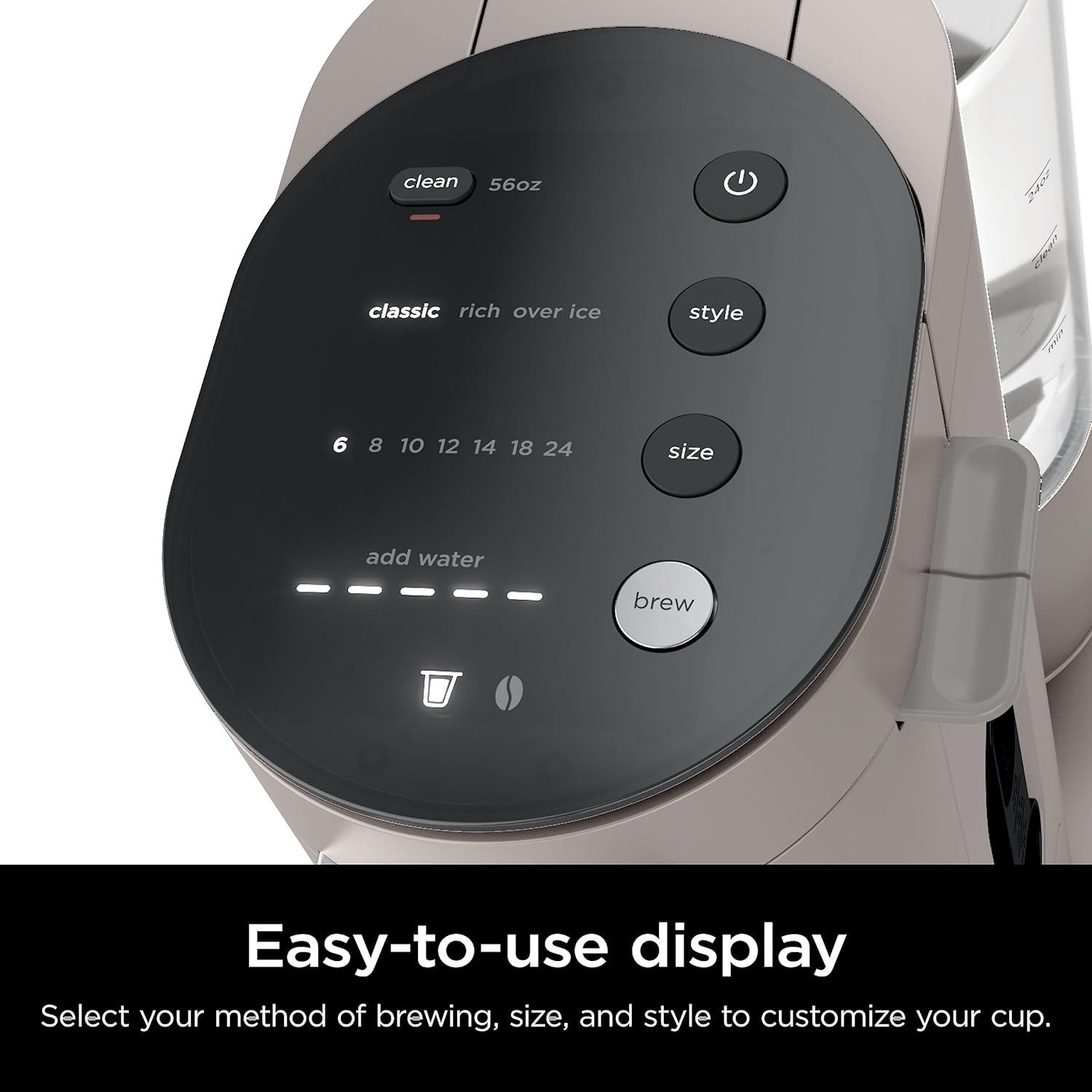
The intuitive control panel allows selection of brew style and size.
Brewing with Ground Coffee
- Ensure the water reservoir is filled with fresh, cold water.
- Lift the brew head handle. Ensure the permanent filter is inserted into the brew basket.
- Use the Ninja Scoop to add your desired amount of ground coffee to the permanent filter. Refer to the scoop markings for recommended amounts based on brew size.
- Close the brew head firmly until it clicks.
- Place your mug on the drip tray. The display will automatically detect the permanent filter.
- Select your desired brew size (6, 8, 10, 12, 18, or 24 oz.) and brew style (Classic, Rich, or Over Ice).
- Press the BREW button to start.

Adding ground coffee to the permanent filter using the Ninja Scoop.

3 brew styles: Classic, Rich, Over Ice.
Brew Styles Explained
- Classic: A balanced and smooth coffee experience.
- Rich: A more intense and robust coffee flavor.
- Over Ice: Designed to brew hot coffee directly over ice, preventing dilution and preserving flavor. Ensure your mug is filled with ice before brewing.
The Ninja coffee maker brewing an iced coffee, demonstrating its versatility.
Adjustable Drip Tray
The drip tray can be adjusted or removed to accommodate various mug and travel mug sizes up to 24 oz.

The adjustable drip tray accommodates tall travel mugs for on-the-go convenience.
Maintenance
Daily Cleaning
- After each use, remove and empty the brew basket, Ninja pod adapter, or permanent filter. Rinse them thoroughly.
- Empty and rinse the removable water reservoir daily.
- Wipe down the exterior of the machine with a damp cloth.
Descaling
Descaling is necessary to remove mineral buildup and maintain optimal performance. The "CLEAN" light on the display will illuminate when descaling is recommended.
- Pour 16 oz. of white vinegar or a descaling solution into the empty water reservoir. Fill the remainder of the reservoir with water up to the MAX fill line.
- Place a large container (at least 24 oz. capacity) on the drip tray.
- Press the POWER button to turn on the unit.
- Press the CLEAN button. The descaling cycle will begin and typically takes about 75 minutes.
- Once the cycle is complete, discard the solution from the container and rinse the water reservoir thoroughly.
- Fill the water reservoir with fresh water and run two full 24 oz. CLASSIC brew cycles to rinse the system. Discard water after each cycle.
Troubleshooting
Common Issues and Solutions
| Issue | Possible Cause | Solution |
|---|---|---|
| Coffee not brewing. | Water reservoir empty. | Fill water reservoir to the desired level. |
| Coffee tastes weak. | Incorrect brew style or coffee-to-water ratio. | Select RICH brew style or add more ground coffee. Ensure correct pod size is selected. |
| Coffee grounds in cup. | Permanent filter overflowed or pod punctured incorrectly. | Do not overfill the permanent filter. Ensure the pod is correctly seated. Clean the brew head needle if clogged. |
| "CLEAN" light is on. | Mineral buildup. | Perform a descaling cycle as per maintenance instructions. |
| Machine not turning on. | Not plugged in or power outage. | Ensure the power cord is securely plugged into a working outlet. Check circuit breaker. |
Specifications
- Brand: Ninja
- Model Name: PB041ST
- Color: Stone
- Product Dimensions: 13.07"D x 5.31"W x 13.31"H
- Water Reservoir Capacity: 56 oz.
- Brew Sizes (Pods): 6, 8, 10, 12 oz.
- Brew Sizes (Grounds): 6, 8, 10, 12, 18, 24 oz.
- Brew Styles: Classic, Rich, Over Ice
- Filter Type: Reusable (Permanent Filter)
- Manufacturer: SharkNinja
- UPC: 622356617581
- Item Weight: 7.78 pounds
- Country of Origin: China
Warranty and Support
For warranty information, product registration, or customer support, please visit the official Ninja website or contact their customer service line. Keep your purchase receipt for warranty claims.
Online Support: www.ninjakitchen.com
Related documentsPB041ST


Ask a question about this manual
Ask about setup, troubleshooting, compatibility, parts, safety, or missing instructions. Manuals+ will review the question and use this page’s manual context to help answer it.