1. Introduction
This manual provides detailed instructions for the safe and effective use, assembly, maintenance, and troubleshooting of your Helavo 2 in 1 Walker Wheelchair Combo. Please read this manual thoroughly before initial use and retain it for future reference.

The Helavo 2 in 1 Walker Wheelchair Combo offers versatile mobility support, easily converting between a walker and a transport chair to suit various user needs.
2. Setup and Assembly
Your Helavo 2 in 1 Walker Wheelchair Combo is designed for quick and easy assembly. Follow the steps below or refer to the assembly video for visual guidance.
2.1 Unboxing and Part Identification
Carefully remove all components from the packaging. Ensure all parts are present and undamaged before proceeding with assembly.
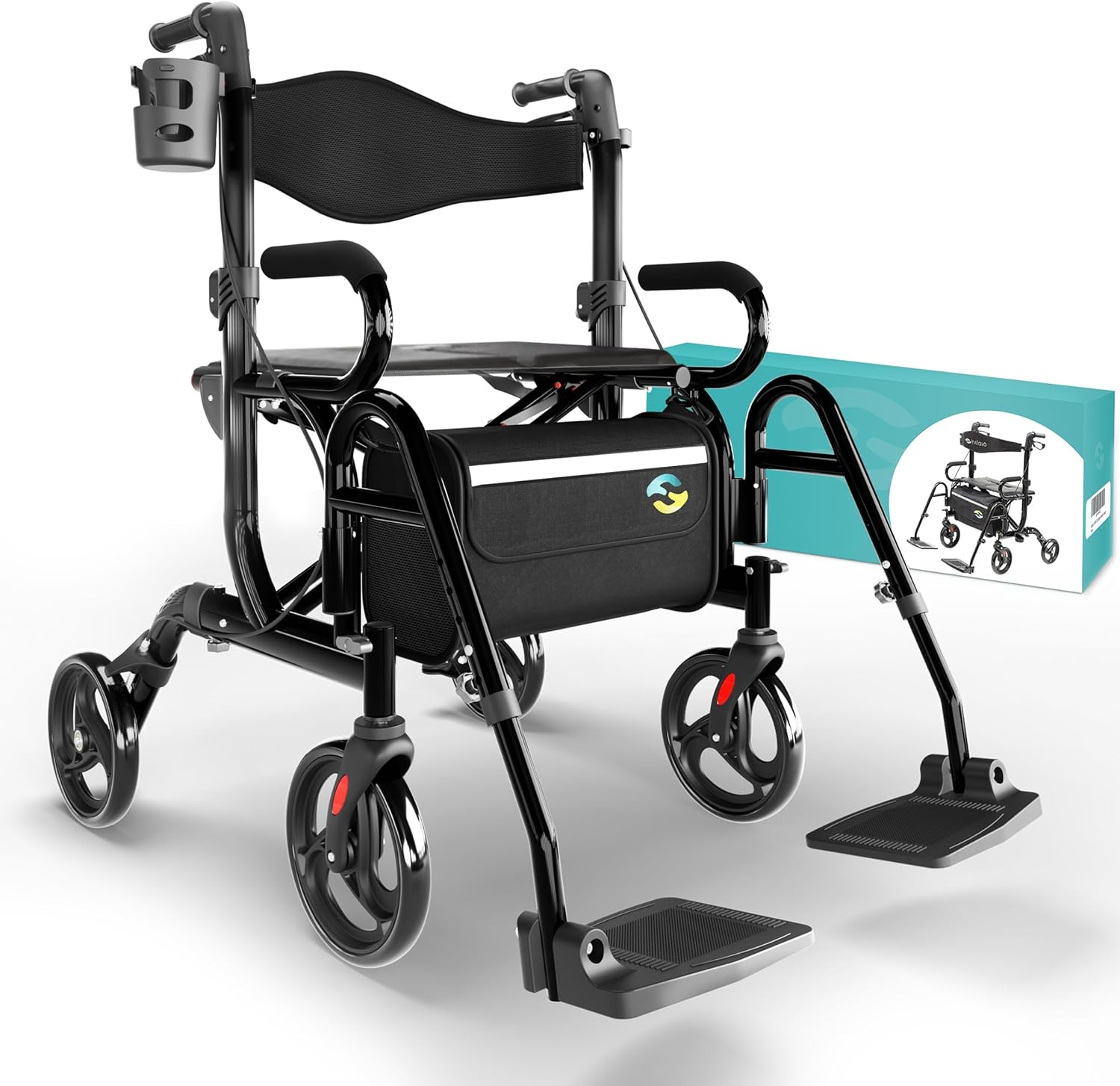
The image displays the main frame, wheels, footrests, and accessory bag, ready for assembly.
2.2 Assembly Steps
- Unfold the Frame: Place the rollator in an upright position and carefully unfold it until it locks into place with an audible "click" sound. Ensure the seat is fully extended and stable.
- Attach Rear Wheels: Insert the rear wheel axles into the designated slots on the frame. Ensure the push buttons engage securely with a "click" sound. Fasten with the wing screws.
- Attach Front Wheels: Insert the front wheels into the corresponding slots on the frame. Fasten with the wing screws, ensuring the wing screw points outwards.
- Adjust Handle Height: Press and hold the gray height adjustment button on each handle and slide the handle to your desired height. Ensure both handles are at the same height and securely locked.
- Install Footrests: Insert the legrests into the click mechanisms on the frame. Press the golden push button to ensure they are engaged with a "click" sound.
- Secure Brake Cables: Use the provided velcro tape to fix the brake cables along both sides of the frame, preventing them from snagging.
- Attach Accessories: Hook the tabs of the practical shopping bag onto the hooks provided under the seat. Slide the cane holder and cup holder onto their respective brackets.
2.3 Assembly Video Guide
This official Helavo video provides a quick and easy step-by-step guide for assembling your H1070 rollator.
3. Operating Instructions
3.1 Walker Mode
To use the device as a walker, ensure the footrests are folded away or removed. Adjust the handle height to a comfortable position, allowing for a slight bend in your elbows when holding the handles. Walk behind the rollator, pushing it forward as you move.

The Helavo rollator provides stable support for walking on various surfaces.
3.2 Wheelchair (Transport Chair) Mode
To convert to transport chair mode, ensure the footrests are deployed and locked into position. The padded backrest and spacious seat provide comfort for the user being transported. A caregiver can then push the chair using the handles.

The device easily converts into a comfortable transport chair for assisted mobility.
3.3 Braking System
- To Brake: Pull the brake handles backwards towards you to engage the brakes and slow down or stop the rollator.
- To Engage Parking Brake: Push the brake handles forward until they lock into place. This will lock the rear wheels, providing stability when sitting on the seat or when the device is stationary.
- To Release Parking Brake: Pull the brake handles backwards until they release from the locked position.
3.4 Height Adjustment
The handle height can be adjusted from 32.7" to 37.8" to accommodate users between approximately 5'4" and 6'2" tall. The footrests are also height-adjustable for user comfort in transport chair mode.
4. Maintenance
- Cleaning: Clean the frame and fabric components with a damp cloth and mild detergent. Avoid abrasive cleaners.
- Inspection: Regularly inspect all screws, bolts, and moving parts to ensure they are secure and functioning correctly. Check the brakes for proper operation and adjust if necessary.
- Storage: When not in use, store the rollator in a dry, clean environment. The device folds compactly for convenient storage.
5. Troubleshooting
| Problem | Possible Cause | Solution |
|---|---|---|
| Rollator does not unfold/fold smoothly. | Mechanism obstructed or not fully engaged. | Ensure no items are obstructing the folding mechanism. Apply gentle pressure until it clicks into place. |
| Brakes are not engaging effectively. | Brake cables are loose or worn. | Inspect brake cables for damage. Consult a qualified technician for adjustment or replacement if needed. |
| Wheels are not rolling smoothly. | Debris in wheels or loose wheel attachment. | Check wheels for debris and clean if necessary. Ensure wheels are securely attached to the frame. |
6. Specifications
| Feature | Detail |
|---|---|
| Model Number | H1070 |
| Product Dimensions (Unfolded) | 32.7 x 11.4 x 32.7 inches (L x W x H) |
| Folded Dimensions | 27.6" x 11.4" x 32.7" (L x W x H) |
| Item Weight | 21.2 lbs (9.6 kg) |
| Maximum Load Capacity | 300 lbs |
| Material | Aluminum |
| Color | Black |
| Handle Height Adjustment | 32.7" to 37.8" |
| Seat Dimensions (W x D x H) | 18.3" x 12.2" x 21.7" |
7. Warranty and Support
The Helavo 2 in 1 Walker Wheelchair Combo comes with a standard one-year warranty, which can be extended to three years upon product registration. For any questions, concerns, or support needs, our customer service team is available 24/7.
Please refer to the warranty card included in your product packaging for detailed terms and conditions, or visit the official Helavo website for more information.


