
1. Introduction
This manual provides instructions for the installation, operation, and maintenance of the TYPE S Smart Wheel Well Rock Lights. This 4-pack RGB LED kit is designed to provide customizable lighting for various vehicles, including trucks, Jeeps, ATVs, UTVs, and SUVs. Please read this manual thoroughly before installation and use to ensure proper function and safety.

Image 1.1: A truck demonstrating the blue underglow lighting effect from the installed rock lights.
2. Product Overview
2.1. What's in the Box
- 4x Wheel Well Lights
- Mounting Hardware (screws, nuts, washers)
- VHB Adhesive Pads
- Rubber Seats for Curved Surfaces
- Cable Ties
- Smart Control Box with Wiring Harness

Image 2.1: Contents of the TYPE S Smart Wheel Well Rock Lights kit, showing all included components.
2.2. Key Features
- RGB LED Illumination: Offers 49 distinct colors and 25 dynamic lighting modes.
- Durable Construction: Features IP68 waterproof rating and diecast aluminum housing for resistance against water, dirt, and impacts.
- Bluetooth App Control: Manage lighting settings, colors, modes, and music synchronization via the TYPE S LED app on iOS and Android devices.
- Versatile Mounting: Includes options for flat or curved surfaces using VHB adhesive, rubber seats, and cable ties.
- Universal Fit: Designed for compatibility with a wide range of vehicles.

Image 2.2: The TYPE S Smart Wheel Well Rock Lights and the associated mobile application for color control.

Image 2.3: Close-up of a rock light pod highlighting its IP68 waterproof and diecast aluminum construction.
3. Safety Information
Always observe the following safety precautions during installation and operation:
- Disconnect the vehicle's battery before performing any electrical work.
- Ensure all wiring connections are secure and properly insulated to prevent short circuits.
- Do not install lights in locations that obstruct vehicle operation or visibility.
- Verify that the power source is 12V DC.
- Avoid looking directly into the LED lights when they are active, as this may cause eye strain.
- Keep children away from electrical components during installation.
4. Setup and Installation
Follow these steps for proper installation of your TYPE S Smart Wheel Well Rock Lights:
4.1. Pre-Installation Checks
- Unpack all components and verify that all items listed in Section 2.1 are present.
- Choose suitable mounting locations for each rock light, typically within the wheel wells or underbody, ensuring they do not interfere with moving parts or vehicle operation.
- Clean the mounting surfaces thoroughly to ensure proper adhesion for VHB pads or secure attachment for screws.
4.2. Mounting the Rock Lights
The kit provides multiple mounting options:
- Screw Mounting: Use the provided screws, nuts, and washers to secure the lights to flat surfaces.
- VHB Adhesive: For non-drilling applications, apply the VHB adhesive pads to the back of the lights and press firmly onto a clean, dry surface.
- Curved Surfaces: Utilize the rubber seats to adapt the lights for secure mounting on contoured areas.
- Cable Ties: Use cable ties for additional securing of lights or wiring as needed.
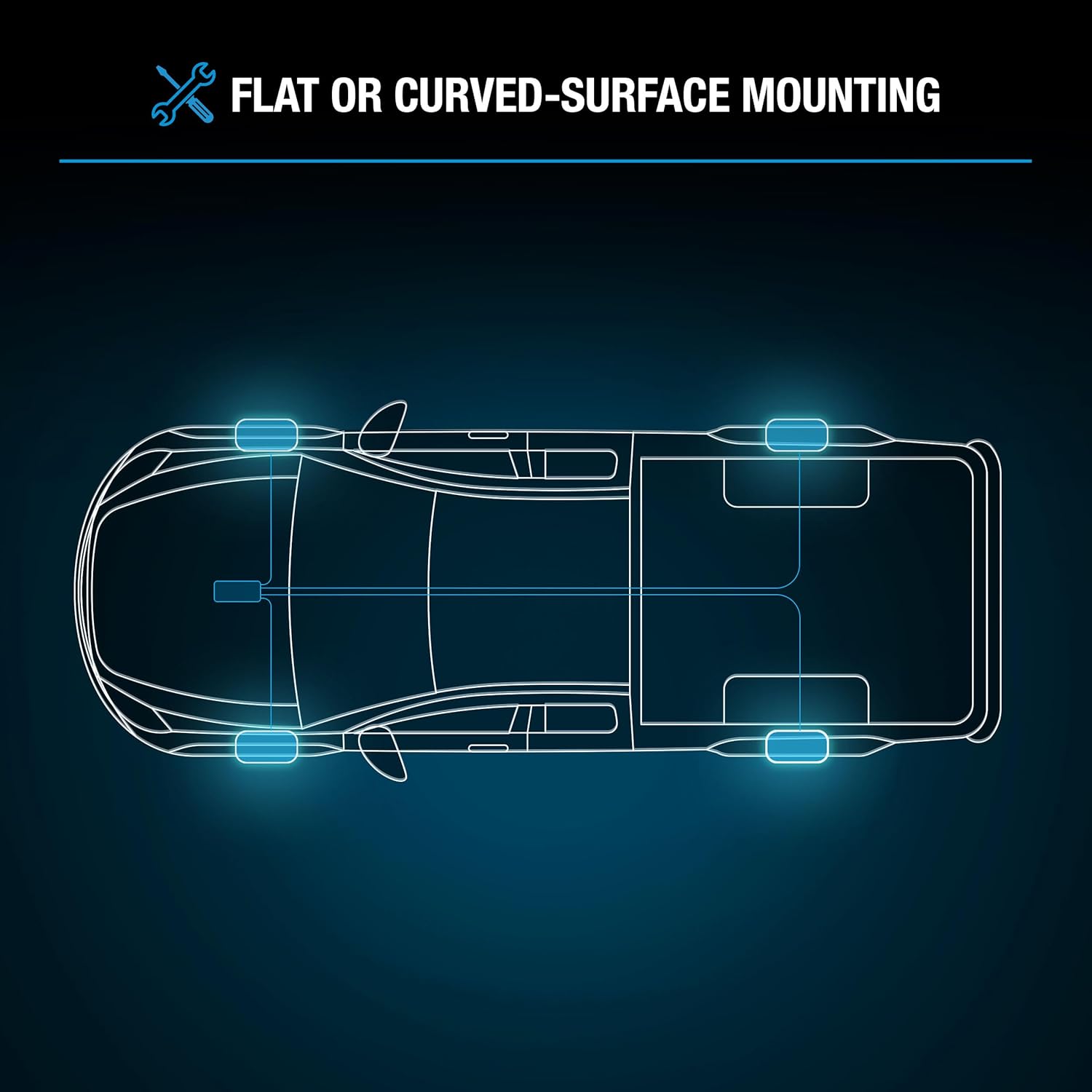
Image 4.1: Recommended installation points for the rock lights on a vehicle chassis.
4.3. Wiring Connections
- Connect each rock light to the smart control box using the provided wiring harnesses. Ensure connections are snug.
- Connect the smart control box's power and ground wires to a suitable 12V DC power source in your vehicle. It is recommended to connect to a switched power source to prevent battery drain when the vehicle is off.
- Route all wiring securely, away from hot engine parts, sharp edges, and moving components. Use cable ties to bundle and secure wires.
- Once all connections are made, reconnect the vehicle's battery.
5. Operating Instructions
The TYPE S Smart Wheel Well Rock Lights are controlled via the TYPE S LED mobile application.
5.1. App Download and Installation
- Download the "TYPE S LED" app from the Apple App Store (for iOS devices) or Google Play Store (for Android devices).
- Install the app on your smartphone or tablet.
5.2. Bluetooth Pairing
- Ensure your vehicle's ignition is on (or the lights are receiving power) and Bluetooth is enabled on your mobile device.
- Open the TYPE S LED app. The app will automatically search for and connect to the smart control box.
- Once connected, the app interface will display control options.
5.3. Controlling the Lights
Within the app, you can:
- Select Colors: Choose from 49 vibrant colors using a color wheel or preset options.
- Choose Modes: Access 25 dynamic lighting modes, including flashing, fading, and pulsing effects.
- Adjust Brightness: Increase or decrease the intensity of the lights.
- Adjust Speed: Control the speed of dynamic lighting modes.
- Music Sync: Synchronize the lights with music playing on your device or through the app's microphone.
- Create Custom Presets: Save your preferred color and mode combinations for quick access.
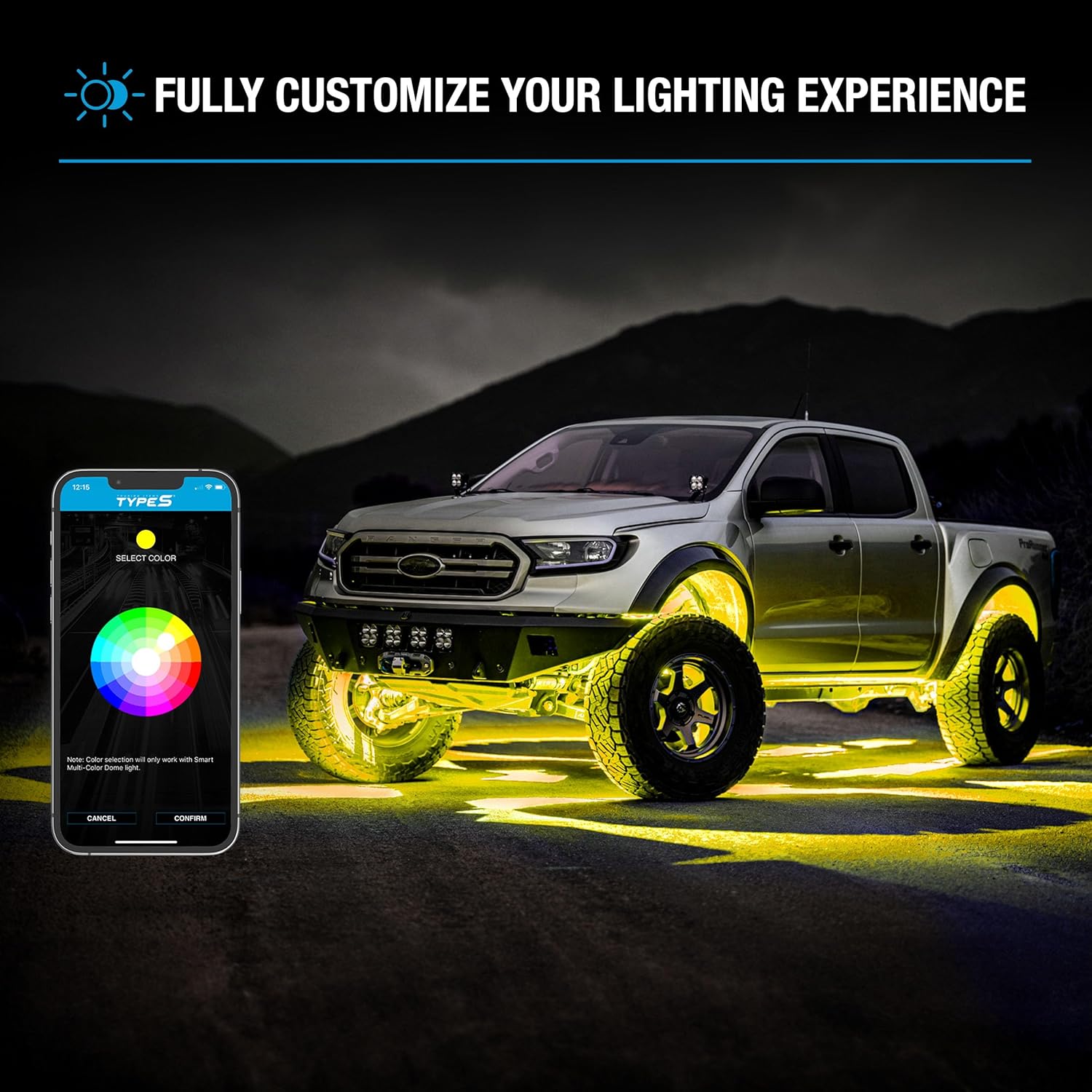
Image 5.1: The TYPE S LED app interface demonstrating color selection, with a vehicle displaying yellow rock lights.
6. Maintenance
Regular maintenance ensures the longevity and optimal performance of your rock lights:
- Cleaning: Periodically clean the light pods with a soft, damp cloth to remove dirt and debris. Avoid abrasive cleaners.
- Connection Check: Inspect all wiring and connections for signs of wear, corrosion, or looseness. Re-secure or replace as necessary.
- Mounting Security: Verify that all lights are still securely mounted. Tighten screws or reapply adhesive if any looseness is detected.
7. Troubleshooting
If you encounter issues with your TYPE S Smart Wheel Well Rock Lights, refer to the following troubleshooting guide:
| Problem | Possible Cause | Solution |
|---|---|---|
| Lights do not turn on. | No power to the control box. Loose wiring connection. Blown fuse. | Check vehicle's 12V power source. Inspect all wiring connections for tightness. Check and replace any blown fuses in the power line. |
| Lights flicker or dim. | Insufficient power. Loose connection. Faulty light pod. | Ensure stable 12V power supply. Check all wiring connections. Isolate and test individual light pods if possible. |
| App cannot connect to lights. | Bluetooth is off. Lights are not powered. App requires restart. | Ensure Bluetooth is enabled on your device. Verify lights are receiving power. Close and reopen the TYPE S LED app. Restart your phone if necessary. |
| Incorrect colors or modes. | App setting error. Temporary software glitch. | Verify settings within the TYPE S LED app. Restart the app and reconnect. |
8. Specifications
| Feature | Detail |
|---|---|
| Brand | TYPE S TOURING ITEMS |
| Model | AUTOLEDALIGHT |
| Color | RGB (Color-Changing) |
| Form Factor | Pod |
| Recommended Uses | Vehicle Exterior (Wheel Wells, Underbody) |
| Auto Part Position | Outer |
| Included Components | 4x Wheel Well Lights, Mounting Hardware, Control Box |
| Special Features | 49 Colors & 25 Modes, Bluetooth App Control, IP68 Waterproof, Durable Aluminum Housing |
| Material | Aluminum |
| Water Resistance Level | IP68 (Water Resistant) |
| Number of Pieces | 4 |
| UPC | 643334582578 |
| Automotive Fit Type | Universal Fit |
9. Warranty and Support
TYPE S is committed to product quality and customer satisfaction.
- Extended Warranty: Register your product online to qualify for an extended warranty. Visit the official TYPE S website for registration details.
- Customer Support: For technical assistance or product inquiries, contact the US-based customer care hotline. Refer to the product packaging or official website for contact information.
- Installation Videos: Additional installation guidance and tips may be available on the TYPE S YouTube channel.


