1. Introduction
Thank you for choosing the Braun Series X XT3100 Cordless Body Trimmer Shaver. This manual provides important information regarding the safe operation, maintenance, and care of your device. Please read these instructions carefully before using the product and keep them for future reference.
2. Safety Warnings
WARNING: To reduce the risk of electric shock, injury, or damage to the appliance, please observe the following safety precautions:
- This appliance is suitable for cleaning under running tap water. Do not immerse the appliance in water.
- Do not use this appliance near water (e.g., in a bathtub, shower, or sink) or while charging in a wet environment.
- Always ensure the appliance is clean and dry after each use to prevent bacterial growth and maintain hygiene.
- The appliance contains batteries that are not replaceable. Do not attempt to open the appliance.
- This appliance can be used by children aged from 8 years and above and persons with reduced physical, sensory or mental capabilities or lack of experience and knowledge if they have been given supervision or instruction concerning use of the appliance in a safe way and understand the hazards involved. Children shall not play with the appliance. Cleaning and user maintenance shall not be made by children unless they are older than 8 years and supervised.
- Only use the power supply provided with the appliance.
- Do not use the appliance if the blade or foil is damaged, as this may cause skin irritation or injury.
- Keep the appliance away from hot surfaces.
3. Product Overview
The Braun Series X XT3100 is a versatile cordless device designed for trimming, styling, and shaving facial and body hair. It features a durable 4D blade system for efficient and comfortable grooming.
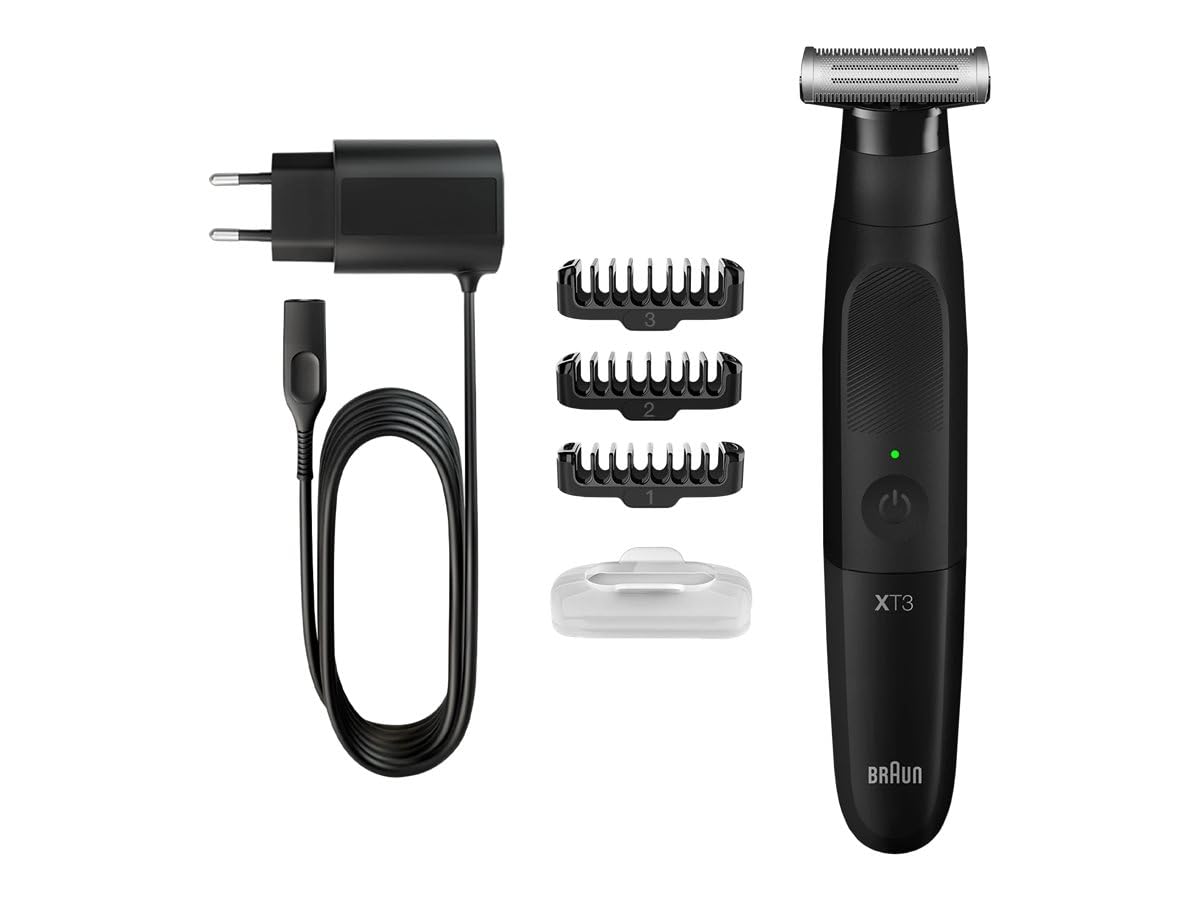
Image: The Braun Series X XT3100 device, highlighting its cordless design and approximately 45 minutes of runtime on a full charge.
4. Components and Accessories
Your Braun Series X XT3100 package includes the following items:
- Braun Series X XT3100 Device
- Protective Cap
- Charging Cable
- 3 Beard Combs (various lengths)
- Cleaning Brush

Image: Product packaging illustrating the Braun Series X XT3100 device, its 4D blade technology, and the included beard combs for different styling options.
5. Setup
5.1 Charging the Device
- Ensure the device is switched off.
- Connect the charging cable to the device and plug the other end into a suitable power outlet.
- The charging indicator light will illuminate, indicating that the device is charging.
- A full charge typically takes approximately 8 hours and provides up to 50 minutes of cordless operation.
- Do not charge the device in wet conditions.
5.2 Attaching and Detaching Comb Attachments
- To attach a comb: Align the comb with the blade head and push it down until it clicks into place.
- To detach a comb: Gently pull the comb upwards from the blade head.
- Always ensure the device is switched off before attaching or detaching any accessories.
6. Operating Instructions
6.1 General Usage
- Press the power button to turn the device on or off.
- For best results, ensure your skin is clean and dry before use.
- Move the device against the direction of hair growth for an effective trim or shave.
6.2 Trimming and Styling
Use the provided comb attachments to achieve desired hair lengths for trimming and styling your beard or body hair.

Image: Demonstrating how to use the Braun Series X XT3100 for precise trimming and styling of facial hair.
- Select the appropriate comb length for your desired style.
- Hold the device flat against the skin and move it slowly and steadily.
- For defining lines, remove the comb attachment and use the bare blade edge.
6.3 Shaving
For a close shave, use the device without any comb attachments.

Image: Illustrating the technique for achieving a clean shave using the Braun Series X XT3100 without a comb attachment.
- Ensure the blade is clean and free of debris.
- Stretch the skin with your free hand to create a smooth surface.
- Move the shaver gently against the direction of hair growth.
7. Maintenance and Cleaning
7.1 Cleaning the Device
- After each use, switch off the device and remove any comb attachments.
- Brush away loose hairs from the blade head using the provided cleaning brush.
- Rinse the blade head under warm running tap water. You can also rinse the entire device as it is waterproof.
- Shake off excess water and allow the device to air dry completely before storing or recharging.
- Do not use abrasive cleaners or harsh chemicals.
7.2 Blade Care
- The 4D blade is designed for long-lasting performance. However, for optimal results, it is recommended to replace the blade head approximately every 6 months, depending on usage.
- To replace the blade head, gently pull the old head off and snap a new one into place.
7.3 Storage
- Store the device in a cool, dry place, away from direct sunlight and moisture.
- Always attach the protective cap when storing or traveling with the device.
8. Troubleshooting
| Problem | Possible Cause | Solution |
|---|---|---|
| Device does not turn on. | Battery is depleted. | Charge the device for at least 8 hours. |
| Poor trimming/shaving performance. | Blade head is dirty or worn. | Clean the blade head thoroughly. If performance does not improve, replace the blade head. |
| Device stops during use. | Battery is low. | Recharge the device. |
9. Specifications
| Brand | Braun |
| Model Name | Series X XT3100 |
| Internal Model Number | BG3340 |
| Power Source | Rechargeable Battery (Cordless Operation), charged via Electric Cable |
| Battery Life | Up to 50 minutes |
| Charging Time | Approx. 8 hours (for full charge) |
| Blade Material | Stainless Steel |
| Head Type | 4D Blade System (Foil/Trimmer) |
| Color | Black |
| Dimensions (L x W x H) | 50 x 50 x 28 mm (approx. 5 x 5 x 2.8 cm) |
| Weight | 300 grams |
| Recommended Use | Facial and Body Hair Trimming, Styling, and Shaving |
10. Warranty and Support
Braun products are manufactured to the highest quality standards. For detailed information regarding warranty coverage, terms, and conditions, please refer to the warranty card included in your product packaging or visit the official Braun website. For technical support, spare parts, or service, please contact Braun customer service in your region.
Online Support: www.braun.com


