Introduction
Thank you for choosing the INTEMPO EE7183BLKSTKEU7 Wireless Karaoke Microphone Speaker. This device combines a microphone and a speaker, allowing you to enjoy karaoke and music playback wirelessly. This manual provides essential information for safe and efficient use of your product.
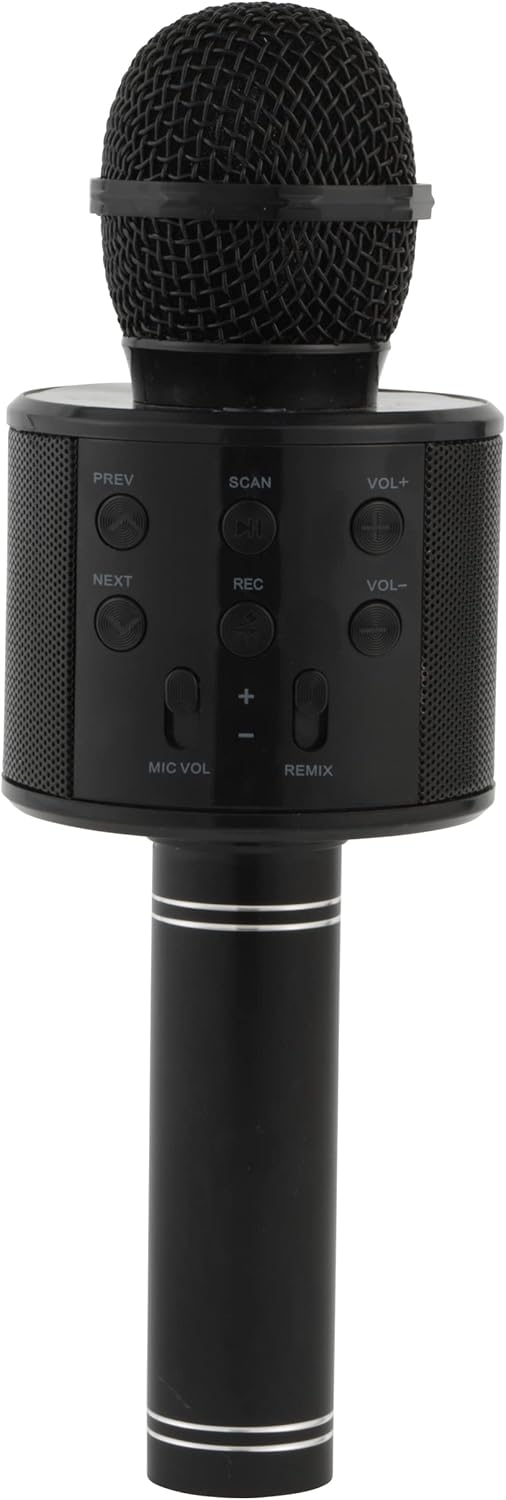
Image: The INTEMPO EE7183BLKSTKEU7 Wireless Karaoke Microphone Speaker, showcasing its sleek black design and integrated speaker grille.
Product Features
- Wireless Bluetooth connectivity for seamless audio streaming.
- Integrated speaker for direct sound output.
- Easy-to-use control panel for managing audio and microphone settings.
- Built-in voice sound effects for enhanced karaoke experience.
- Rechargeable battery providing up to 11 hours of playtime.
- Micro USB charging for convenience.
Setup
1. Charging the Device
Before first use, fully charge the microphone speaker. Connect the included Micro USB charging cable to the charging port on the device and the other end to a compatible USB power source (e.g., computer USB port, USB wall adapter). The charging indicator light will typically show charging status and turn off or change color when fully charged.
2. Powering On/Off

Image: A close-up view of the top section of the microphone speaker, highlighting the central power button.
- To power on: Press and hold the Power button (usually a circular button with a power symbol) located on the control panel until the device activates.
- To power off: Press and hold the Power button again until the device shuts down.
3. Bluetooth Pairing
Once powered on, the device will typically enter Bluetooth pairing mode automatically, indicated by a flashing LED light. Follow these steps to connect:
- Enable Bluetooth on your smartphone, tablet, or other audio device.
- Search for available Bluetooth devices.
- Select "INTEMPO EE7183BLKSTKEU7" or a similar name from the list.
- Once paired, the device will confirm the connection, and the LED indicator will stop flashing.
Operating Instructions
Control Panel Overview

Image: A detailed view of the control panel, showing buttons for PREV, NEXT, SCAN, REC, VOL+, VOL-, MIC VOL, and REMIX.
The control panel provides access to various functions:
- PREV / NEXT: Navigate between tracks.
- SCAN / PAUSE/PLAY: Short press to play/pause music. Long press for scanning (if applicable).
- REC: Record your singing (functionality may vary; refer to device specifics).
- VOL+ / VOL-: Adjust the main speaker volume.
- MIC VOL: Adjust the microphone's volume level.
- REMIX: Activate or cycle through voice sound effects.
Playing Music
After successfully pairing with your Bluetooth device, open your preferred music application and start playing audio. The sound will be transmitted wirelessly to the INTEMPO microphone speaker.
Using the Microphone for Karaoke

Image: A hand holding the microphone speaker, demonstrating its use for singing, with an inset showing the control panel.
To use the microphone:
- Ensure the device is powered on and connected to an audio source.
- Adjust the MIC VOL to your desired microphone volume.
- Use the REMIX button to experiment with different voice sound effects.
- Sing into the microphone while music plays from the integrated speaker.
Maintenance
Proper maintenance ensures the longevity of your device:
- Cleaning: Use a soft, dry cloth to clean the exterior of the microphone speaker. Do not use abrasive cleaners or solvents.
- Storage: Store the device in a cool, dry place away from direct sunlight and extreme temperatures when not in use.
- Battery Care: To preserve battery life, avoid fully discharging the battery frequently. Charge the device regularly, even if not in constant use.
- Water Exposure: This device is not waterproof. Avoid exposure to water or excessive moisture.
Troubleshooting
If you encounter issues with your INTEMPO Wireless Karaoke Microphone Speaker, refer to the following common solutions:
- Device not powering on: Ensure the battery is charged. Connect the Micro USB charging cable and try again after a few minutes.
- Cannot pair via Bluetooth:
- Ensure the microphone speaker is in pairing mode (flashing LED).
- Turn off and on Bluetooth on your source device.
- Move the devices closer to each other.
- Clear previous Bluetooth connections on your source device.
- No sound from speaker:
- Check the main volume (VOL+) on the microphone speaker and your connected device.
- Ensure the device is successfully paired.
- Microphone not working:
- Adjust the MIC VOL to increase microphone volume.
- Ensure the microphone is not obstructed.
If problems persist, contact customer support for further assistance.
Specifications
| Feature | Specification |
|---|---|
| Model Number | EE7183BLKSTKEU7 |
| Microphone Form Factor | Handheld |
| Dimensions (L x W x H) | 8 x 7.6 x 23 cm |
| Power Source | Rechargeable Battery (Corded Electric for charging) |
| Material | Kohlenstoffstahl (Carbon Steel) |
| Signal-to-Noise Ratio | 78 dB |
| Hardware Platform | Karaoke Machine |
| Number of Channels | 1 |
| Connectivity Technology | Bluetooth, USB (for charging) |
| Connector Type | Micro USB |
| Special Feature | Wireless |
| Recommended Uses | Karaoke |
| Compatible Devices | Bluetooth-enabled devices |
| Color | Black |
| Included Components | Microphone speaker, Micro USB charging cable |
| Impedance | 4 Ohm |
| Playtime | Up to 11 hours |
| Wireless Range | Up to 25 meters |
Warranty and Support
Warranty and specific support information for the INTEMPO EE7183BLKSTKEU7 Wireless Karaoke Microphone Speaker is not available in the provided product data. Please refer to the product packaging or the manufacturer's official website for details regarding warranty coverage and customer support contacts.


