
1. Introduction
Thank you for choosing the KITWLEMEN D13 40000mAh Rechargeable Camping Fan. This versatile device combines a powerful fan, bright LED light, and a portable power bank, making it an essential companion for outdoor activities, power outages, and various indoor uses. This manual provides detailed instructions for safe and efficient operation, maintenance, and troubleshooting.
2. Safety Instructions
- Read all instructions before use and retain for future reference.
- Do not insert fingers or any objects into the fan grille.
- Keep the fan away from water or excessive moisture.
- Do not attempt to disassemble or repair the unit yourself. Contact qualified service personnel.
- Use only the provided adapter for charging.
- Keep out of reach of children.
- Ensure the fan is placed on a stable, flat surface to prevent tipping.
3. Package Contents
- KITWLEMEN D13 Camping Fan
- Power Adapter
- USB-C Charging Cable
- Remote Control
- User Manual
4. Product Overview
The KITWLEMEN D13 fan features a robust design with multiple functionalities for enhanced user experience.
Key Features:
- 40000mAh Rechargeable Battery: Provides up to 136 hours of cooling on low speed and supports PD 22.5W fast charging.
- Power Bank Functionality: Equipped with Type-C and USB output ports to charge external devices like phones.
- Super Bright LED Light: 32 LED beads with 3 brightness settings and warm/white modes, offering up to 220 hours of lighting.
- 9-inch Triblade Design: Delivers powerful airflow up to 16.1 ft/s.
- Adjustable Airflow: 4 fan speeds, 90°/45° auto oscillation, and 270° manual tilt.
- Dual Control: Operates via control panel buttons or remote control.
- Smart Features: LED indicators for fan speed and battery status, 1/2/4/8H timer, and sleep mode.
- Portable Design: Sturdy ABS material with a built-in silicone handle and a 360° rotatable/foldable hook for hanging.
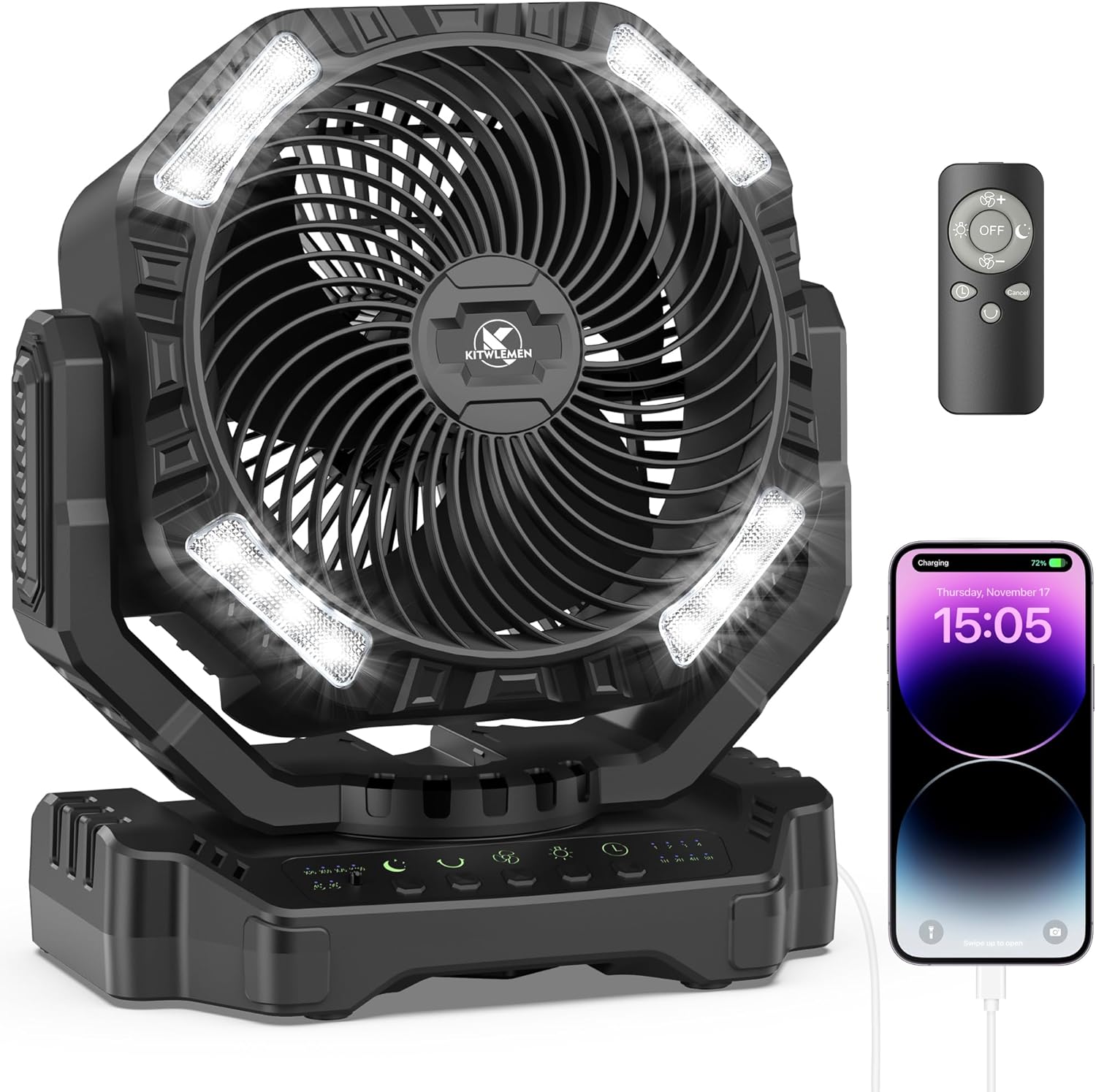
Figure 1: KITWLEMEN D13 Camping Fan with remote control and a phone connected for charging.
5. Setup
5.1 Initial Charging
Before first use, fully charge the fan. Connect the USB-C charging cable to the fan's Type-C port and the power adapter. Plug the adapter into a power outlet. The battery indicator lights on the control panel will show the charging progress. A full charge typically takes 9-10 hours.

Figure 2: Close-up of the fan's base showing the USB output port and Type-C input/output port.
5.2 Remote Control Setup
The remote control is pre-paired with the fan. Ensure the insulating sheet is removed from the remote's battery compartment before first use.
6. Operating Instructions
6.1 Power On/Off
Press the power button on the control panel or the remote control to turn the fan on or off.
6.2 Fan Speed Adjustment
Press the fan speed button on the control panel or remote to cycle through 4 different fan speeds (1-4). The LED indicators will show the current speed.

Figure 3: The fan operating outdoors, illustrating its four adjustable speeds.
6.3 Oscillation Control
Press the oscillation button on the control panel or remote to activate or deactivate the auto-oscillation feature (90° or 45°). The fan head can also be manually tilted 270° for precise airflow direction.

Figure 4: Diagram illustrating the fan's 45/90-degree auto oscillation and 270-degree manual tilt capabilities.
6.4 LED Light Modes and Brightness
Press the light button on the control panel or remote to cycle through 3 brightness settings and warm/white light modes. The LED lights can provide illumination for various situations.

Figure 5: The fan's integrated LED lantern with various brightness levels and the hanging hook feature.
6.5 Timer Function
Press the timer button on the control panel or remote to set the fan to automatically shut off after 1, 2, 4, or 8 hours. The corresponding LED indicator will light up.
6.6 Sleep Mode
Activate sleep mode by pressing the moon icon button. In this mode, all indicator lights on the control panel will turn off to prevent light disturbance during sleep, while the fan continues to operate at a low, quiet setting.

Figure 6: The fan demonstrating its sleep mode and timer settings for undisturbed rest.
6.7 Using as a Power Bank
Connect your device's charging cable to the fan's USB output port or Type-C output port to charge your devices. The fan's 40000mAh battery can serve as a reliable power source.
Figure 7: The fan charging a smartphone, highlighting its power bank capability.
6.8 Hanging the Fan
Utilize the 360° rotatable and foldable hook located at the bottom of the fan to hang it in tents, gazebos, or other suitable locations.

Figure 8: Illustration of the fan's versatile hanging hook.
6.9 Official Product Videos
Video 1: Demonstrates the KITWLEMEN 40000mAh Rechargeable Battery Operated Camping Fan in various outdoor scenarios, highlighting its portability, power bank function, and oscillation.
Video 2: Showcases the KITWLEMEN 40000mAh Rechargeable Battery Powered Fan for Outdoor Camping, emphasizing its features like LED lighting, remote control, and robust design.
7. Maintenance
7.1 Cleaning
- Ensure the fan is turned off and unplugged before cleaning.
- Use a soft, dry cloth to wipe the exterior surfaces.
- For the fan blades, use a soft brush or compressed air to remove dust. Do not use water directly on the fan.
7.2 Storage
When not in use for extended periods, store the fan in a cool, dry place. It is recommended to charge the battery every 3-6 months to maintain its lifespan.
8. Troubleshooting
- Fan not turning on: Check battery level. Ensure the fan is charged.
- Weak airflow: Adjust fan speed to a higher setting. Ensure fan grilles are not obstructed.
- LED lights not working: Check if the light function is activated. Ensure battery has sufficient charge.
- Remote control not working: Check if the insulating sheet is removed. Replace remote battery if necessary.
- Device not charging from fan: Ensure the fan has sufficient battery charge. Check the charging cable and device connection.
9. Specifications
| Feature | Specification |
|---|---|
| Brand | KITWLEMEN |
| Model Name | D13 |
| Power Source | Battery Powered |
| Battery Capacity | 40000mAh (Lithium Polymer) |
| Max Cooling Duration | 136 hours (low speed) |
| Charging Time | 9-10 hours (via 5V/3A Type-C) |
| Wattage | 22.5 watts |
| Voltage | 5 Volts |
| Fan Speeds | 4 RPM |
| Air Flow Capacity | 290 Cubic Feet Per Minute |
| Noise Level | 24 Decibels |
| LED Light Beads | 32 |
| LED Light Modes | 3 brightness settings, warm/white modes |
| Max Lighting Duration | 220 hours (low setting) |
| Oscillation | 90°/45° Auto Oscillation |
| Tilt Adjustment | 270° Manual Tilt |
| Product Dimensions | 7"D x 13"W x 14"H |
| Item Weight | 6.9 Pounds |
| Control Method | Remote, Push Button |
10. Warranty and Support
For warranty information or technical support, please refer to the contact details provided on the product packaging or visit the official KITWLEMEN website. Keep your purchase receipt as proof of purchase.

