
1. Introduction
Thank you for choosing the HiLook IPC-B121H(C) 2MP Outdoor Surveillance Camera. This manual provides essential information for the proper installation, operation, and maintenance of your device. Please read this manual thoroughly before using the product and retain it for future reference.
2. Safety Information
- Ensure the power supply voltage is within the specified range (12 Volts). Incorrect voltage can damage the camera.
- Disconnect power before performing any maintenance or installation.
- Install the camera in a secure location to prevent unauthorized access or tampering.
- Avoid pointing the camera directly at strong light sources for extended periods, as this may damage the image sensor.
- This camera is IP67 rated for outdoor use, providing protection against dust and water immersion. However, avoid submerging the camera in water.
- Use only accessories specified by the manufacturer.
3. Package Contents
Please check the package contents upon receipt. If any items are missing or damaged, contact your retailer.
- HiLook IPC-B121H(C) 2MP Outdoor Surveillance Camera
- Mounting Screws and Wall Plugs
- Quick Start Guide
- Waterproof Connector Kit (for Ethernet cable)
4. Product Overview
The HiLook IPC-B121H(C) is a robust 2-megapixel outdoor surveillance camera designed for reliable security monitoring. It features a high-resolution CMOS sensor capable of capturing video at 1920 x 1080 (1080p). With its IP67 rating and durable metal construction, the camera is suitable for various outdoor environments. Integrated infrared (IR) illumination provides clear night vision capabilities.
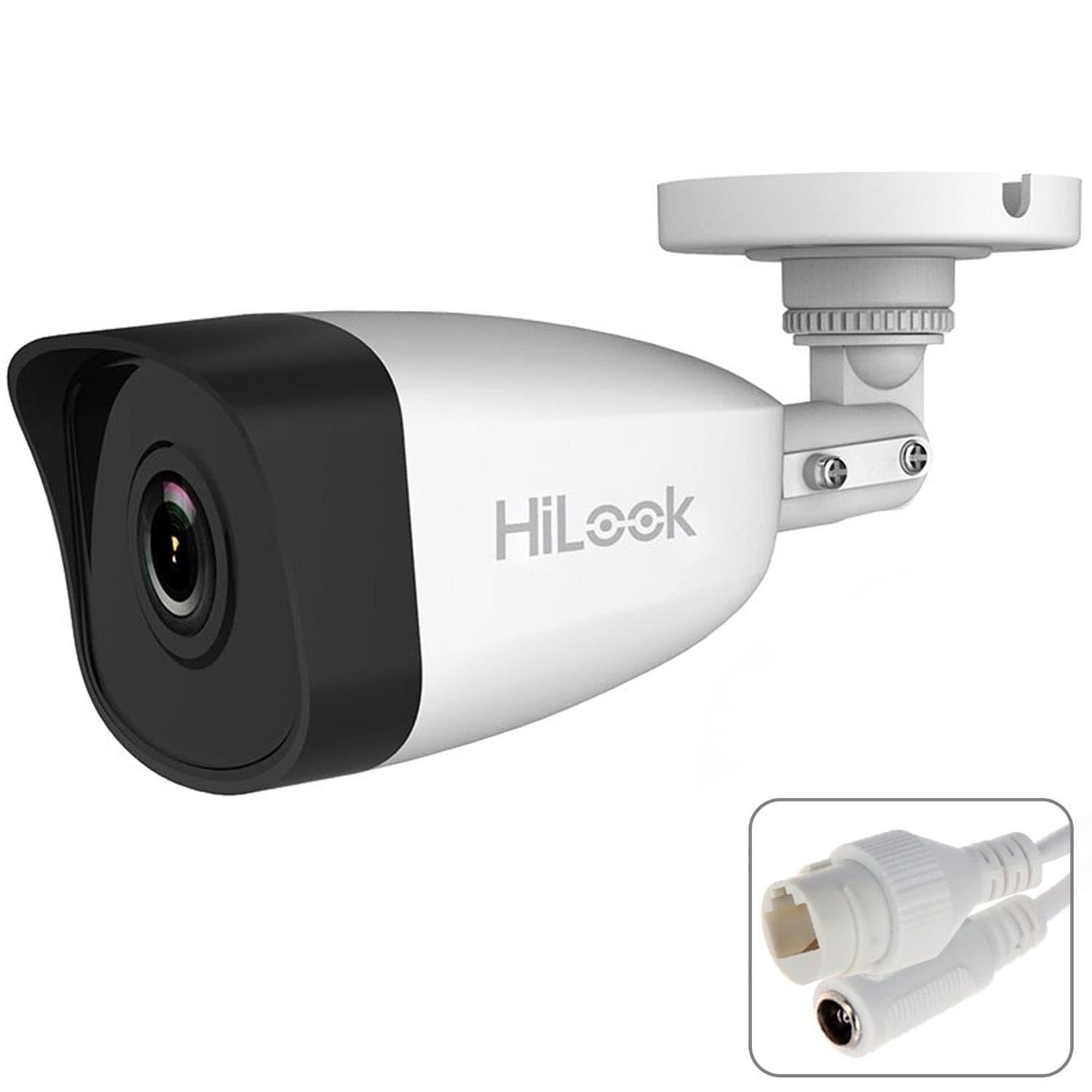
This image shows the HiLook IPC-B121H(C) 2MP Outdoor Surveillance Camera, a compact bullet-style camera with a dark casing, designed for outdoor use. It features a prominent lens and an adjustable mounting bracket.
Key Features:
- Resolution: 2 Megapixel (1920 x 1080)
- Sensor: CMOS
- Ingress Protection: IP67 (Dust and water resistant)
- Night Vision: Infrared (IR) light source
- Connectivity: Wired (Ethernet) and Wi-Fi
- Mounting: Wall mount
- Material: Metal housing
- Power: 12 Volts DC
5. Setup
5.1 Mounting the Camera
- Choose a suitable wall location for optimal surveillance coverage. Ensure the surface is strong enough to support the camera's weight.
- Use the provided mounting template (if available) or the camera base to mark the drill holes on the wall.
- Drill holes and insert the wall plugs.
- Secure the camera's mounting bracket to the wall using the provided screws.
- Adjust the camera angle as needed.
5.2 Power Connection
Connect the 12V DC power adapter (not always included, check package) to the camera's power input port. Ensure a stable power source.
5.3 Network Connection
The camera supports both wired and wireless connectivity.
- Wired Connection: Connect an Ethernet cable from your router or network switch to the camera's RJ45 port. Use the waterproof connector kit for outdoor installations to protect the connection.
- Wi-Fi Connection: For wireless setup, power on the camera. Download the official HiLook mobile application (e.g., HiLookVision) from your app store. Follow the in-app instructions to add the device and connect it to your Wi-Fi network. You may need to scan a QR code on the camera or enter its serial number.
5.4 Initial Configuration
After connecting the camera to the network, use the HiLook mobile app or client software on your computer to perform initial setup. This typically includes:
- Setting a strong password for the camera.
- Configuring date and time settings.
- Adjusting video resolution and quality.
- Setting up motion detection zones and sensitivity.
6. Operating
6.1 Live View
Access the live video feed through the HiLook mobile app or client software. This allows real-time monitoring of the camera's view.
6.2 Recording
The camera supports various recording modes:
- Continuous Recording: Records 24/7.
- Motion-Triggered Recording: Records only when motion is detected.
- Scheduled Recording: Records during specific time periods.
Configure recording settings and storage options (e.g., NVR, cloud storage, or local SD card if supported) via the app or software.
6.3 Night Vision
The camera automatically switches to infrared night vision mode in low-light conditions. The infrared light source provides clear black-and-white video footage in complete darkness.
6.4 Remote Access
With the camera connected to the internet, you can remotely access live view and recorded footage from anywhere using the HiLook mobile app on your smartphone or tablet.
7. Maintenance
7.1 Cleaning
Regularly clean the camera lens and housing to ensure optimal image quality. Use a soft, dry cloth. For stubborn dirt, a slightly damp cloth can be used. Avoid harsh chemicals or abrasive cleaners.
7.2 Firmware Updates
Check the HiLook official website or the mobile app periodically for firmware updates. Keeping your camera's firmware up-to-date ensures optimal performance, security, and access to new features.
7.3 Cable Connections
Periodically inspect all cable connections (power and Ethernet) for any signs of wear, damage, or corrosion, especially in outdoor environments. Ensure waterproof connections remain sealed.
8. Troubleshooting
| Problem | Possible Cause | Solution |
|---|---|---|
| Camera not connecting to network | Incorrect Wi-Fi password; poor Wi-Fi signal; incorrect wired connection; network firewall. | Verify Wi-Fi password and signal strength. Ensure Ethernet cable is securely connected. Check router settings and firewall rules. Try restarting the camera and router. |
| No image/video feed | No power; network issue; camera malfunction. | Check power connection and adapter. Verify network connectivity. Restart the camera. If problem persists, contact support. |
| Poor image quality | Dirty lens; low light; incorrect resolution settings. | Clean the camera lens. Ensure adequate lighting or verify night vision is active. Adjust resolution settings in the app/software. |
| Night vision not working | IR LEDs blocked; sensor malfunction. | Ensure nothing is obstructing the IR LEDs. Check settings to confirm night vision is enabled or set to auto. |
9. Specifications
| Feature | Specification |
|---|---|
| Model Number | IPC-B121H(C) |
| Brand | HiLook |
| Manufacturer | Hilook |
| Video Resolution | 1920 x 1080 (1080p) |
| Optical Sensor Technology | CMOS |
| Connectivity Technology | Wired (Ethernet) |
| Wireless Communication Technology | Wi-Fi |
| Power Source | Electric Cable |
| Voltage | 12 Volts |
| Mounting Type | Wall Mount |
| Material | Metal |
| Light Source Type | Infrared |
| International Protection Rating | IP67 |
| Item Dimensions (L x W x H) | 22 x 12 x 12 cm |
| Item Weight | 1 Kilogram |
| Batteries Required | No |
10. Warranty and Support
For warranty information, please refer to the warranty card included with your product or consult the official HiLook website. If you encounter any issues that cannot be resolved using this manual, please contact HiLook customer support for assistance. Contact details can typically be found on the official website or in your product packaging.