
Introduction
Thank you for choosing the 4ever2buy Black Nightstand with Charging Station. This manual provides detailed instructions for assembly, operation, and maintenance to ensure safe and efficient use of your new furniture. Please read this manual thoroughly before beginning assembly or use, and retain it for future reference.
Safety Information
Please observe the following safety guidelines to prevent injury or damage to the product:
- Ensure all components are securely fastened before use. Loose parts can cause instability.
- Do not exceed the maximum weight recommendation of 100 pounds on the tabletop.
- Keep electrical components (charging station) away from water or excessive moisture.
- Place the nightstand on a flat, stable surface to prevent tipping.
- Children should not climb on or play with the nightstand.
- Refer to product description and attributes for potential safety warnings regarding electronic device use, proper care of wooden furniture, and assembly instructions.
Package Contents
Before assembly, verify that all parts are present and undamaged. The package should include:
- All necessary furniture panels and hardware
- Assembly Guide
- Installation Tool
If any parts are missing or damaged, please contact customer service immediately.
Assembly Instructions
Assembly of the 4ever2buy Nightstand with Charging Station requires careful attention to the provided step-by-step manual. It is recommended to assemble the unit in the room where it will be used.
- Unpack all components and lay them out on a clean, soft surface to prevent scratches.
- Identify each part using the labels in the assembly guide.
- Follow the step-by-step instructions in the included assembly guide to connect panels and install hardware.
- Ensure all screws and fasteners are tightened securely, but do not overtighten.
- Install the drawer slides and then the drawers, ensuring smooth operation.
- Connect the LED lighting and charging station components as directed.

Image: Dimensions of the 4ever2buy Black Nightstand. The nightstand measures 23.6 inches in height, 13.4 inches in depth, and 19.3 inches in width. The drawer interior dimensions are also shown.
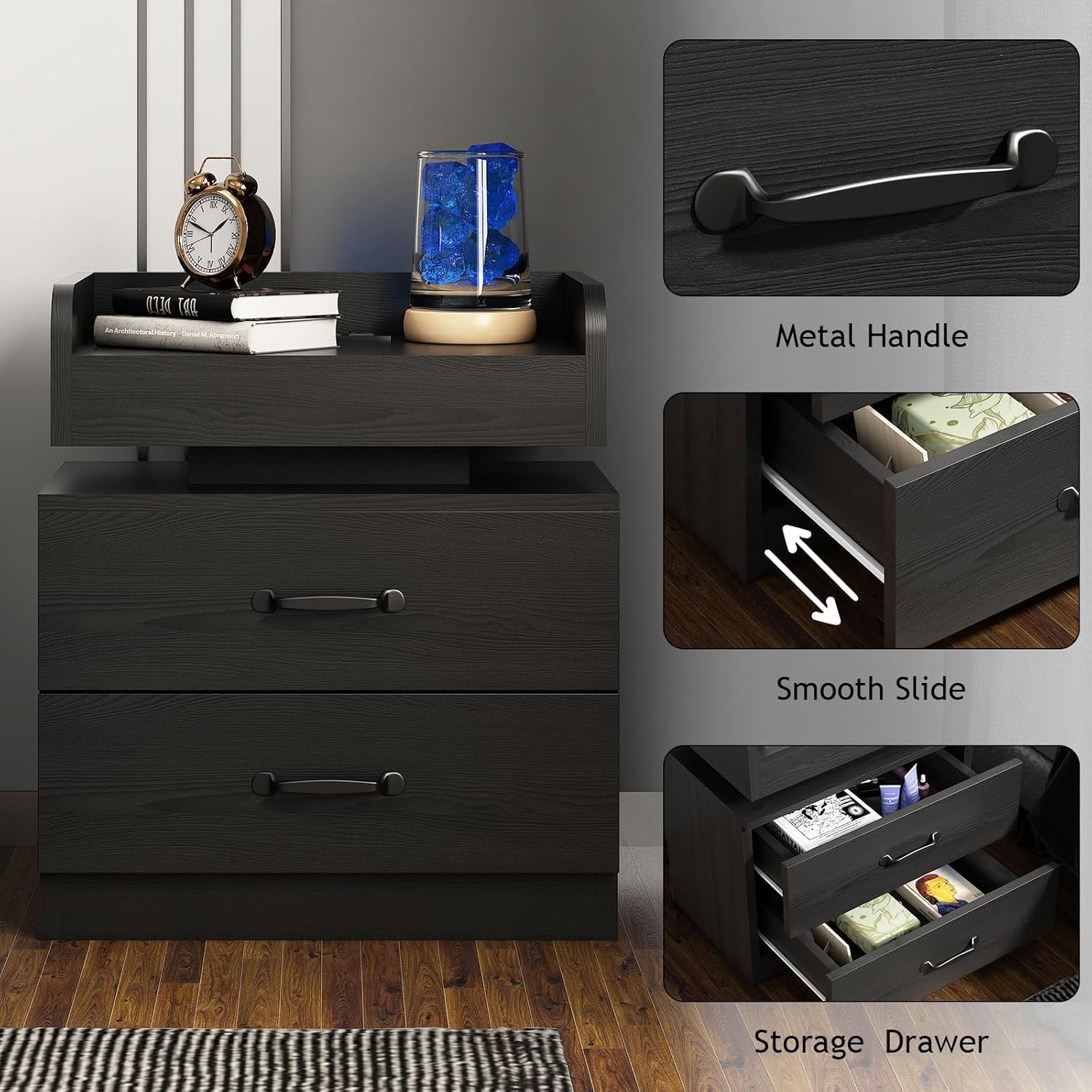
Image: Detailed view of the nightstand's features, highlighting the metal handles, the smooth operation of the drawer slides, and the ample storage space within the drawers.
Operating Instructions
LED Lighting
The nightstand features integrated cool blue LED lighting. Once assembled and connected to a power source, the LED lights can be activated. Refer to the assembly guide for specific instructions on how to turn the LED lights on and off. The lighting provides an ambient glow suitable for various room settings.
Charging Station
The integrated charging station includes:
- 2 AC Outlets (120V/12A)
- 2 USB Ports (5V/2V)
To use the charging station, ensure the nightstand's power cord (6.5 feet long) is securely plugged into a functional wall outlet. You can then plug in your electronic devices to the AC outlets or USB ports for charging.

Image: The recessed power strip on the nightstand's top tray, featuring two AC outlets and two USB ports, designed for convenient charging of electronic devices like smartphones and smartwatches.

Image: A detailed view showcasing the blue LED illumination beneath the nightstand's floating top, creating an ambient light effect. The top tray holds bottles and a glass, demonstrating its utility.
Maintenance
To maintain the appearance and longevity of your nightstand:
- Cleaning: The nightstand has a smooth, waterproof surface. Wipe clean with a soft, damp cloth. Avoid harsh chemicals or abrasive cleaners.
- Dusting: Regularly dust with a dry, soft cloth.
- Spills: Promptly wipe up any spills to prevent staining or damage to the engineered wood.
- Inspection: Periodically check all fasteners and tighten if necessary to ensure stability.
Troubleshooting
If you encounter any issues with your 4ever2buy Nightstand, consider the following common solutions:
- LED Lights Not Working: Ensure the power cord is fully plugged into a functional wall outlet and the LED light connection is secure. Check if the power switch for the LED is in the 'on' position.
- Charging Station Not Functioning: Verify the nightstand is plugged into a live power source. Test the outlets and USB ports with different devices to rule out device-specific issues.
- Drawers Sticking/Not Sliding Smoothly: Check for any obstructions in the drawer slides. Ensure the drawer slides are properly aligned and securely fastened.
- Instability/Wobbling: Confirm that all assembly screws are tightened. Ensure the nightstand is placed on a level surface.
If problems persist, please contact 4ever2buy customer service for assistance.
Specifications
| Feature | Detail |
|---|---|
| Brand | 4ever2buy |
| Model Name | Nightstand with Charging Station |
| Product Dimensions (D x W x H) | 13.4"D x 19.3"W x 23.6"H |
| Item Weight | 26.5 Pounds |
| Maximum Weight Recommendation | 100 Pounds |
| Color | Black |
| Material Type | Engineered Wood |
| Number of Drawers | 2 |
| AC Outlets | 2 (120V/12A) |
| USB Ports | 2 (5V/2V) |
| Power Cord Length | 6.5 Feet |
| LED Light Color | Cool Blue |
| Included Components | Assembly Guide, Installation Tool |
| Indoor/Outdoor Usage | Indoor |
Warranty and Support
4ever2buy is committed to providing quality products. If you encounter any problems with your LED nightstand, please contact our customer service team. We aim to reply and assist you in resolving any issues within 24 hours.
For support, please refer to the contact information provided with your purchase or visit the official 4ever2buy store on Amazon: 4ever2buy Amazon Store.


