
ANNKE I81CK
Contents
ANNKE 4MP PTZ Outdoor Security Camera User Manual
Model: I81CK
1. Introduction
Thank you for choosing the ANNKE 4MP PTZ Outdoor Security Camera. This manual provides detailed instructions for the installation, operation, and maintenance of your new security camera. Please read this manual thoroughly before use to ensure proper functionality and safety.
Key Features:
- 4MP/2K Resolution: Captures clear and detailed video at 2560x1440 resolution.
- 360° Pan & 90° Tilt: Offers extensive coverage with remote pan and tilt capabilities.
- 8X Digital Zoom: Allows for closer inspection of details within the video feed.
- AI Human Detection & Auto Tracking: Intelligently identifies human presence and tracks their movement.
- Smart Night Mode: Provides traditional IR night vision (66ft) and color night vision (33ft), with an intelligent mode that activates color vision upon human detection.
- Two-Way Talk: Built-in microphone and speaker for real-time communication.
- Alexa Integration: Seamlessly works with Alexa for voice control.
- Flexible Storage: Supports up to 128GB microSD card and cloud storage options.

Figure 1.1: ANNKE 4MP PTZ Outdoor Security Camera
2. What's in the Box
Please check the contents of your package upon unboxing to ensure all components are present and undamaged.
- ANNKE 4MP PTZ Outdoor Security Camera
- Power Adapter
- Mounting Screw Pack
- User Manual (this document)
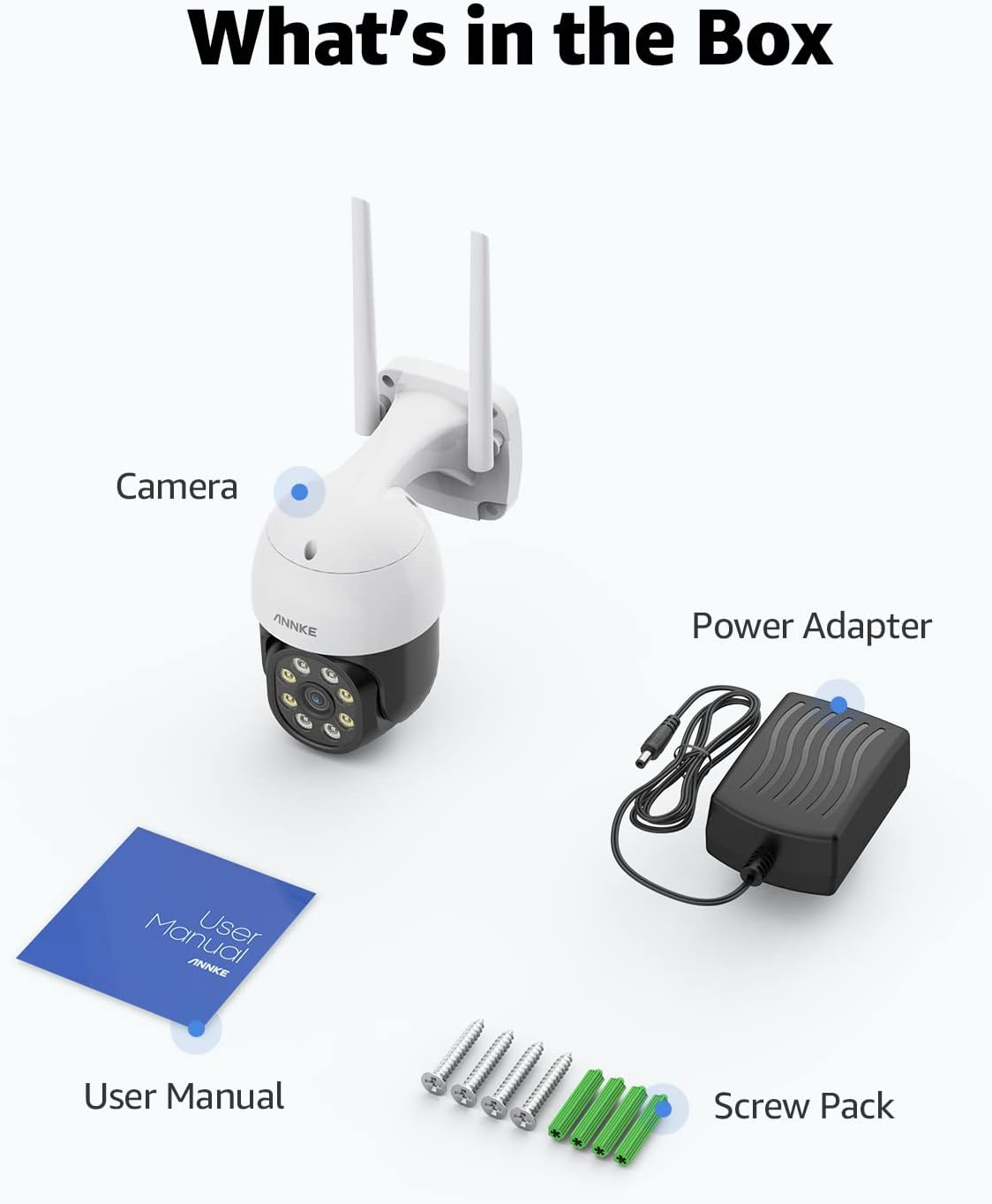
Figure 2.1: Package Contents
3. Setup and Installation
3.1 Choosing a Location
Select an outdoor location that provides the desired viewing angle and is within range of your 2.4GHz Wi-Fi network. Ensure the camera is mounted securely and has access to a power outlet. Consider areas like courtyards, entrances, garages, or intersections for optimal surveillance.

Figure 3.1: Recommended Installation Scenarios
3.2 Mounting the Camera
- Mark the drilling points on the wall using the camera's base as a template.
- Drill holes at the marked positions.
- Insert the wall plugs (if necessary) into the drilled holes.
- Align the camera base with the holes and secure it using the provided screws.
3.3 Powering On and Initial Setup
- Connect the power adapter to the camera and plug it into a power outlet.
- Wait for the camera to power on and indicate readiness (refer to LED indicator status in the app).
- Download the 'Myannke' app from your mobile device's app store.
- Register an account and follow the in-app instructions to add your camera. This typically involves scanning a QR code on the camera or entering its serial number.
- Connect the camera to your 2.4GHz Wi-Fi network through the app.
4. Operating Instructions
4.1 Live View and Playback
Access the live view of your camera through the 'Myannke' app. You can also review recorded footage from your microSD card or cloud storage.
4.2 Pan, Tilt, and Zoom (PTZ) Control
The camera features a delicate gimbal motor allowing for 360° pan and 90° tilt movements. Use the controls within the app to adjust the camera's viewing angle. The 8X digital zoom function allows you to magnify specific areas of the image for more detail.

Figure 4.1: All-Around Vision with Pan and Tilt

Figure 4.2: Pan and Tilt Coverage

Figure 4.3: 8X Digital Zoom-In

Figure 4.4: Digital Zoom Detail
4.3 AI Human Detection and Auto Tracking
The camera can intelligently detect human figures and automatically track their movement within its field of view. When a human is detected, you will receive instant notifications (email, push notifications) and the camera can trigger an audible siren to deter intruders.

Figure 4.5: Human Detection and Alerts

Figure 4.6: Audible Siren Deterrent
4.4 Two-Way Talk
Utilize the built-in microphone and speaker for two-way audio communication. This feature is useful for speaking to visitors, delivery personnel, or deterring unwanted guests.

Figure 4.7: Two-Way Talk Functionality

Figure 4.8: Interactive Two-Way Communication
4.5 Night Vision Modes
The camera offers multiple night vision options:
- IR Night Vision: Provides clear black and white video up to 66 feet in complete darkness.
- Color Night Vision: Achieves full-color video up to 33 feet in low-light conditions.
- Smart Night Mode: Automatically switches to color night vision when human presence is detected, ensuring detailed capture of potential intruders.

Figure 4.9: Night Vision Modes

Figure 4.10: Night Vision Comparison
4.6 Alexa Integration
The camera works seamlessly with Amazon Alexa. You can use voice commands to view the camera feed on compatible Alexa-enabled devices, such as an Echo Show.

Figure 4.11: Alexa Voice Control
5. Storage Options
Your ANNKE camera offers flexible storage solutions for your video recordings.
5.1 MicroSD Card Storage
The camera supports a microSD card up to 128GB (not included). Insert the card into the designated slot on the camera. Recordings will be stored locally on the card.
5.2 Cloud Storage
Optional cloud storage services are available for secure off-site storage of your video footage. Refer to the 'Myannke' app for subscription details and trial offers.

Figure 5.1: Storage Options
5.3 H.264+ Video Compression
The camera utilizes H.264+ video compression technology, which significantly reduces bandwidth occupation and storage space requirements compared to older H.264 formats. This allows for faster transmission speeds and more efficient storage of your video data.

Figure 5.2: H.264+ Efficiency

Figure 5.3: Storage Occupation Comparison
6. Maintenance
To ensure optimal performance and longevity of your ANNKE security camera, follow these maintenance guidelines:
- Regular Cleaning: Periodically wipe the camera lens and body with a soft, damp cloth to remove dust, dirt, or water spots. Avoid using harsh chemicals or abrasive materials.
- Check Connections: Ensure all cable connections (power, network) are secure and free from damage.
- Firmware Updates: Check the 'Myannke' app regularly for available firmware updates. Keeping your camera's firmware up-to-date ensures you have the latest features and security enhancements.
- Environmental Considerations: While designed for outdoor use, extreme weather conditions (e.g., heavy snow, ice, direct prolonged exposure to saltwater spray) may require additional protective measures or more frequent inspection.
7. Troubleshooting
If you encounter issues with your ANNKE camera, please refer to the following common troubleshooting steps:
- No Internet Connection / Frequent Disconnections:
- Ensure your Wi-Fi router is working correctly and the camera is within its effective range.
- Verify that the camera is connected to a 2.4GHz Wi-Fi network, as 5GHz networks are not supported.
- Check for Wi-Fi interference from other devices.
- Restart your Wi-Fi router and the camera.
- Poor Image Quality:
- Ensure the camera lens is clean and free from obstructions.
- Check your internet connection speed; a slow connection can affect streaming quality.
- Verify that the camera is set to its highest resolution in the app settings.
- Missing Components / Damaged Packaging:
- If any parts are missing or the packaging was damaged upon arrival, please contact ANNKE customer support immediately.
- App Compatibility Issues:
- Ensure you are using the correct app, 'Myannke', for this specific camera model. Older ANNKE apps may not be compatible.
- Update the 'Myannke' app to the latest version.
- Power Cable Length:
- If the provided power cable is too short for your installation, you may need to use a suitable outdoor-rated extension lead.
For further assistance, please contact ANNKE technical support.
8. Specifications
| Feature | Specification |
|---|---|
| Model Number | I81CK |
| Video Capture Resolution | 4 MP (2560x1440) |
| Connectivity Technology | Wireless (Wi-Fi) |
| Wireless Communication Technology | Wi-Fi (2.4GHz) |
| Pan Range | 360° |
| Tilt Range | 90° |
| Digital Zoom | 8X |
| Night Vision Range (IR) | 66 Feet |
| Night Vision Range (Color) | 33 Feet |
| Storage Options | MicroSD (up to 128GB), Cloud Storage |
| Power Source | Corded Electric |
| Mounting Type | Wall Mount |
| Controller Type | Amazon Alexa |
| Color | White |
| Item Dimensions (L x W x H) | 18.5 x 18.5 x 10.5 cm |
| Item Weight | 600 g |
| Indoor/Outdoor Usage | Outdoor |
9. Warranty and Support
ANNKE products are designed for reliability and performance. For information regarding warranty coverage, please refer to the warranty card included with your product or visit the official ANNKE website. If you require technical assistance, have questions about your product, or need to report an issue, please contact ANNKE customer support. Our team is dedicated to providing prompt and helpful service.
For the latest support resources, FAQs, and contact information, please visit the ANNKE support page:
Ask a question about this manual
Ask about setup, troubleshooting, compatibility, parts, safety, or missing instructions. Manuals+ will review the question and use this page’s manual context to help answer it.