
1. Introduction
This manual provides detailed instructions for the installation, operation, and maintenance of your Podofo Backup Camera Kit. This system is designed to enhance visibility and safety for various large vehicles, including RVs, buses, trailers, trucks, vans, and campers, operating on 12V-24V power systems. It features a 9-inch HD monitor with 4-split screen capability and four 1080P waterproof night vision cameras with DVR recording functionality.
2. Package Contents
Verify that all items listed below are included in your package:
- 9-inch Color IPS Monitor
- Weatherproof 1080P Cameras (x4)
- Remote Control
- Sunshade for Monitor
- Universal Mount with Adhesive Pad
- Camera Cables (2 x 10m, 2 x 20m)
- Screw Kit for Camera Installation
- Additional Accessories
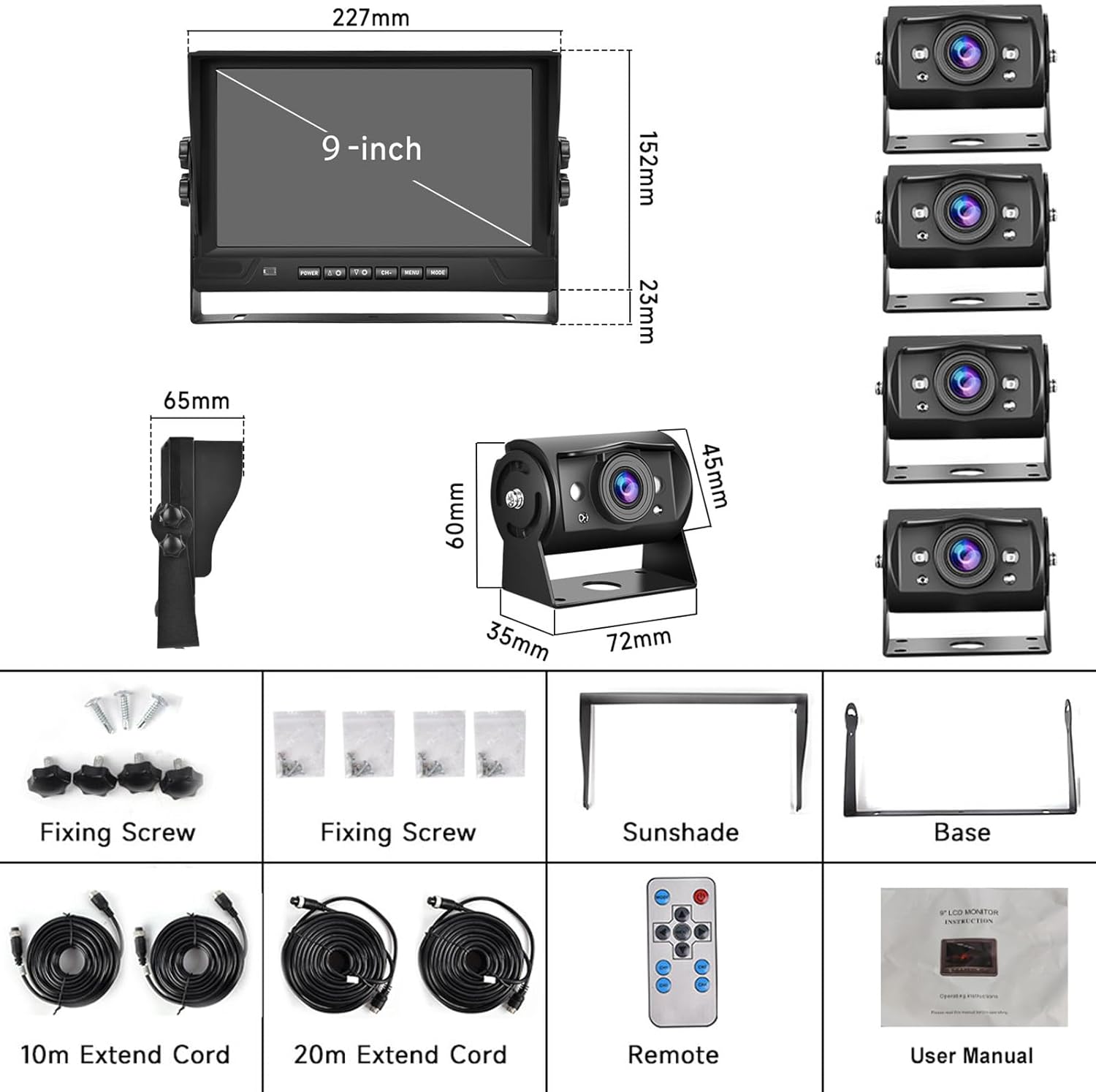
Image: Overview of the Podofo Backup Camera Kit components, including the 9-inch monitor, four cameras, cables, remote, and mounting hardware, along with their dimensions.
3. Specifications
3.1 Camera Specifications
- Effective Pixels: 1920*1080 (1080P)
- Output Signal: AHD720P
- Working Voltage: 12V
- Working Current: 110mA
- Video Format: PAL/NTSC (optional)
- Minimum Illumination: 0 LUX
- LED Light Range: 5-10 meters
- Working Temperature: -20°C to 60°C (-4°F to 140°F)
- Waterproof Grade: IP68
- Lens Horizontal Angle: 105 degrees
- Night Vision: Black and White
- Optical Sensor Technology: CMOS
- Lens Type: Wide Angle
- Real Angle of View: 170 Degrees
3.2 Monitor Specifications
- Voltage: DC12V-24V
- Screen Type: IPS Screen
- Screen Size: 9 inches
- Screen Resolution: 1024*600
- Brightness: 500 cd/m²
- Supported Languages: German, French, Russian, Italian, Spanish, Portuguese, English, Korean, Japanese
- Power Consumption: 6W
- Working Temperature: -10°C to 60°C (14°F to 140°F)
- Signal Input Interface: Four-way AHD720P input
- Picture Splitting Modes: Single picture, two pictures, three pictures, four pictures
- Storage: TF card, maximum support 128GB (TF card not included)
- Signal Format: AHD/720P
- Audio Input: None
- Remote Control: Supported
- Reversing Line: Support turn on/off
- Reversing Image Delay: Settable (Off / 3s / 6s / 9s)
- Image Rotation: Up/Down
- Recording Resolution: 720P/1080P
- Recording Function: Supports TF card recording
3.3 General Specifications
- Brand: podofo
- Compatible Devices: Car Console
- Remote Control Type: IR
- Display Technology: LED
- Video Capture Resolution: 1080p
- Batteries Included: No
- Batteries Required: No
- Product Dimensions: 22.7L x 6.5W x 17.5H Centimetres
- Installation Type: Surface Mount
- Connector Type: RCA
4. Setup and Installation
Proper installation is crucial for optimal performance. It is recommended to have this system installed by a qualified professional if you are unfamiliar with vehicle electrical systems.
4.1 Mounting the Monitor
- Choose a suitable location on your dashboard or overhead console that does not obstruct your view or interfere with vehicle controls.
- Attach the universal mount to the desired surface using the adhesive pad or screws provided.
- Secure the monitor to the mount, adjusting the angle for optimal viewing.
- Install the sunshade onto the monitor to reduce glare.
4.2 Mounting the Cameras
- Identify the desired locations for each of the four cameras (e.g., rear, sides, front). Ensure the locations provide a clear field of view and are protected from potential damage.
- Securely mount each camera using the provided screw kit.
- Adjust the camera angle as needed.
4.3 Wiring Diagram
Connect the cameras to the monitor using the provided aviation extension cables. The system supports non-destructive installation. Ensure all connections are secure and waterproof.
- Connect each camera to its corresponding channel input (CH1, CH2, CH3, CH4) on the monitor using the extension cables.
- Connect the trigger wires (CH1 TRIG, CH2 TRIG, CH3 TRIG, CH4 TRIG) to the appropriate vehicle signals (e.g., reverse light, turn signals) if automatic display switching is desired.
- Connect the GND (Ground) wire to a suitable vehicle ground point.
- Connect the ACC (Accessory) wire to a switched power source that turns on with the vehicle's ignition.
- Connect the B+ (Battery Positive) wire to a constant 12V-24V power source.

Image: Detailed wiring diagram illustrating the connections for the four cameras to the monitor, including trigger wires, ground, accessory power, and battery positive connections.
With correct wiring, the screen will actively display the corresponding camera view when turning left, right, or reversing, based on the trigger wire connections.
5. Operating Instructions
5.1 Powering On/Off
The monitor will typically power on automatically when the vehicle's ignition is turned on (if connected to ACC power). To manually power on/off, use the power button on the monitor or the remote control.
5.2 Monitor Controls
The monitor can be controlled using the physical buttons located on the front panel or via the included IR remote control. Functions include power, menu navigation, channel selection, and display mode switching.
5.3 Split Screen Functionality
The 9-inch IPS screen supports various display modes, allowing you to view multiple camera feeds simultaneously:
- Single Picture: Displays one camera feed in full screen.
- Two Pictures: Divides the screen into two sections to display two camera feeds.
- Four Pictures: Divides the screen into four sections to display all four camera feeds simultaneously.
Use the 'Split' or 'Mode' button on the monitor or remote to cycle through these display options.

Image: Illustration of the monitor displaying a single camera view in full screen and examples of 2-split and 4-split screen configurations.
5.4 Reversing Line Adjustment
The monitor can display adjustable reversing guidelines to assist with parking and maneuvering. These lines can be turned on or off via the monitor settings. You can also set a reversing image delay (3s, 6s, or 9s) to keep the reverse camera view active for a short period after shifting out of reverse.

Image: Display showing the option to toggle reversing guide lines on or off, with examples of the guide lines visible on the monitor.
5.5 DVR Recording
The system supports live recording from all four cameras simultaneously onto a TF (microSD) card (up to 128GB, not included). The monitor features intelligent loop recording, which overwrites the oldest footage when the card is full. You can set the recording duration to 1 minute or 3 minutes per segment. A timestamp can also be enabled or disabled on the recordings.

Image: Graphic illustrating the intelligent loop recording function, showing continuous recording and playback capabilities, along with various vehicle types suitable for the system.
5.6 Night Vision
The cameras are equipped with night vision capabilities, providing clear black and white visibility in low-light conditions, down to 0 LUX. This feature activates automatically to ensure continuous monitoring day or night.

Image: Comparison showing the camera's view in daylight (Day Vision) and its enhanced black and white view in low-light conditions (Night Vision).
5.7 Image Mirroring
The monitor allows for image mirroring settings for each camera (front/back/left/right) to ensure the displayed image orientation is correct for your viewing preference and camera placement.
6. Maintenance
- Cleaning: Regularly clean the monitor screen and camera lenses with a soft, damp cloth. Avoid abrasive cleaners that could scratch surfaces.
- Connections: Periodically check all cable connections to ensure they are secure and free from corrosion.
- Firmware: Check the manufacturer's website for any available firmware updates for improved performance or new features.
- TF Card: If using the DVR function, regularly format the TF card (at least once a month) to maintain optimal recording performance and prevent data corruption.
7. Troubleshooting
If you encounter issues with your Podofo Backup Camera Kit, refer to the following common problems and solutions:
- No Power to Monitor:
- Check all power connections (ACC, B+, GND) to ensure they are correctly wired and secure.
- Verify the vehicle's power source is active (e.g., ignition is on).
- Inspect fuses in the vehicle's electrical system that supply power to the unit.
- No Camera Signal/Black Screen:
- Ensure all camera cables are securely connected to both the cameras and the monitor.
- Check if the correct camera channel is selected on the monitor.
- Verify that the cameras are receiving power.
- Test individual cameras if possible to isolate a faulty unit or cable.
- Buttons on Monitor Not Responding:
- Try using the remote control to operate the monitor.
- Ensure no debris is obstructing the buttons.
- Power cycle the monitor by turning off and on the vehicle's ignition.
- DVR Not Recording or Corrupting Files:
- Ensure a compatible TF card (Class 10 or higher, up to 128GB) is inserted correctly.
- Format the TF card through the monitor's menu settings.
- Try a different TF card from a reputable brand.
- Check for stable power supply to the monitor, as power fluctuations can affect recording.
- Image Quality Issues (Blurry, Distorted):
- Clean camera lenses and monitor screen.
- Check cable connections for any damage or loose contacts.
- Ensure the camera is securely mounted and not vibrating.
- Adjust monitor display settings (brightness, contrast, color).
If these steps do not resolve the issue, please contact customer support for further assistance.
8. Warranty and Customer Support
Podofo is committed to providing excellent customer service and product satisfaction. Your product is covered by a 3-Year Warranty from the date of purchase. Additionally, a 30-Day Refund policy is in place for eligible returns.
Our team of skilled technicians is available to assist you with any product-related questions or concerns you may encounter. For technical support, warranty claims, or any other inquiries, please do not hesitate to reach out to us through the contact information provided with your purchase or on the official Podofo website.
We are dedicated to helping you resolve any problems and ensuring your satisfaction with our product and attentive after-sales services.


