
1. Introduction
This manual provides comprehensive instructions for the setup, operation, and maintenance of your Nineigh 85-inch phone tripod, model S180RG. Designed for versatility, this tripod features an adjustable height, a flexible gooseneck, and a wireless remote, making it suitable for various photography and videography needs with smartphones and other compatible devices.

Image 1.1: The Nineigh 85-inch phone tripod, showcasing its extended height, flexible gooseneck, and included remote control.
2. Package Contents
Please verify that all items listed below are included in your package:
- Nineigh 85-inch Phone Tripod (Model S180RG)
- Flexible Gooseneck Attachment
- Universal Phone Holder
- Wireless Remote Control
- User Manual (this document)
- Storage Bag
3. Product Features
The Nineigh S180RG phone tripod offers several features designed for enhanced usability and stability:
- Adjustable Height: Extends from 17 inches (collapsed) up to 85 inches (maximum height).
- Flexible Gooseneck: A 13.78-inch flexible gooseneck arm allows for diverse shooting angles, including overhead and low-angle shots.
- Universal Compatibility: Standard 1/4" screw mount for smartphones, DSLR cameras, action cameras, webcams, and projectors. The phone holder accommodates devices from 2.28 to 4 inches wide.
- 2-in-1 Design: Functions as both a freestanding tripod and a handheld selfie stick.
- Wireless Remote Control: Bluetooth-enabled remote for iOS and Android devices, operating up to 33 feet (10 meters).
- Durable Construction: Made from high-grade aluminum alloy for lightweight strength and corrosion resistance.
- Enhanced Stability: Features wider legs, non-slip rubber feet, and a thick center column for secure placement.
- Portable Design: Collapses to 17 inches and weighs approximately 1.35 lbs for easy transport in the included storage bag.

Image 3.1: Overview of the Nineigh tripod's main features, including its remote, gooseneck, and adjustable height.
4. Setup Instructions
- Unpack the Tripod: Carefully remove all components from the packaging.
- Extend the Tripod Legs:
- Place the tripod on a flat, stable surface.
- Gently pull the legs outwards until they are fully extended and locked into position, forming a stable base.
- Adjust Tripod Height:
- Locate the quick flip locks on the central column.
- Open the locks, extend the column to your desired height, and then securely close the locks to fix the height.

Image 4.1: Steps for adjusting the tripod's height using the quick flip locks.
- Attach the Phone Holder and Gooseneck:
- The phone holder can be directly screwed onto the 1/4" screw mount at the top of the tripod.
- Alternatively, attach the flexible gooseneck to the 1/4" screw mount first, then attach the phone holder to the gooseneck. Ensure all connections are tightened.
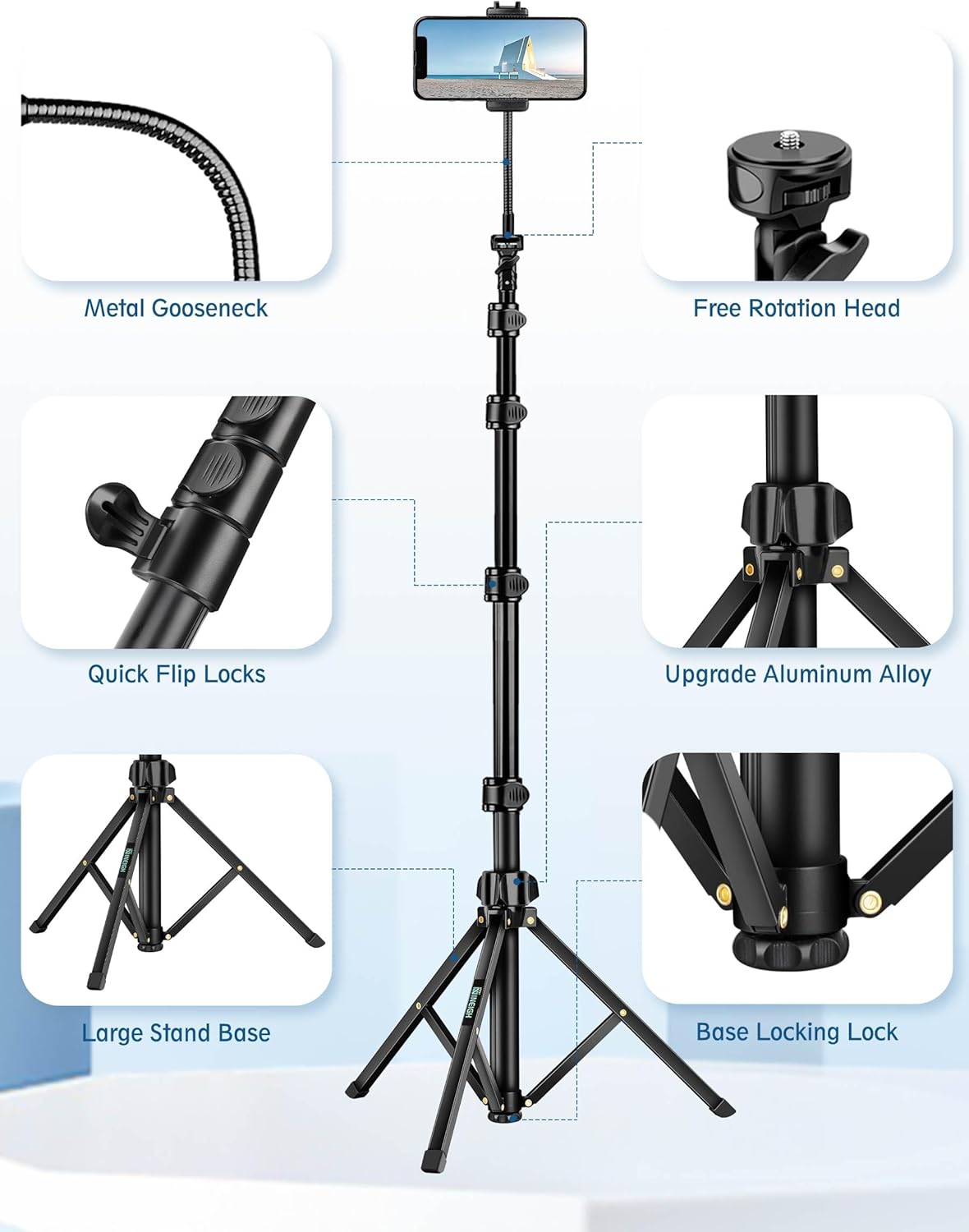
Image 4.2: Close-up of tripod components, including the gooseneck and phone holder attachment point.
- Insert Your Device:
- Gently expand the phone holder clamps and insert your smartphone. Ensure the phone is securely gripped.
- For other devices like cameras, screw them directly onto the 1/4" mount.

Image 4.3: The adjustable phone holder and its compatibility with various smartphones and accessories.
- Pair the Wireless Remote Control:
- Turn on the remote control (usually a small switch on the side).
- On your smartphone, go to Bluetooth settings and search for available devices.
- Select "AB Shutter3" or a similar name to pair. The indicator light on the remote will confirm successful pairing.
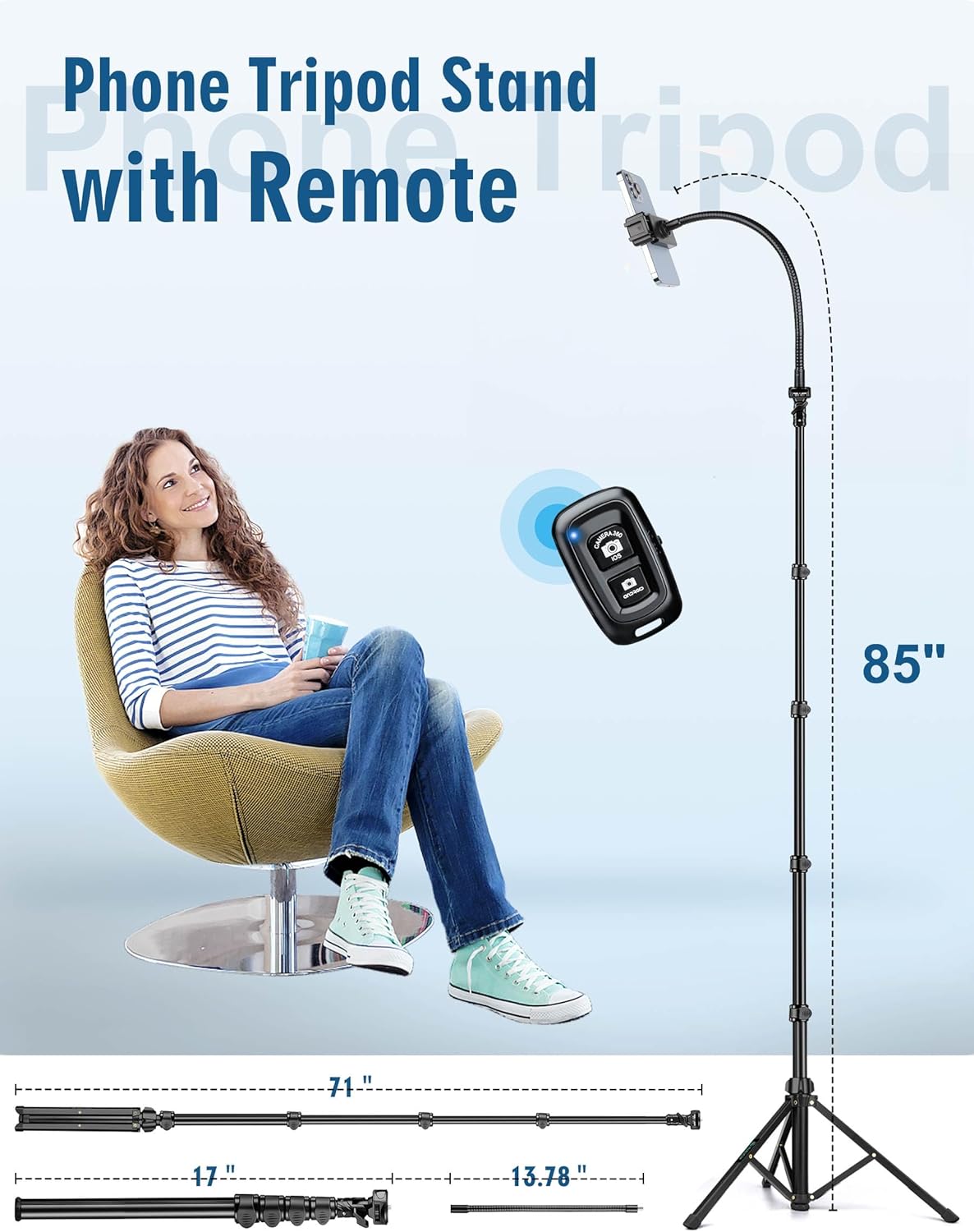
Image 4.4: The Nineigh phone tripod with its wireless remote control in use.
5. Operating Instructions
5.1. Using as a Tripod
- Ensure the tripod legs are fully extended and stable on a flat surface.
- Adjust the central column height using the quick flip locks.
- Position your device in the phone holder or on the 1/4" mount.
- Utilize the flexible gooseneck to achieve desired angles for overhead shots, low angles, or specific framing.
- Use the wireless remote to capture photos or start/stop video recording without touching your device, minimizing shake.

Image 5.1: Example of using the gooseneck for low-angle shots.
5.2. Using as a Selfie Stick
- Collapse the tripod legs fully.
- Hold the tripod base firmly.
- Extend the central column to your desired length.
- Use the wireless remote to take selfies or group photos.

Image 5.2: The Nineigh tripod configured as a selfie stick for group photos.
5.3. Adjusting Camera Orientation
- The phone holder allows for 360-degree rotation, enabling quick switching between horizontal (landscape) and vertical (portrait) modes.
- Loosen the adjustment knob on the phone holder, rotate your device to the desired orientation, and then tighten the knob to secure it.

Image 5.3: The flexible gooseneck allows for diverse camera angles and orientations.
6. Maintenance
- Cleaning: Wipe the tripod with a soft, dry cloth. Avoid using abrasive cleaners or solvents.
- Storage: When not in use, collapse the tripod to its compact size and store it in the provided storage bag in a cool, dry place.
- Inspection: Periodically check all screws and locking mechanisms to ensure they are secure. Tighten if necessary.
7. Troubleshooting
| Problem | Possible Cause | Solution |
|---|---|---|
| Remote control not pairing. | Remote is off, battery low, or not in pairing mode. | Ensure remote is on. Check battery. Re-enable Bluetooth on phone and search again. |
| Tripod is unstable. | Legs not fully extended/locked, uneven surface, or overloaded. | Ensure legs are fully extended and locks are secured. Place on a flat surface. Do not exceed weight limit (5 lbs). |
| Phone holder not gripping securely. | Phone too wide/narrow, or holder not tightened. | Ensure phone width is within 2.28-4 inches. Adjust and tighten the holder securely around the phone. |
| Gooseneck wobbles. | Gooseneck not fully tightened to the tripod or phone holder. | Ensure both ends of the gooseneck are securely screwed into place. |
8. Specifications
| Feature | Detail |
|---|---|
| Model Number | S180RG |
| Material | Aluminum Alloy |
| Maximum Height | 85 Inches |
| Folded Size | 17 Inches |
| Item Weight (Tripod Only) | Approx. 1.35 Pounds (616g) |
| Weight Limit | 5 Pounds |
| Phone Holder Width | 2.28 - 4 Inches |
| Gooseneck Length | 13.78 Inches |
| Remote Control Range | Up to 33 feet (10 meters) |
| Compatible Devices | Smartphones (iOS/Android), DSLR, Action Cameras, Webcams, Projectors |
9. Safety Information
- Do not exceed the maximum weight limit of 5 pounds.
- Ensure all locks and connections are secure before mounting a device.
- Avoid using the tripod in strong winds or on unstable terrain when fully extended, as this may compromise stability.
- Keep out of reach of children.
- Do not attempt to modify the product.
10. Warranty and Support
Nineigh products are designed for quality and reliability. For warranty information or technical support, please refer to the contact details provided with your purchase documentation or visit the official Nineigh website.