
1. Introduction
Thank you for choosing the Nineigh 71" Phone Tripod Selfie Stick with Remote. This versatile accessory is designed to enhance your mobile photography and videography experience, offering stability, adjustable height, and remote control convenience. Please read this manual carefully to ensure proper setup, operation, and maintenance of your device.

Image: The Nineigh 71" Phone Tripod shown as a tall tripod, a handheld selfie stick, and with its wireless remote.
2. Package Contents
Please verify that all items are present in your package:
- Tripod
- Remote Control
3. Product Overview
Familiarize yourself with the main components of your Nineigh Phone Tripod Stand:
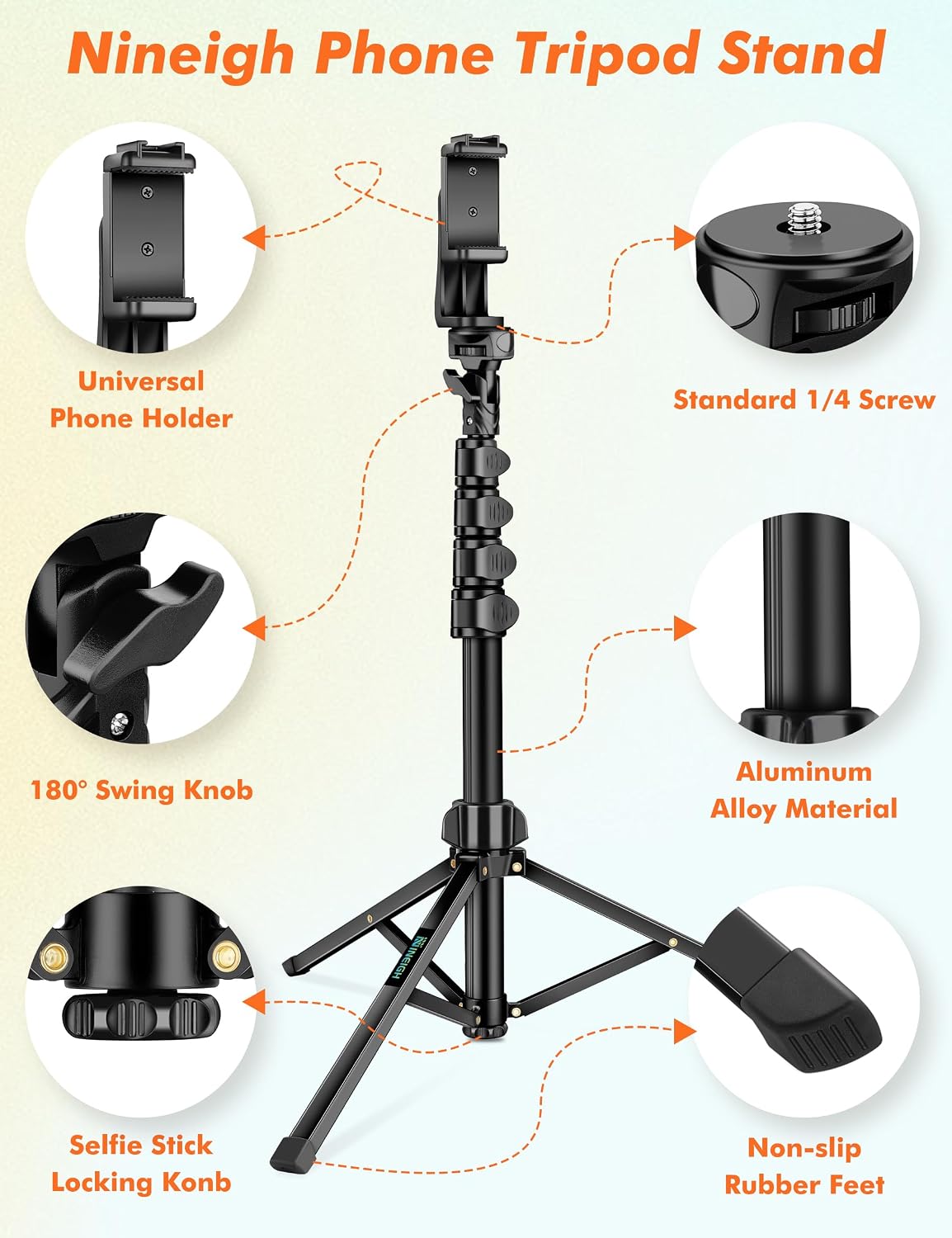
Image: Exploded view highlighting the Universal Phone Holder, Standard 1/4 Screw, 180° Swing Knob, Aluminum Alloy Material, Selfie Stick Locking Knob, and Non-slip Rubber Feet.
- Universal Phone Holder: Securely holds smartphones from 2.28 to 4 inches wide. Features 360° rotation.
- Standard 1/4" Screw: Compatible with cameras, ring lights, and other accessories.
- 180° Swing Knob: Allows for flexible angle adjustments of the phone holder.
- Aluminum Alloy Material: Provides a lightweight yet durable structure.
- Selfie Stick Locking Knob: Secures the extended sections of the stick.
- Non-slip Rubber Feet: Ensures stability when used as a tripod.
- Cold Shoe Mount: Integrated into the phone holder for attaching additional accessories like microphones or LED lights.
4. Setup Instructions
4.1 Unfolding the Tripod
- Gently pull the legs outwards from the base of the tripod until they are fully extended and stable.
- Ensure the legs are locked into position for maximum stability.
4.2 Adjusting Height
The tripod can extend from a folded size of 19.6 inches to a maximum height of 71 inches.

Image: Visual representation of the tripod's adjustable height, from its compact form to its full 71-inch extension.
- To extend, unlock the section clamps on the central pole.
- Pull each section upwards to the desired height.
- Securely lock each clamp to prevent the pole from collapsing.
4.3 Attaching Your Device
The universal phone holder supports smartphones between 2.28 and 4 inches in width. It also features a standard 1/4" screw for other compatible devices.

Image: Detailed view of the universal phone holder, its rotation, cold shoe mount, and 1/4" screw, illustrating broad device compatibility.
- For Smartphones: Expand the phone holder clamps and carefully insert your smartphone. Ensure it is securely gripped.
- For Cameras/Other Devices: If your device has a 1/4" screw mount, attach it directly to the standard 1/4" screw on the tripod head.
4.4 Pairing the Remote Control
The included wireless remote control allows you to trigger your phone's camera from up to 33 feet (10 meters) away.

Image: The wireless remote control and a smartphone displaying Bluetooth pairing instructions.
- Turn on the remote control using the ON/OFF switch. The LED indicator will flash.
- On your smartphone, go to Bluetooth settings and enable Bluetooth.
- Look for a device named 'AB Shutter3' (or similar) in the list of available devices and select it to pair.
- Once paired, the LED indicator on the remote will stop flashing.
- Open your phone's camera app. The remote button will now trigger the shutter.
5. Operating Instructions
5.1 Using as a Tripod
For stable shots, extend the tripod legs fully and place it on a flat, stable surface. Adjust the height and angle as needed.
5.2 Using as a Selfie Stick
When using as a selfie stick, ensure the tripod legs are folded and locked against the central pole. Hold the handle firmly and extend the pole to your desired length.
5.3 Adjusting Shooting Angles
The tripod offers flexibility for various shooting angles:

Image: Examples of parallel, overhead, and 90-degree shooting angles using the tripod.
- The phone holder can rotate 360° for portrait or landscape orientation.
- Use the 180° swing knob to tilt your device up or down for optimal framing.
5.4 Capturing Photos/Videos with Remote
Once the remote is paired, open your phone's camera application. Press the button on the remote to take photos or start/stop video recording.
6. Maintenance
6.1 Cleaning
Wipe the tripod with a soft, dry cloth. Avoid using harsh chemicals or abrasive materials that could damage the finish.
6.2 Storage
When not in use, fold the tripod to its compact size and store it in the provided carry bag in a cool, dry place away from direct sunlight and extreme temperatures.

Image: The tripod in its portable carry bag, emphasizing its travel-friendly design.
7. Troubleshooting
7.1 Remote Control Not Connecting
- Ensure the remote control is turned on and within 33 feet (10 meters) of your phone.
- Check your phone's Bluetooth settings to confirm Bluetooth is enabled and the remote is visible or paired.
- If already paired, try unpairing and re-pairing the remote.
- Check the remote's battery.
7.2 Tripod Instability
- Ensure all leg sections and pole clamps are fully extended and securely locked.
- Verify that the tripod is placed on a flat, stable surface.
- Avoid over-extending the tripod in windy conditions, which can affect stability.
7.3 Phone Not Holding Securely
- Ensure your phone's width is within the supported range (2.28 - 4 inches).
- Make sure the phone is centered and firmly gripped by the holder's clamps.
8. Specifications
| Feature | Specification |
|---|---|
| Product Dimensions | 19.6 x 22.65 x 71 inches |
| Item Weight | 1.74 pounds (0.79 Kilograms) |
| Model Number | S180 |
| Brand | Nineigh |
| Color | Black |
| Compatible Devices | Camera, Smartphone (iPhone 16, 15, 14, 13, XS, X, 8 Plus, XR, 11 Pro, Galaxy S10, Google, most smartphones) |
| Special Features | Foldable, Lightweight, Remote Control, Slip Resistant |
| Material | Aluminum |
| Weight Limit | 6.6 Pounds |
| Maximum Height | 71 Inches |
| Tripod Head Type | Ball Heads |
9. Warranty and Support
For warranty information or technical support, please refer to the product packaging or contact Nineigh customer service directly. Contact details can typically be found on the manufacturer's official website or through your point of purchase.