
Introduction
This manual provides essential information for the safe and effective operation, maintenance, and troubleshooting of your Makita DAS180Z 18V LXT Brushless Dust Blower. Please read this manual thoroughly before using the tool to ensure proper handling and to prevent injury or damage.
The Makita DAS180Z is a cordless dust blower designed for various applications, including blowing dust from equipment, cleaning tools, and inflating/deflating small items. It features an 18V brushless motor, variable speed control, and a tool-less nozzle replacement system.

Image: The Makita DAS180Z 18V LXT Brushless Dust Blower, shown without battery or charger.
Important Safety Instructions
WARNING: Read all safety warnings, instructions, illustrations, and specifications provided with this power tool. Failure to follow all instructions listed below may result in electric shock, fire, and/or serious injury.
- Always wear eye protection.
- Do not point the nozzle at people or animals.
- Keep hands and loose clothing away from the air outlet.
- Use only Makita LXT 18V batteries and chargers. G-Series batteries are not compatible.
- Ensure the tool is switched off before changing accessories or performing maintenance.
- Do not operate in explosive atmospheres, such as in the presence of flammable liquids, gases, or dust.
- Store the tool indoors in a dry, secure place out of reach of children.
Components and Parts List
The Makita DAS180Z typically includes the following components:
- Makita DAS180Z Dust Blower Unit
- Various Nozzles (typically 5 included for different applications)
- Belt Clip (pre-attached or included)
Note: Batteries and charger are sold separately.

Image: The Makita DAS180Z dust blower with its various components and features highlighted, including the five included nozzles, high power brushless motor, variable speed trigger, lock-on button, and 4 digitally controlled speeds.
Setup
1. Battery Installation
- Ensure the dust blower is switched off.
- Align the battery pack with the battery housing on the tool.
- Slide the battery into the housing until it clicks into place.
- To remove, press the release button on the battery and slide it out.
2. Nozzle Attachment
- Ensure the tool is switched off and the battery is removed.
- Select the appropriate nozzle for your application.
- Align the nozzle with the air outlet and push it firmly until it locks into place. The tool-less one-touch nozzle replacement allows for quick changes.
- To remove, twist and pull the nozzle off.
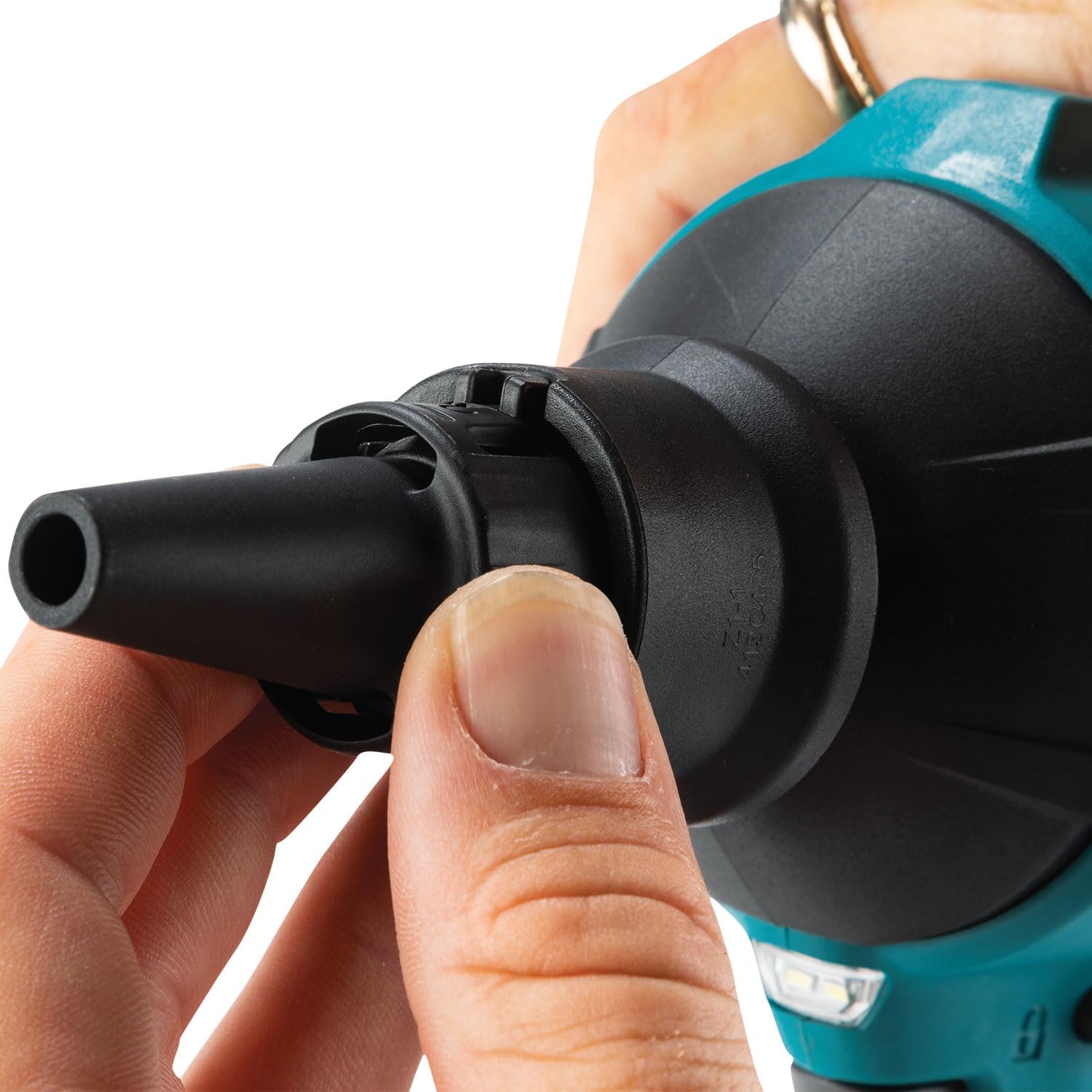
Image: A close-up view of a hand attaching a nozzle to the Makita DAS180Z dust blower, demonstrating the tool-less one-touch nozzle replacement feature.
Operating Instructions
1. Powering On/Off
- To turn on, pull the trigger. The tool features a variable speed trigger for precise control.
- To turn off, release the trigger.
2. Adjusting Air Volume (4 Stages)
- The tool has 4 stages of air volume. Press the "MODE" button to cycle through the settings.
- An LED indicator displays the current air volume setting.

Image: A close-up of the Makita DAS180Z's handle, showing the "MODE" button and the four-bar LED indicator for air volume settings.
3. Lock-On Button and Trigger Lock
- For continuous operation, pull the trigger and then press the lock-on button. Release the trigger, and the tool will continue to operate.
- To stop continuous operation, pull the trigger again.
- The trigger lock prevents accidental startup. Engage the lock when the tool is not in use.
4. Vacuum Function
The DAS180Z is equipped with a vacuum function. To use this feature, attach the appropriate accessory (sold separately) and ensure the filter is clean to prevent foreign materials from being sucked in.
5. LED Job Light
The integrated LED job light illuminates the work area for improved visibility.

Image: A person holding and operating the Makita DAS180Z dust blower in a workshop, demonstrating its practical use for cleaning.
Maintenance
1. Cleaning the Filter
The DAS180Z features a filter to prevent debris from entering the motor. Regularly inspect and clean the filter to maintain optimal performance. Refer to the product diagram for filter location.
2. General Cleaning
- Wipe the tool body with a soft, damp cloth. Do not use strong detergents or solvents.
- Ensure all air vents are clear of obstructions.
3. Storage
- Store the tool in a cool, dry place, away from direct sunlight and moisture.
- Remove the battery pack before storing for extended periods.
- The tool can be hung using its integrated hook for convenient storage.

Image: The Makita DAS180Z dust blower hanging from a utility hook, demonstrating its integrated hanging feature for storage.
Troubleshooting
| Problem | Possible Cause | Solution |
|---|---|---|
| Tool does not start | Battery not inserted correctly or discharged. Trigger lock engaged. | Ensure battery is fully charged and properly inserted. Disengage trigger lock. |
| Reduced air volume | Clogged filter. Nozzle obstruction. | Clean the filter. Check and clear any obstructions in the nozzle. |
| Tool stops unexpectedly | Battery overheated or discharged. Overload protection activated. | Allow battery to cool down or replace with a charged battery. Reduce load on the tool. |
If problems persist, contact Makita customer support or an authorized service center.
Specifications
| Feature | Detail |
|---|---|
| Model Number | DAS180Z |
| Power Source | 18V Li-ion LXT Battery (not included) |
| Motor Type | Brushless |
| Max. Sealed Suction | 10.3 kPa (with air vent hose complete) |
| Max. Air Velocity | 200 m/s (with nozzle 7 on mode 4) |
| Max. Air Volume | 1.1 m³/min |
| Air Volume Stages | 4 |
| Continuous Runtime (with BL1860B) | Mode 1: 55 min, Mode 2: 30 min, Mode 3: 20 min, Mode 4: 15 min |
| Dimensions (L x W x H) | 7.05" x 3.62" x 11.69" (approx.) |
| Item Weight | 862 Grams (1.9 pounds) |
| UPC | 088381779975 |
Warranty and Support
Warranty Information
Makita offers a 1-year manufacturer warranty on this product. An additional 2 years of warranty can be obtained by registering the product within 30 days of purchase. This warranty does not cover damage caused by non-genuine or non-recommended parts, accessories, batteries, or chargers.
Customer Support
For technical assistance, service, or warranty claims, please visit the official Makita website or contact their customer service department. You can find contact information and service center locations on the Makita official website.


